
Connecting a backend
Pyzed is the frontend: it draws windows and reacts to the user. Your data lives somewhere else: a database, a REST API, files. This tutorial connects the two the way large apps do, with a thin backend layer the window talks to, and every slow call moved off the UI thread so the window never freezes.
| Goal | Time | Level | You need |
|---|---|---|---|
| A contacts app backed by SQLite | 40 minutes | Advanced · Python | Background tasks |
What you’ll learn
Section titled “What you’ll learn”- Put all data access in a repository class with no UI in it, easy to test and to replace.
- Run queries in a background thread with
Command.perform(work, then). - Show a spinner while a query runs, and turn exceptions into a message instead of a crash.
- Reload the view after a change (add, delete, search).
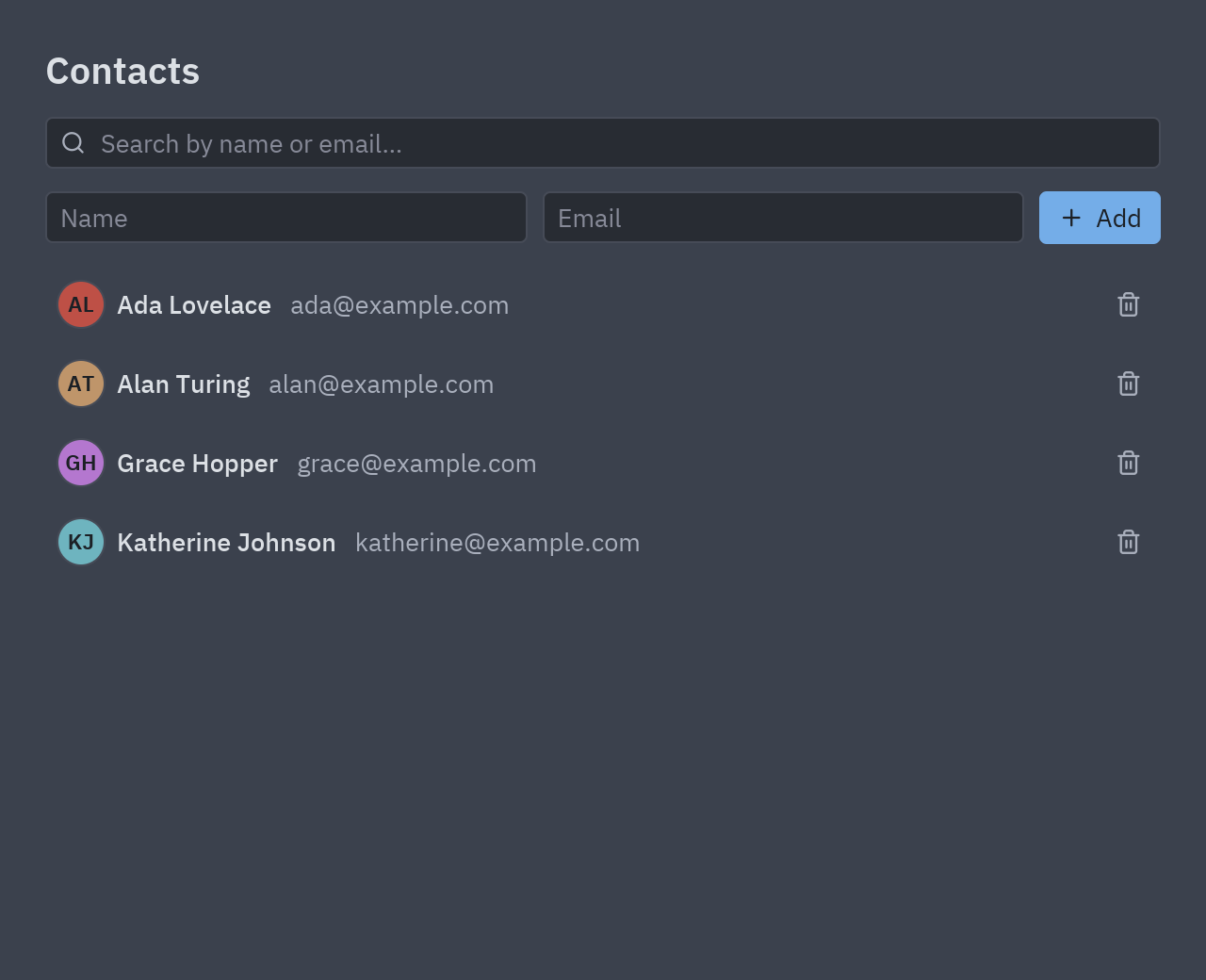
The shape of the app
Section titled “The shape of the app”flowchart LR
UI["Contacts (pz.App)<br/>state + view()"] -- "Command.perform(work)" --> T["background thread"]
T -- "work(): repo.search(...)" --> R["ContactsRepository"]
R --> DB[("SQLite<br/>(or an API, an ORM...)")]
T -- "then(result) on the UI thread" --> UI
-
The repository. Plain Python, no Pyzed import needed. It opens a connection per call, which makes it safe to use from any thread:
class ContactsRepository:def __init__(self, path=DEFAULT_DB):self.path = Path(path)with self.connect() as db:db.execute("CREATE TABLE IF NOT EXISTS contacts (id INTEGER PRIMARY KEY, name TEXT, email TEXT)")def connect(self):return sqlite3.connect(self.path)def search(self, text=""):with self.connect() as db:rows = db.execute("SELECT id, name, email FROM contacts WHERE name LIKE ? ORDER BY name",(f"%{text}%",)).fetchall()return [{"id": i, "name": n, "email": e} for i, n, e in rows] -
Never query on the UI thread. A query that takes 300 ms would freeze the window for 300 ms.
Command.perform(work, then)runswork()in a thread and callsthen(result)back on the UI thread, where it is safe to change state:def reload(self):return pz.Command.perform(lambda: self.repo.search(self.query), self.loaded)def loaded(self, contacts):self.contacts = contacts -
Busy and errors. One small helper wraps every call: it sets
self.busy(the view shows a spinner) and catches exceptions so they become a callout:def background(self, work, then=None):self.busy, self.error = True, Nonedef guarded():try:return ("ok", work())except Exception as exc:return ("error", str(exc))def done(outcome):self.busy = Falsekind, value = outcomeif kind == "error":self.error = valueelif then is not None:return then(value)return pz.Command.perform(guarded, done) -
Load on start, reload after changes.
on_startruns once when the window opens. Adding or deleting reloads the list when it is done:def on_start(self):return self.reload()def add(self):name, email = self.name, self.emailself.name = self.email = ""return self.background(lambda: self.repo.add(name, email), lambda _: self.reload()) -
Test the backend alone. Because the repository has no UI, a test is three lines:
repo = ContactsRepository(tmp_path / "contacts.db")repo.add("Grace Hopper", "grace@example.com")assert [c["name"] for c in repo.search("grace")] == ["Grace Hopper"]
Full code
Section titled “Full code”"""Connecting a backend: a contacts app whose data lives in SQLite, behind a small repository class.
python examples/tutorial/contacts_backend.py
- ``ContactsRepository`` is the backend: plain Python with no UI in it, easy to test and to swap for SQLAlchemy, an HTTP API or anything else.- The window never talks to the database directly: ``Command.perform(work, then)`` runs the query in a background thread and hands the result to ``then`` on the UI thread, so the window never freezes, even on a slow disk or network.- A spinner shows while a query runs; errors become a callout instead of a crash.
Walkthrough: https://albakore.github.io/pyzed/tutorials/advanced/backend/"""
import sqlite3import tempfileimport timefrom pathlib import Path
import pyzed as pzfrom pyzed import ui
DEFAULT_DB = Path(tempfile.gettempdir()) / "pyzed-tutorial-contacts.db"
class ContactsRepository: """The backend. One connection per call, so it is safe to use from any thread."""
def __init__(self, path=DEFAULT_DB, delay=0.3): self.path = Path(path) self.delay = delay # pretend the database is far away, to see the spinner with self.connect() as db: db.execute("CREATE TABLE IF NOT EXISTS contacts (id INTEGER PRIMARY KEY, name TEXT, email TEXT)") if not db.execute("SELECT COUNT(*) FROM contacts").fetchone()[0]: db.executemany("INSERT INTO contacts (name, email) VALUES (?, ?)", [("Ada Lovelace", "ada@example.com"), ("Alan Turing", "alan@example.com")])
def connect(self): return sqlite3.connect(self.path)
def search(self, text=""): time.sleep(self.delay) with self.connect() as db: rows = db.execute("SELECT id, name, email FROM contacts WHERE name LIKE ? OR email LIKE ? ORDER BY name", (f"%{text}%", f"%{text}%")).fetchall() return [{"id": i, "name": n, "email": e} for i, n, e in rows]
def add(self, name, email): if not name.strip() or "@" not in email: raise ValueError("A contact needs a name and a valid email.") time.sleep(self.delay) with self.connect() as db: db.execute("INSERT INTO contacts (name, email) VALUES (?, ?)", (name.strip(), email.strip()))
def delete(self, contact_id): with self.connect() as db: db.execute("DELETE FROM contacts WHERE id = ?", (contact_id,))
class Contacts(pz.App): title = "Contacts" size = (640, 520)
def __init__(self, repository=None): self.repo = repository or ContactsRepository() self.contacts = [] self.query = "" self.name = self.email = "" self.busy = False self.error = None
# -- talking to the backend --------------------------------------------------------- def background(self, work, then=None): """Runs ``work()`` in a thread; ``then(result)`` gets the result on the UI thread.""" self.busy, self.error = True, None
def guarded(): try: return ("ok", work()) except Exception as exc: # noqa: BLE001 - show the problem instead of crashing return ("error", str(exc))
def done(outcome): self.busy = False kind, value = outcome if kind == "error": self.error = value elif then is not None: return then(value)
return pz.Command.perform(guarded, done)
def on_start(self): return self.reload()
def reload(self): return self.background(lambda: self.repo.search(self.query), self.loaded)
def loaded(self, contacts): self.contacts = contacts
def search(self, text): self.query = text return self.reload()
def add(self): name, email = self.name, self.email self.name = self.email = "" return self.background(lambda: self.repo.add(name, email), lambda _: self.reload())
def delete(self, contact): return self.background(lambda: self.repo.delete(contact["id"]), lambda _: self.reload())
# -- view --------------------------------------------------------------------------- def row(self, contact): initials = "".join(part[0] for part in contact["name"].split()[:2]) return ui.list_item( pz.row([ui.label(contact["name"], weight="medium"), ui.muted(contact["email"])], spacing=10), None, start=ui.avatar(initials, size=26, index=contact["id"]), height=40, end=ui.icon_button("trash-2", lambda: self.delete(contact), size="sm", tooltip="Delete"), )
def view(self): t = self.resolved_theme() form = pz.row([ ui.input(self.name, lambda v: setattr(self, "name", v), placeholder="Name"), ui.input(self.email, lambda v: setattr(self, "email", v), placeholder="Email", on_submit=self.add), ui.button("Add", self.add, variant="solid", icon="plus"), ], spacing=8) body = (ui.empty_state("No contacts", "Add one above.", icon="users") if not self.contacts else pz.scrollable(pz.column([self.row(c) for c in self.contacts], spacing=2), height="fill")) return pz.container(pz.column([ pz.row([ui.heading("Contacts", level=2), pz.hspace(), ui.spinner() if self.busy else None], align="center"), ui.search_input(self.query, self.search, placeholder="Search by name or email…"), form, ui.callout("Could not save", self.error, tint="error") if self.error else None, body, ], spacing=12), padding=24, width="fill", height="fill", bg=t.background)
if __name__ == "__main__": pz.run(Contacts)uv run --with pyzed-ui python examples/tutorial/contacts_backend.pypython3 -m venv .venvsource .venv/bin/activatepython -m pip install pyzed-uipython examples/tutorial/contacts_backend.pypy -m venv .venv.venv\Scripts\Activate.ps1python -m pip install pyzed-uipython examples\tutorial\contacts_backend.pypython3 examples/tutorial/contacts_backend.pypy examples\tutorial\contacts_backend.pyReal backends
Section titled “Real backends”The same pattern with real libraries, each a complete project in
examples/integrations:
Events in this tutorial
Section titled “Events in this tutorial”| Source | Event | Handler |
|---|---|---|
| The app | on_start |
Loads the contacts from the backend in the background. |
ui.input |
on_input |
Stores the text of each field. |
ui.input (email) |
on_submit |
self.add: sends the new contact to the backend. |
Try more events
Section titled “Try more events”def row(self, contact): return ui.list_item(contact.name, None, icon="user", on_double_press=lambda: setattr(self, "editing", contact), # edit it on_right_press=lambda: setattr(self, "deleting", contact)) # ask to delete it
def on_key(self, combo): if combo == "f5": # reload from the backend return self.on_start()- Package your app for Windows, macOS and Linux.
- Integrations overview: where your code runs and how forms show server errors.