
Change the theme
A theme is the set of colors (and a few sizes, like the corner radius) every component reads when it draws itself. Change the theme and the whole window changes at once: buttons, inputs, badges, the code editor… You never color components one by one.
| Goal | Time | Level | You need |
|---|---|---|---|
| A window with a theme picker | 15 minutes | Basic · Python, or no code in the designer | Layout basics |
What you’ll learn
Section titled “What you’ll learn”- Pick a theme in code (
theme = "One Light") and in the designer (Properties → Look → Theme). - Change only the accent color.
- Follow the operating system’s light or dark mode.
- Make your own theme from three colors and give it a name.
- Use theme colors (
"accent","text_muted") instead of fixed#hexvalues.
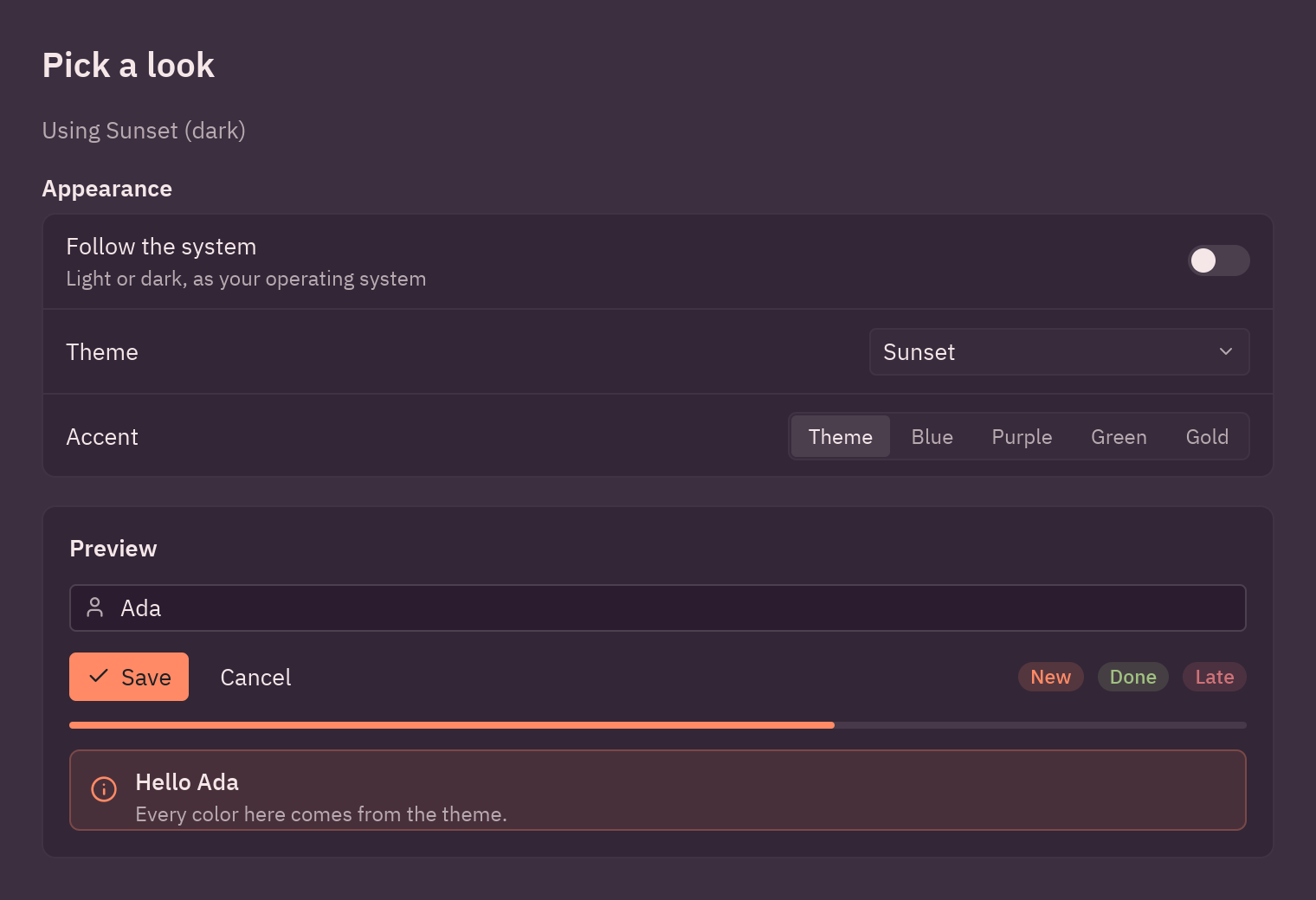
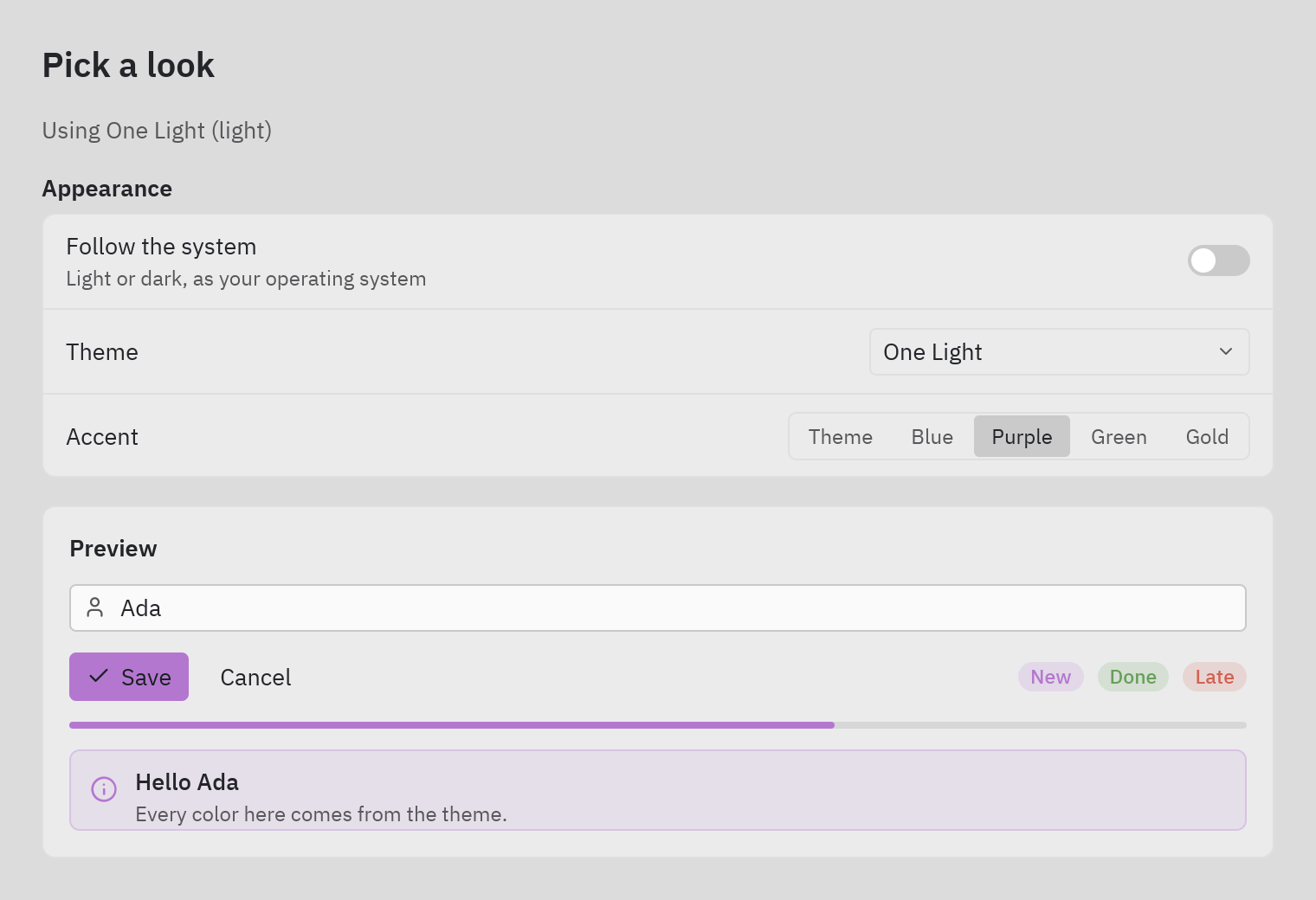
-
Pick a bundled theme.
themeis a class attribute of your app. Any name frompz.themes.names()works: the One, Ayu and Gruvbox families, light and dark.class ThemeSwitcher(pz.App):theme = "One Dark" -
Change it while the app runs. Assign
self.theme; the next redraw uses it. A drop-down of every theme is one line:ui.select(pz.themes.names(), self.base, lambda name: setattr(self, "theme", name)) -
Change only the accent. The accent is the color of primary buttons, focus rings, selection and links:
self.theme = pz.themes.get("One Dark").with_accent("#e5c07b") -
Follow the system.
pz.themes.auto(light, dark)switches by itself when the user changes their operating system between light and dark mode:self.theme = pz.themes.auto("One Light", "One Dark") -
Make your own.
pz.Theme.generatederives every surface, border, hover state and muted text from three colors;pz.themes.registeradds it to the list under its name:SUNSET = pz.themes.register(pz.Theme.generate("Sunset", background="#2b1d2f", text="#f5e6e8", accent="#ff8a65")) -
Read the theme in your view.
self.resolved_theme()returns theThemein use, handy for a background or to say “dark” or “light”:t = self.resolved_theme()pz.container(..., bg=t.background)ui.muted(f"Using {t.name} ({'dark' if t.is_dark else 'light'})")
In Pyzed Design
Section titled “In Pyzed Design”Select an empty spot of the canvas so the Properties panel shows the form, then open the Look section:
- Theme: every registered theme.
- Accent: seven preset colors, or a custom
#rrggbb. - Background, Corner radius and Font size for the whole form.
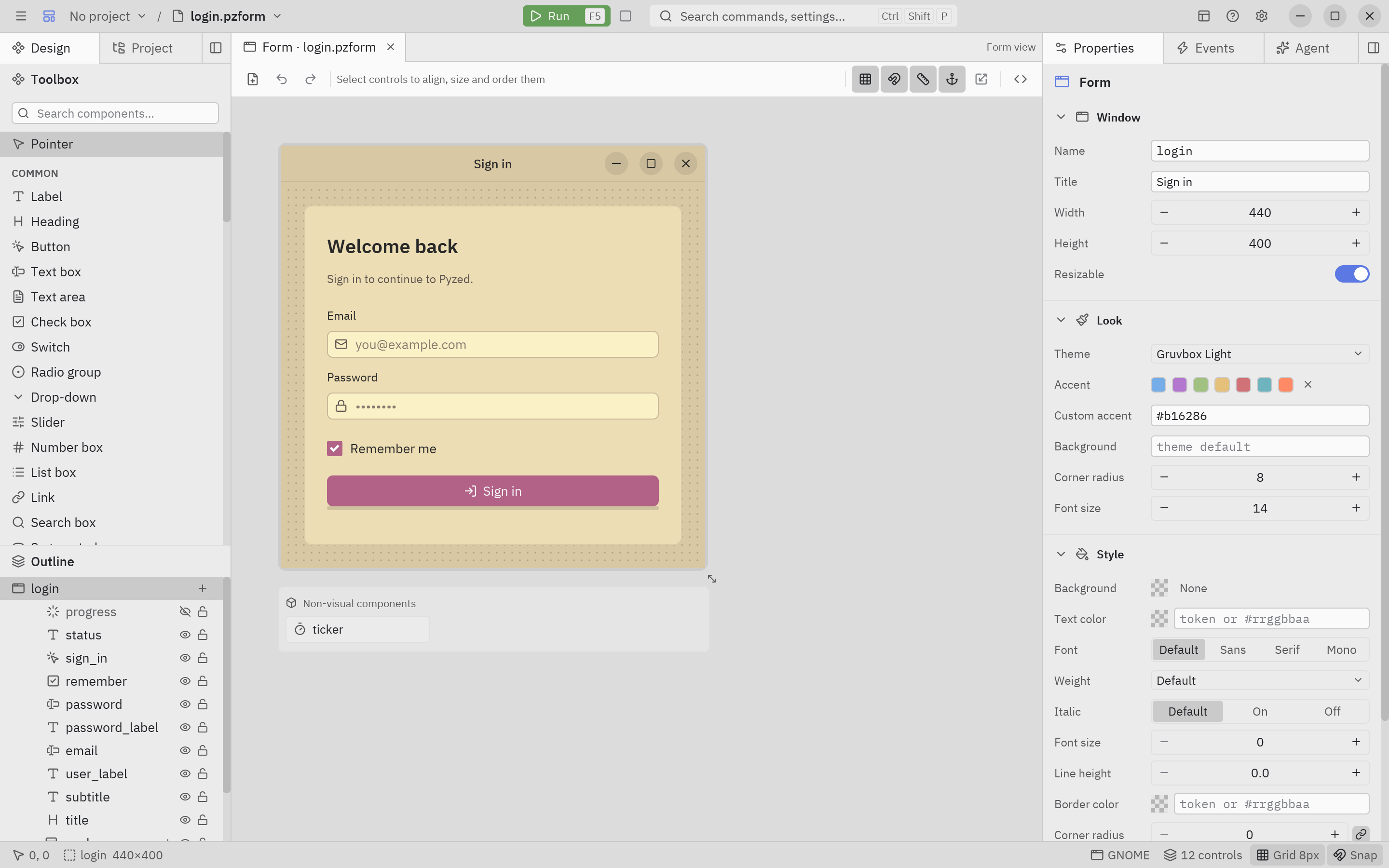
View → Preview theme… shows the canvas in another theme without changing the form, so you can check both looks. Each control can also override its own colors in its Style section.
Full code
Section titled “Full code”"""Changing the theme: a bundled theme, an accent color, follow the system, or your own.
python examples/tutorial/theme_switcher.py
- ``theme`` (a class attribute or ``self.theme``) takes the name of a bundled theme, a ``pz.Theme`` or ``pz.themes.auto(light, dark)``, which follows the operating system's light/dark setting.- ``theme.with_accent("#e5c07b")`` changes only the accent (primary buttons, focus, selection).- ``pz.Theme.generate(...)`` builds a whole theme from three colors; ``pz.themes.register`` adds it to ``pz.themes.names()``.
Every component reads its colors from the active theme, so the window restyles at once.Walkthrough: https://albakore.github.io/pyzed/tutorials/basic/themes/"""
import pyzed as pzfrom pyzed import ui
# A theme of your own, made from three colors and registered by name.SUNSET = pz.themes.register(pz.Theme.generate("Sunset", background="#2b1d2f", text="#f5e6e8", accent="#ff8a65"))
ACCENTS = {"Theme": None, "Blue": "#74ade8", "Purple": "#b477cf", "Green": "#a1c181", "Gold": "#e5c07b"}
class ThemeSwitcher(pz.App): title = "Themes" size = (760, 520) theme = "One Dark" # the theme the window opens with
def __init__(self): self.base = "One Dark" self.accent = "Theme" self.follow_system = False self.name = "Ada"
def apply(self): """Builds the theme from the choices and assigns it: the next view() uses it.""" if self.follow_system: self.theme = pz.themes.auto("One Light", "One Dark") return theme = pz.themes.get(self.base) color = ACCENTS[self.accent] self.theme = theme.with_accent(color) if color else theme
def choose(self, field): def setter(value): setattr(self, field, value) self.apply() return setter
def controls(self): return ui.settings_group("Appearance", [ ui.field("Follow the system", ui.switch(self.follow_system, self.choose("follow_system")), description="Light or dark, as your operating system"), ui.field("Theme", ui.select(pz.themes.names(), self.base, self.choose("base"), width=220)), ui.field("Accent", ui.segmented(list(ACCENTS), self.accent, self.choose("accent"))), ])
def preview(self): return ui.card(pz.column([ ui.input(self.name, lambda v: setattr(self, "name", v), placeholder="Your name", icon="user"), pz.row([ ui.button("Save", lambda: None, variant="solid", icon="check"), ui.button("Cancel", lambda: None, variant="ghost"), pz.hspace(), ui.badge("New"), ui.badge("Done", tint="success"), ui.badge("Late", tint="error"), ], spacing=8, align="center"), ui.progress(0.65), ui.callout("Hello " + (self.name or "there"), "Every color here comes from the theme.", tint="info"), ], spacing=12), title="Preview", width="fill")
def view(self): t = self.resolved_theme() # the Theme in use right now return pz.container( pz.column([ ui.heading("Pick a look", level=2), ui.muted(f"Using {t.name} ({'dark' if t.is_dark else 'light'})"), self.controls(), self.preview(), ], spacing=16), padding=24, width="fill", height="fill", bg=t.background, )
if __name__ == "__main__": pz.run(ThemeSwitcher)uv run --with pyzed-ui python examples/tutorial/theme_switcher.pypython3 -m venv .venvsource .venv/bin/activatepython -m pip install pyzed-uipython examples/tutorial/theme_switcher.pypy -m venv .venv.venv\Scripts\Activate.ps1python -m pip install pyzed-uipython examples\tutorial\theme_switcher.pypython3 examples/tutorial/theme_switcher.pypy examples\tutorial\theme_switcher.pyEvents in this tutorial
Section titled “Events in this tutorial”| Widget | Event | Handler gets |
|---|---|---|
ui.switch (Follow the system) |
on_toggle |
True or False. |
ui.select (Theme) |
on_select |
The theme’s name. |
ui.segmented (Accent) |
on_select |
The accent’s name. |
ui.input (Your name) |
on_input |
The text. |
self.choose("base") returns the handler: a small function that stores what it receives in that field. One factory
serves the three controls.
Try more events
Section titled “Try more events”def on_key(self, combo): # a shortcut for every window of the app if combo == "ctrl-t": # Ctrl+T: flip between light and dark self.base = "One Light" if self.resolved_theme().is_dark else "One Dark" self.follow_system = False
def on_resize(self, width, height): # the window's own resize event self.compact = width < 600 # e.g. hide the preview on small windows- 5-step tutorial: state, layout, async and a notes app in pure Python.
- Themes and Styles in the Theming section.