
A custom shader graph
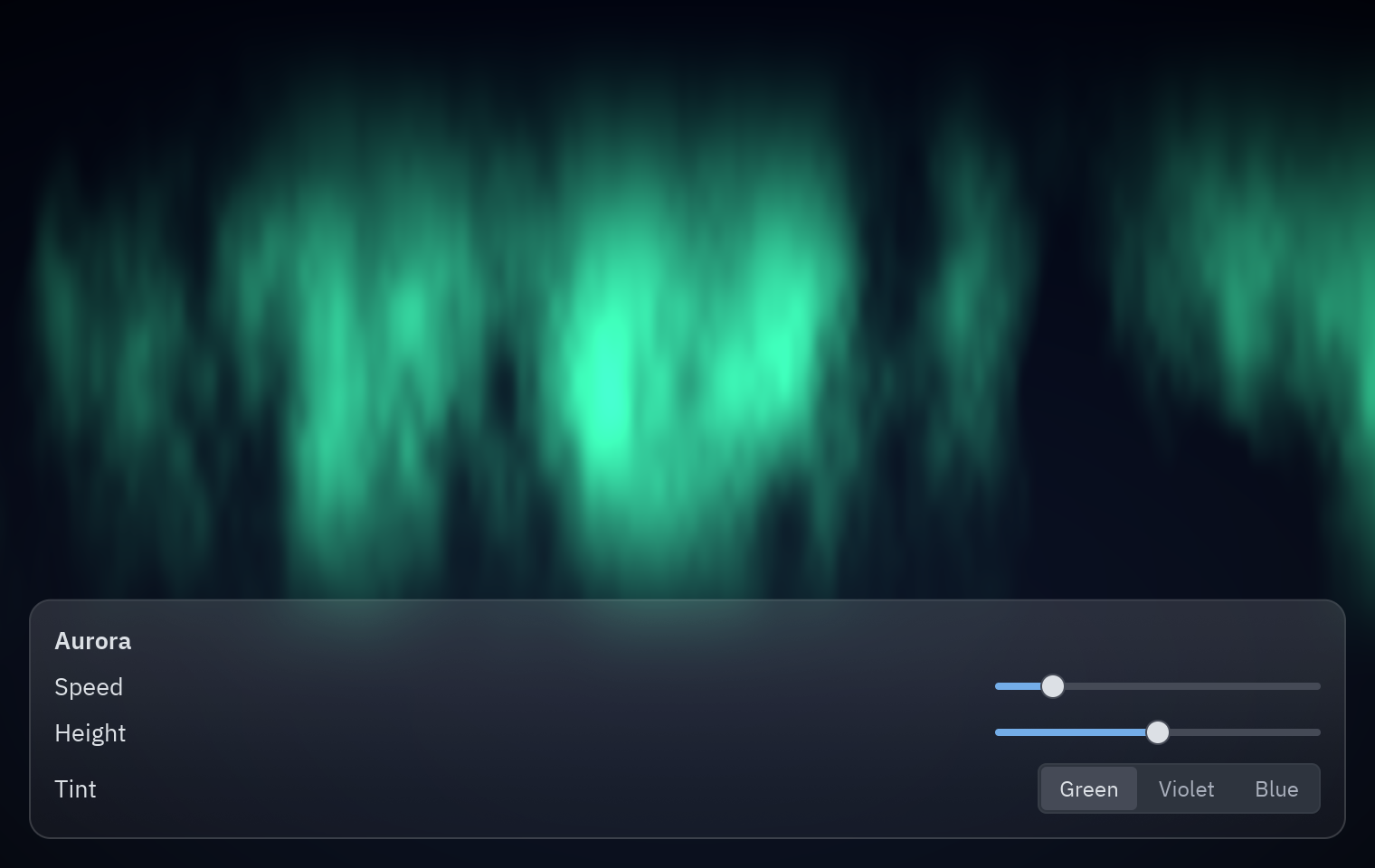
In the intermediate shader tutorial you edited a template in the Shader view. Here you build a shader from nothing, in Python, with the same graph the Shader view edits: an aurora, curtains of green light drifting over a night sky, with sliders for its speed, height and color.
| Goal | Time | Level | You need |
|---|---|---|---|
| An animated aurora made of nodes, with live controls | 40 minutes | Advanced · Python | A shader effect |
What you’ll learn
Section titled “What you’ll learn”- Create a
shading.Graph, add nodes by calling them, and pick their outputs. - Use arithmetic on outputs (
+,-,*) to add Math nodes for you. - Combine fractal noise, smoothstep and a gradient into a picture.
- Add mutable variables (uniforms) and change them every frame from sliders.
- Save the graph as a
.pzshadand keep editing it visually in Pyzed Design.
How a shader thinks
Section titled “How a shader thinks”A shader answers one question, for every pixel at once: what color is this pixel right now? It knows where the pixel is (UV: from 0,0 at the top left to 1,1 at the bottom right) and the time. Everything else is math on those two things. The graph is that math, drawn as boxes and wires:
flowchart LR
    UV[UV] --> P["Compose: x·3 + t, y·0.6 − t·0.3"]
    T["Time × speed"] --> P
    P --> N[Fractal noise]
    N --> S1["Smoothstep 0.35 → 0.8"]
    UV --> B["Band near the top (height)"]
    S1 --> L["light = curtains × band"]
    B --> L
    UV --> SKY["Gradient: night sky"]
    SKY --> M["Mix sky → tint by light"]
    L --> M
    M --> V["× Vignette"] --> O[Output]
-
A graph and its variables.
g.uniformadds a mutable variable (the GPU reads it every frame, so changing it is free) and returns a node that reads it:from pyzed import shadingg = shading.Graph("aurora")speed = g.uniform("speed", "float", 0.3, min=0, max=2)height = g.uniform("height", "float", 0.55, min=0.2, max=0.9)tint = g.uniform("tint", "color", "#34d399") -
Inputs. Calling a node type on the graph adds that node.
node["name"]picks an output, and arithmetic adds Math nodes:uv = g.uv()t = g.time()["time"] * speed # a Multiply node -
The curtains. Stretch the coordinates sideways and move them with time, then sample fractal noise (layers of noise, each finer than the last; the classic look of clouds and smoke):
p = g.compose(uv["x"] * 3.0 + t, uv["y"] * 0.6 - t * 0.3)["vector"]curtains = g.fbm(p, scale=2.5, octaves=5) -
Keep them in a band.
smoothstep(a, b, x)is 0 belowa, 1 aboveband a smooth ramp between: the shader version of “fade in”. Two of them make a band near the top, controlled byheight:band = g.smoothstep(height - 0.35, height, 1.0 - uv["y"]) * g.smoothstep(1.0, height, 1.0 - uv["y"])light = g.smoothstep(0.35, 0.8, curtains["value"]) * band -
Color it. A Gradient node makes the sky; Mix blends from the sky to the tint where there is light; Vignette darkens the corners; Output is the final color:
sky = g.gradient(uv["y"], stops=[[0.0, "#020617"], [1.0, "#0f172a"]])glow = g.mix(sky["rgb"], tint * 1.4, light)g.output(g.rgba(glow * g.vignette(strength=0.6), 1.0)["color"])g.arrange() # lay the nodes out in columns, like the Arrange button of the Shader view -
Show it.
pz.shadertakes the graph, compiles it to WGSL once and runs it on the GPU.uniforms=sets the mutable variables by name, so the sliders change the picture without recompiling anything:pz.shader(AURORA, uniforms={"speed": self.speed, "height": self.height, "tint": TINTS[self.tint]},width="fill", height="fill", fallback=pz.Gradient(["#020617", "#064e3b"], angle=180)) -
Open it in the designer. Run the example with
--saveto writeexamples/tutorial/shaders/aurora.pzshad, thenpyzed design examples/tutorial/shaders/aurora.pzshad: every node you created in code is on the canvas, with its live preview, ready to tweak with the mouse.
Full code
Section titled “Full code”"""A custom shader graph built in Python: an aurora with sliders for its variables.
python examples/tutorial/aurora_graph.py # show it python examples/tutorial/aurora_graph.py --save # also write shaders/aurora.pzshad
- ``shading.Graph`` is the same graph the Shader view of Pyzed Design edits: calling a node type on it (``g.fbm(...)``, ``g.smoothstep(...)``) adds that node, ``node["output"]`` picks an output, and ``+``, ``-``, ``*`` and ``/`` on outputs add Math nodes.- ``g.uniform(...)`` adds a *mutable* variable: the sliders change it every frame without recompiling anything.- ``pz.shader(graph, uniforms=...)`` compiles the graph to WGSL and runs it on the GPU. Without a GPU it draws the ``fallback`` gradient.- ``--save`` writes the graph as a ``.pzshad`` file you can open in Pyzed Design to keep editing.
Walkthrough: https://albakore.github.io/pyzed/tutorials/advanced/shader-graph/"""
import sysfrom pathlib import Path
import pyzed as pzfrom pyzed import shading, ui
HERE = Path(__file__).resolve().parentTINTS = {"Green": "#34d399", "Violet": "#a78bfa", "Blue": "#38bdf8"}
def build_aurora() -> shading.Graph: g = shading.Graph("aurora") g.description = "Curtains of light drifting over a night sky."
# Variables: the knobs your Python code (and the sliders) can turn. speed = g.uniform("speed", "float", 0.3, min=0, max=2) height = g.uniform("height", "float", 0.55, min=0.2, max=0.9) tint = g.uniform("tint", "color", "#34d399")
# 1. Where is this pixel, and what time is it? uv = g.uv() t = g.time()["time"] * speed
# 2. Drifting fractal noise, stretched sideways: the curtains. p = g.compose(uv["x"] * 3.0 + t, uv["y"] * 0.6 - t * 0.3)["vector"] curtains = g.fbm(p, scale=2.5, octaves=5)
# 3. Keep them in a band near the top, fading toward the ground. band = g.smoothstep(height - 0.35, height, 1.0 - uv["y"]) * g.smoothstep(1.0, height, 1.0 - uv["y"]) light = g.smoothstep(0.35, 0.8, curtains["value"]) * band
# 4. Colors: a night sky gradient, plus the tint where there is light. sky = g.gradient(uv["y"], stops=[[0.0, "#020617"], [1.0, "#0f172a"]]) glow = g.mix(sky["rgb"], tint * 1.4, light) g.output(g.rgba(glow * g.vignette(strength=0.6), 1.0)["color"])
g.arrange() # lay the nodes out in columns, as the Arrange button of the Shader view does return g
AURORA = build_aurora()
class Aurora(pz.App): title = "Aurora" size = (760, 480) theme = "One Dark"
def __init__(self): self.speed = 0.3 self.height = 0.55 self.tint = "Green"
def knob(self, label, value, low, high, field): return ui.field(label, pz.container(ui.slider(value, lambda v: setattr(self, field, v), min=low, max=high), width=180))
def view(self): sky = pz.shader(AURORA, uniforms={"speed": self.speed, "height": self.height, "tint": TINTS[self.tint]}, width="fill", height="fill", fallback=pz.Gradient(["#020617", "#064e3b"], angle=180)) panel = pz.container(pz.column([ ui.label("Aurora", weight="semibold"), self.knob("Speed", self.speed, 0, 2, "speed"), self.knob("Height", self.height, 0.2, 0.9, "height"), ui.field("Tint", ui.segmented(list(TINTS), self.tint, lambda c: setattr(self, "tint", c))), ], spacing=8), padding=14).style(glass=True, radius=12) return pz.stack([sky, pz.container(panel, padding=16, width="fill", height="fill", align_x="start", align_y="end")])
if __name__ == "__main__": if "--save" in sys.argv: print("wrote", AURORA.save(HERE / "shaders" / "aurora.pzshad")) pz.run(Aurora)uv run --with pyzed-ui python examples/tutorial/aurora_graph.pypython3 -m venv .venvsource .venv/bin/activatepython -m pip install pyzed-uipython examples/tutorial/aurora_graph.pypy -m venv .venv.venv\Scripts\Activate.ps1python -m pip install pyzed-uipython examples\tutorial\aurora_graph.pypython3 examples/tutorial/aurora_graph.pypy examples\tutorial\aurora_graph.py- Shader graphs: the whole
pyzed.shadingAPI and the.pzshadformat. - The Shading section: every node, with examples.
- Connecting a backend.