
Layout basics
Every screen, from a login box to a full IDE, is built from four ideas: stack things vertically, put them side by side, decide who takes the free space, and leave room between them. Learn them once and you can read any Pyzed layout.
| Goal | Time | Level | You need |
|---|---|---|---|
| A profile page that resizes nicely | 20 minutes | Basic · Python | Pyzed installed (Installation) |
What you’ll learn
Section titled “What you’ll learn”pz.columnandpz.row: vertical and horizontal stacks.spacing(the gap between children) andpadding(the room inside the edge).width="fill"/height="fill"andpz.hspace(): taking the free space.align: lining children up across the stack.pz.grid: equal cells.- The same ideas in the designer: Flex row, Flex column, Grid, Spacer and anchors.
The four ideas
Section titled “The four ideas”pz.column([...], spacing=16) pz.row([...], spacing=12, align="center")┌──────────────┐ ┌───────────────────────────────────────┐│ header │ │ (AL) Ada Lovelace ⟷fill⟷ [Follow]││ ── 16 px ── │ └───────────────────────────────────────┘│ stats │ pz.hspace() pushes the button right│ ── 16 px ── ││ about (fill) │ ← height="fill" takes what is left└──────────────┘| Size value | Means |
|---|---|
a number (width=200) |
Exactly that many pixels. |
"shrink" (the default for most widgets) |
As small as the content. |
"fill" |
All the free space; several fill children share it equally. |
"fill:2" |
Twice the share of a plain fill sibling. |
-
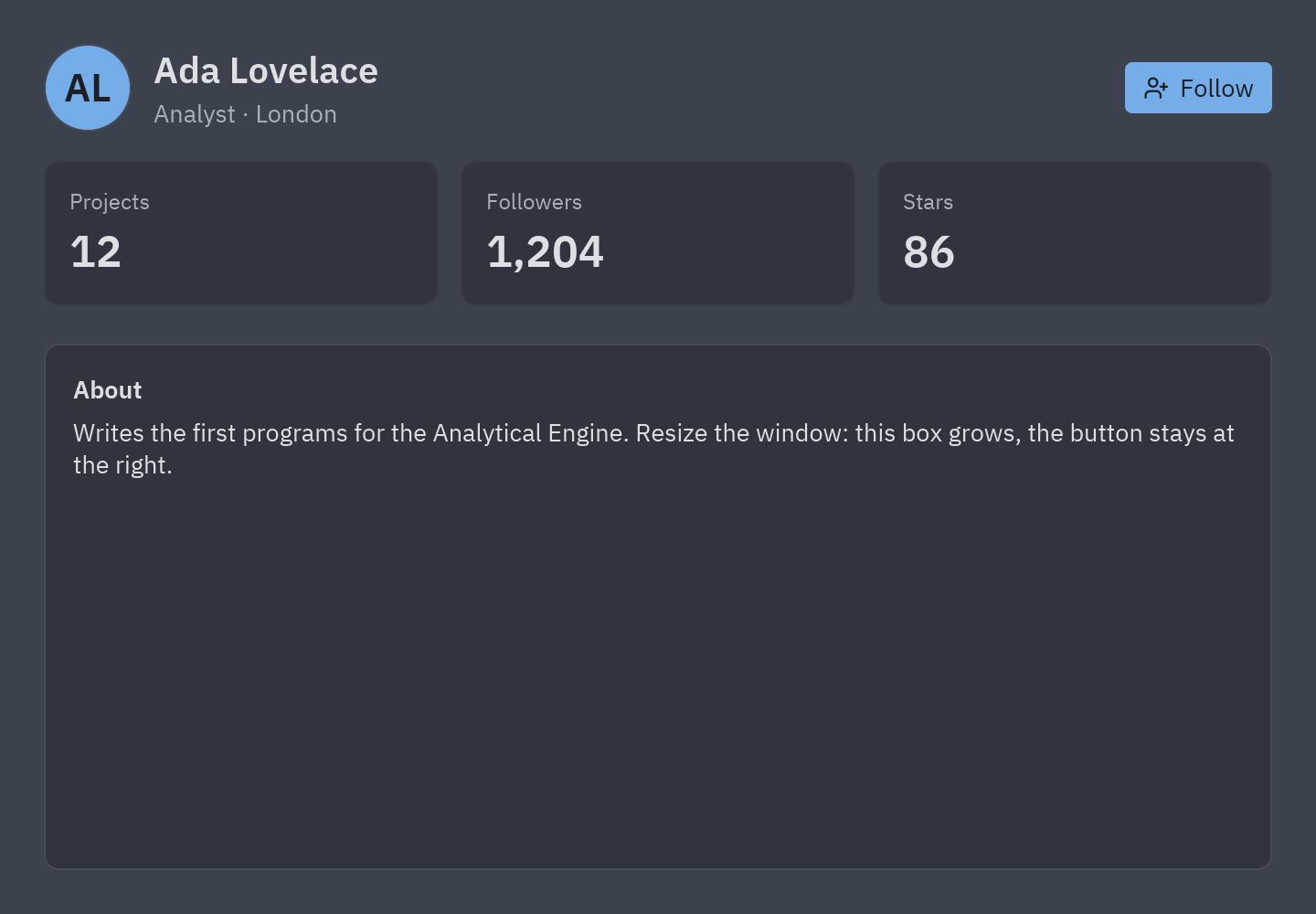
The page is a column.
view()returns one widget; here apz.containerwithpadding=24around a column of three parts,spacing=16apart:def view(self):t = self.resolved_theme()return pz.container(pz.column([self.header(), self.stats(), self.about()], spacing=16, height="fill"),padding=24, width="fill", height="fill", bg=t.background,) -
The header is a row. An avatar, a column with the name and a muted line, then
pz.hspace(), an empty piece withwidth="fill", then the button.align="center"centers them vertically:pz.row([ui.avatar("AL", size=48),pz.column([ui.heading("Ada Lovelace", level=2), ui.muted("Analyst · London")], spacing=2),pz.hspace(),ui.button("Follow", self.toggle_follow, variant="solid", icon="user-plus"),], spacing=12, align="center") -
Three equal cards: a grid.
columns=3makes three cells of the same width;heightis the height of each row:pz.grid([ui.stat("Projects", "12", width="fill"), ...], columns=3, spacing=12, height=84) -
The last part fills.
height="fill"on the About box makes it take every pixel the other parts leave, so it grows with the window. -
Run it and resize the window. The header keeps the button at the right edge, the cards stay equal and the About box stretches.
The same thing in Pyzed Design
Section titled “The same thing in Pyzed Design”The designer has the same building blocks in the Layout category of the toolbox:
| In code | In the designer |
|---|---|
pz.row([...], spacing=8) |
Flex row, with Gap 8 |
pz.column([...]) |
Flex column |
pz.hspace() |
Spacer (a child with grow 1) |
width="fill" on a child |
The child’s Grow field (Position section) set to 1 |
pz.grid([...], columns=3) |
Grid with Columns 3 |
padding=24 |
The container’s Padding |
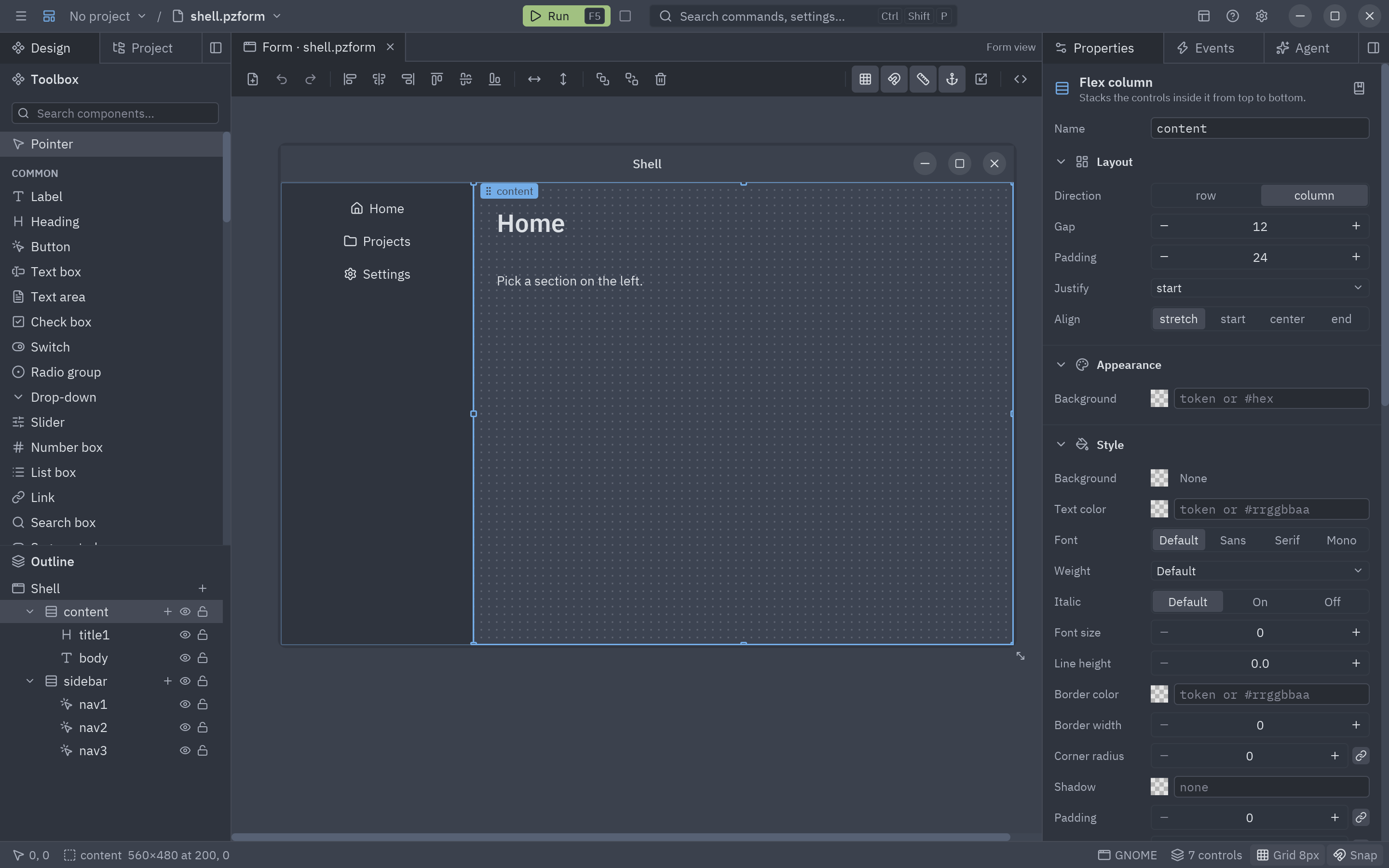
Controls placed freely on the form (not in a flex container) use anchors instead: anchored left and right, a control stretches; anchored only right, it follows the right edge. Select controls and use Group in a row / column / grid (right-click menu) to turn a free arrangement into a flex one. Details in Layouts and containers.
Full code
Section titled “Full code”"""Layout basics: rows, columns, fill, spacing, padding, alignment and grids.
python examples/tutorial/layout_basics.py
A small profile page laid out with the four ideas behind every Pyzed layout:
- ``pz.column`` stacks children top to bottom, ``pz.row`` puts them side by side.- ``spacing`` is the gap between children, ``padding`` the room inside the edge.- ``width="fill"`` / ``height="fill"`` take the space that is left; ``pz.hspace()`` is an empty piece that fills, so it pushes what follows to the end of the row.- ``pz.grid`` places children in cells of equal width.
Walkthrough: https://albakore.github.io/pyzed/tutorials/basic/layout-basics/"""
import pyzed as pzfrom pyzed import ui
class Profile(pz.App): title = "Layout basics" size = (720, 500)
def __init__(self): self.follows = False
def header(self): # A row: avatar, a column with two lines, a spacer that fills, then a button at the far right. return pz.row([ ui.avatar("AL", size=48), pz.column([ui.heading("Ada Lovelace", level=2), ui.muted("Analyst · London")], spacing=2), pz.hspace(), ui.button("Following" if self.follows else "Follow", self.toggle_follow, variant="outline" if self.follows else "solid", icon="user-plus"), ], spacing=12, align="center")
def stats(self): # A grid: three cells of the same width, whatever the window size. return pz.grid([ ui.stat("Projects", "12", width="fill"), ui.stat("Followers", "1,205" if self.follows else "1,204", width="fill"), ui.stat("Stars", "86", width="fill"), ], columns=3, spacing=12, height=84) # height: the height of each row
def about(self): # A container with height="fill" grows to take the rest of the window. t = self.resolved_theme() return pz.container( pz.column([ ui.label("About", weight="semibold"), ui.label("Writes the first programs for the Analytical Engine. " "Resize the window: this box grows, the button stays at the right."), ], spacing=6), padding=16, width="fill", height="fill", bg=t.surface, border_color=t.border, border_width=1, radius=t.radius + 2, )
def toggle_follow(self): self.follows = not self.follows
def view(self): t = self.resolved_theme() return pz.container( pz.column([self.header(), self.stats(), self.about()], spacing=16, height="fill"), padding=24, width="fill", height="fill", bg=t.background, )
if __name__ == "__main__": pz.run(Profile)uv run --with pyzed-ui python examples/tutorial/layout_basics.pypython3 -m venv .venvsource .venv/bin/activatepython -m pip install pyzed-uipython examples/tutorial/layout_basics.pypy -m venv .venv.venv\Scripts\Activate.ps1python -m pip install pyzed-uipython examples\tutorial\layout_basics.pypython3 examples/tutorial/layout_basics.pypy examples\tutorial\layout_basics.pyEvents in this tutorial
Section titled “Events in this tutorial”The page has one event: the Follow button’s on_press, which calls toggle_follow (no argument). Layout
widgets have no events of their own, but any widget takes the common events with .on().
Try more events
Section titled “Try more events”def __init__(self): self.follows = False self.narrow = False # new: the window is narrow self.opened = None # new: the stat that was clicked
def stats(self): return pz.grid([ ui.stat(name, value, width="fill", on_press=lambda name=name: setattr(self, "opened", name)) for name, value in (("Projects", "12"), ("Followers", "1,204"), ("Stars", "86")) ], columns=1 if self.narrow else 3, spacing=12, height=84)
def view(self): page = pz.column([self.header(), self.stats(), self.about()], spacing=20, padding=24) # resize: one column when the window is narrower than 560 px return page.on(resize=lambda e: setattr(self, "narrow", e.width < 560), double_click=lambda: setattr(self, "opened", None))- Change the theme of this window.
- Layout guide: track grids (
"200 1fr auto"),pz.flex, scrolling and anchored layouts. - Row, Column and Grid in the component library.