
Data binding and validation
In A form that does something every field was read and checked by hand. Here
the controls do that work themselves: each one is bound to a field of the form’s data, carries its own
rules, and shows its own error message. The Python left to write is a single if.
| Goal | Time | Level | You need |
|---|---|---|---|
| A sign-up form that validates itself | 25 minutes | Intermediate · a little Python | A form that does something |
What you’ll learn
Section titled “What you’ll learn”- Bind an input to a field of
form.data(two-way: it shows the field and writes back what the user types). - Show a live expression in a label (
f"Nice to meet you, {name}!"). - Add rules: required, a pattern, a minimum length, a minimum number, your own message.
- Validate everything with
form.validate(), and readform.dataandform.errors.
-
Draw the form. A new form named
signupwith a Heading, a Label namedgreeting, three Text boxes (your_name,email,password, the last with Password switched on), a Number box namedage, a Check box namedterms(textI accept the terms), a small labelsummary, a labelstatusand a Button namedcreate. -
Bind the inputs. Select
your_nameand, in the Data section of Properties, typenamein Bind to. Do the same for the others:Control Bind to Rules (Data section) your_namenameRequired emailemailRequired, Pattern [^@\s]+@[^@\s]+\.[a-z]{2,}, MessageEnter a valid emailpasswordpasswordRequired, Minimum length 8 ageageMinimum 13, Message You must be 13 or oldertermstermsRequired (a check box passes only when checked), Message Please accept the terms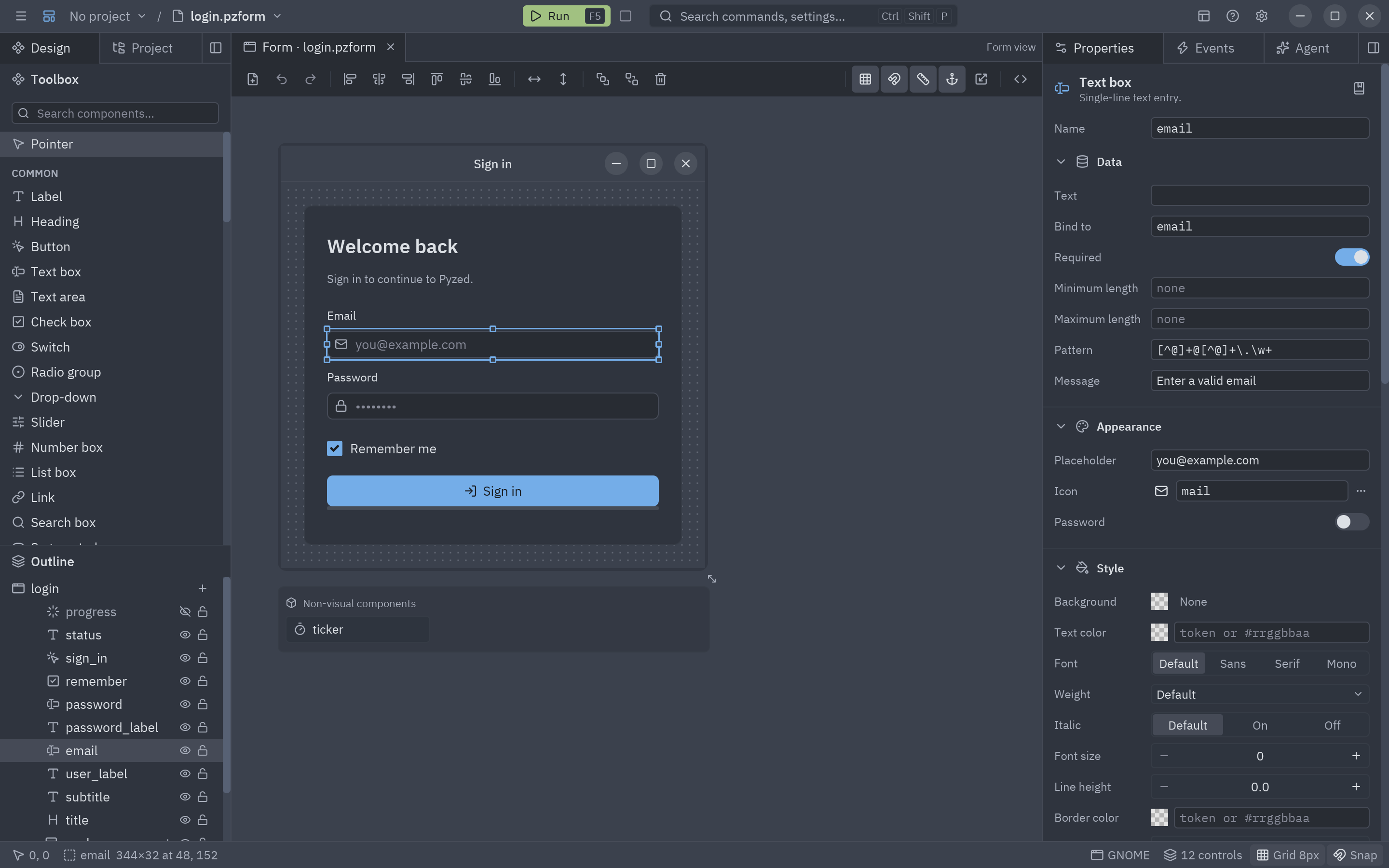
The Data section: the field the control is bound to and its rules. -
Show a live expression. A display control (label, heading, badge…) can bind to a Python expression over the data, recomputed on every redraw. Select
greetingand set Bind to:f"Nice to meet you, {name}!" if name else "Fill in the form below."And
summary:f"{len(password)} characters in your password" -
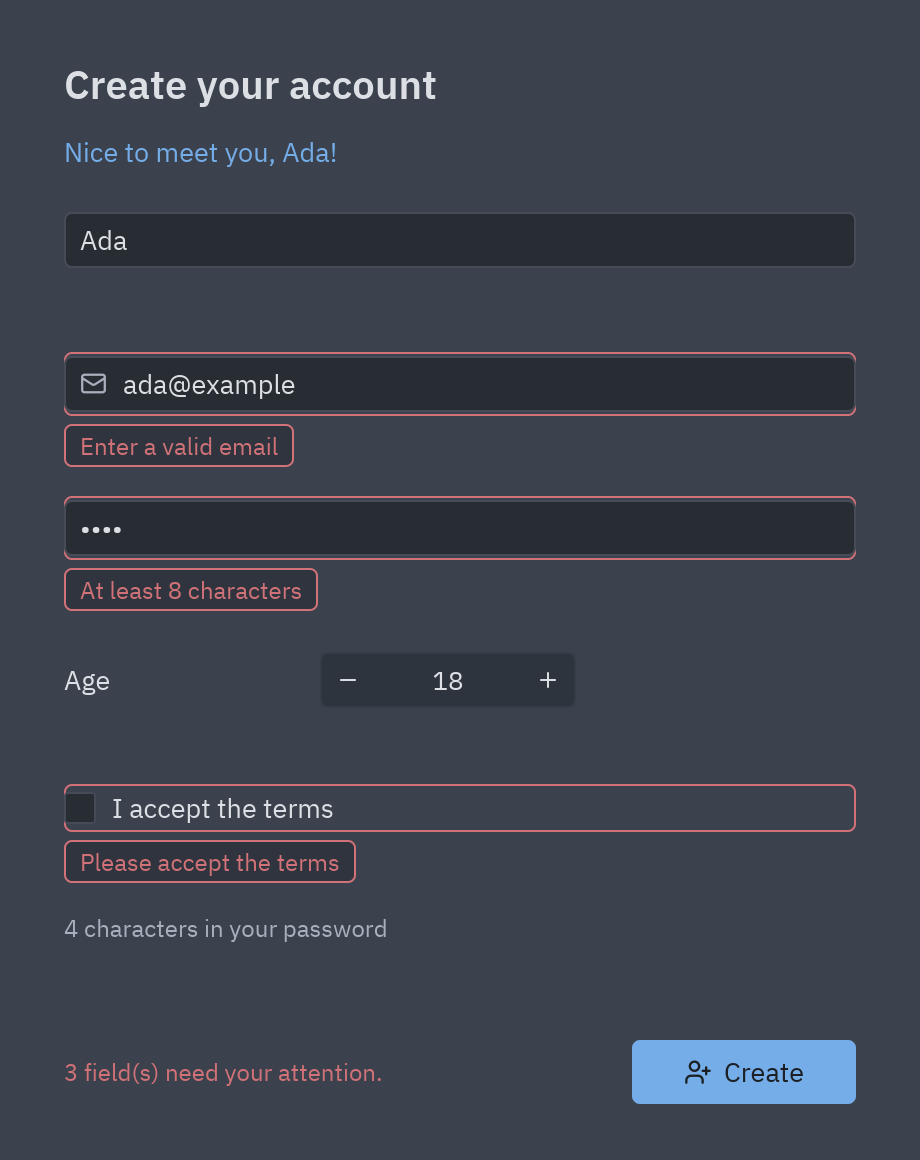
Run it (F5) and type. The greeting follows your name letter by letter, and each input checks its rules as you type: a red border and a message bubble under it.
-
Validate on click. Double-click
createand write the handler:def create_click(form, event):if not form.validate(): # checks every rule and shows every messageform.status.color = "error"form.status.text = f"{len(form.errors)} field(s) need your attention."returndata = form.data # {"name": ..., "email": ..., "age": 18, "terms": True, ...}form.status.color = "success"form.status.text = f"Welcome aboard, {data['name']}!"form.datais a plain dict filled by the bound controls. Save it, send it to an API or pass it to another form.
Full code
Section titled “Full code”signup.pzform holds the layout, the bindings and the rules; signup.py only the button:
"""Event handlers for the sign-up form (tutorial: Data binding and validation).
    pyzed run examples/tutorial/designer/signup.pzform
The controls are bound to fields of ``form.data`` (Properties → Data → Bind to) and carry theirvalidation rules, so the handler only has to call ``form.validate()`` and read ``form.data``."""

def create_click(form, event):    """Runs when create is clicked."""    if not form.validate():  # checks every rule and shows the messages under the controls        form.status.color = "error"        form.status.text = f"{len(form.errors)} field(s) need your attention."        return    data = form.data  # {"name": ..., "email": ..., "password": ..., "age": ..., "terms": True}    print("New account:", {k: v for k, v in data.items() if k != "password"})    form.status.color = "success"    form.status.text = f"Welcome aboard, {data['name']}!"
uv run --with pyzed-ui pyzed run examples/tutorial/designer/signup.pzformpython3 -m venv .venvsource .venv/bin/activatepython -m pip install pyzed-uipyzed run examples/tutorial/designer/signup.pzformpy -m venv .venv.venv\Scripts\Activate.ps1python -m pip install pyzed-uipyzed run examples\tutorial\designer\signup.pzformpython3 -m pyzed run examples/tutorial/designer/signup.pzformpy -m pyzed run examples\tutorial\designer\signup.pzformEvents in this tutorial
Section titled “Events in this tutorial”Bound controls need almost no events: each change goes into form.data by itself. The form has one handler,
create_click, which calls form.validate() and reads form.data.
Try more events
Section titled “Try more events”def form_load(form, event): # start in the first box return form.name.focus()
def terms_change(form, event): # a check box: event.value is True or False form.create.enabled = event.value
def email_change(form, event): # check one field as the user types form.email.validate() # shows (or clears) its message right away- Data binding and validation in the designer manual: nested paths
(
customer.address.city), tables, translations with@keysand previewing other languages. - Validation errors from Pydantic, Django or FastAPI.
- A multi-view app.