
To-do list
In this tutorial we build a to-do list: the classic first app, and a good one, because it has everything a real app has: data, a form to add to it, a list to show it and ways to change it.
| Goal | Time | Level | You need |
|---|---|---|---|
| A to-do list with filters and shortcuts | 30 minutes | Basic · Python | 5-step tutorial (steps 1 and 2) |
What you’ll learn
Section titled “What you’ll learn”- Keep the app’s data in plain Python objects (a dataclass).
- Read a text field as the user types, and submit it with Enter.
- Draw a list of rows with a checkbox and a delete button each.
- Filter what is shown, and add keyboard shortcuts.
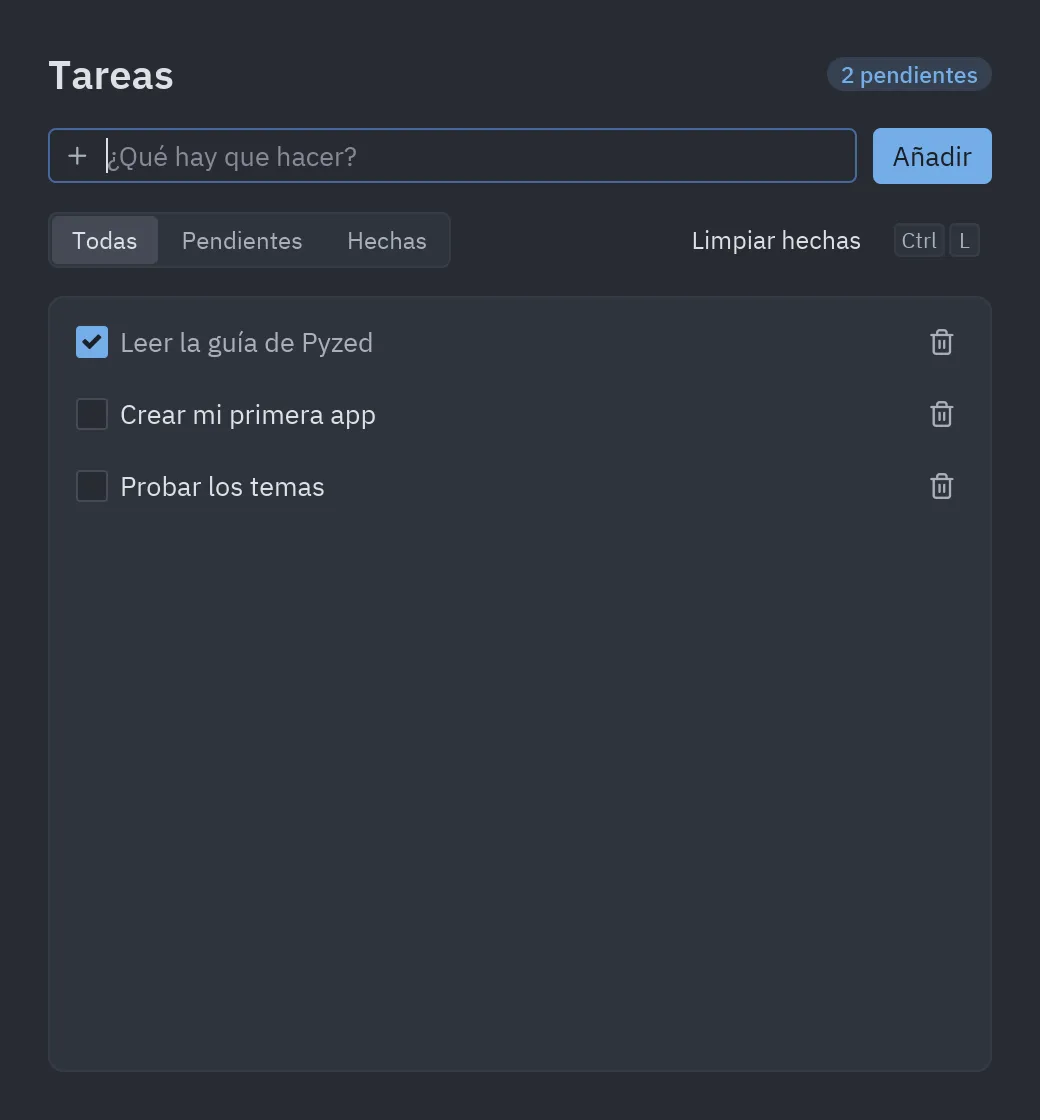
-
The model. A task is a dataclass. The app state is the list of tasks, the text being typed and the active filter:
@dataclassclass Task:title: strdone: bool = Falseclass Todo(pz.App):title = "Tasks"size = (520, 560)def __init__(self):self.tasks = [Task("Build my first app")]self.draft = ""self.filter = "All" -
Adding tasks. The field is controlled: it shows
self.draftand every keystroke updates it. Enter (on_submit) and the button call the same method:def add(self):if self.draft.strip():self.tasks.append(Task(self.draft.strip()))self.draft = ""return Command.focus("new-task") # give focus back to the field# in view():pz.row([ui.input(self.draft, lambda text: setattr(self, "draft", text), id="new-task",placeholder="What needs to be done?", on_submit=self.add, icon="plus"),ui.button("Add", self.add, variant="solid"),], spacing=8) -
Drawing the list. Each task is a
ui.list_itemwith a checkbox at the start and a delete button at the end. The lambdas capturetaskbecausetask_rowreceives the task as an argument:def task_row(self, task):return ui.list_item(ui.label(task.title, color="text_muted" if task.done else "text"),lambda: self.toggle(task),start=ui.checkbox(task.done, lambda _: self.toggle(task)),end=ui.icon_button("trash-2", lambda: self.remove(task), size="sm", tooltip="Delete"),height=34,inset=True,) -
Filtering.
ui.segmentedchangesself.filter, andview()only shows the visible tasks. Sinceview()is called again after every change, there is nothing to “refresh”:ui.segmented(["All", "Pending", "Done"], self.filter, lambda f: setattr(self, "filter", f)) -
Shortcuts.
on_keyreceives each key as text:def on_key(self, combo):if combo == "ctrl-l":return self.clear_done()if combo == "ctrl-t":self.theme = "One Light" if self.resolved_theme().is_dark else "One Dark" -
Initial focus.
on_startruns once when the window opens:def on_start(self):return Command.focus("new-task")
Full code
Section titled “Full code”"""A to-do list: state, text input, list items, filters and keyboard shortcuts.
python examples/todo.py
Walkthrough: https://albakore.github.io/pyzed/tutorials/basic/todo-app/"""
from dataclasses import dataclassfrom itertools import count
import pyzed as pzfrom pyzed import Command, ui
_ids = count(1)
@dataclassclass Task: title: str done: bool = False id: int = 0
def __post_init__(self): self.id = self.id or next(_ids)
class Todo(pz.App): title = "Tareas" size = (520, 560) min_size = (400, 360)
def __init__(self): self.tasks = [Task("Leer la guía de Pyzed", done=True), Task("Crear mi primera app"), Task("Probar los temas")] self.draft = "" self.filter = "Todas"
# -- actions ----------------------------------------------------------- def add(self): if self.draft.strip(): self.tasks.append(Task(self.draft.strip())) self.draft = "" return Command.focus("new-task")
def toggle(self, task): task.done = not task.done
def remove(self, task): self.tasks.remove(task)
def clear_done(self): self.tasks = [t for t in self.tasks if not t.done]
def on_start(self): return Command.focus("new-task")
def on_key(self, combo): if combo == "ctrl-l": return self.clear_done() if combo == "ctrl-t": self.theme = "One Light" if self.resolved_theme().is_dark else "One Dark"
# -- view ---------------------------------------------------------------- def visible(self): if self.filter == "Pendientes": return [t for t in self.tasks if not t.done] if self.filter == "Hechas": return [t for t in self.tasks if t.done] return self.tasks
def task_row(self, task): return ui.list_item( ui.label(task.title, color="text_muted" if task.done else "text"), lambda: self.toggle(task), start=ui.checkbox(task.done, lambda _: self.toggle(task)), end=ui.icon_button("trash-2", lambda: self.remove(task), size="sm", tooltip="Eliminar"), height=34, inset=True, )
def view(self): pending = sum(not t.done for t in self.tasks) tasks = self.visible() return pz.container( pz.column( [ pz.row([ui.heading("Tareas", level=2), pz.hspace(), ui.badge(f"{pending} pendientes")], align="center"), pz.row( [ ui.input(self.draft, lambda text: setattr(self, "draft", text), id="new-task", placeholder="¿Qué hay que hacer?", on_submit=self.add, icon="plus"), ui.button("Añadir", self.add, variant="solid"), ], spacing=8, ), pz.row( [ ui.segmented(["Todas", "Pendientes", "Hechas"], self.filter, lambda f: setattr(self, "filter", f)), pz.hspace(), ui.button("Limpiar hechas", self.clear_done, variant="ghost", size="sm", keys="ctrl-l"), ], align="center", ), ui.card( pz.scrollable(pz.column([self.task_row(t) for t in tasks], spacing=2), height="fill") if tasks else pz.center(ui.muted("No hay tareas aquí."), height=120), padding=6, ), ], spacing=14, max_width=640, ), padding=24, width="fill", height="fill", align_x="center", bg=self.resolved_theme().editor, )
if __name__ == "__main__": pz.run(Todo)uv run --with pyzed-ui python examples/todo.pypython3 -m venv .venvsource .venv/bin/activatepython -m pip install pyzed-uipython examples/todo.pypy -m venv .venv.venv\Scripts\Activate.ps1python -m pip install pyzed-uipython examples\todo.pypython3 examples/todo.pypy examples\todo.pyEvents in this tutorial
Section titled “Events in this tutorial”| Widget | Event | Handler | Gets |
|---|---|---|---|
ui.input |
on_input |
lambda text: setattr(self, "draft", text) |
The text. |
ui.input, Add |
on_submit, on_press |
self.add |
Nothing. |
ui.segmented |
on_select |
lambda f: setattr(self, "filter", f) |
The filter. |
ui.list_item |
on_press |
lambda: self.toggle(task) |
Nothing. |
ui.checkbox |
on_toggle |
lambda _: self.toggle(task) |
True/False (ignored: _). |
ui.icon_button |
on_press |
lambda: self.remove(task) |
Nothing. |
| The app | on_start, on_key |
focus the field; ctrl-l, ctrl-t |
—, the combo. |
Try more events
Section titled “Try more events”Rename a task with a double click, and open a menu with a right click:
def __init__(self):    ...    self.renaming = None                    # the task being renamed    self.menu_for = None                    # the task whose menu is open
def task_row(self, task):    return ui.list_item(        ui.label(task.title), lambda: self.toggle(task),        start=ui.checkbox(task.done, lambda _: self.toggle(task)),        on_double_press=lambda: setattr(self, "renaming", task),     # double click        on_right_press=lambda: setattr(self, "menu_for", task),      # right click        height=34, inset=True,    )
def view(self): page = ... # the page of the tutorial dialog = None if self.renaming: task = self.renaming dialog = ui.prompt("Rename", task.title, lambda t: setattr(task, "title", t), lambda: setattr(self, "renaming", None), lambda: setattr(self, "renaming", None)) return ui.dialog_layer(page, dialog)- Data binding and validation in the designer.
- Lists and tables: search, sort and select rows.
- The Todos showcase, which saves the list to disk.