
Dialogs, notifications and validation
A good app tells the user what is going on: what is wrong with the form, what is about to happen, what just happened. Pyzed has a ready-made piece for each: field errors, dialogs and toasts (small notifications in the corner).
| Goal | Time | Level | You need |
|---|---|---|---|
| A sign-up form with errors, a confirmation and notifications | 30 minutes | Intermediate · Python | Lists and tables |
What you’ll learn
Section titled “What you’ll learn”- Compute validation errors from your state and show them with
ui.field(..., error=...). - Show them only after the first try, not while the user is still typing.
- Open a confirmation dialog over the page with
ui.dialog_layerandui.confirm. - Show toasts with
ui.toastsand remove them after a few seconds without freezing the window.
-
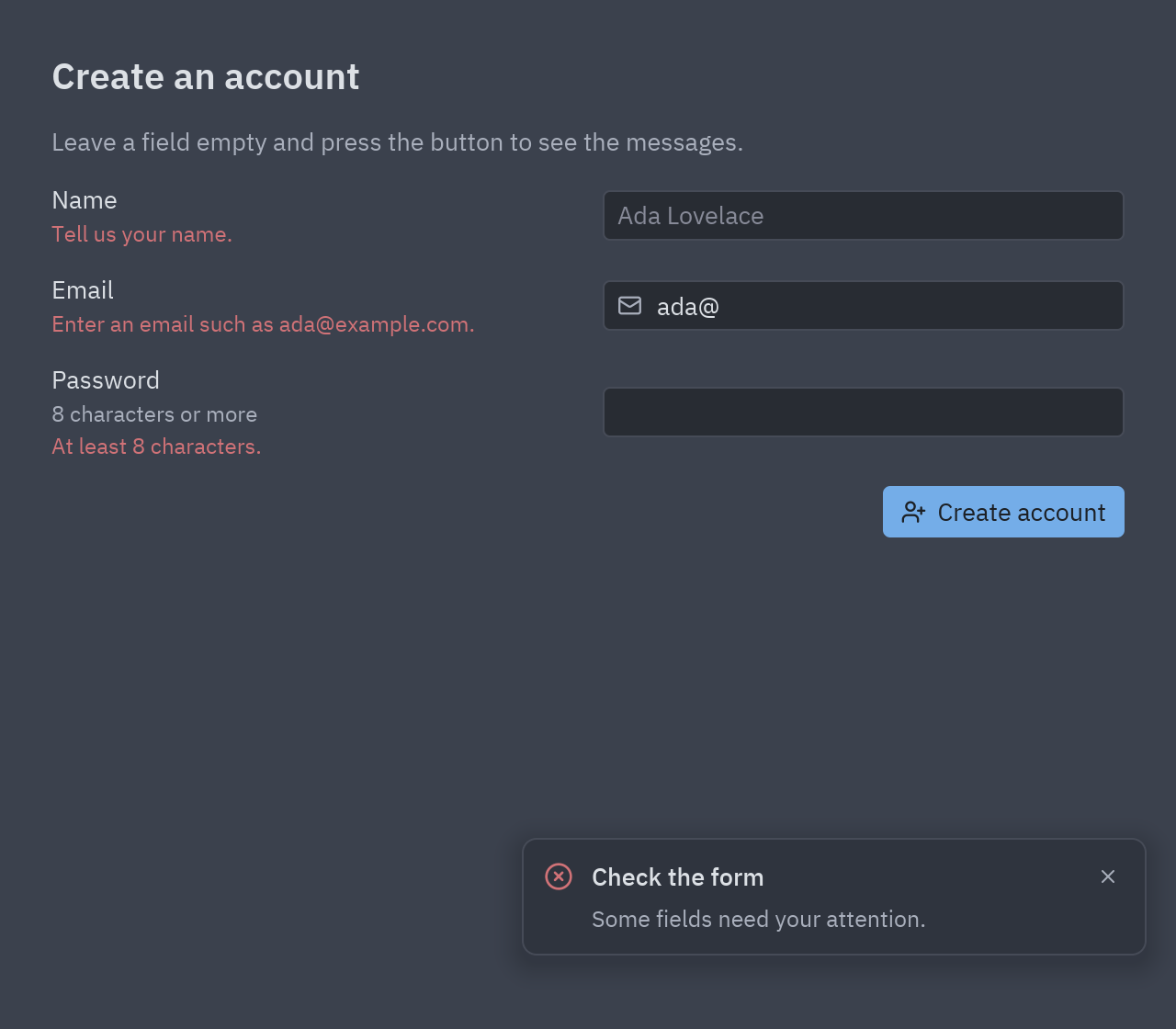
Errors are a function of the state. One method returns
{field: message}for whatever is wrong right now:def errors(self):found = {}if not self.name.strip():found["name"] = "Tell us your name."if "@" not in self.email:found["email"] = "Enter an email such as ada@example.com."if len(self.password) < 8:found["password"] = "At least 8 characters."return found -
Show them under each field, but only once the user has tried to submit (
self.tried). Nobody likes red text before they had a chance:errors = self.errors() if self.tried else {}ui.field("Email", ui.input(self.email, lambda v: setattr(self, "email", v)), error=errors.get("email")) -
A confirmation dialog.
ui.dialog_layer(page, dialog)drawsdialogcentered over a dimmed page;dialog=Noneshows just the page. So “is the dialog open?” is one attribute:dialog = Noneif self.confirming:dialog = ui.confirm(f"Create an account for {self.email}?", self.create,lambda: setattr(self, "confirming", False), title="Almost there",confirm_label="Create")page = ui.dialog_layer(page, dialog, on_dismiss=lambda: setattr(self, "confirming", False))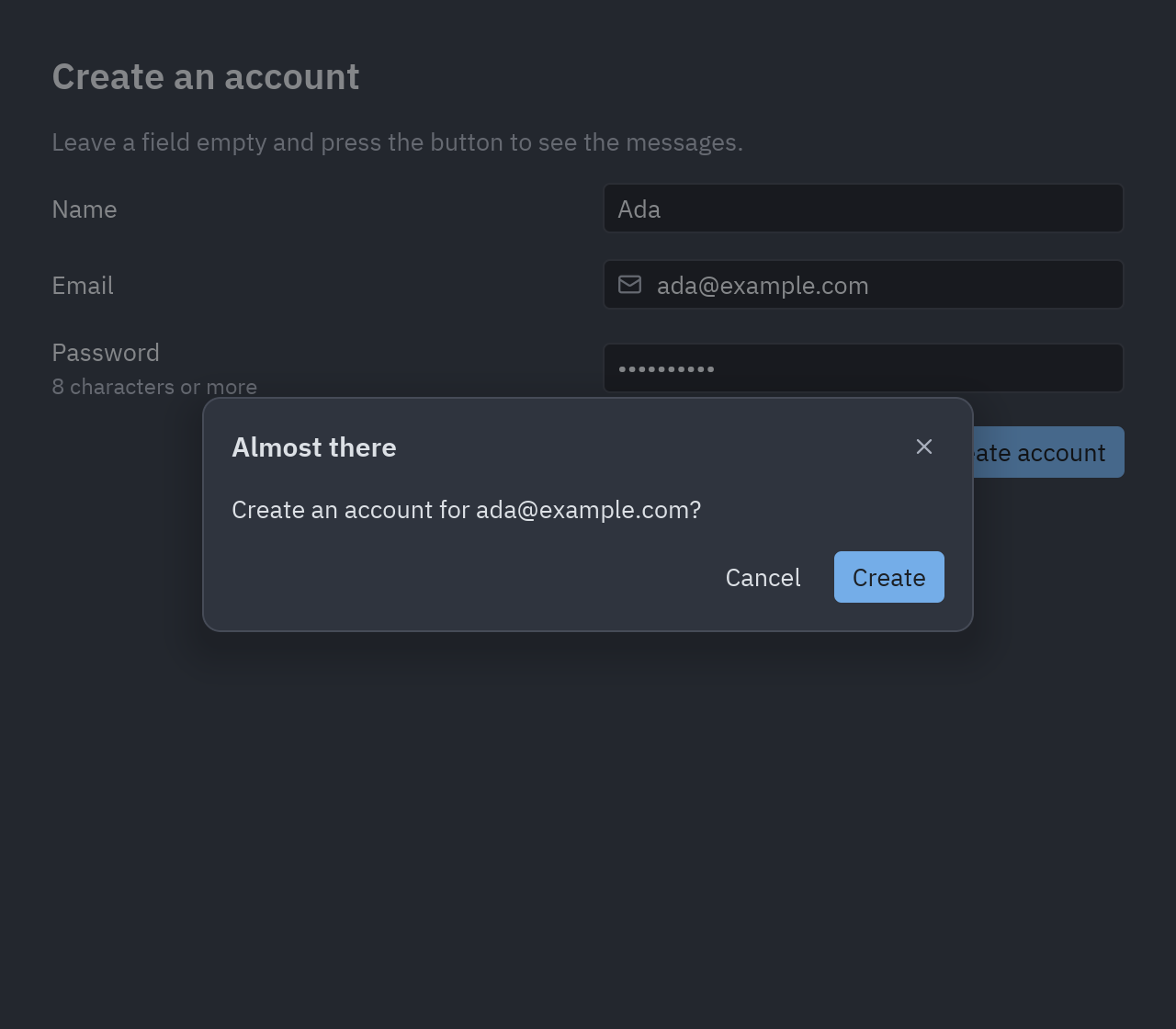
ui.confirm over the page; clicking outside it (on_dismiss) cancels. -
Toasts. Keep a list of notes, draw them with
ui.toasts, and remove each one after 4 seconds.Command.performwaits in a background thread, so the window keeps responding:def notify(self, kind, title, text=""):note_id = next(_ids)self.notes.append((note_id, kind, title, text))return pz.Command.perform(lambda: time.sleep(4), lambda _: self.dismiss(note_id))# in view():return ui.toasts(page, [ui.toast(title, text, kind=kind, on_dismiss=lambda i=i: self.dismiss(i))for i, kind, title, text in self.notes]) -
Put it together. The button sets
tried, shows an error toast if something is wrong, or opens the dialog; confirming clears the form and shows a success toast.
Full code
Section titled “Full code”"""Talking to the user: validation messages, a confirmation dialog and toast notifications.
python examples/tutorial/feedback.py
- ``ui.field(..., error=...)`` shows a message under a field; the errors are computed from the state.- ``ui.dialog_layer(page, dialog)`` puts a dialog (``ui.confirm``, ``ui.alert``...) over the page; ``dialog`` is ``None`` when nothing is open.- ``ui.toasts(page, [...])`` stacks notifications in the corner; ``Command.perform`` waits a few seconds in the background and then removes them.
Walkthrough: https://albakore.github.io/pyzed/tutorials/intermediate/dialogs-feedback/"""
import itertoolsimport time
import pyzed as pzfrom pyzed import ui
_ids = itertools.count()
class Signup(pz.App): title = "Create an account" size = (640, 560)
def __init__(self): self.name = "" self.email = "" self.password = "" self.tried = False # show errors only after the first try self.confirming = False self.notes = [] # (id, kind, title, text) of the visible toasts
# -- validation ----------------------------------------------------------------------- def errors(self): found = {} if not self.name.strip(): found["name"] = "Tell us your name." if "@" not in self.email or "." not in self.email.split("@")[-1]: found["email"] = "Enter an email such as ada@example.com." if len(self.password) < 8: found["password"] = "At least 8 characters." return found
# -- toasts --------------------------------------------------------------------------- def notify(self, kind, title, text=""): note_id = next(_ids) self.notes.append((note_id, kind, title, text)) # wait 4 seconds in a background thread, then remove it (the window never freezes) return pz.Command.perform(lambda: time.sleep(4), lambda _: self.dismiss(note_id))
def dismiss(self, note_id): self.notes = [n for n in self.notes if n[0] != note_id]
# -- actions -------------------------------------------------------------------------- def submit(self): self.tried = True if self.errors(): return self.notify("error", "Check the form", "Some fields need your attention.") self.confirming = True # open the dialog
def create(self): self.confirming = False name = self.name self.name = self.email = self.password = "" self.tried = False return self.notify("success", "Account created", f"Welcome, {name}!")
# -- view ----------------------------------------------------------------------------- def view(self): t = self.resolved_theme() errors = self.errors() if self.tried else {} form = pz.column([ ui.heading("Create an account", level=2), ui.muted("Leave a field empty and press the button to see the messages."), ui.field("Name", ui.input(self.name, lambda v: setattr(self, "name", v), placeholder="Ada Lovelace"), error=errors.get("name")), ui.field("Email", ui.input(self.email, lambda v: setattr(self, "email", v), icon="mail", placeholder="ada@example.com"), error=errors.get("email")), ui.field("Password", ui.input(self.password, lambda v: setattr(self, "password", v), secure=True, on_submit=self.submit), error=errors.get("password"), description="8 characters or more"), pz.row([pz.hspace(), ui.button("Create account", self.submit, variant="solid", icon="user-plus")]), ], spacing=14, padding=28, width="fill") page = pz.container(form, width="fill", height="fill", bg=t.background)
dialog = None if self.confirming: dialog = ui.confirm(f"Create an account for {self.email}?", self.create, lambda: setattr(self, "confirming", False), title="Almost there", confirm_label="Create") page = ui.dialog_layer(page, dialog, on_dismiss=lambda: setattr(self, "confirming", False)) return ui.toasts(page, [ui.toast(title, text, kind=kind, on_dismiss=lambda i=i: self.dismiss(i)) for i, kind, title, text in self.notes])
if __name__ == "__main__": pz.run(Signup)uv run --with pyzed-ui python examples/tutorial/feedback.pypython3 -m venv .venvsource .venv/bin/activatepython -m pip install pyzed-uipython examples/tutorial/feedback.pypy -m venv .venv.venv\Scripts\Activate.ps1python -m pip install pyzed-uipython examples\tutorial\feedback.pypython3 examples/tutorial/feedback.pypy examples\tutorial\feedback.pyEvents in this tutorial
Section titled “Events in this tutorial”| Widget | Event | Handler |
|---|---|---|
ui.input (three fields) |
on_input |
lambda v: setattr(self, "name", v)… |
ui.input (password) |
on_submit |
self.submit |
| Create account | on_press |
self.submit |
ui.confirm |
on_confirm, on_cancel |
self.create, close the dialog |
ui.dialog_layer |
on_dismiss |
close the dialog (a click on the backdrop) |
ui.toast |
on_dismiss |
lambda i=i: self.dismiss(i) |
Try more events
Section titled “Try more events”def on_key(self, combo): if combo == "escape" and self.confirming: # Escape closes the dialog self.confirming = False return [] # handled: the key goes no further
def view(self): ... toasts = [ui.toast(title, text, kind=kind, on_dismiss=lambda i=i: self.dismiss(i), on_press=lambda i=i: self.dismiss(i)) # a click on the card closes it too for i, kind, title, text in self.notes]- A custom component in the designer’s Component view.
- Background tasks: progress bars and toasts from threads.