
A mini code editor
Let’s build a code editor in about 150 lines: it opens a real folder, shows the file tree, opens tabs, edits with syntax highlighting, saves with Ctrl+S and has a command palette. The workspace pieces (docks, tabs, palette) are the same ones Pyzed Design is built with; their look is inspired by the Zed editor.
| Goal | Time | Level | You need |
|---|---|---|---|
| A working code editor for a folder | 45 minutes | Advanced · Python | Lists and tables, Navigation |
What you’ll learn
Section titled “What you’ll learn”- Turn a folder into a file tree (
ui.TreeNode.from_paths) and open files in tabs. - Edit with syntax highlighting (
ui.editor) and track unsaved changes. - Lay out a whole workspace: title bar, docks, status bar.
- Add a command palette with fuzzy search, and keyboard shortcuts.
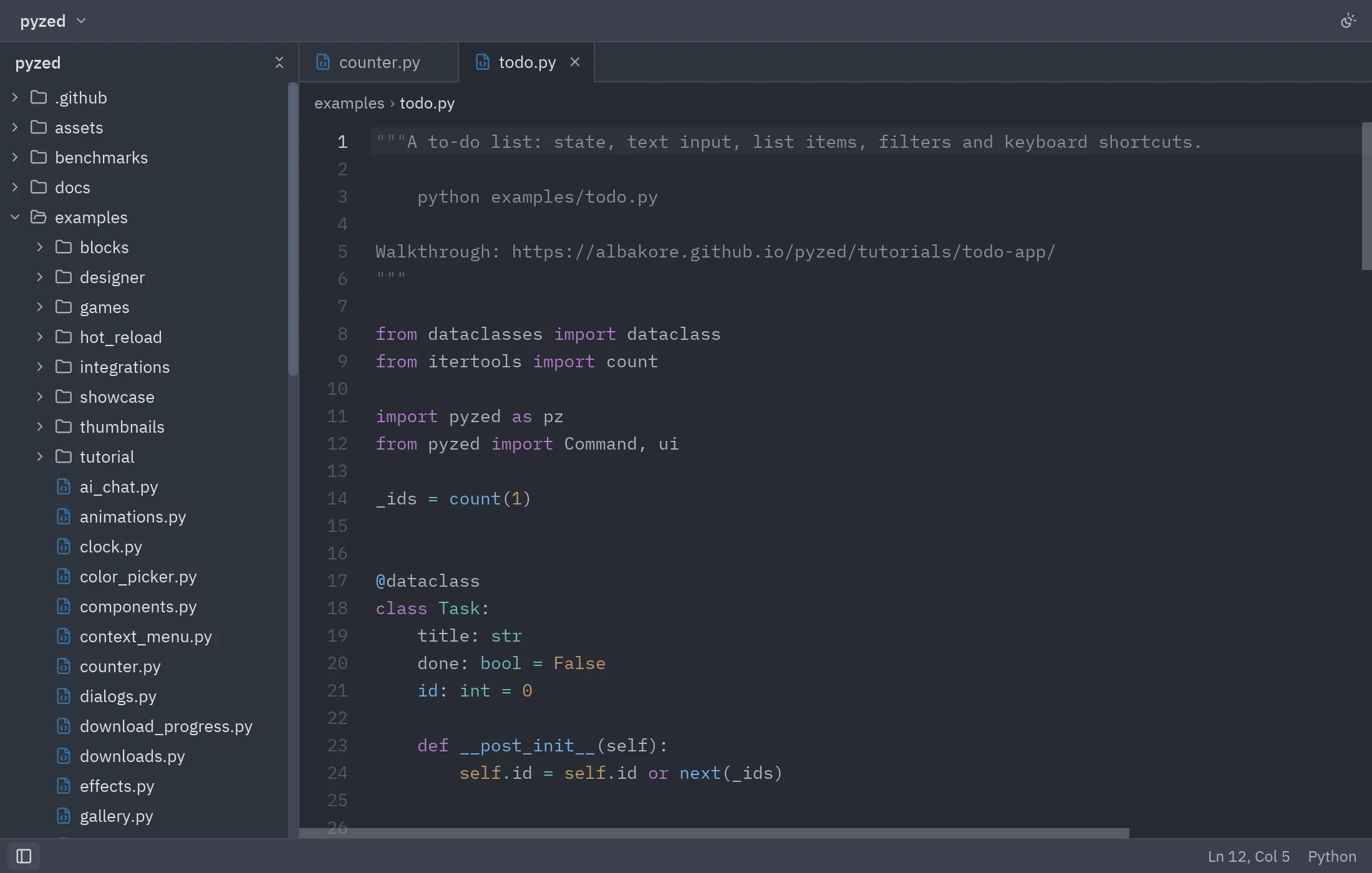
-
Reading the folder.
TreeNode.from_pathsturns a list of paths into the project panel tree. We skip heavy folders such as.gitornode_modules:def scan(self):files = []for folder, dirs, names in os.walk(self.root):dirs[:] = [d for d in dirs if d not in IGNORED]rel = Path(folder).relative_to(self.root)files += [(rel / n).as_posix() for n in names]return filesself.nodes = ui.TreeNode.from_paths(self.scan())self.expanded = set() # expanded folders -
Opening and closing tabs. The state is the open paths, the active one and the text of each. Each tab’s id is its path:
def open_file(self, path):if path not in self.texts:self.texts[path] = (self.root / path).read_text(encoding="utf-8")if path not in self.open_tabs:self.open_tabs.append(path)self.active = path -
The editor. We use the path as the editor’s
id, so each file keeps its cursor and undo history when switching tabs.on_changemarks the file as modified:ui.editor(self.active, self.texts[self.active], path=self.active,on_change=self.edited,on_cursor=lambda line, col: setattr(self, "cursor", (line, col)))def edited(self, text):self.texts[self.active] = textself.dirty.add(self.active) # the tab shows a dot -
The workspace.
ui.workspacelays out the title bar, the left dock, the center and the status bar. PassingNoneaslefthides the panel:ui.workspace(self.center(),title_bar=ui.title_bar([ui.title_button(self.root.name, chevron=True)]),left=project if self.show_left else None,status_bar=ui.status_bar([...], [ui.status_item(f"Ln {line}, Col {col}")]),) -
Shortcuts. We map Cmd to Ctrl so it works the same on macOS:
def on_key(self, combo):combo = combo.replace("cmd-", "ctrl-")if combo == "ctrl-s":self.save()elif combo == "ctrl-b":self.toggle_left() -
Command palette. It opens with Ctrl+Shift+P, focuses its field and floats over the workspace with
ui.layer:if combo == "ctrl-shift-p":self.palette_open, self.query = True, ""return Command.focus("command-palette")# at the end of view():palette = ui.command_palette(self.query, lambda q: setattr(self, "query", q), self.commands(),on_submit=self.run_first_match) if self.palette_open else Nonereturn ui.layer(layout, palette, on_dismiss=lambda: setattr(self, "palette_open", False))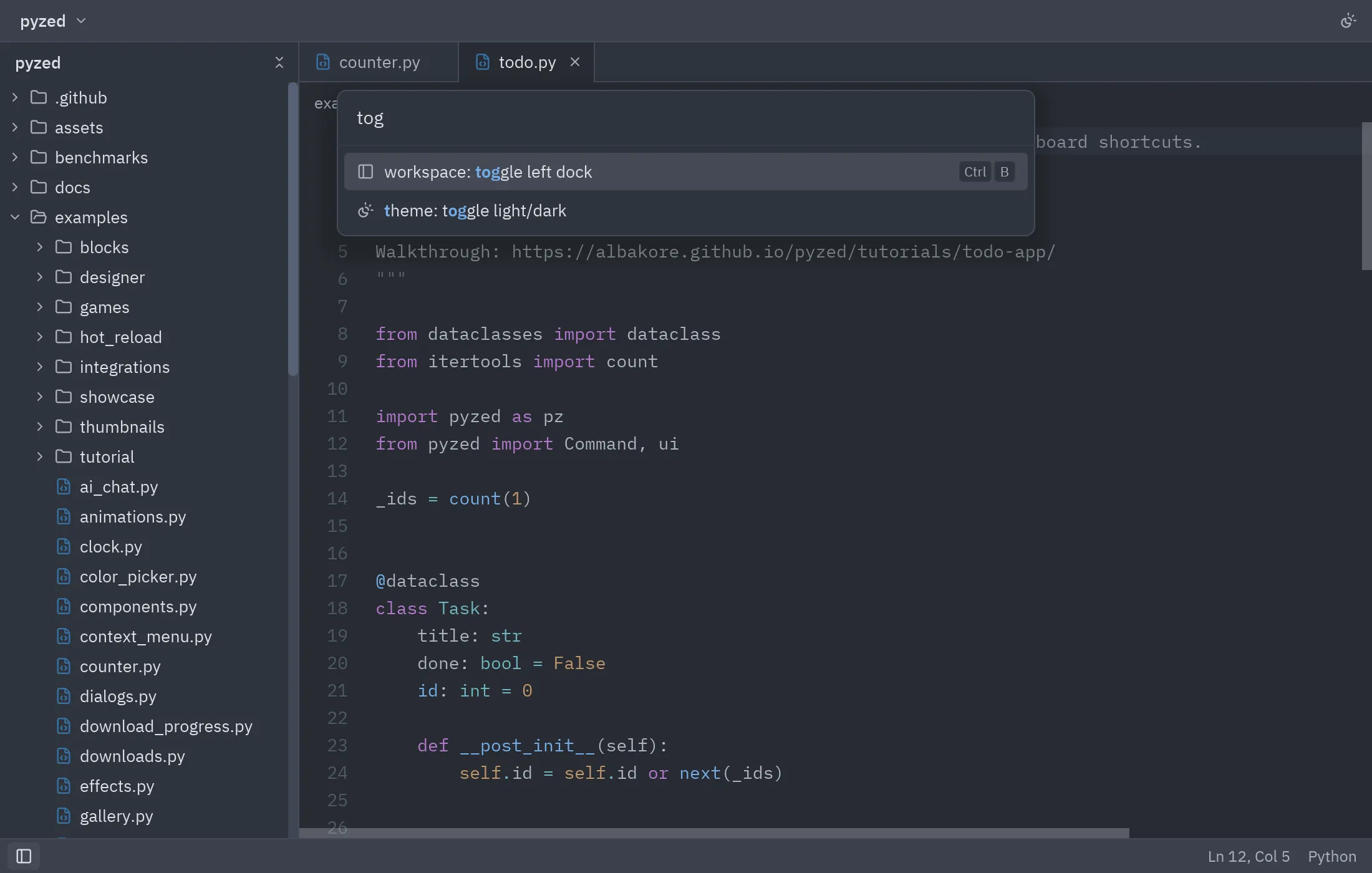
Full code
Section titled “Full code”"""A small Zed-like editor in ~150 lines: project tree, tabs, code editor, save, docks and command palette.
python examples/mini_editor.py [folder]
Walkthrough: https://albakore.github.io/pyzed/tutorials/advanced/code-editor/For a fuller version see examples/zed_editor.py."""
import osimport sysfrom pathlib import Path
import pyzed as pzfrom pyzed import Command, icons, ui
IGNORED = {".git", "target", "node_modules", "__pycache__", ".venv", "dist"}
class MiniEditor(pz.App): size = (1100, 700)
def __init__(self, root="."): self.root = Path(root).resolve() self.nodes = ui.TreeNode.from_paths(self.scan()[:2000]) self.expanded = set() self.open_tabs = [] # paths, in tab order self.active = None self.texts = {} # path -> current text self.dirty = set() self.cursor = (1, 1) self.show_left = True self.palette_open = False self.query = ""
def scan(self): files = [] for folder, dirs, names in os.walk(self.root): dirs[:] = [d for d in dirs if d not in IGNORED] rel = Path(folder).relative_to(self.root) files += [(rel / n).as_posix() for n in names] return files
def title(self): name = self.active or "sin archivos" return f"{name} — {self.root.name}"
# -- files ------------------------------------------------------------------ def open_file(self, path): if path not in self.texts: try: self.texts[path] = (self.root / path).read_text(encoding="utf-8") except (UnicodeDecodeError, OSError): return if path not in self.open_tabs: self.open_tabs.append(path) self.active = path
def close_tab(self, path): index = self.open_tabs.index(path) self.open_tabs.remove(path) if self.active == path: self.active = self.open_tabs[min(index, len(self.open_tabs) - 1)] if self.open_tabs else None
def edited(self, text): self.texts[self.active] = text self.dirty.add(self.active)
def save(self): if self.active in self.dirty: (self.root / self.active).write_text(self.texts[self.active], encoding="utf-8") self.dirty.discard(self.active)
def toggle_folder(self, folder): self.expanded ^= {folder}
# -- commands & keys ---------------------------------------------------------- def toggle_left(self): self.show_left = not self.show_left
def toggle_theme(self): self.theme = "One Light" if self.resolved_theme().is_dark else "One Dark"
def commands(self): return [ ui.PaletteItem("workspace: save", self.save, keys="ctrl-s", icon="save"), ui.PaletteItem("workspace: toggle left dock", self.toggle_left, keys="ctrl-b", icon="panel-left"), ui.PaletteItem("theme: toggle light/dark", self.toggle_theme, icon="sun-moon"), ui.PaletteItem("pane: close active item", lambda: self.active and self.close_tab(self.active), keys="ctrl-w", icon="x"), ]
def run_first_match(self): matches = ui.fuzzy_filter(self.query, self.commands(), key=lambda c: c.label) self.palette_open = False if matches: return matches[0][0].on_press()
def on_key(self, combo): combo = combo.replace("cmd-", "ctrl-") if combo == "ctrl-shift-p": self.palette_open, self.query = True, "" return Command.focus("command-palette") if combo == "escape": self.palette_open = False elif combo == "ctrl-s": self.save() elif combo == "ctrl-b": self.toggle_left() elif combo == "ctrl-w" and self.active: self.close_tab(self.active)
# -- view ----------------------------------------------------------------------- def center(self): if not self.active: return pz.center(pz.column([ui.heading("Mini editor", level=2), ui.muted("Abre un archivo del panel de proyecto."), ui.kbd("ctrl-shift-p")], spacing=8, align="center")) tabs = [ui.Tab.for_file(p, dirty=p in self.dirty) for p in self.open_tabs] return pz.column([ ui.tab_bar(tabs, self.active, on_select=lambda p: setattr(self, "active", p), on_close=self.close_tab), ui.toolbar([ui.breadcrumbs(self.active.split("/"))]), ui.editor(self.active, self.texts[self.active], path=self.active, on_change=self.edited, on_cursor=lambda line, col: setattr(self, "cursor", (line, col))), ])
def view(self): project = pz.column([ ui.panel_header(self.root.name, [ui.icon_button("chevrons-down-up", lambda: self.expanded.clear(), size="xs", tooltip="Plegar todo")]), pz.scrollable(ui.tree(self.nodes, expanded=self.expanded, selected=self.active, on_toggle=self.toggle_folder, on_select=self.open_file), height="fill"), ]) line, col = self.cursor layout = ui.workspace( self.center(), title_bar=ui.title_bar([ui.title_button(self.root.name, chevron=True)], [ui.icon_button("sun-moon", self.toggle_theme, size="sm", tooltip="Tema")]), left=project if self.show_left else None, status_bar=ui.status_bar( [ui.status_item(icon="panel-left", on_press=self.toggle_left, selected=self.show_left, tooltip="Panel de proyecto", keys="ctrl-b")], [ui.status_item(f"Ln {line}, Col {col}") if self.active else None, ui.status_item(icons.language_for(self.active)) if self.active else None], ), ) palette = None if self.palette_open: palette = ui.command_palette(self.query, lambda q: setattr(self, "query", q), self.commands(), on_submit=self.run_first_match) return ui.layer(layout, palette, on_dismiss=lambda: setattr(self, "palette_open", False))
if __name__ == "__main__": pz.run(MiniEditor(sys.argv[1] if len(sys.argv) > 1 else "."))uv run --with pyzed-ui python examples/mini_editor.pypython3 -m venv .venvsource .venv/bin/activatepython -m pip install pyzed-uipython examples/mini_editor.pypy -m venv .venv.venv\Scripts\Activate.ps1python -m pip install pyzed-uipython examples\mini_editor.pypython3 examples/mini_editor.pypy examples\mini_editor.pyFor a more complete version (file finder, terminal panel, outline, themes, git markers) see
examples/zed_editor.py and its page in the
Showcase.
Events in this tutorial
Section titled “Events in this tutorial”| Widget | Event | Handler gets |
|---|---|---|
ui.tab_bar |
on_select, on_close |
The tab’s id (its path). |
ui.editor |
on_change, on_cursor |
The text; the line and column. |
ui.tree |
on_toggle, on_select |
The path of the folder or file. |
ui.status_item |
on_press |
Nothing. |
ui.command_palette |
on_query, on_submit |
The query; nothing. |
ui.layer |
on_dismiss |
Nothing (a click outside the palette). |
| The app | on_key |
The combo (ctrl-shift-p, ctrl-b…). |
Try more events
Section titled “Try more events”ui.editor(self.active, self.texts[self.active], path=self.active, font_size=self.font_size, on_change=self.edited, on_cursor=lambda line, col: setattr(self, "cursor", (line, col)), on_zoom=lambda step: setattr(self, "font_size", 14 if step == 0 else self.font_size + step))
ui.tree(self.nodes, expanded=self.expanded, selected=self.active, on_toggle=self.toggle_folder, on_select=self.open_file, on_open=self.open_file, # double click on_context=lambda path: setattr(self, "menu_for", path)) # right click: a menu
ui.tab_bar(tabs, self.active, on_select=lambda p: setattr(self, "active", p), on_close=self.close_tab, on_new=self.new_file) # double click after the tabs- A game loop with
pyzed.game. - Workspace, Tree and Command palette in the component library.