
Django
The demo is the project from Django’s tutorial,
mysite with its polls app, built step by step as the tutorial does: models, migrations, the
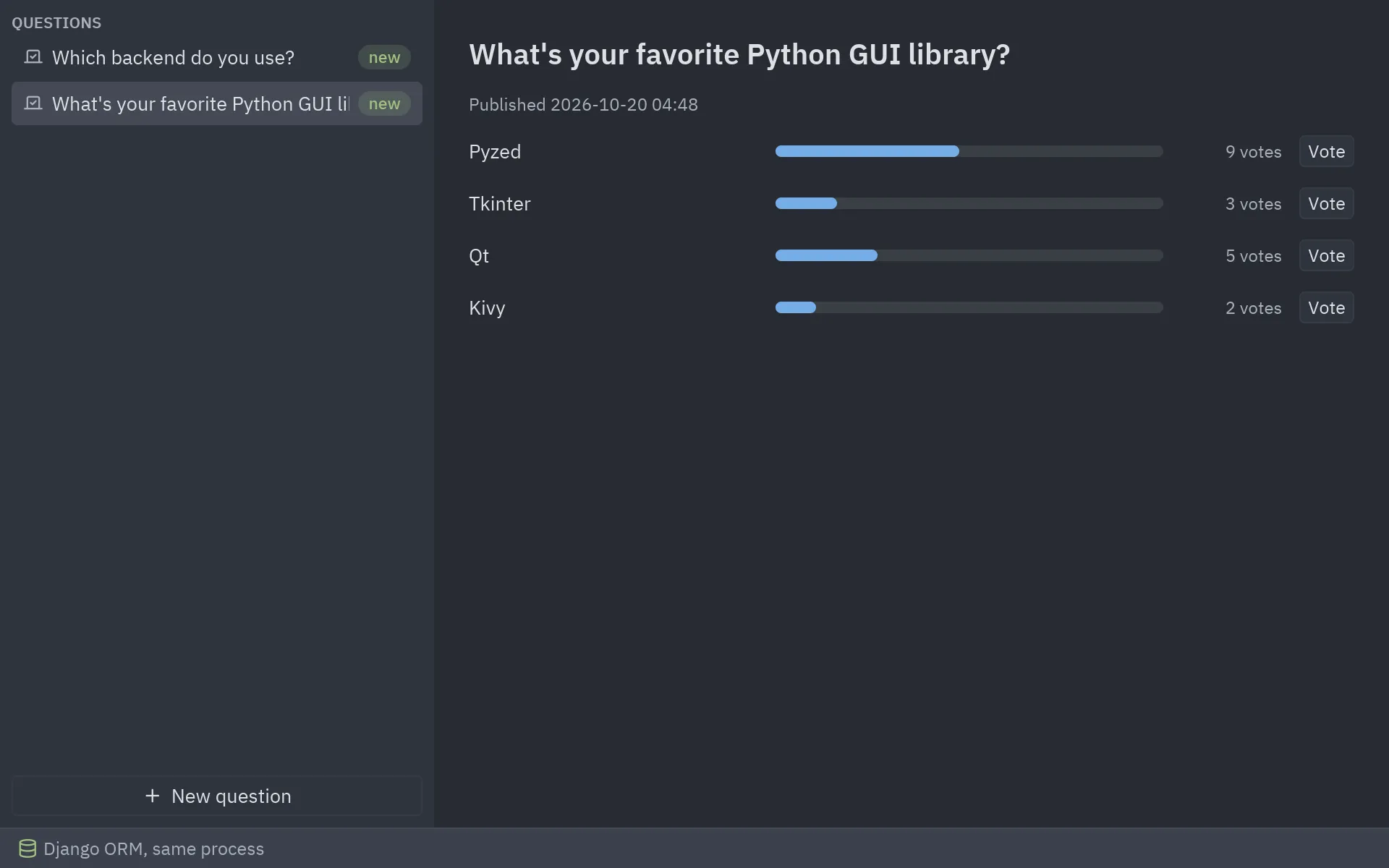
admin, generic views and templates. A Pyzed window then votes on the polls in two ways, which
correspond to two architectures:
desktop.py: the window imports the models and uses the ORM directly (same process).client.py: the site runs withrunserverand the window calls its JSON views (client and server).
The Django project, as the tutorial builds it
Section titled “The Django project, as the tutorial builds it”-
Create the project and the app (already done in the demo folder):
Windows, macOS and Linux uv run django-admin startproject mysite .uv run manage.py startapp pollsmacOS and Linux python3 -m venv .venvsource .venv/bin/activatepip install pyzed-ui django httpxdjango-admin startproject mysite .python manage.py startapp pollsWindows (PowerShell) py -m venv .venv.venv\Scripts\Activate.ps1pip install pyzed-ui django httpxdjango-admin startproject mysite .python manage.py startapp pollsmacOS and Linux python3 -m pip install pyzed-ui django httpxpython3 -m django startproject mysite .python3 manage.py startapp pollsWindows (PowerShell) py -m pip install pyzed-ui django httpxpy -m django startproject mysite .py manage.py startapp pollsand add
"polls.apps.PollsConfig"toINSTALLED_APPSinmysite/settings.py. -
Write the models in
polls/models.py(tutorial part 2):class Question(models.Model):question_text = models.CharField(max_length=200)pub_date = models.DateTimeField("date published")class Choice(models.Model):question = models.ForeignKey(Question, on_delete=models.CASCADE)choice_text = models.CharField(max_length=200)votes = models.IntegerField(default=0) -
Create the tables and an admin user:
Windows, macOS and Linux uv run manage.py migrateuv run manage.py createsuperuserWindows, macOS and Linux python manage.py migratepython manage.py createsuperusermacOS and Linux python3 manage.py migratepython3 manage.py createsuperuserWindows (PowerShell) py manage.py migratepy manage.py createsuperuser -
Register the admin (part 7), with the choices inline, so you can add polls at http://127.0.0.1:8000/admin/.
-
Write the views and URLs (parts 3 and 4):
IndexView,DetailView,ResultsViewandvote, which uses anF()expression so concurrent votes don’t overwrite each other. The demo adds two small JSON views for the desktop client,api/questions/andapi/questions/<id>/vote/. -
Run the site:
Windows, macOS and Linux uv run manage.py runserverWindows, macOS and Linux python manage.py runservermacOS and Linux python3 manage.py runserverWindows (PowerShell) py manage.py runserverThe polls are at http://127.0.0.1:8000/polls/.
Way 1: the ORM in the same process
Section titled “Way 1: the ORM in the same process”desktop.py sets up Django the way manage.py does and then imports the models. No web server
is needed; the window reads and writes db.sqlite3 through the ORM.
uv run manage.py migrate # onceuv run desktop.pypython manage.py migrate # oncepython desktop.pypython3 manage.py migrate # oncepython3 desktop.pypy manage.py migrate # oncepy desktop.pyflowchart LR
subgraph p["uv run desktop.py"]
W["PollsWindow"] -- "Command.perform" --> F["load · vote · create<br/>worker thread"]
F --> ORM["Django ORM<br/>polls.models"]
end
ORM --> DB[("db.sqlite3")]
S["manage.py runserver<br/>(optional, at the same time)"] --> DB
-
Call
django.setup()before importing models:os.environ.setdefault("DJANGO_SETTINGS_MODULE", "mysite.settings")django.setup()from polls.models import Question -
Run ORM queries in worker threads. They block, so
Command.performruns them off the UI thread. Django opens one database connection per thread; closing them afterwards keeps the thread pool from holding connections:def in_thread(function):@functools.wraps(function)def wrapper(*args, **kwargs):try:return function(*args, **kwargs)finally:connections.close_all()return wrapper@in_threaddef vote(question_id, choice_id):choice = Question.objects.get(pk=question_id).choice_set.get(pk=choice_id)choice.votes = F("votes") + 1choice.save() -
Validate with the model’s own rules.
full_clean()checksmax_length, required fields and custom validators;pz.validation_errorsturns Django’sValidationErrorinto{field: message}forui.field:question = Question(question_text=draft["question_text"], pub_date=timezone.now())try:question.full_clean()except ValidationError as error:return pz.validation_errors(error)with transaction.atomic():question.save()for text in draft["choices"]:question.choice_set.create(choice_text=text, votes=0)
Way 2: an HTTP client of the site
Section titled “Way 2: an HTTP client of the site”client.py doesn’t import Django at all. It talks to the site’s JSON views with httpx, so the
site can run on this computer or on a server:
uv run manage.py runserver # terminal 1uv run client.py # terminal 2 (or: uv run client.py https://polls.example.com)python manage.py runserver # terminal 1python client.py # terminal 2 (or: python client.py https://polls.example.com)python3 manage.py runserver # terminal 1python3 client.py # terminal 2 (or: python3 client.py https://polls.example.com)py manage.py runserver # terminal 1py client.py # terminal 2 (or: py client.py https://polls.example.com)flowchart LR
W["PollsWindow<br/>uv run client.py"] -- "httpx · JSON" --> V["polls/views.py<br/>api_questions · api_vote"]
B["Browser<br/>/polls/ · /admin/"] --> V2["Tutorial views<br/>and admin"]
subgraph s["uv run manage.py runserver"]
V --> DB[("db.sqlite3")]
V2 --> DB
end
async def vote(question_id, choice_id): async with httpx.AsyncClient(base_url=SITE, timeout=5) as client: response = await client.post(f"/polls/api/questions/{question_id}/vote/", json={"choice": choice_id}) response.raise_for_status() return response.json()One window, two backends
Section titled “One window, two backends”PollsWindow receives load, vote and optionally create as plain functions. desktop.py
passes regular functions (run in threads) and client.py passes coroutines (run on the asyncio
loop); Command.perform accepts both, so the window code is the same.
Full code
Section titled “Full code”"""Desktop app on Django's ORM: the models, validation and database of the site, with no web server.
uv run manage.py migrate # once, as in Django's tutorial uv run desktop.py
The window imports the polls app and queries it directly (architecture "same process").`uv run manage.py runserver` can run at the same time on the same database: votes cast inthe window show up on /polls/ and in /admin/, and the other way round."""
import functoolsimport os
import django
os.environ.setdefault("DJANGO_SETTINGS_MODULE", "mysite.settings")django.setup() # what manage.py does before anything touches the models
from django.core.exceptions import ValidationError # noqa: E402from django.db import connections, transaction # noqa: E402from django.db.models import F # noqa: E402from django.utils import timezone # noqa: E402
import pyzed as pz # noqa: E402
from polls.models import Question # noqa: E402from polls.views import question_json # noqa: E402from polls_window import PollsWindow # noqa: E402
def in_thread(function): """Pyzed runs these in a worker thread; Django opens one connection per thread, so close it."""
@functools.wraps(function) def wrapper(*args, **kwargs): try: return function(*args, **kwargs) finally: connections.close_all()
return wrapper
@in_threaddef load(): questions = Question.objects.filter(pub_date__lte=timezone.now()).order_by("-pub_date").prefetch_related("choice_set") return [question_json(q) for q in questions]
@in_threaddef vote(question_id, choice_id): choice = Question.objects.get(pk=question_id).choice_set.get(pk=choice_id) choice.votes = F("votes") + 1 # the database adds one, so two voters never overwrite each other choice.save()
@in_threaddef create(draft): question = Question(question_text=draft["question_text"], pub_date=timezone.now()) try: question.full_clean() # the model's own rules: required, max_length=200 if len(draft["choices"]) < 2: raise ValidationError("A poll needs at least two choices.") except ValidationError as error: return pz.validation_errors(error) with transaction.atomic(): question.save() for text in draft["choices"]: question.choice_set.create(choice_text=text, votes=0) return question_json(question)
if __name__ == "__main__": pz.run(PollsWindow(load, vote, create, mode="Django ORM, same process"))"""Desktop client for the Django site over HTTP: the site runs on its own, the window uses its JSON API.
uv run manage.py runserver # terminal 1: the site (http://127.0.0.1:8000/polls/) uv run client.py # terminal 2: the window uv run client.py https://polls.example.com
Use this when the site is deployed on a server and the desktop app is one more client. Thewindow needs no Django and no database, only httpx."""
import sys
import httpx
import pyzed as pz
from polls_window import PollsWindow
SITE = sys.argv[1] if len(sys.argv) > 1 else "http://127.0.0.1:8000"
async def load(): try: async with httpx.AsyncClient(base_url=SITE, timeout=5) as client: response = await client.get("/polls/api/questions/") response.raise_for_status() except httpx.HTTPError as error: return f"Can't reach {SITE}: {error or type(error).__name__}" return response.json()["questions"]
async def vote(question_id, choice_id): try: async with httpx.AsyncClient(base_url=SITE, timeout=5) as client: response = await client.post(f"/polls/api/questions/{question_id}/vote/", json={"choice": choice_id}) response.raise_for_status() except httpx.HTTPError as error: return f"The vote failed: {error or type(error).__name__}" return response.json()
if __name__ == "__main__": pz.run(PollsWindow(load, vote, mode=f"HTTP client of {SITE}"))"""The Pyzed window shared by desktop.py (Django ORM in this process) and client.py (HTTP to the site).
A backend is three functions returning plain dicts like ``polls.views.question_json``.They may be regular functions (Pyzed runs them in a thread) or ``async def`` (run onPyzed's asyncio loop): ``Command.perform`` accepts both."""
from __future__ import annotations
from datetime import datetime, timedelta, timezonefrom typing import Callable, Optional
import pyzed as pzfrom pyzed import Command, ui
class PollsWindow(pz.App): title = "Polls · Django" size = (960, 600)
def __init__(self, load: Callable, vote: Callable, create: Optional[Callable] = None, mode: str = ""): self.backend_load, self.backend_vote, self.backend_create = load, vote, create self.mode = mode self.questions: list[dict] = [] self.selected_id: int | None = None self.message = "" self.creating = False self.draft = {"question_text": "", "choices": ["", "", ""]} self.errors: dict[str, str] = {}
# -- backend calls ---------------------------------------------------------------------- def on_start(self): return self.reload()
def reload(self): return Command.perform(self.backend_load, self.loaded)
def loaded(self, result): if isinstance(result, str): # the backend couldn't answer self.message = result return self.questions, self.message = result, "" if self.questions and self.selected_id not in {q["id"] for q in self.questions}: self.selected_id = self.questions[0]["id"]
def vote(self, question_id: int, choice_id: int): return Command.perform(lambda: self.backend_vote(question_id, choice_id), self.voted)
def voted(self, result): if isinstance(result, str): self.message = result return None return self.reload()
def create(self): draft = {"question_text": self.draft["question_text"], "choices": [c for c in self.draft["choices"] if c.strip()]} return Command.perform(lambda: self.backend_create(draft), self.created)
def created(self, result): if "id" not in result: # {field: message} self.errors = result return None self.creating, self.selected_id = False, result["id"] self.draft = {"question_text": "", "choices": ["", "", ""]} return self.reload()
# -- view -------------------------------------------------------------------------------- @staticmethod def recent(question: dict) -> bool: # Question.was_published_recently, on the JSON published = datetime.fromisoformat(question["pub_date"]) now = datetime.now(timezone.utc) return now - timedelta(days=1) <= published <= now
def sidebar(self, t): rows = [ui.list_item(q["question_text"], lambda q=q: setattr(self, "selected_id", q["id"]), icon="vote", end=ui.badge("new", tint="success") if self.recent(q) else None, selected=q["id"] == self.selected_id, inset=True, height=30) for q in self.questions] new = ui.button("New question", lambda: setattr(self, "creating", True), icon="plus", full_width=True) \ if self.backend_create else ui.muted("Add questions in the Django admin.", size="sm") return pz.container(pz.column([ui.muted("QUESTIONS", size="xs", weight="semibold"), *rows, pz.vspace(), new], spacing=2), padding=8, width=300, height="fill", bg=t.panel)
def results(self): question = next((q for q in self.questions if q["id"] == self.selected_id), None) if question is None: return ui.empty_state("No polls are available.", icon="vote") total = sum(c["votes"] for c in question["choices"]) or 1 rows = [pz.row([ pz.container(ui.label(c["choice_text"]), width=200), pz.container(ui.progress(c["votes"] / total, height=8), width="fill"), pz.container(ui.muted(f"{c['votes']} vote{'s' if c['votes'] != 1 else ''}", size="sm"), width=70, align_x="end"), ui.button("Vote", lambda c=c: self.vote(question["id"], c["id"]), size="sm"), ], spacing=12, align="center") for c in question["choices"]] return pz.column([ui.heading(question["question_text"], level=2), ui.muted(f"Published {question['pub_date'][:16].replace('T', ' ')}", size="sm"), *rows], spacing=14, padding=24)
def dialog(self): if not self.creating: return None choices = self.draft["choices"]
def set_choice(i): return lambda value: choices.__setitem__(i, value)
form = pz.column([ ui.field("Question", ui.input(self.draft["question_text"], lambda v: self.draft.__setitem__("question_text", v), placeholder="What's new?", width=260), error=self.errors.get("question_text")), *[ui.field(f"Choice {i + 1}", ui.input(text, set_choice(i), width=260)) for i, text in enumerate(choices)], ui.callout(self.errors[""], tint="error") if self.errors.get("") else None, ], spacing=12) close = lambda: setattr(self, "creating", False) # noqa: E731 return ui.modal(form, title="New question", on_close=close, width=520, footer=[ui.button("Cancel", close, variant="ghost"), ui.button("Publish", self.create, icon="check", variant="solid")])
def view(self): t = self.resolved_theme() status = ui.status_bar([ui.status_item(self.message or self.mode, icon="circle-alert" if self.message else "database", icon_color="error" if self.message else "success")]) page = pz.column([pz.row([self.sidebar(t), pz.container(self.results(), width="fill", height="fill", bg=t.editor)]), status]) return ui.layer(page, self.dialog(), on_dismiss=lambda: setattr(self, "creating", False), backdrop="#00000066")"""The views from Django's tutorial (parts 3 and 4), plus a small JSON API for the desktop client.
Tutorial: https://docs.djangoproject.com/en/stable/intro/tutorial04/"""
import json
from django.db.models import Ffrom django.http import HttpResponseRedirect, JsonResponsefrom django.shortcuts import get_object_or_404, renderfrom django.urls import reversefrom django.utils import timezonefrom django.views import genericfrom django.views.decorators.csrf import csrf_exemptfrom django.views.decorators.http import require_GET, require_POST
from .models import Choice, Question
class IndexView(generic.ListView): template_name = "polls/index.html" context_object_name = "latest_question_list"
def get_queryset(self): """Return the last five published questions (not including those set to be published in the future).""" return Question.objects.filter(pub_date__lte=timezone.now()).order_by("-pub_date")[:5]
class DetailView(generic.DetailView): model = Question template_name = "polls/detail.html"
def get_queryset(self): """Excludes any questions that aren't published yet.""" return Question.objects.filter(pub_date__lte=timezone.now())
class ResultsView(generic.DetailView): model = Question template_name = "polls/results.html"
def vote(request, question_id): question = get_object_or_404(Question, pk=question_id) try: selected_choice = question.choice_set.get(pk=request.POST["choice"]) except (KeyError, Choice.DoesNotExist): # Redisplay the question voting form. return render(request, "polls/detail.html", {"question": question, "error_message": "You didn't select a choice."}) else: selected_choice.votes = F("votes") + 1 selected_choice.save() # Always return an HttpResponseRedirect after successfully dealing with POST data. return HttpResponseRedirect(reverse("polls:results", args=(question.id,)))
# -- JSON API for desktop clients (client.py) ---------------------------------------------------
def question_json(question): return { "id": question.id, "question_text": question.question_text, "pub_date": question.pub_date.isoformat(), "choices": [{"id": c.id, "choice_text": c.choice_text, "votes": c.votes} for c in question.choice_set.all()], }
@require_GETdef api_questions(request): questions = Question.objects.filter(pub_date__lte=timezone.now()).order_by("-pub_date").prefetch_related("choice_set") return JsonResponse({"questions": [question_json(q) for q in questions]})
@csrf_exempt # a desktop app has no CSRF cookie; protect a real API with tokens instead (e.g. Django REST framework)@require_POSTdef api_vote(request, question_id): question = get_object_or_404(Question, pk=question_id) try: choice_id = json.loads(request.body)["choice"] selected_choice = question.choice_set.get(pk=choice_id) except (KeyError, ValueError, Choice.DoesNotExist): return JsonResponse({"detail": "You didn't select a choice."}, status=400) selected_choice.votes = F("votes") + 1 selected_choice.save() return JsonResponse(question_json(question))