
Projects with uv
A Pyzed project is a normal uv project. The interface lives in its own folder
(ui/) and the rest of the code stays where uv puts it, so the frontend and the backend are separated but can
still import each other. Dependencies are managed by uv, ruff lints and formats,
ty checks types, and the project starts as a git repository.
Create a project
Section titled “Create a project”uvx --from pyzed-ui pyzed new shopcd shopuv run pyzed design # edit ui/main.pzformuv run pyzed run # run itpip install pyzed-ui uvpyzed new shopcd shopsource .venv/bin/activate # the project's own .venvpyzed design # edit ui/main.pzformpyzed run # run itpip install pyzed-ui uvpyzed new shopcd shop.venv\Scripts\Activate.ps1 # the project's own .venvpyzed design # edit ui/main.pzformpyzed run # run itpython3 -m pip install pyzed-ui uvpython3 -m pyzed new shopcd shop.venv/bin/python -m pyzed design # edit ui/main.pzform.venv/bin/python -m pyzed run # run itpy -m pip install pyzed-ui uvpy -m pyzed new shopcd shop.venv\Scripts\python -m pyzed design # edit ui/main.pzform.venv\Scripts\python -m pyzed run # run itshop/├── pyproject.toml # uv project + [tool.pyzed]├── uv.lock├── .venv/ # created by uv sync├── .python-version├── .gitignore├── src/shop/ # backend: plain Python, no UI code│ └── __init__.py└── ui/ # frontend: forms and their handlers ├── main.pzform └── main.pyThe starter form calls a function of the backend, so you can see the import across folders working:
from shop import greeting

def greet_click(form, event): form.message.text = greeting(form.name_input.text or "world")| Option | Effect |
|---|---|
--app |
No src/: backend modules go next to pyproject.toml (uv init --app). |
--python 3.12 |
Python version of the project (uv downloads it if needed). |
--no-git |
Do not create a git repository. |
--no-sync |
Only write pyproject.toml; do not resolve or install anything (offline). |
--script |
The old single-file app (main.py + requirements.txt), without uv. |
Add Pyzed to an existing uv project
Section titled “Add Pyzed to an existing uv project”If you start projects with uv init, keep doing it and add the UI afterwards:
uv init --package shop && cd shopuvx --from pyzed-ui pyzed init # or `pyzed init` if pyzed is installedpyzed init never touches your code: it adds the [tool.pyzed] table, creates ui/ with a starter form, and
adds pyzed-ui (and ruff/ty as dev dependencies) with uv add. Run it in a folder without
pyproject.toml and it runs uv init first.
[tool.pyzed]ui = "ui" # the UI foldermain = "ui/main.pzform" # opened by `pyzed design`/`pyzed run` and started by `pyzed build`Importing code outside the UI folder
Section titled “Importing code outside the UI folder”Forms and their handlers can import anything in the project. pyzed run, pyzed design and pyzed build
activate the project first, which puts these folders on sys.path:
ui/: helper modules next to the handlers (from helpers import money).src/: the backend package, even beforeuv syncinstalls it.- The project root: modules next to
pyproject.toml(--applayout). - The
.venvsite-packages, when the designer runs on a different interpreter of the same Python version, so every dependency installed withuv addresolves too.
Anything else (a sibling repository, a shared library) is just another dependency: add it with a path and uv installs it in editable mode.
pyzed add --editable ../billing # uv add --editable ../billingFrom your own scripts, do the same with pyzed.project:
from pyzed import project
project.find().activate()   # the project containing the current folder
Dependencies
Section titled “Dependencies”Every command runs uv in the project folder and prints its output.
| Command | Runs |
|---|---|
pyzed add httpx |
uv add httpx |
pyzed add "httpx==0.27.2" |
Changes the constraint of a package already there. |
pyzed add --dev pytest |
uv add --dev pytest (--group docs for other groups). |
pyzed remove httpx |
uv remove httpx (finds the group by itself). |
pyzed upgrade |
uv lock --upgrade + uv sync (every package). |
pyzed upgrade httpx |
uv lock --upgrade-package httpx + uv sync. |
pyzed sync |
uv sync: makes .venv match uv.lock. |
pyzed deps [--outdated] |
Lists direct dependencies with their locked (and newest) versions. |
pyzed check [--fix] |
ruff check and ty check with the project’s .venv. |
Plain uv commands work just as well; Pyzed only reads pyproject.toml and uv.lock.
The Project tab of the designer
Section titled “The Project tab of the designer”The designer has a Project tab next to the toolbox. It opens the project the form belongs to, or offers New project and Open… (a folder browser with your recent projects) when there is none.
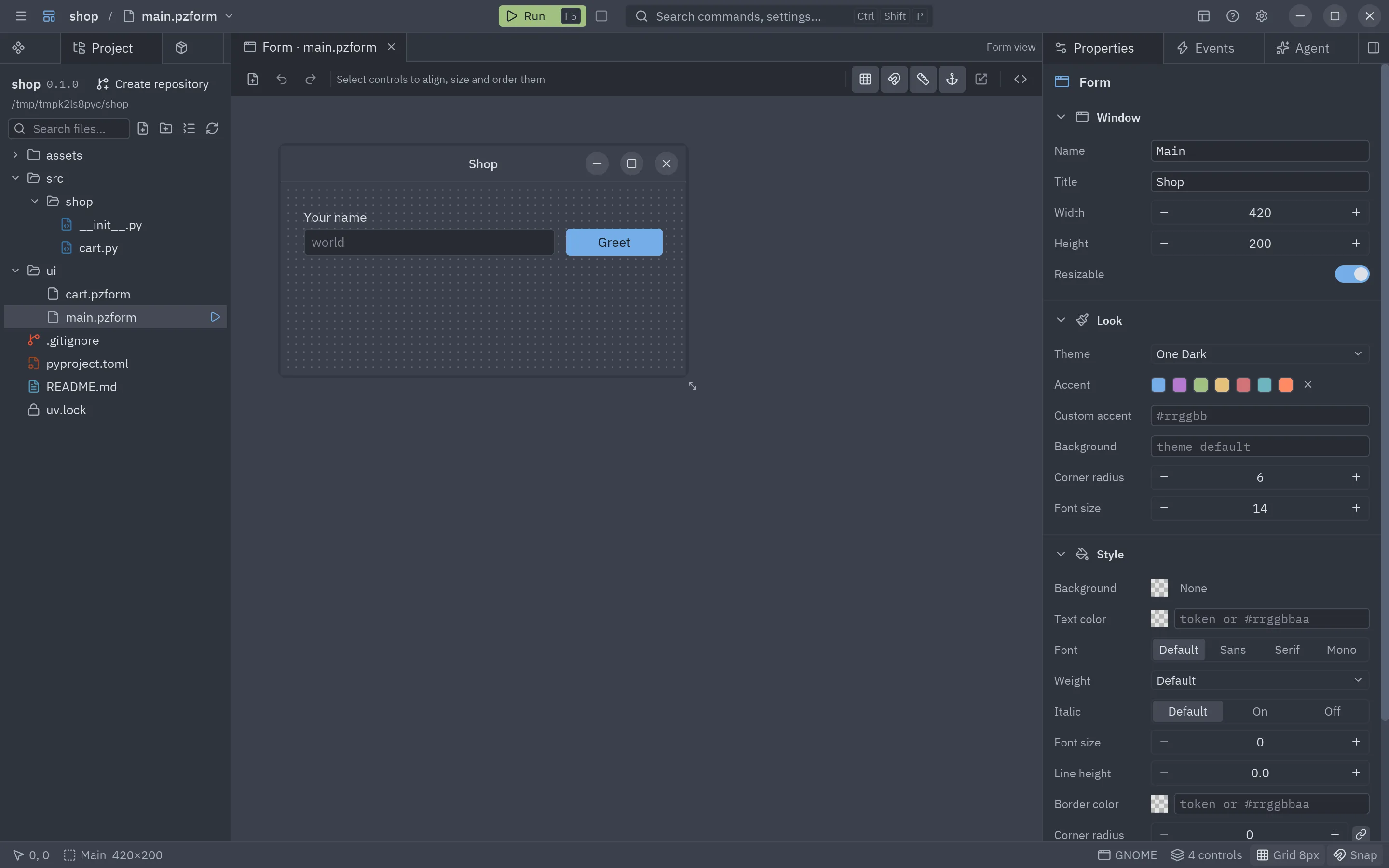
- Project shows the project’s files as a tree, like in a code editor, colored by git status. Search files and folders from its toolbar or with Ctrl+P; right-click for new file, new folder, rename, delete, copy path and reveal in the file manager. Forms and components open in the designer; other files open in the system’s app.
- Dependencies, a tab of its own next to it: add a package (tick dev for the dev group), change its version (pencil), upgrade it or remove it. Its toolbar syncs the environment, checks for updates (shown in green) and upgrades everything. Below, Tools shows the versions of uv, git, ruff and ty found; Lint, Format and Types run ruff and ty and show their output.
- Create repository (in the header) runs
git initand writes a.gitignore. Once there is a repository the header shows its branch.
Commands run in the background, so the designer stays responsive while uv downloads packages.
When the designer is not running inside the project’s environment (for example the standalone Pyzed Design,
or pyzed design installed with uv tool), F5 saves the form and starts it with
uv run pyzed run --reload, so it has all the project’s dependencies and updates on every save.
Pyzed Design as a standalone app
Section titled “Pyzed Design as a standalone app”Each release includes Pyzed Design for Linux, Windows and
macOS (pyzed-design-*.zip): the designer compiled with its own Python and the uv binary. Unzip it and run it;
nothing else needs to be installed. Projects created from it are normal uv projects with their own .venv.
To build it yourself on the current platform:
uv syncuv run --with pyinstaller --with uv python scripts/build_designer.py # dist/Pyzed Design/ and dist/pyzed-design-<os>-<arch>.zippython3 -m venv .venvsource .venv/bin/activatepip install pyzed-ui pyinstaller uvpython scripts/build_designer.py # dist/Pyzed Design/ and dist/pyzed-design-<os>-<arch>.zippy -m venv .venv.venv\Scripts\Activate.ps1pip install pyzed-ui pyinstaller uvpython scripts/build_designer.py # dist/Pyzed Design/ and dist/pyzed-design-<os>-<arch>.zippython3 -m pip install pyzed-ui pyinstaller uvpython3 scripts/build_designer.py # dist/Pyzed Design/ and dist/pyzed-design-<os>-<arch>.zippy -m pip install pyzed-ui pyinstaller uvpy scripts/build_designer.py # dist/Pyzed Design/ and dist/pyzed-design-<os>-<arch>.zipUpdates
Section titled “Updates”Pyzed Design checks GitHub for a newer release at launch (once a day) and every few hours while it is open
(turn it off in Help → Check for updates automatically, or check now with Help → Check for updates).
The download for your platform starts on its own, is checked against the release’s SHA-256 and unpacked in the
background; a softly blinking Restart to update button then appears at the top right of the title bar. It
quits, swaps the app folder (the .app on macOS) for
the new one and starts it again. After an update, the What’s new tab opens on its own with the notes of the new
version, and Help → What’s new shows them at any time. Skip this version hides an update until a newer
one comes out.
Help → Get preview releases switches to the preview channel, which also takes pre-releases (X.Y.Z-rc.N).
The installers (Download) put the app in a folder of your own, so it can
replace itself; otherwise download the new installer or zip again. When the
designer runs from Python (pip or uv), the tab shows the command that upgrades the package instead.
The same updater is available to your own compiled apps in pyzed.updater:
from pyzed import updater
release = updater.latest("me/my-app")              # the newest GitHub Releaseif updater.is_newer(release.version, "1.0.0"):    asset = release.asset_for(updater.asset_name("my-app"))   # my-app-<os>-<arch>.zip    app = updater.extract(updater.download(asset))    updater.replace_on_exit(app)                    # then quit; the new version starts
From Python
Section titled “From Python”from pyzed import project
shop = project.init("shop", git=True) # returns a Projectshop.add("httpx") # every command returns a Result(code, output)shop.upgrade("httpx")print([(d.name, d.locked) for d in shop.dependencies()])print(shop.check().output, shop.typecheck().output)shop.git_init()To package the app for each platform, see Build and distribute.