
A form that does something
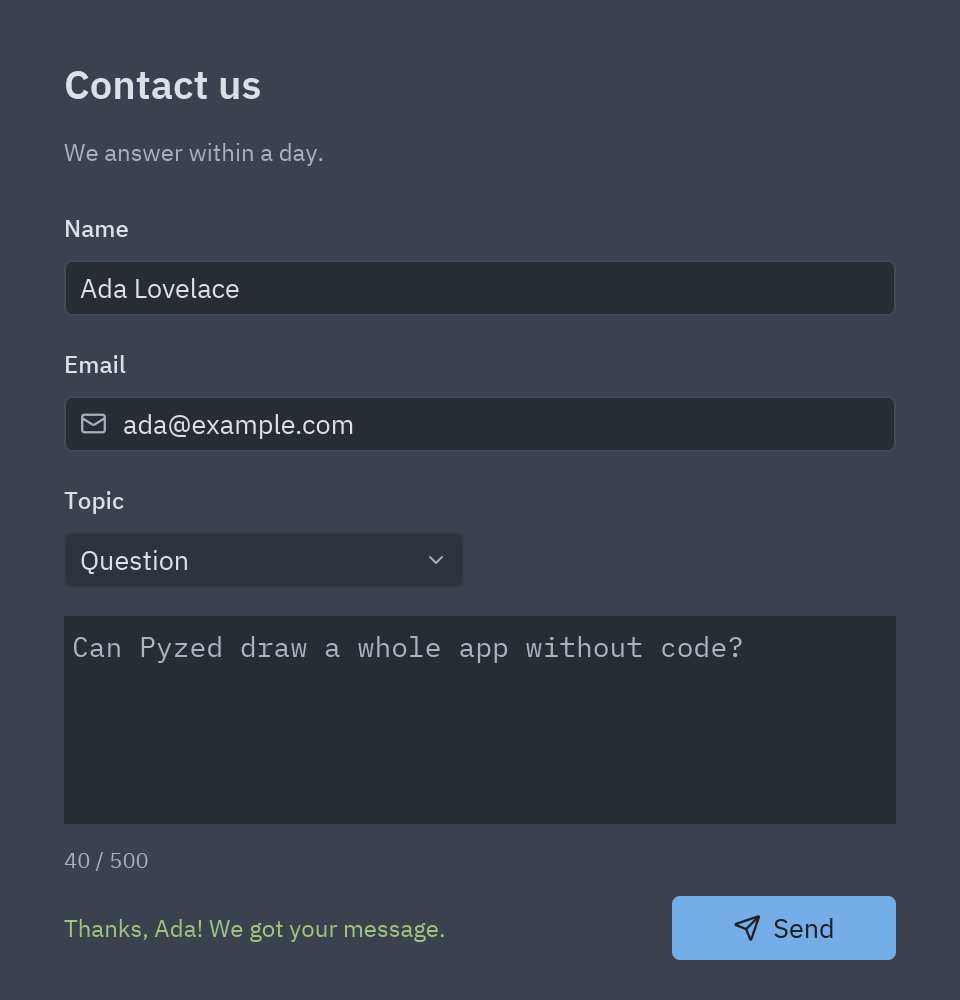
A contact form: the user types a name, an email and a message, picks a topic and presses Send. The form checks what was typed, shows a friendly message, counts characters as you type, and prints what it “sent” in the console. It is the shape of most business apps: inputs, a button, and a few lines of Python that react.
| Goal | Time | Level | You need |
|---|---|---|---|
| A contact form with checks and feedback | 25 minutes | Basic · a little Python | Your first window |
What you’ll learn
Section titled “What you’ll learn”- Use several kinds of input: Text box, Drop-down and Text area.
- Read what the user typed in code:
form.email.text,form.topic.selected. - React as the user types with a
changeevent, and to a click withclick. - Give feedback: change a label’s text and color, move the cursor with
focus(). - Run code when the window opens (the form’s
loadevent) and readprintoutput in the console.
-
Create the form. Ctrl+N → Form, name it
contact, titleContact us. Select an empty spot of the canvas: the Properties panel now shows the form. Set Width to 480 and Height to 500. -
Add the fields. For each field drag a Label (its title) and the input under it:
Label text Control Name Properties Name Text box your_namePlaceholder Ada LovelaceEmail Text box emailPlaceholder ada@example.com, IconmailTopic Drop-down topicOptions Question,Bug report,Idea; SelectedQuestion(none) Text area messagePlaceholder How can we help?The Options of a drop-down are a list: each item is its own field, and + adds one.
-
Add the button and two labels for feedback. A Button named
send(textSend, variantsolid, iconsend) in the bottom-right corner, a small Label namedcounter(text0 / 500, sizexs) under the message, and an empty Label namedstatusnext to the button. -
Anchor everything. Text boxes and labels: stretch left and right. The text area: stretch on all four sides, so it takes the extra room when the window grows. The button: bottom · right.
counterandstatus: bottom, so they stay under the text area. -
Focus the first box when the window opens. Click an empty spot (the form is selected), open Events and double-click
load. Write:def form_load(form, event):return form.your_name.focus()Handlers can return a command:
focus()puts the cursor in that box. -
Count characters as the user types. Select the text area, double-click its
changeevent.event.valueis the new text:LIMIT = 500def message_change(form, event):count = len(event.value)form.counter.text = f"{count} / {LIMIT}"form.counter.color = "error" if count > LIMIT else "text_muted""error"and"text_muted"are theme colors: they look right in a dark and in a light theme. -
Check and send. Double-click the Send button and write the checks. Each one shows a message, moves the cursor to the field and stops with
return:def send_click(form, event):if not form.your_name.text.strip():form.status.color = "error"form.status.text = "Please tell us your name."return form.your_name.focus()if "@" not in form.email.text:form.status.color = "error"form.status.text = "That email does not look right."return form.email.focus()print(f"New {form.topic.selected.lower()} from {form.email.text}")form.status.color = "success"form.status.text = "Thanks! We got your message." -
Run it with F5. Press Send with empty fields, then fill them in. The
printgoes to the Console at the bottom of the editor, together with the events the form handled and any error.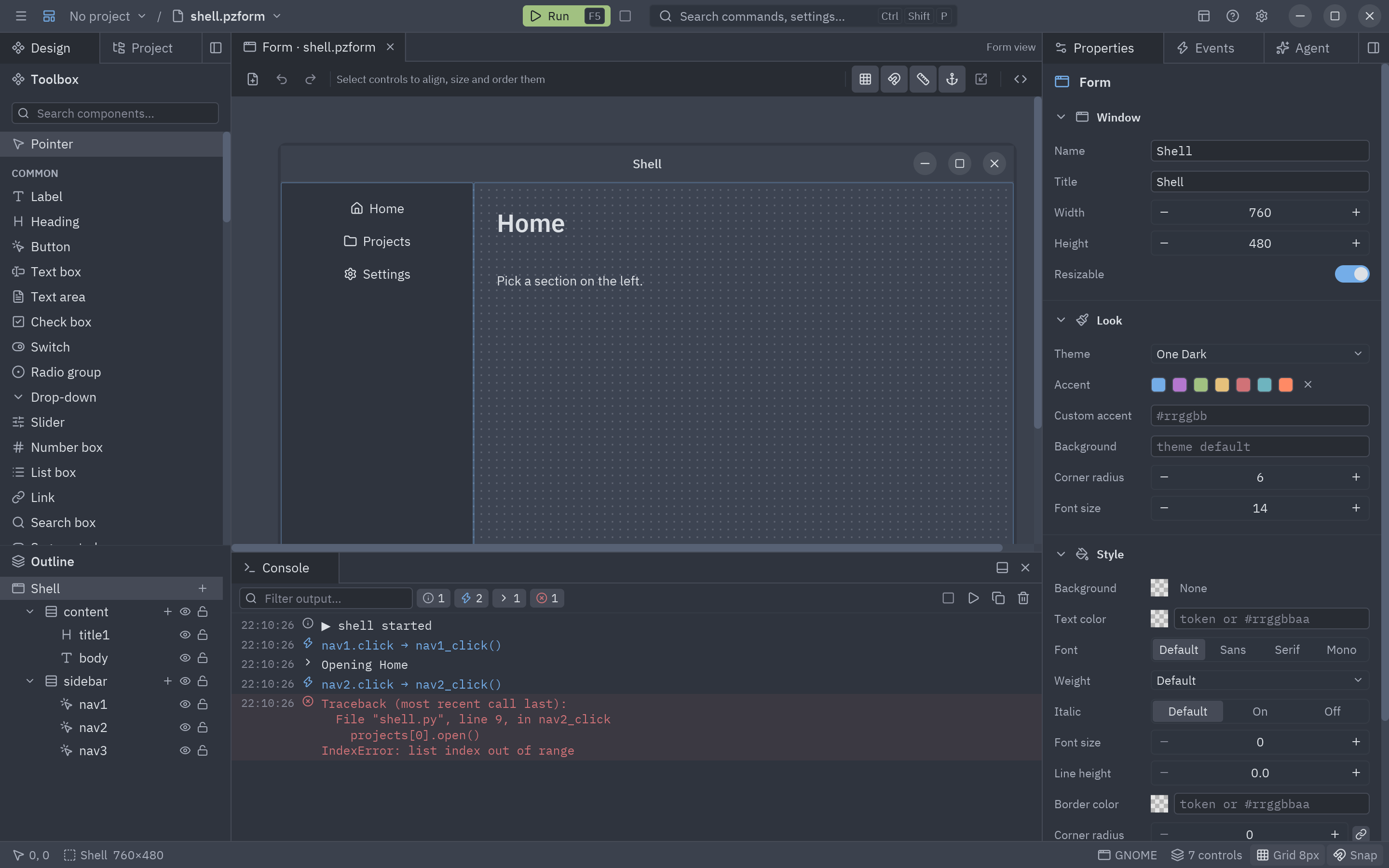
The console shows what your form prints, the events it handled and its errors.
The complete code
Section titled “The complete code”"""Event handlers for the contact form (tutorial: A form with inputs and a button).
pyzed run examples/tutorial/designer/contact.pzform
Each function receives the running ``form`` and an ``event`` (``event.value`` holds the newvalue of a ``change`` event)."""
LIMIT = 500
def form_load(form, event): """Runs once when contact opens: put the cursor in the first box.""" return form.your_name.focus()
def message_change(form, event): """Runs on every keystroke in message: update the character counter.""" count = len(event.value) form.counter.text = f"{count} / {LIMIT}" form.counter.color = "error" if count > LIMIT else "text_muted"
def send_click(form, event): """Runs when send is clicked: check the fields, then 'send' the message.""" if not form.your_name.text.strip(): form.status.color = "error" form.status.text = "Please tell us your name." return form.your_name.focus() if "@" not in form.email.text: form.status.color = "error" form.status.text = "That email does not look right." return form.email.focus() if len(form.message.text) > LIMIT: form.status.color = "error" form.status.text = f"Keep the message under {LIMIT} characters." return None # print() shows up in the designer's console (and in the terminal) print(f"New {form.topic.selected.lower()} from {form.email.text}: {form.message.text!r}") form.status.color = "success" form.status.text = f"Thanks, {form.your_name.text.split()[0]}! We got your message." form.message.text = "" form.counter.text = f"0 / {LIMIT}" return Noneuv run --with pyzed-ui pyzed run examples/tutorial/designer/contact.pzformpython3 -m venv .venvsource .venv/bin/activatepython -m pip install pyzed-uipyzed run examples/tutorial/designer/contact.pzformpy -m venv .venv.venv\Scripts\Activate.ps1python -m pip install pyzed-uipyzed run examples\tutorial\designer\contact.pzformpython3 -m pyzed run examples/tutorial/designer/contact.pzformpy -m pyzed run examples\tutorial\designer\contact.pzformEvents in this tutorial
Section titled “Events in this tutorial”| Control | Event | Handler | event.value |
|---|---|---|---|
| The form | load |
form_load |
None: it puts the cursor in the first box. |
message (Text area) |
change |
message_change |
The whole text, on every keystroke. |
send (Button) |
click |
send_click |
None. |
Try more events
Section titled “Try more events”def email_submit(form, event): # Enter in the email box sends too return send_click(form, event)
def topic_change(form, event): # a drop-down: event.value is the option picked form.status.color = "text_muted" form.status.text = f"Topic: {event.value}"
def send_mouse_enter(form, event): # every control has mouse_enter and mouse_leave form.status.text = "Ready to send?"
def form_close(form, event): # return False to keep the window open if form.message.text.strip(): form.status.text = "Send or clear the message before closing." return False- Layout basics: rows, columns and grids, in the designer and in code.
- Events and handlers: every event of every control.
- Running and the console.