
Custom components
A component is a class that groups widgets with their logic, like a React component:
- Props are annotated class attributes with defaults. The parent passes them on every render.
- State is any other attribute you set. It stays between renders.
render()returns the component’s widgets.eventsdeclares the custom events it raises withself.emit(name, value).
import pyzed as pz

class Rating(pz.Component):    """Stars the user can click."""
    value: int = 0                 # props    max: int = 5    events = {"change": "A star was picked (event.value is the rating)."}    icon = "star"                  # how it appears in the designer's toolbox
    def setup(self):               # once, before the first render        self.hover = None          # state
    def render(self):        shown = self.hover or self.value        return pz.row([            pz.text("★" if i <= shown else "☆", size=20).on(                click=lambda i=i: self.emit("change", i),                mouse_enter=lambda i=i: setattr(self, "hover", i),                mouse_leave=lambda: setattr(self, "hover", None),            )            for i in range(1, self.max + 1)        ], spacing=2)
Calling a component returns a widget, so it goes anywhere a widget does:
class Review(pz.App):    stars = 3
    def view(self):        return pz.column([            Rating(value=self.stars, on_change=lambda e: setattr(self, "stars", e.value)),            pz.text(f"{self.stars} of 5"),        ])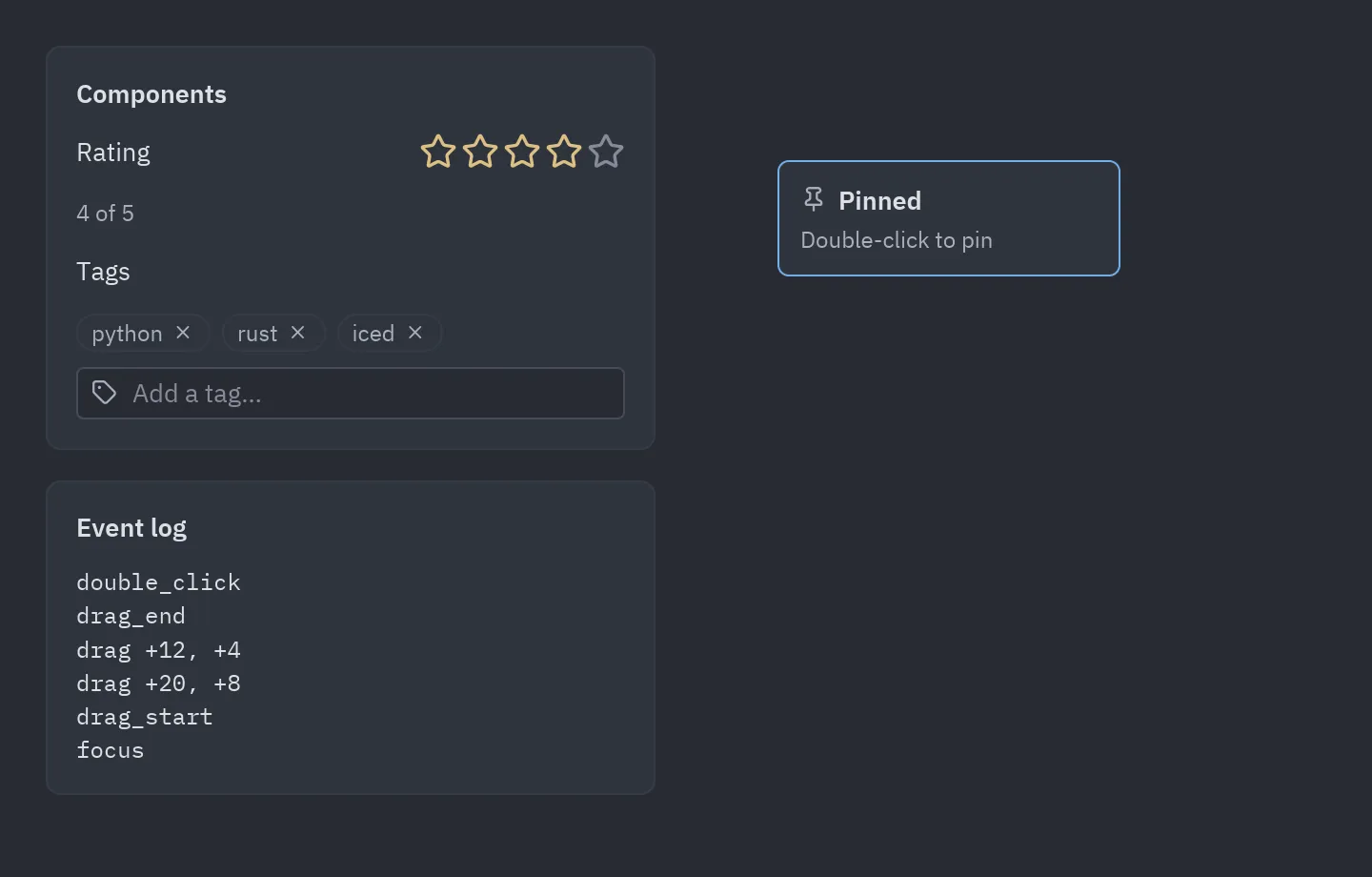
See examples/components.py
for a star rating, a tag editor and a draggable note.
Events
Section titled “Events”- Custom events are declared in
events, as a tuple of names or a{name: description}dict. The parent handles them withon_<name>=. self.emit(name, value)calls the parent’s handler with apz.Eventwhosevalueandsourceare set. Return its result from your callback, so aCommandor a message reaches the runtime.- Common events, such as
on_click,on_dragandon_key_down, work on every component without any code. See Events. - Lifecycle events:
on_mountandon_unmounttell the parent when the component appears and disappears. style=styles the component like any widget (Rating(value=3, style="card")), unless it declares astyleprop of its own. See Styles.
State and keys
Section titled “State and keys”State can also be declared on the class with pz.state(default). Unlike a prop, the parent cannot
pass it, every instance starts with its own copy of the default (so lists and dicts are safe), and the
designer lists it next to the props:
class Counter(pz.Component):    step: int = 1             # prop    count: int = pz.state(0)  # state
    def render(self):        return ui.button(f"{self.count}", lambda: setattr(self, "count", self.count + self.step))
State is kept per position in the parent’s view(): the second Rating in a view keeps its own
state as long as the order stays the same. When components come from a list whose items move,
give each one a stable key:
pz.column([TodoItem(key=todo.id, todo=todo) for todo in self.todos])A component that is no longer rendered is unmounted, and its state is dropped.
flowchart LR
    View["App.view()"] -->|"Rating(value=3)"| Slot{"Instance at this<br/>position or key?"}
    Slot -->|no| New["new instance<br/>setup()"]
    Slot -->|yes| Same["same instance<br/>(state kept)"]
    New --> Props["props set"]
    Same --> Props
    Props --> Changed{"props, state or<br/>context changed?"}
    Changed -->|yes| Render["render() → widgets"]
    Changed -->|no| Last["last drawing, reused"]
    Render -->|first time| Mount["on_mount()"]
    View -.->|not rendered again| Unmount["on_unmount()"]
render() only runs when something it depends on changed: its props, its state, the context it
reads, the theme or a component inside it. Otherwise the last drawing is reused, so a view with
hundreds of components stays fast. If render() reads something else (the time, a global), call
self.refresh() when it changes or set cache = False on the class. See
components drawn only when they change.
Children, context and styles
Section titled “Children, context and styles”Components nest like HTML elements and React components:
class Card(pz.Component):    title: str = ""    children: list = ()            # the positional arguments, like JSX children    stylesheet = {                 # CSS-like rules for this component (& is the component)        "&": {"background": "panel", "padding": 16, "radius": 8, "border": (1, "border")},        "&:hover": {"border_color": "accent"},    }
    def render(self):        return pz.box(pz.text(self.title).style(weight="bold"), *self.children, gap=8)
Card(pz.text("Three new messages"), ui.button("Open", self.open), title="Inbox", class_="wide", animate="fade_in_up")- A prop called
childrentakes the positional arguments. Lists are flattened, andNoneandFalseare skipped. stylesheetadds rules topz.stylesheetwhen the class is defined.&stands for the component:"&","&:hover","&.wide".- Every component takes
style=,class_=,id=andanimate=(presets forwidget.animate), unless it declares props with those names. - Context shares values with every component rendered inside, without passing props down each level:
with pz.provide(user=self.user):    page = Dashboard()                      # any component inside reads it
class Avatar(pz.Component):    def render(self):        return ui.avatar(pz.use_context("user").name)   # or self.context("user")
A component can also share values with what it renders by returning them from a
provide() method. Children passed in as arguments are rendered before the component, so
they see the context around it, not its own. See
examples/web_layout.py for a page built this way.
Lifecycle
Section titled “Lifecycle”| Hook | When |
|---|---|
setup() |
Once, before the first render. Props are already set. Initialize state here. |
render() |
On every render of the parent. |
on_mount() |
After the first render. It may return a Command or a message. |
on_unmount() |
When the component is no longer rendered. |
Hooks run after the view is drawn, never in the middle of it.
In the designer
Section titled “In the designer”Every pz.Component subclass appears in the designer’s toolbox:
-
Props become properties.
boolgets a switch,intandfloata number box,Literal[...]a drop-down,listone item per line, and a prop namedcolororicongets its own picker. Unions, optionals, dicts, sets and tuples (int | None,dict[str, int]…) get an editor built from the type, with a row per item. The type hints ofpyzedpick a richer editor, like export hints in Godot:Annotation Editor pz.ColorA color picker (theme token or #rrggbb).pz.IconAn icon picker. pz.MultilineA text area. Annotated[int, pz.Range(0, 10)]A number box limited to 0 to 10 ( stepis optional).They are plain
strandintat run time:tint: pz.Color = "accent". -
Custom events become events you can write code for.
Class attributes control how it appears:
| Attribute | Default |
|---|---|
label |
The class name, split into words. |
icon |
"component" (any Lucide icon). |
category |
"Custom". |
size |
(160, 40), the size when placed on a form. |
designer |
True; False keeps it out of the toolbox. |
type_name |
The class name in snake case; the id saved in forms. |
The docstring’s first paragraph is shown as the description.
To build a component by drawing it instead of writing render(), use the designer’s
component mode.