
FastAPI
The API in this demo is FastAPI’s own SQL (Relational) Databases tutorial, copied without changes: heroes stored with SQLModel, with separate models for creating, reading and updating. The Pyzed window is a desktop client for it, and the same window runs in the three architectures that involve an API.
fastapi_heroes/├── main.py # the API, exactly as in FastAPI's tutorial├── heroes_window.py # the Pyzed window, which only speaks HTTP (httpx)├── client.py # 2. client and server├── embedded.py # 3. embedded server└── in_process.py # 4. in process1. The API, as FastAPI teaches it
Section titled “1. The API, as FastAPI teaches it”-
Install FastAPI with its standard extras, which bring the
fastapiCLI and Uvicorn. The demo’spyproject.tomlalready lists them:Windows, macOS and Linux cd examples/integrations/fastapi_heroesuv add "fastapi[standard]" sqlmodel httpx # in your own projectmacOS and Linux cd examples/integrations/fastapi_heroespython3 -m venv .venvsource .venv/bin/activatepip install pyzed-ui "fastapi[standard]" sqlmodel httpxWindows (PowerShell) cd examples/integrations/fastapi_heroespy -m venv .venv.venv\Scripts\Activate.ps1pip install pyzed-ui "fastapi[standard]" sqlmodel httpxmacOS and Linux cd examples/integrations/fastapi_heroespython3 -m pip install pyzed-ui "fastapi[standard]" sqlmodel httpxWindows (PowerShell) cd examples/integrations/fastapi_heroespy -m pip install pyzed-ui "fastapi[standard]" sqlmodel httpx -
Write the models.
HeroBaseholds the shared fields,Herois the table,HeroPublicis what the API returns (never thesecret_name), andHeroCreateandHeroUpdatedescribe the request bodies:class HeroBase(SQLModel):name: str = Field(index=True)age: int | None = Field(default=None, index=True)class Hero(HeroBase, table=True):id: int | None = Field(default=None, primary_key=True)secret_name: strclass HeroPublic(HeroBase):id: intclass HeroCreate(HeroBase):secret_name: strclass HeroUpdate(HeroBase):name: str | None = Noneage: int | None = Nonesecret_name: str | None = None -
Declare a session dependency so every request gets its own
Session:def get_session():with Session(engine) as session:yield sessionSessionDep = Annotated[Session, Depends(get_session)] -
Write the path operations.
response_modelfilters the output and FastAPI validates the input, returning 422 with one entry per invalid field:@app.post("/heroes/", response_model=HeroPublic)def create_hero(hero: HeroCreate, session: SessionDep):db_hero = Hero.model_validate(hero)session.add(db_hero)session.commit()session.refresh(db_hero)return db_hero@app.patch("/heroes/{hero_id}", response_model=HeroPublic)def update_hero(hero_id: int, hero: HeroUpdate, session: SessionDep):hero_db = session.get(Hero, hero_id)if not hero_db:raise HTTPException(status_code=404, detail="Hero not found")hero_data = hero.model_dump(exclude_unset=True)hero_db.sqlmodel_update(hero_data)... -
Run it with the FastAPI CLI and open the interactive docs at http://127.0.0.1:8000/docs:
Windows, macOS and Linux uv run fastapi dev main.pyWindows, macOS and Linux fastapi dev main.pymacOS and Linux python3 -m fastapi dev main.pyWindows (PowerShell) py -m fastapi dev main.pyfastapi devreloads on every change;fastapi run main.pyis the production command.
The desktop client
Section titled “The desktop client”heroes_window.py is a pz.App that talks to the API with an httpx.AsyncClient. It receives a
function that creates the client, so the same window works with any of the architectures below.
-
Send requests from coroutines. Returning a coroutine from a callback runs it on Pyzed’s asyncio loop; its return value reaches
update. The client is created on first use, so it belongs to that loop:async def api(self, method, url, **kwargs):if self.client is None:self.client = self.make_client()try:return await self.client.request(method, url, **kwargs)except httpx.HTTPError as error:return f"Can't reach the API: {error}"async def load(self):response = await self.api("GET", "/heroes/", params={"limit": 100})if isinstance(response, str):return ("offline", response)return ("loaded", response.json()) -
Create with POST and edit with PATCH. Only the fields the user filled in are sent, which is what
HeroUpdateandexclude_unset=Trueexpect:async def save(self):body = {key: value for key, value in self.draft.items() if value != ""}if self.selected is None:response = await self.api("POST", "/heroes/", json=body)else:response = await self.api("PATCH", f"/heroes/{self.selected['id']}", json=body)if response.status_code == 422:return ("invalid", response.json())... -
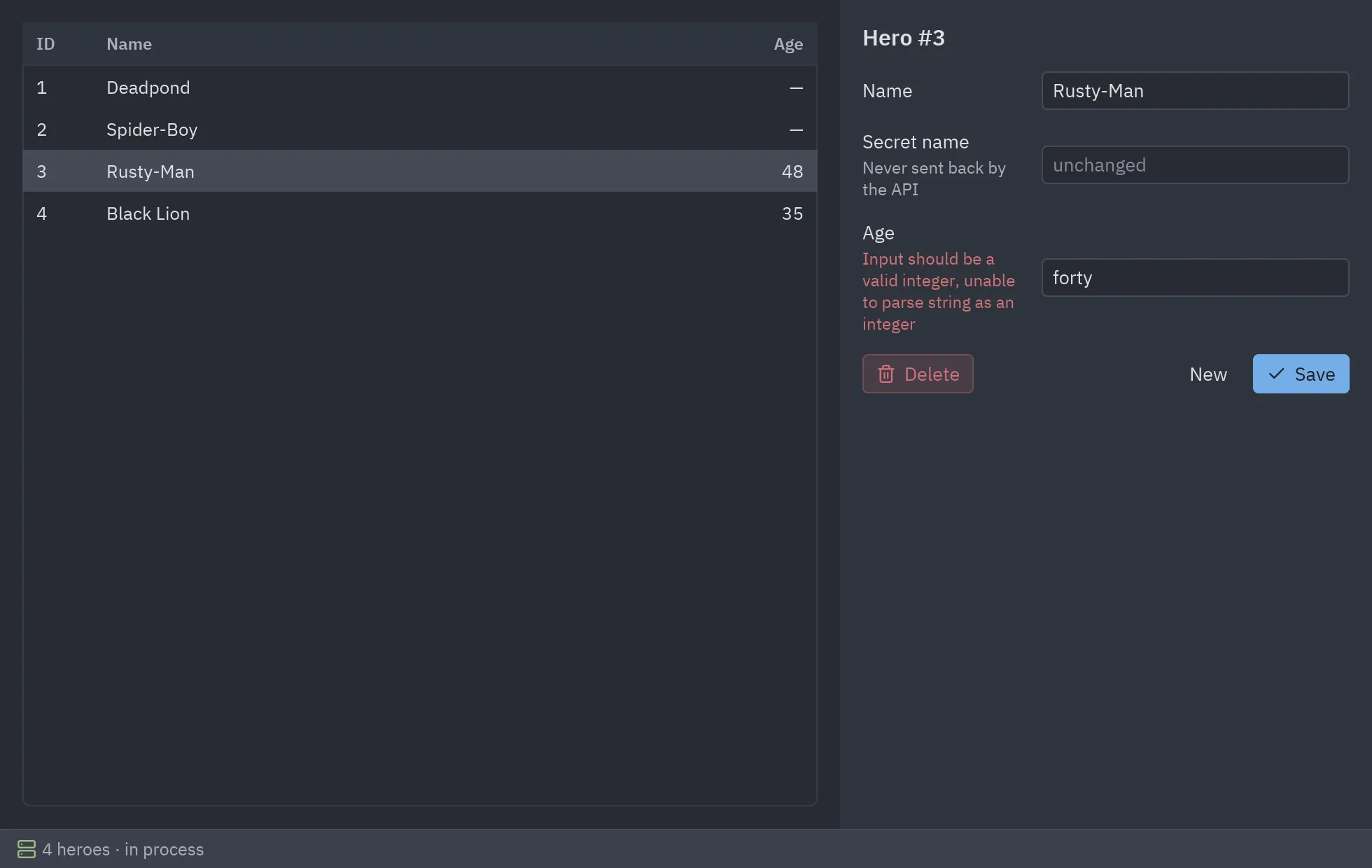
Show FastAPI’s 422 on each field.
pz.validation_errorsreads{"detail": [...]}and returns{"age": "Input should be a valid integer, ..."}:def update(self, message):kind, value = messageif kind == "invalid":self.errors = pz.validation_errors(value)
2. Client and server
Section titled “2. Client and server”The API and the window are two programs. This is how a deployed API is used, and how you work on both at once with reload:
uv run fastapi dev main.py # terminal 1uv run client.py # terminal 2 (or: uv run client.py https://api.example.com)fastapi dev main.py # terminal 1python client.py # terminal 2 (or: python client.py https://api.example.com)python3 -m fastapi dev main.py # terminal 1python3 client.py # terminal 2 (or: python3 client.py https://api.example.com)py -m fastapi dev main.py # terminal 1py client.py # terminal 2 (or: py client.py https://api.example.com)"""Architecture 1, client and server: the API runs on its own and the window talks to it over HTTP.
uv run fastapi dev main.py # terminal 1: the API (FastAPI's own CLI) uv run client.py # terminal 2: the desktop client uv run client.py https://api.example.com # or any other deployment of main.py
The usual setup when the API also serves a website or a mobile app, or runs on a server."""
import sys
import httpx
import pyzed as pz
from heroes_window import HeroesWindow
API = sys.argv[1] if len(sys.argv) > 1 else "http://127.0.0.1:8000"
if __name__ == "__main__": pz.run(HeroesWindow(lambda: httpx.AsyncClient(base_url=API, timeout=5), mode=f"server at {API}", docs_url=f"{API}/docs"))3. Embedded server
Section titled “3. Embedded server”One command starts the API in a background thread with Uvicorn, the server fastapi run uses,
and opens the window. While the window is open, http://127.0.0.1:8000/docs
works in a browser too.
uv run embedded.pypython embedded.pypython3 embedded.pypy embedded.py"""Architecture 2, embedded server: one program starts the API and opens the window.
uv run embedded.py
The API runs with Uvicorn (the server `fastapi run` and `fastapi dev` use) in a backgroundthread, so other programs on this computer, a browser at /docs for instance, can use itwhile the window is open. It stops when the window closes."""
import threading
import httpximport uvicorn
import pyzed as pz
from heroes_window import HeroesWindowfrom main import app
HOST, PORT = "127.0.0.1", 8000
def start_api() -> None: # What `fastapi run main.py` does, but in a thread of this process. server = uvicorn.Server(uvicorn.Config(app, host=HOST, port=PORT, log_level="warning")) threading.Thread(target=server.run, daemon=True).start()
if __name__ == "__main__": start_api() url = f"http://{HOST}:{PORT}" pz.run(HeroesWindow(lambda: httpx.AsyncClient(base_url=url, timeout=5), mode=f"embedded at {url}", docs_url=f"{url}/docs"))4. In process
Section titled “4. In process”No server and no port: httpx.ASGITransport hands each request to the FastAPI app as a function
call. The program works offline, and the API code stays the same.
uv run in_process.pypython in_process.pypython3 in_process.pypy in_process.py"""Architecture 3, in process: the window calls the FastAPI app directly, with no server or port.
uv run in_process.py
httpx can send requests straight to an ASGI app (httpx.ASGITransport), so the same API codeand the same client code run inside one desktop program that works offline. Nothing listenson the network. ASGITransport doesn't send startup events, so the tables are created here."""
import httpx
import pyzed as pz
from heroes_window import HeroesWindowfrom main import app, create_db_and_tables
if __name__ == "__main__": create_db_and_tables() transport = httpx.ASGITransport(app=app) pz.run(HeroesWindow(lambda: httpx.AsyncClient(transport=transport, base_url="http://heroes"), mode="in process"))Full code
Section titled “Full code”"""The FastAPI app, exactly as FastAPI's "SQL (Relational) Databases" tutorial writes it:https://fastapi.tiangolo.com/tutorial/sql-databases/
uv run fastapi dev main.py # http://127.0.0.1:8000, interactive docs at /docs
Nothing in this file knows about Pyzed. The three desktop entry points (client.py,embedded.py, in_process.py) reuse it unchanged."""
from typing import Annotated
from fastapi import Depends, FastAPI, HTTPException, Queryfrom sqlmodel import Field, Session, SQLModel, create_engine, select
class HeroBase(SQLModel):    name: str = Field(index=True)    age: int | None = Field(default=None, index=True)
class Hero(HeroBase, table=True):    id: int | None = Field(default=None, primary_key=True)    secret_name: str
class HeroPublic(HeroBase):    id: int
class HeroCreate(HeroBase):    secret_name: str
class HeroUpdate(HeroBase):    name: str | None = None    age: int | None = None    secret_name: str | None = None
sqlite_file_name = "database.db"sqlite_url = f"sqlite:///{sqlite_file_name}"
connect_args = {"check_same_thread": False}engine = create_engine(sqlite_url, connect_args=connect_args)
def create_db_and_tables(): SQLModel.metadata.create_all(engine)
def get_session():    with Session(engine) as session:        yield session
SessionDep = Annotated[Session, Depends(get_session)]app = FastAPI()
@app.on_event("startup")def on_startup(): create_db_and_tables()
@app.post("/heroes/", response_model=HeroPublic)def create_hero(hero: HeroCreate, session: SessionDep): db_hero = Hero.model_validate(hero) session.add(db_hero) session.commit() session.refresh(db_hero) return db_hero
@app.get("/heroes/", response_model=list[HeroPublic])def read_heroes( session: SessionDep, offset: int = 0, limit: Annotated[int, Query(le=100)] = 100,): heroes = session.exec(select(Hero).offset(offset).limit(limit)).all() return heroes
@app.get("/heroes/{hero_id}", response_model=HeroPublic)def read_hero(hero_id: int, session: SessionDep): hero = session.get(Hero, hero_id) if not hero: raise HTTPException(status_code=404, detail="Hero not found") return hero
@app.patch("/heroes/{hero_id}", response_model=HeroPublic)def update_hero(hero_id: int, hero: HeroUpdate, session: SessionDep): hero_db = session.get(Hero, hero_id) if not hero_db: raise HTTPException(status_code=404, detail="Hero not found") hero_data = hero.model_dump(exclude_unset=True) hero_db.sqlmodel_update(hero_data) session.add(hero_db) session.commit() session.refresh(hero_db) return hero_db
@app.delete("/heroes/{hero_id}")def delete_hero(hero_id: int, session: SessionDep): hero = session.get(Hero, hero_id) if not hero: raise HTTPException(status_code=404, detail="Hero not found") session.delete(hero) session.commit() return {"ok": True}"""The Pyzed window: a desktop client for the heroes API in main.py, written with httpx.
It only knows the API's URLs and JSON, so it works the same whether the API runs in anotherprocess, in a thread of this one or in-process without a network (see client.py,embedded.py and in_process.py)."""
from __future__ import annotations
import webbrowserfrom typing import Callable
import httpx
import pyzed as pzfrom pyzed import ui
EMPTY = {"name": "", "secret_name": "", "age": ""}
class HeroesWindow(pz.App): title = "Heroes · FastAPI" size = (980, 620)
def __init__(self, make_client: Callable[[], httpx.AsyncClient], mode: str, docs_url: str | None = None): self.make_client = make_client # called once, inside a coroutine, so the client lives on Pyzed's loop self.client: httpx.AsyncClient | None = None self.mode, self.docs_url = mode, docs_url self.heroes: list[dict] = [] self.selected: dict | None = None # the hero being edited, or None for a new one self.draft = dict(EMPTY) self.errors: dict[str, str] = {} self.status = "Connecting…"
# -- the API, with httpx -------------------------------------------------------------- async def api(self, method: str, url: str, **kwargs) -> httpx.Response | str: """Sends a request; returns the response, or the error text when the API can't be reached.""" if self.client is None: self.client = self.make_client() try: return await self.client.request(method, url, **kwargs) except httpx.HTTPError as error: return f"Can't reach the API: {error or type(error).__name__}"
async def load(self): response = await self.api("GET", "/heroes/", params={"limit": 100}) # GET /heroes/?offset=0&limit=100 if isinstance(response, str): return ("offline", response) return ("loaded", response.json())
async def save(self): body = {key: value for key, value in self.draft.items() if value != ""} # leave empty fields out if self.selected is None: response = await self.api("POST", "/heroes/", json=body) else: response = await self.api("PATCH", f"/heroes/{self.selected['id']}", json=body) if isinstance(response, str): return ("offline", response) if response.status_code == 422: # FastAPI's validation error, one entry per field return ("invalid", response.json()) response.raise_for_status() return ("saved", response.json())
async def delete(self): response = await self.api("DELETE", f"/heroes/{self.selected['id']}") if isinstance(response, str): return ("offline", response) return ("deleted", self.selected["id"])
# -- state ----------------------------------------------------------------------------- def on_start(self): return self.load()
def pick(self, hero: dict | None): self.selected, self.errors = hero, {} self.draft = dict(EMPTY) if hero is None else { "name": hero["name"], "secret_name": "", "age": "" if hero["age"] is None else str(hero["age"])}
def edit(self, key: str): return lambda value: self.draft.__setitem__(key, value)
def update(self, message): kind, value = message if kind == "loaded": self.heroes, self.status = value, f"{len(value)} heroes · {self.mode}" elif kind == "offline": self.status = value elif kind == "invalid": self.errors = pz.validation_errors(value) elif kind == "saved": self.pick(value) return self.load() elif kind == "deleted": self.pick(None) return self.load()
# -- view -------------------------------------------------------------------------------- def form(self): e = self.errors.get new = self.selected is None return pz.column([ ui.heading("New hero" if new else f"Hero #{self.selected['id']}", level=3), ui.field("Name", ui.input(self.draft["name"], self.edit("name"), placeholder="Deadpond", width=220), error=e("name")), ui.field("Secret name", ui.input(self.draft["secret_name"], self.edit("secret_name"), placeholder="Dive Wilson" if new else "unchanged", width=220), description="Never sent back by the API", error=e("secret_name")), ui.field("Age", ui.input(self.draft["age"], self.edit("age"), placeholder="optional", width=220), error=e("age")), pz.row([ None if new else ui.button("Delete", self.delete, icon="trash-2", variant="ghost", tint="error"), pz.hspace(), ui.button("New", lambda: self.pick(None), variant="ghost") if not new else None, ui.button("Create" if new else "Save", self.save, icon="check", variant="solid"), ], spacing=8), ], spacing=14, padding=16, width=380)
def view(self): t = self.resolved_theme() columns = [ui.Column("ID", "id", width=50), ui.Column("Name", "name"), ui.Column("Age", lambda h: "—" if h["age"] is None else h["age"], width=70, align="end")] table = ui.table(columns, self.heroes, on_row_press=self.pick, selected=self.selected, height="fill") offline = self.status.startswith("Can't") status = ui.status_bar( [ui.status_item(self.status, icon="cloud-off" if offline else "server", icon_color="error" if offline else "success")], [ui.status_item("API docs", lambda: webbrowser.open(self.docs_url), icon="book-open")] if self.docs_url else [], ) body = pz.row([pz.container(table, padding=16, width="fill", height="fill"), pz.container(self.form(), height="fill", bg=t.panel)]) return pz.container(pz.column([body, status]), width="fill", height="fill", bg=t.editor)