
Apps and utilities
Everyday programs, each a single Python file in
examples/ that runs as it is. They are short on purpose:
read one from top to bottom and you will have seen state, a view, events and a subscription working together.
Several are Pyzed versions of the classic Iced demos, the Rust GUI library Pyzed draws with.
Add, edit, complete, filter and delete tasks; they are saved as JSON in your user folder, so they are still there the next time you open the app.
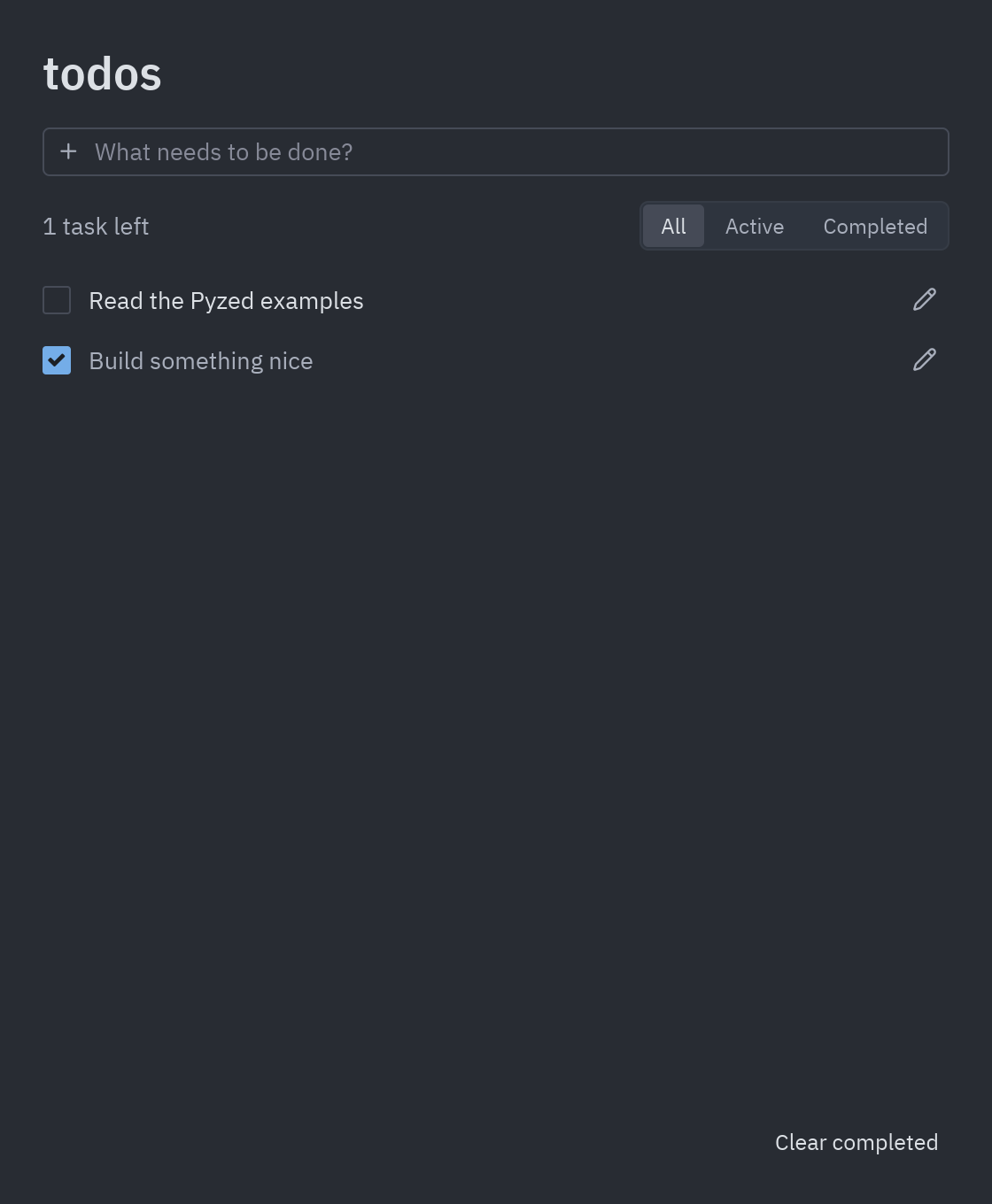
- A dataclass per task and a list in the state; the filter is a
ui.segmentedcontrol. - Double-click a task to edit it in place; tasks are written to disk on every change.
- A simpler version is built step by step in the To-do list tutorial.
uv run --with pyzed-ui python examples/todos.pypython3 -m venv .venvsource .venv/bin/activatepython -m pip install pyzed-uipython examples/todos.pypy -m venv .venv.venv\Scripts\Activate.ps1python -m pip install pyzed-uipython examples\todos.pypython3 examples/todos.pypy examples\todos.pyFull code: examples/todos.py
"""Todos, after Iced's ``todos`` demo: add, edit, complete, filter and persist tasks.
    python examples/todos.py
Tasks are saved as JSON next to your user config, so they survive restarts."""
import jsonfrom dataclasses import asdict, dataclass, fieldfrom itertools import countfrom pathlib import Path
import pyzed as pzfrom pyzed import ui
STORE = Path.home() / ".config" / "pyzed-todos.json"_ids = count()

@dataclassclass Task:    text: str    done: bool = False    id: int = field(default_factory=lambda: next(_ids))

class Todos(pz.App):    title = "Todos"    size = (560, 680)
    def __init__(self, store=STORE):        self.store = store        self.draft = ""        self.filter = "All"        self.editing = None  # (task id, edited text)        self.tasks = self.load()
    # -- persistence --------------------------------------------------------    def load(self):        try:            return [Task(t["text"], t["done"]) for t in json.loads(self.store.read_text())]        except (OSError, ValueError, KeyError, TypeError):            return [Task("Read the Pyzed examples"), Task("Build something nice", done=True)]
    def save(self):        try:            self.store.parent.mkdir(parents=True, exist_ok=True)            self.store.write_text(json.dumps([{"text": t.text, "done": t.done} for t in self.tasks], indent=2))        except OSError:            pass
    # -- actions --------------------------------------------------------------    def add(self):        if self.draft.strip():            self.tasks.append(Task(self.draft.strip()))            self.draft = ""            self.save()
    def toggle(self, task):        task.done = not task.done        self.save()
    def remove(self, task):        self.tasks.remove(task)        self.save()
    def start_edit(self, task):        self.editing = (task.id, task.text)        return pz.Command.focus(f"edit-{task.id}")
    def finish_edit(self):        task_id, text = self.editing        for task in self.tasks:            if task.id == task_id and text.strip():                task.text = text.strip()        self.editing = None        self.save()
    def clear_done(self):        self.tasks = [t for t in self.tasks if not t.done]        self.save()
    def on_key(self, combo):        if combo == "escape":            self.editing = None
    # -- view -------------------------------------------------------------------    def visible(self):        if self.filter == "Active":            return [t for t in self.tasks if not t.done]        if self.filter == "Completed":            return [t for t in self.tasks if t.done]        return self.tasks
    def task_row(self, task):        t = self.resolved_theme()        if self.editing and self.editing[0] == task.id:            return pz.row([                ui.input(self.editing[1], lambda text: setattr(self, "editing", (task.id, text)),                         on_submit=self.finish_edit, id=f"edit-{task.id}"),                ui.icon_button("check", self.finish_edit, tooltip="Save"),                ui.icon_button("trash-2", lambda: self.remove(task), tooltip="Delete", color=t.error),            ], spacing=6, align="center")        return pz.row([            ui.checkbox(task.done, lambda _: self.toggle(task)),            pz.mouse_area(                ui.label(task.text, color="text_muted" if task.done else "text", width="fill"),                on_double_click=lambda: self.start_edit(task),            ),            ui.icon_button("pencil", lambda: self.start_edit(task), tooltip="Edit"),        ], spacing=10, align="center")
    def view(self):        t = self.resolved_theme()        left = sum(not task.done for task in self.tasks)        tasks = self.visible()        body = (pz.column([self.task_row(task) for task in tasks], spacing=6)                if tasks else ui.empty_state("Nothing here", f"No {self.filter.lower()} tasks."))        return pz.container(            pz.column([                ui.heading("todos"),                ui.input(self.draft, lambda text: setattr(self, "draft", text), on_submit=self.add,                         placeholder="What needs to be done?", icon="plus"),                pz.row([                    ui.muted(f"{left} {'task' if left == 1 else 'tasks'} left"),                    pz.hspace(),                    ui.segmented(["All", "Active", "Completed"], self.filter, lambda f: setattr(self, "filter", f)),                ], align="center"),                pz.scrollable(body, height="fill"),                pz.row([pz.hspace(), ui.button("Clear completed", self.clear_done, variant="ghost", size="sm")]),            ], spacing=14, max_width=520),            padding=24, width="fill", height="fill", align_x="center", bg=t.editor,        )

if __name__ == "__main__":    pz.run(Todos)
Markdown viewer
Section titled “Markdown viewer”A live Markdown editor: write on the left, see the formatted result on the right, and drag the divider between them.
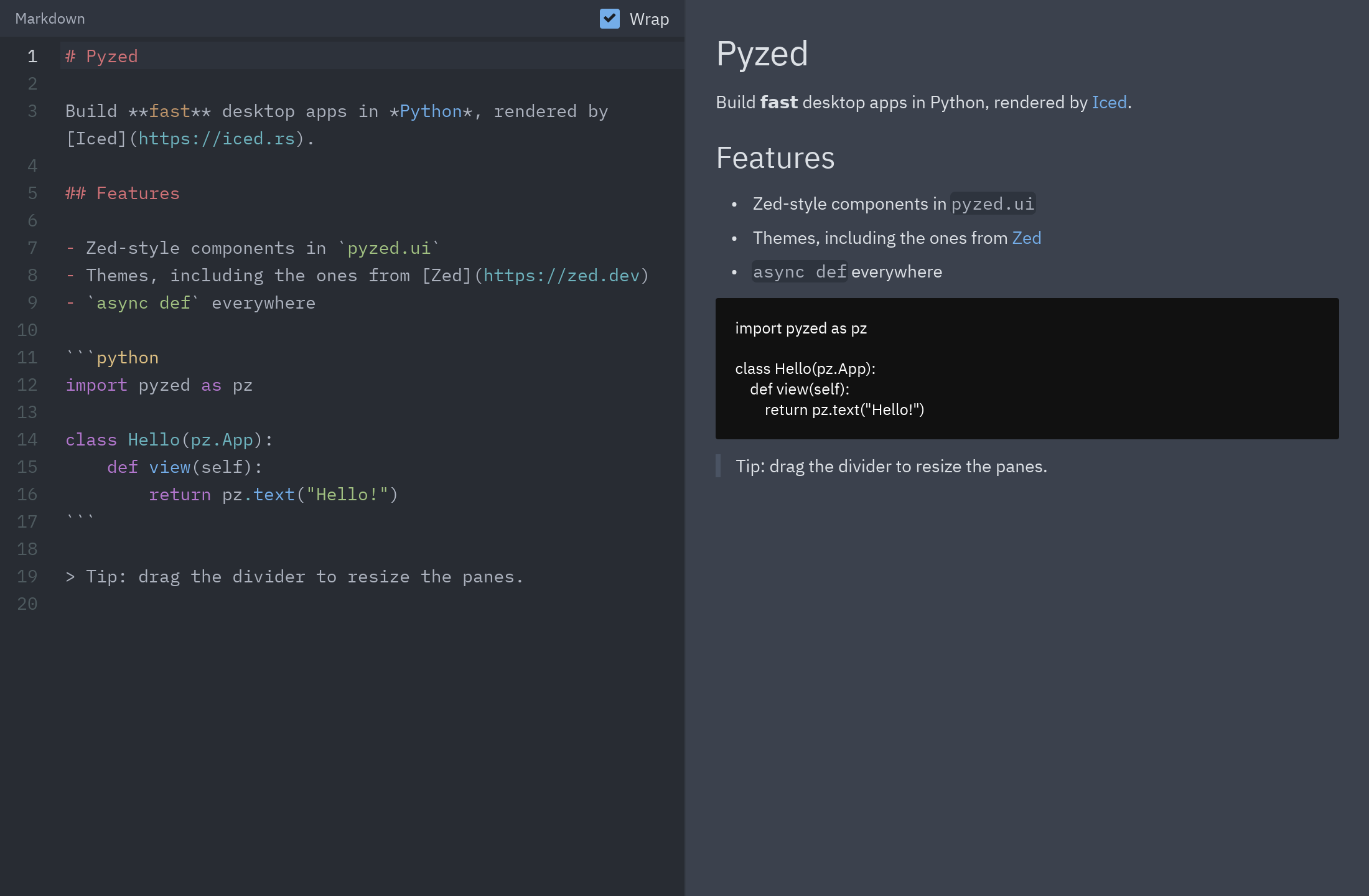
ui.editorwithon_changekeeps the text in the state;ui.markdownrenders it.ui.splitmakes the two panes resizable; links in the preview open in your browser.
uv run --with pyzed-ui python examples/markdown_viewer.pypython3 -m venv .venvsource .venv/bin/activatepython -m pip install pyzed-uipython examples/markdown_viewer.pypy -m venv .venv.venv\Scripts\Activate.ps1python -m pip install pyzed-uipython examples\markdown_viewer.pypython3 examples/markdown_viewer.pypy examples\markdown_viewer.pyFull code: examples/markdown_viewer.py
"""A live Markdown editor: code editor on the left, rendered preview on the right.
    python examples/markdown_viewer.py
Shows ``ui.editor`` with ``on_change``, ``ui.markdown`` and a draggable ``ui.split``.Links in the preview open in your browser."""
import webbrowser
import pyzed as pzfrom pyzed import ui
SAMPLE = """# Pyzed
Build **fast** desktop apps in *Python*, rendered by [Iced](https://iced.rs).
## Features
- Zed-style components in `pyzed.ui`- Themes, including the ones from [Zed](https://zed.dev)- `async def` everywhere
```pythonimport pyzed as pz
class Hello(pz.App):    def view(self):        return pz.text("Hello!")```
> Tip: drag the divider to resize the panes."""

class MarkdownViewer(pz.App):    title = "Markdown"    size = (1100, 720)
    def __init__(self):        self.source = SAMPLE        self.ratio = 0.5        self.wrap = True
    def view(self):        t = self.resolved_theme()        editor = pz.column([            pz.container(                pz.row([ui.label("Markdown", size="sm", color="text_muted"), pz.hspace(),                        ui.checkbox(self.wrap, lambda v: setattr(self, "wrap", v), label="Wrap")], align="center"),                padding=(6, 12), bg=t.tab_bar, width="fill",            ),            ui.editor("source", self.source, language="md", wrap=self.wrap,                      on_change=lambda text: setattr(self, "source", text)),        ])        preview = pz.container(            pz.scrollable(pz.container(ui.markdown(self.source, on_link=webbrowser.open), padding=24, max_width=760),                          height="fill"),            width="fill", height="fill", bg=t.background,        )        return ui.split(editor, preview, ratio=self.ratio, on_resize=lambda r: setattr(self, "ratio", r))

if __name__ == "__main__":    pz.run(MarkdownViewer)
Image viewer
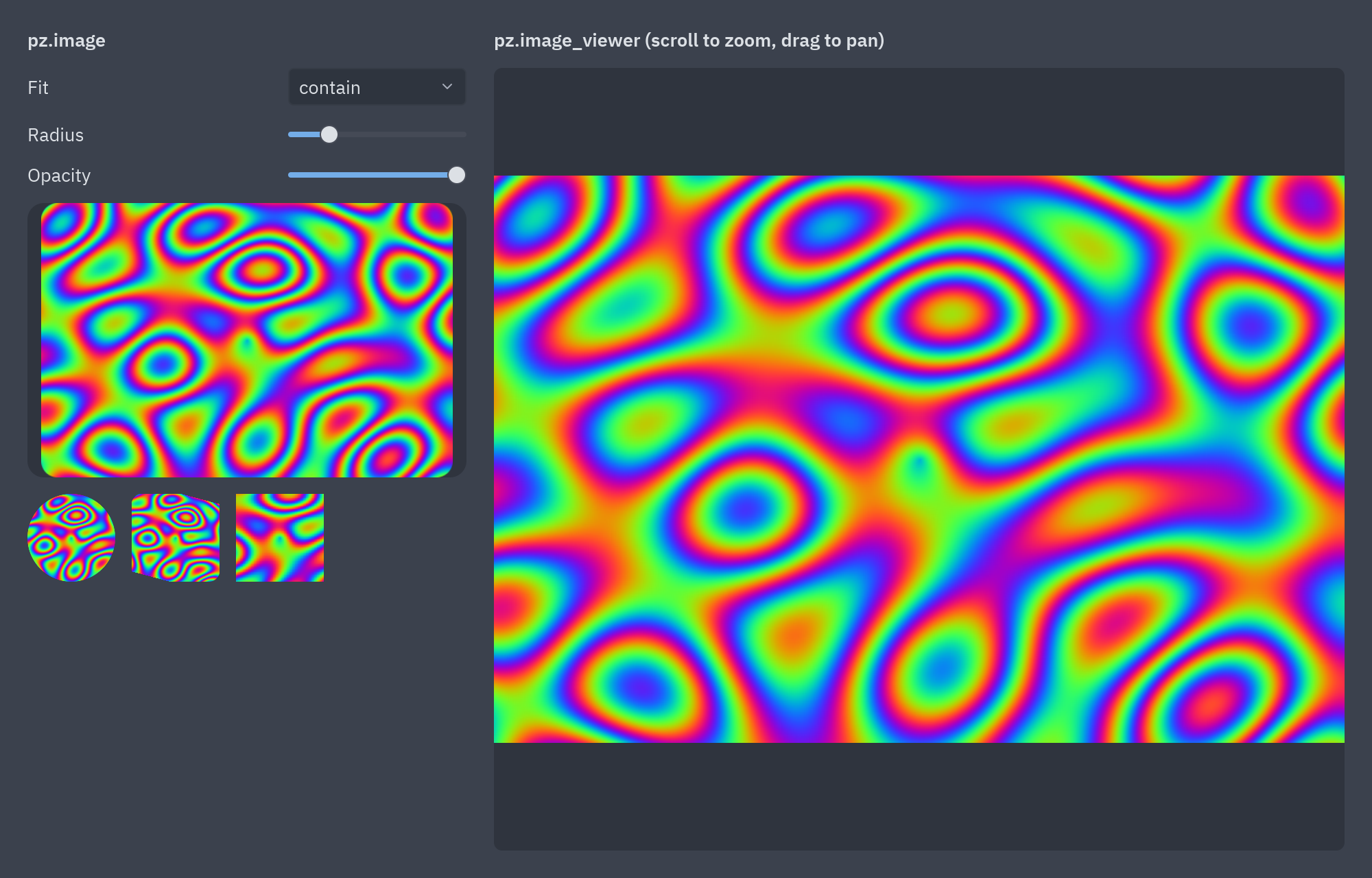
Section titled “Image viewer”Shows a picture with pz.image and in a zoomable pz.image_viewer: scroll to zoom, drag to pan. Pass a path to
open your own image; without one it draws a picture from raw pixels made in pure Python.
uv run --with pyzed-ui python examples/image_viewer.pypython3 -m venv .venvsource .venv/bin/activatepython -m pip install pyzed-uipython examples/image_viewer.pypy -m venv .venv.venv\Scripts\Activate.ps1python -m pip install pyzed-uipython examples\image_viewer.pypython3 examples/image_viewer.pypy examples\image_viewer.pyFull code: examples/image_viewer.py
"""Bitmap images: ``pz.image`` and the zoomable ``pz.image_viewer``.
    python examples/image_viewer.py [picture.png]
Without an argument it shows a picture generated in pure Python (raw RGBA pixelspassed with ``size=(w, h)``). Scroll to zoom the viewer and drag to pan."""
import mathimport sys
import pyzed as pzfrom pyzed import ui
W, H = 480, 320

def generated_pixels():    """A colorful plasma pattern as raw RGBA bytes."""    out = bytearray()    for y in range(H):        for x in range(W):            v = math.sin(x / 23) + math.sin(y / 17) + math.sin((x + y) / 31) + math.sin(math.hypot(x - W / 2, y - H / 2) / 19)            out += bytes((int(128 + 127 * math.sin(v * math.pi)), int(128 + 127 * math.sin(v * math.pi + 2)),                          int(128 + 127 * math.sin(v * math.pi + 4)), 255))    return bytes(out)

class Viewer(pz.App):    title = "Image viewer"    size = (1000, 640)
    def __init__(self, path=None):        self.path = path        self.pixels = None if path else generated_pixels()        self.fit = "contain"        self.radius = 12.0        self.opacity = 1.0
    def source(self, **kwargs):        if self.path:            return dict(source=self.path, **kwargs)        return dict(source=self.pixels, size=(W, H), **kwargs)
    def view(self):        t = self.resolved_theme()        thumbs = pz.column([            ui.label("pz.image", weight="semibold"),            ui.field("Fit", ui.select(["contain", "cover", "fill", "none", "scale_down"], self.fit,                                      lambda v: setattr(self, "fit", v), width=130)),            ui.field("Radius", pz.container(ui.slider(self.radius, lambda v: setattr(self, "radius", v), min=0, max=60),                                            width=130)),            ui.field("Opacity", pz.container(ui.slider(self.opacity, lambda v: setattr(self, "opacity", v)),                                             width=130)),            pz.container(pz.image(**self.source(width="fill", height=200, content_fit=self.fit, radius=self.radius,                                                opacity=self.opacity)),                         width="fill", height=200, bg=t.surface, radius=self.radius),            pz.row([pz.image(**self.source(width=64, height=64, content_fit="cover", radius=32)),                    pz.image(**self.source(width=64, height=64, content_fit="cover", radius=8, rotation=15)),                    pz.image(**self.source(width=64, height=64, content_fit="cover", filter="nearest", scale=2))],                   spacing=12),        ], spacing=12, width=320)        viewer = pz.column([            ui.label("pz.image_viewer (scroll to zoom, drag to pan)", weight="semibold"),            pz.container(pz.image_viewer(**self.source(width="fill", height="fill")), width="fill", height="fill",                         bg=t.surface, radius=t.radius, clip=True),        ], spacing=12, width="fill")        return pz.container(pz.row([thumbs, viewer], spacing=20), padding=20, bg=t.background,                            width="fill", height="fill")

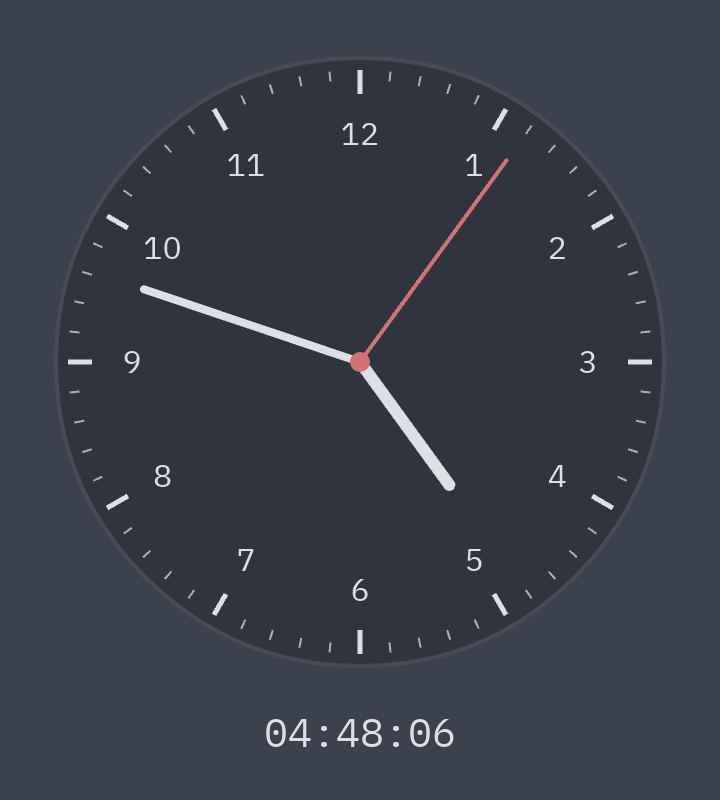
if __name__ == "__main__": pz.run(Viewer(sys.argv[1] if len(sys.argv) > 1 else None))An analog clock drawn on a pz.canvas. A subscription, pz.every(1, ...), redraws it every second, and the hands
are paths rotated around the center.
uv run --with pyzed-ui python examples/clock.pypython3 -m venv .venvsource .venv/bin/activatepython -m pip install pyzed-uipython examples/clock.pypy -m venv .venv.venv\Scripts\Activate.ps1python -m pip install pyzed-uipython examples\clock.pypython3 examples/clock.pypy examples\clock.pyFull code: examples/clock.py
"""An analog clock drawn on a canvas, after Iced's ``clock`` demo.
    python examples/clock.py
``pz.every(1, ...)`` redraws it every second; the hands are rotated paths."""
import mathimport time
import pyzed as pzfrom pyzed import draw
SIZE = 320

def hand(cx, cy, angle, length, width, color):    a = math.radians(angle - 90)    return draw.line(cx, cy, cx + length * math.cos(a), cy + length * math.sin(a), stroke=color, width=width,                     cap="round")

class Clock(pz.App):    title = "Clock"    size = (SIZE + 40, SIZE + 80)
    def __init__(self):        self.now = time.localtime()
    def subscriptions(self):        return [pz.every(1.0, lambda: setattr(self, "now", time.localtime()))]
    def view(self):        t = self.resolved_theme()        c = SIZE / 2        r = c - 8        shapes = [draw.circle(c, c, r, fill=t.surface, stroke=t.border, width=2)]        for i in range(60):            a = math.radians(i * 6)            outer, inner = r - 6, r - (18 if i % 5 == 0 else 11)            shapes.append(draw.line(c + inner * math.sin(a), c - inner * math.cos(a),                                    c + outer * math.sin(a), c - outer * math.cos(a),                                    stroke=t.text if i % 5 == 0 else t.text_muted, width=2.5 if i % 5 == 0 else 1))        for h in range(1, 13):            a = math.radians(h * 30)            shapes.append(draw.text(c + (r - 38) * math.sin(a), c - (r - 38) * math.cos(a), h, color=t.text,                                    size=16, align_x="center", align_y="center"))        hours, minutes, seconds = self.now.tm_hour % 12, self.now.tm_min, self.now.tm_sec        shapes += [            hand(c, c, hours * 30 + minutes / 2, r * 0.5, 6, t.text),            hand(c, c, minutes * 6 + seconds / 10, r * 0.75, 4, t.text),            hand(c, c, seconds * 6, r * 0.82, 2, t.error),            draw.circle(c, c, 5, fill=t.error),        ]        return pz.container(            pz.column([pz.canvas(shapes, width=SIZE, height=SIZE),                       pz.text(time.strftime("%H:%M:%S", self.now), size=20, font="mono", color=t.text)],                      spacing=12, align="center"),            center=True, bg=t.background,        )

if __name__ == "__main__":    pz.run(Clock)
Stopwatch
Section titled “Stopwatch”A stopwatch with laps. Space starts and stops it, L records a lap and R resets it.
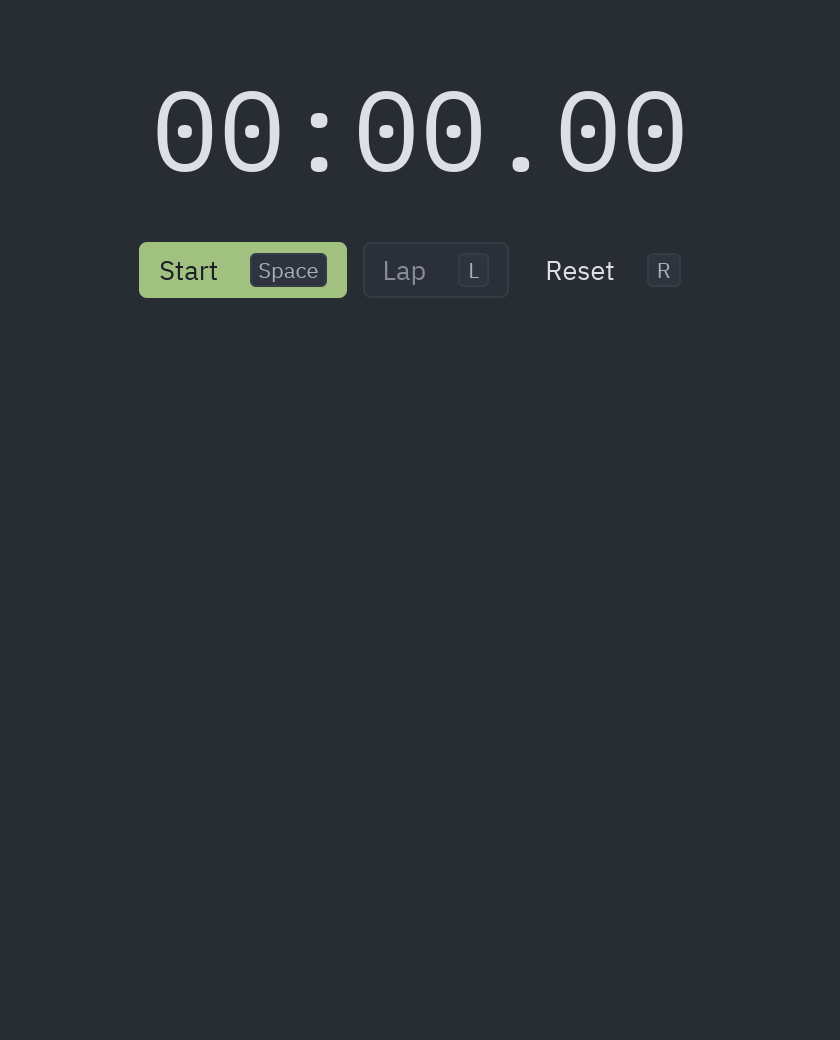
- The timer subscription only exists while the watch runs:
subscriptions()returns an empty list otherwise, so an idle app uses no CPU.
uv run --with pyzed-ui python examples/stopwatch.pypython3 -m venv .venvsource .venv/bin/activatepython -m pip install pyzed-uipython examples/stopwatch.pypy -m venv .venv.venv\Scripts\Activate.ps1python -m pip install pyzed-uipython examples\stopwatch.pypython3 examples/stopwatch.pypy examples\stopwatch.pyFull code: examples/stopwatch.py
"""A stopwatch with laps, after Iced's ``stopwatch`` demo.
    python examples/stopwatch.py
The timer subscription only exists while the watch runs, so an idle app uses no CPU.Space starts/stops, ``l`` records a lap, ``r`` resets."""
import time
import pyzed as pzfrom pyzed import ui

def fmt(seconds):    minutes, rest = divmod(seconds, 60)    return f"{int(minutes):02d}:{rest:05.2f}"

class Stopwatch(pz.App):    title = "Stopwatch"    size = (420, 520)
    def __init__(self):        self.elapsed = 0.0        self.started = None        self.laps = []
    @property    def running(self):        return self.started is not None
    def now(self):        return self.elapsed + (time.monotonic() - self.started if self.running else 0.0)
    def toggle(self):        if self.running:            self.elapsed = self.now()            self.started = None        else:            self.started = time.monotonic()
    def reset(self):        self.elapsed, self.started, self.laps = 0.0, None, []
    def lap(self):        if self.running:            self.laps.insert(0, self.now())
    def subscriptions(self):        # An empty message still triggers a redraw; ``now()`` does the rest.        return [pz.every(0.03, lambda: None)] if self.running else []
    def on_key(self, combo):        {"space": self.toggle, "l": self.lap, "r": self.reset}.get(combo, lambda: None)()
    def view(self):        t = self.resolved_theme()        laps = [            pz.row([ui.muted(f"Lap {len(self.laps) - i}"), pz.hspace(), pz.text(fmt(v), font="mono", color=t.text)])            for i, v in enumerate(self.laps)        ]        return pz.container(            pz.column([                pz.text(fmt(self.now()), size=56, font="mono", color=t.text),                pz.row([                    ui.button("Stop" if self.running else "Start", self.toggle, variant="solid",                              tint="error" if self.running else "success", keys="space"),                    ui.button("Lap", self.lap, disabled=not self.running, keys="l"),                    ui.button("Reset", self.reset, variant="ghost", keys="r"),                ], spacing=8),                pz.scrollable(pz.column(laps, spacing=6, width="fill"), height="fill"),            ], spacing=20, align="center", max_width=340),            padding=28, width="fill", height="fill", align_x="center", bg=t.editor,        )

if __name__ == "__main__":    pz.run(Stopwatch)
QR code
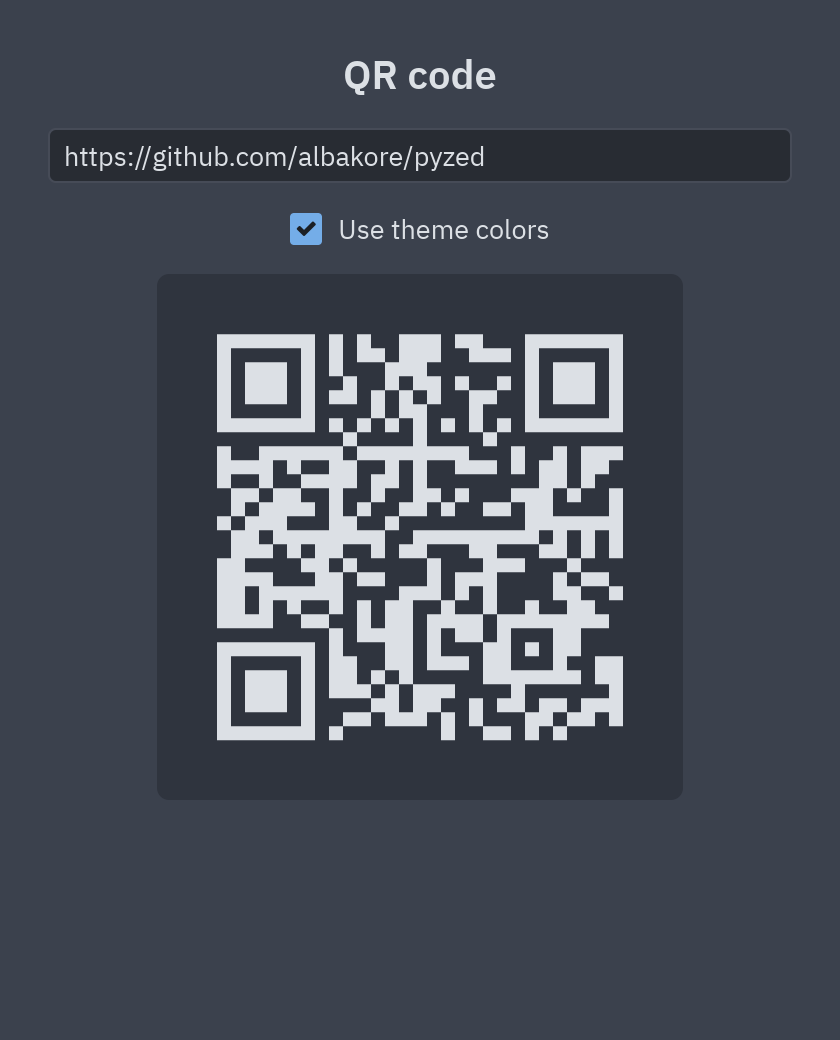
Section titled “QR code”Type a text or a link and get its QR code, in the theme’s colors or in black and white. The whole app is about 30
lines: pz.qr_code(data, cell_size=7) does the work.
uv run --with pyzed-ui python examples/qr_code.pypython3 -m venv .venvsource .venv/bin/activatepython -m pip install pyzed-uipython examples/qr_code.pypy -m venv .venv.venv\Scripts\Activate.ps1python -m pip install pyzed-uipython examples\qr_code.pypython3 examples/qr_code.pypy examples\qr_code.pyFull code: examples/qr_code.py
"""Type something and get its QR code, after Iced's ``qr_code`` demo."""
import pyzed as pzfrom pyzed import ui

class QR(pz.App):    title = "QR code"    size = (420, 520)
    def __init__(self):        self.data = "https://github.com/albakore/pyzed"        self.dark = True
    def view(self):        t = self.resolved_theme()        fg, bg = (t.text, t.surface) if self.dark else ("#000000", "#ffffff")        return pz.container(            pz.column([                ui.heading("QR code", level=2),                ui.input(self.data, lambda v: setattr(self, "data", v), placeholder="Text or URL"),                ui.checkbox(self.dark, lambda v: setattr(self, "dark", v), label="Use theme colors"),                pz.container(pz.qr_code(self.data, cell_size=7, color=fg, bg=bg) if self.data else ui.muted("Empty"),                             padding=16, bg=bg, radius=t.radius),            ], spacing=14, align="center"),            padding=24, width="fill", height="fill", align_x="center", bg=t.background,        )

if __name__ == "__main__":    pz.run(QR)
Pomodoro
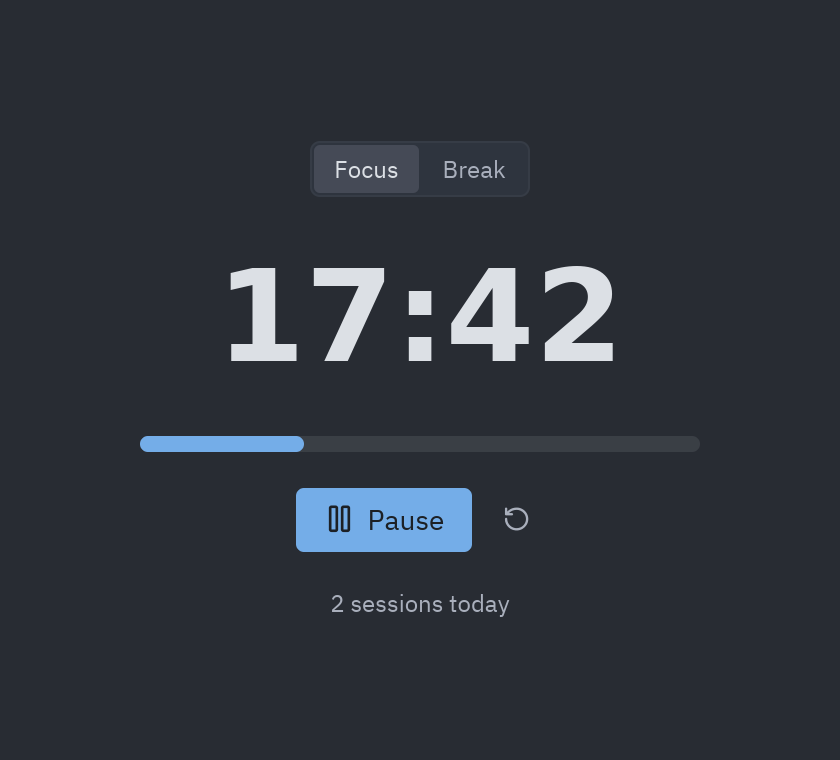
Section titled “Pomodoro”A focus timer with work and break periods: the app that the Prompting guide builds with an AI assistant, one request at a time.
uv run --with pyzed-ui python examples/pomodoro.pypython3 -m venv .venvsource .venv/bin/activatepython -m pip install pyzed-uipython examples/pomodoro.pypy -m venv .venv.venv\Scripts\Activate.ps1python -m pip install pyzed-uipython examples\pomodoro.pypython3 examples/pomodoro.pypy examples\pomodoro.pyFull code: examples/pomodoro.py
"""A Pomodoro timer: the app built step by step in the AI prompting guide."""
import pyzed as pzfrom pyzed import ui
WORK, BREAK = 25 * 60, 5 * 60

class Pomodoro(pz.App):    title = "Pomodoro"    size = (420, 380)
    def __init__(self):        self.mode = "Focus"        self.left = WORK        self.running = False        self.done = 0
    def subscriptions(self):        return [pz.every(1, self.tick, key="timer")] if self.running else []
    def tick(self):        self.left -= 1        if self.left <= 0:            if self.mode == "Focus":                self.done += 1            self.mode = "Break" if self.mode == "Focus" else "Focus"            self.left = BREAK if self.mode == "Break" else WORK
    def switch(self, mode):        self.mode, self.running = mode, False        self.left = WORK if mode == "Focus" else BREAK
    def toggle(self):        self.running = not self.running
    def reset(self):        self.running, self.left = False, WORK if self.mode == "Focus" else BREAK
    def view(self):        total = WORK if self.mode == "Focus" else BREAK        return pz.center(pz.column([            ui.segmented(["Focus", "Break"], self.mode, self.switch),            pz.text(f"{self.left // 60:02d}:{self.left % 60:02d}", size=64, weight="bold"),            ui.progress(1 - self.left / total, height=8, width=280),            pz.row([                ui.button("Pause" if self.running else "Start", self.toggle,                          icon="pause" if self.running else "play", variant="solid", size="lg"),                ui.icon_button("rotate-ccw", self.reset, tooltip="Reset"),            ], spacing=8, align="center"),            ui.muted(f"{self.done} sessions today", size="sm"),        ], spacing=18, align="center")).style(background="editor")

if __name__ == "__main__":    pz.run(Pomodoro)
Color picker
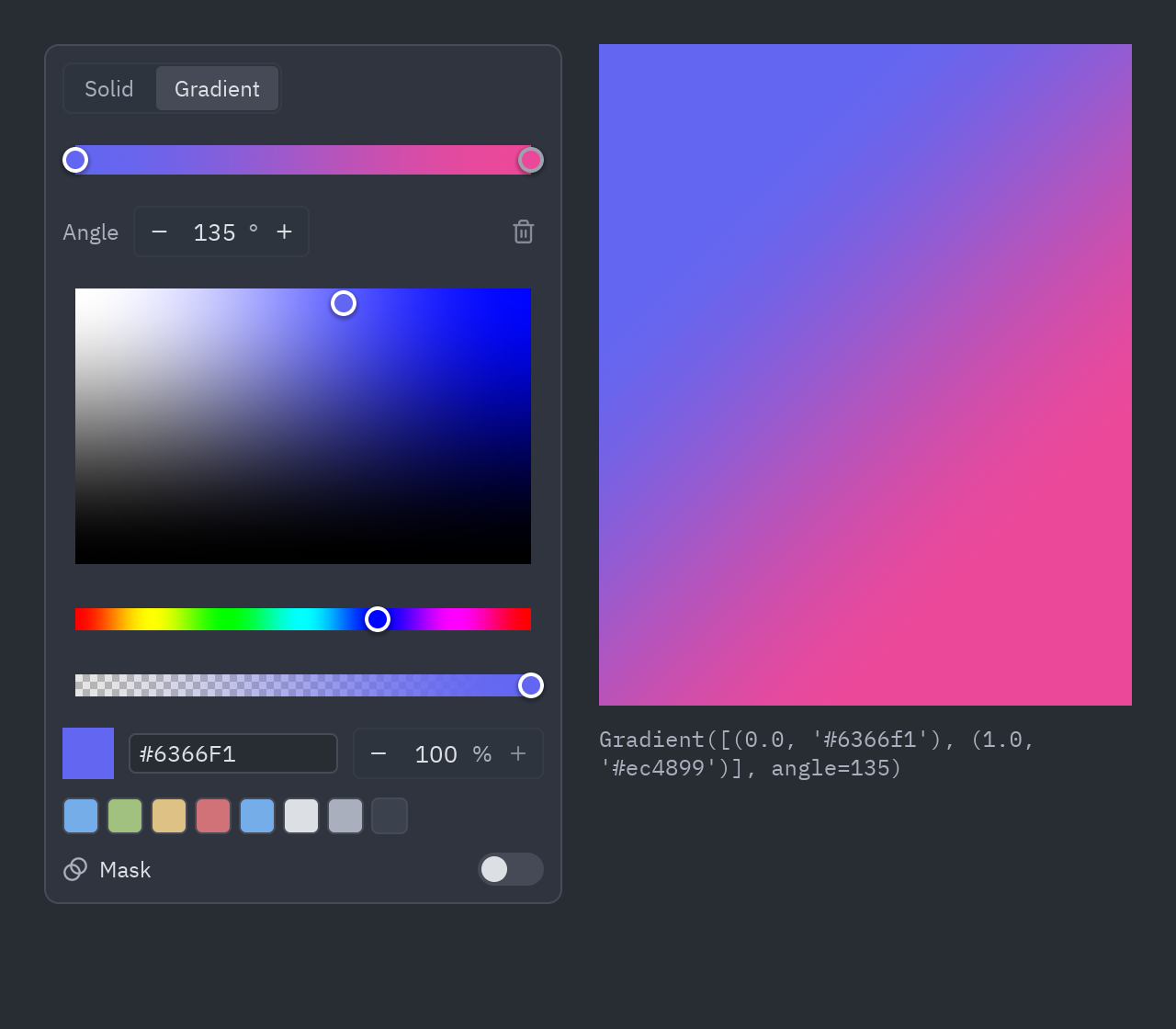
Section titled “Color picker”ui.ColorPicker in its three modes: a color with transparency, a linear gradient, and a fill with an opacity mask.
It reports a "#rrggbbaa" string, a pz.Gradient or a pz.Paint, and all three work as a background.
uv run --with pyzed-ui python examples/color_picker.pypython3 -m venv .venvsource .venv/bin/activatepython -m pip install pyzed-uipython examples/color_picker.pypy -m venv .venv.venv\Scripts\Activate.ps1python -m pip install pyzed-uipython examples\color_picker.pypython3 examples/color_picker.pypy examples\color_picker.pyFull code: examples/color_picker.py
"""Color picker: a color with alpha, a linear gradient, or a fill with an opacity mask.
    python examples/color_picker.py
``ui.ColorPicker`` reports a ``"#rrggbbaa"`` string, a ``pz.Gradient`` or a ``pz.Paint``;all of them work as a ``background`` in ``widget.style``."""
import pyzed as pzfrom pyzed import ui

class ColorPickerDemo(pz.App):    title = "Color picker"    size = (640, 560)
    def __init__(self):        self.fill = pz.Gradient(["#6366f1", "#ec4899"], angle=135)
    def pick(self, event):        self.fill = event.value
    def view(self):        preview = pz.container(None, width="fill", height="fill").style(background=self.fill)        return pz.row([            ui.ColorPicker(value=self.fill, on_change=self.pick),            pz.column([                pz.stack([ui.checkerboard(320, 360, 12), preview], width=320, height=360).style(border=(1, "border")),                pz.text(repr(self.fill)).style(font="mono", size=12, color="text_muted"),            ], spacing=10, width="fill"),        ], spacing=20).style(padding=24, width="fill", height="fill")

if __name__ == "__main__":    pz.run(ColorPickerDemo)
Game of Life
Section titled “Game of Life”Conway’s Game of Life: click or drag to paint cells, Space to play or pause, N to advance one
generation. Thousands of cells are drawn as a single shape on a pz.canvas, and pz.every drives the simulation.
uv run --with pyzed-ui python examples/game_of_life.pypython3 -m venv .venvsource .venv/bin/activatepython -m pip install pyzed-uipython examples/game_of_life.pypy -m venv .venv.venv\Scripts\Activate.ps1python -m pip install pyzed-uipython examples\game_of_life.pypython3 examples/game_of_life.pypy examples\game_of_life.pyFull code: examples/game_of_life.py
"""Conway's Game of Life, after Iced's ``game_of_life`` demo.
    python examples/game_of_life.py
Click or drag on the grid to paint cells, Space to play/pause, ``n`` to step once.Shows ``pz.canvas`` drawing thousands of cells in one shape and ``pz.every`` drivingthe simulation."""
import random
import pyzed as pzfrom pyzed import draw, ui
CELL = 10COLS, ROWS = 80, 56

def step(alive):    counts = {}    for x, y in alive:        for dx in (-1, 0, 1):            for dy in (-1, 0, 1):                if dx or dy:                    key = ((x + dx) % COLS, (y + dy) % ROWS)                    counts[key] = counts.get(key, 0) + 1    return {cell for cell, n in counts.items() if n == 3 or (n == 2 and cell in alive)}

class Life(pz.App):    title = "Game of Life"    size = (COLS * CELL + 48, ROWS * CELL + 120)
    def __init__(self):        self.alive = set()        self.playing = False        self.speed = 10        self.generation = 0        self.painting = None  # True paints cells, False erases them        self.randomize()
    def randomize(self):        self.alive = {(x, y) for x in range(COLS) for y in range(ROWS) if random.random() < 0.18}        self.generation = 0
    def clear(self):        self.alive.clear()        self.generation = 0
    def tick(self):        self.alive = step(self.alive)        self.generation += 1
    def subscriptions(self):        return [pz.every(1 / self.speed, self.tick, key="life")] if self.playing else []
    def on_key(self, combo):        if combo == "space":            self.playing = not self.playing        elif combo == "n":            self.tick()
    def cell_at(self, x, y):        return int(x // CELL) % COLS, int(y // CELL) % ROWS
    def press(self, x, y):        cell = self.cell_at(x, y)        self.painting = cell not in self.alive        self.paint(x, y)
    def paint(self, x, y):        if self.painting is None:            return        cell = self.cell_at(x, y)        (self.alive.add if self.painting else self.alive.discard)(cell)
    def view(self):        t = self.resolved_theme()        grid = [draw.background(t.editor)]        grid.append(draw.rects(((x * CELL, y * CELL, CELL - 1, CELL - 1) for x, y in self.alive), fill=t.accent))        board = pz.canvas(            grid,            width=COLS * CELL,            height=ROWS * CELL,            on_press=self.press,            on_move=self.paint,            on_release=lambda: setattr(self, "painting", None),            cursor="crosshair",        )        controls = pz.row([            ui.button("Pause" if self.playing else "Play", lambda: setattr(self, "playing", not self.playing),                      icon="pause" if self.playing else "play", variant="solid", keys="space"),            ui.button("Step", self.tick, icon="step-forward", disabled=self.playing),            ui.button("Random", self.randomize, icon="shuffle"),            ui.button("Clear", self.clear, icon="eraser"),            pz.hspace(),            ui.muted(f"Speed {self.speed}/s"),            pz.container(ui.slider(self.speed, lambda v: setattr(self, "speed", int(v)), min=1, max=60, step=1),                         width=160),            ui.muted(f"Generation {self.generation} · {len(self.alive)} alive"),        ], spacing=8, align="center")        return pz.container(pz.column([controls, board], spacing=12), padding=16, bg=t.background,                            width="fill", height="fill")

if __name__ == "__main__":    pz.run(Life)
Downloads with progress
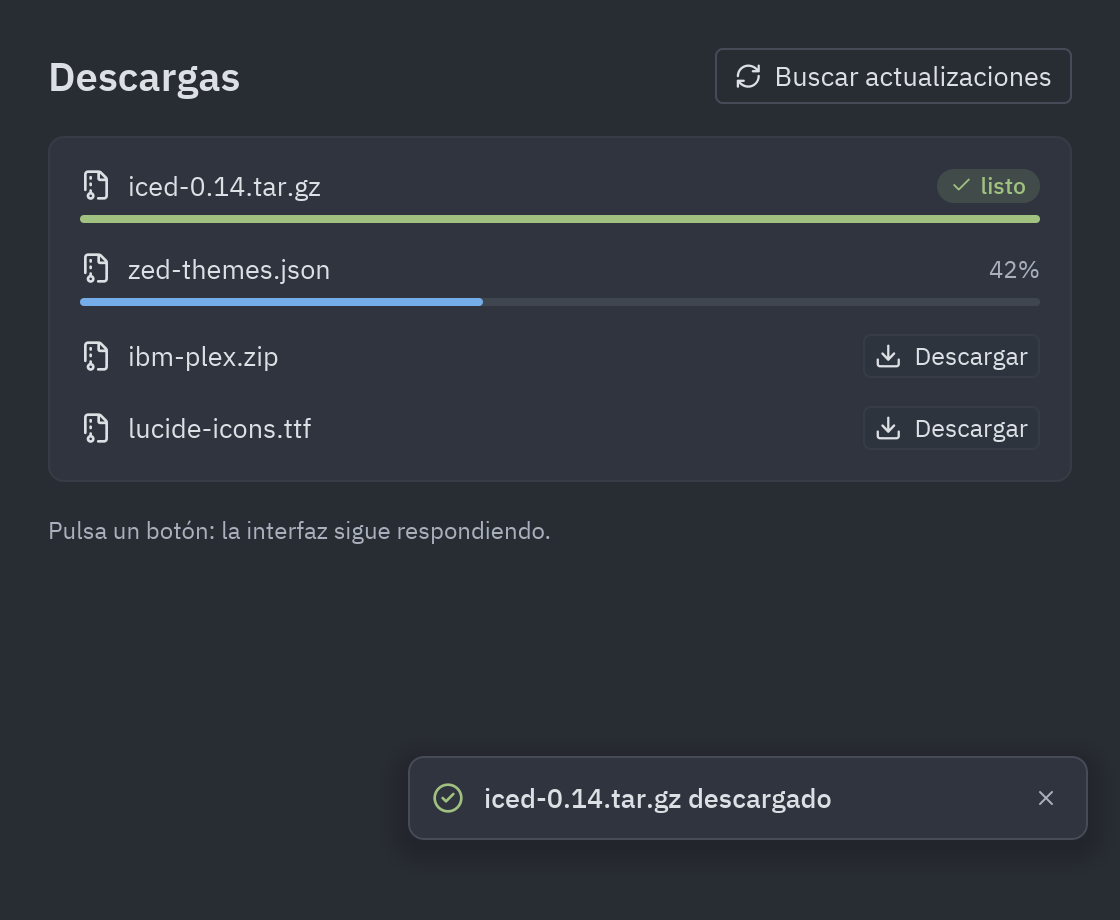
Section titled “Downloads with progress”Several downloads at once, each with its own progress bar, and a window that never freezes. Each download is an
async def generator: every value it yields goes to update while it keeps running on Pyzed’s event loop. Swap
the simulated transfer for streaming with httpx to download real files.
uv run --with pyzed-ui python examples/download_progress.pypython3 -m venv .venvsource .venv/bin/activatepython -m pip install pyzed-uipython examples/download_progress.pypy -m venv .venv.venv\Scripts\Activate.ps1python -m pip install pyzed-uipython examples\download_progress.pypython3 examples/download_progress.pypy examples\download_progress.pyFull code: examples/download_progress.py
"""Concurrent downloads with live progress, after Iced's ``download_progress`` demo.
    python examples/download_progress.py
Each download is an ``async def`` generator: every value it yields goes to ``update``while it keeps running on Pyzed's asyncio loop, so the UI never blocks. Swap thesimulated transfer for ``aiohttp``/``httpx`` streaming to download real files."""
import asyncioimport random
import pyzed as pzfrom pyzed import ui

async def download(index, size):    """Simulates a transfer that sometimes fails; yields ``(index, event, value)``."""    received = 0    while received < size:        await asyncio.sleep(random.uniform(0.02, 0.08))        received = min(size, received + random.randint(20_000, 120_000))        if random.random() < 0.004:            yield index, "failed", "connection reset"            return        yield index, "progress", received / size    yield index, "finished", size

class Download:    def __init__(self, index):        self.index = index        self.size = random.randint(2, 12) * 1_000_000        self.state = "idle"  # idle | running | finished | failed        self.progress = 0.0        self.error = ""

class Downloads(pz.App):    title = "Downloads"    size = (560, 520)
    def __init__(self):        self.downloads = [Download(0)]
    def start(self, item):        item.state, item.progress = "running", 0.0        # Returning an async generator runs it in the background.        return download(item.index, item.size)
    def add(self):        self.downloads.append(Download(len(self.downloads)))
    def start_all(self):        return [pz.Command.perform(self.start(d)) for d in self.downloads if d.state != "running"]
    def update(self, message):        index, event, value = message        item = self.downloads[index]        if event == "progress":            item.progress = value        elif event == "finished":            item.state, item.progress = "finished", 1.0        elif event == "failed":            item.state, item.error = "failed", value
    def row(self, item):        t = self.resolved_theme()        mb = item.size / 1_000_000        if item.state == "idle":            status, action = ui.muted(f"{mb:.0f} MB"), ui.button("Start", lambda: self.start(item), size="sm")        elif item.state == "running":            status, action = ui.muted(f"{item.progress * mb:.1f} / {mb:.0f} MB"), ui.spinner(size=14)        elif item.state == "finished":            status = ui.label("Done", color="success", size="sm")            action = ui.icon_button("rotate-ccw", lambda: self.start(item), tooltip="Again")        else:            status = ui.label(f"Failed: {item.error}", color="error", size="sm")            action = ui.button("Retry", lambda: self.start(item), size="sm", tint="error")        return ui.card(pz.column([            pz.row([ui.label(f"file-{item.index + 1}.bin", weight="medium"), pz.hspace(), status, action],                   spacing=10, align="center"),            ui.progress(item.progress, tint="error" if item.state == "failed" else "accent",                        theme=t),        ], spacing=8), padding=12)
    def subscriptions(self):        # Keep the spinners turning while something is downloading.        busy = any(d.state == "running" for d in self.downloads)        return [pz.every(1 / 30, lambda: None)] if busy else []
    def view(self):        t = self.resolved_theme()        return pz.container(            pz.column([                pz.row([ui.heading("Downloads", level=2), pz.hspace(),                        ui.button("Add", self.add, icon="plus"),                        ui.button("Start all", self.start_all, icon="download", variant="solid")], spacing=8,                       align="center"),                pz.scrollable(pz.column([self.row(d) for d in self.downloads], spacing=8), height="fill"),            ], spacing=16),            padding=24, width="fill", height="fill", bg=t.background,        )

if __name__ == "__main__":    pz.run(Downloads)
The same idea with threads (for blocking code) is explained in the Background tasks tutorial.
Live data
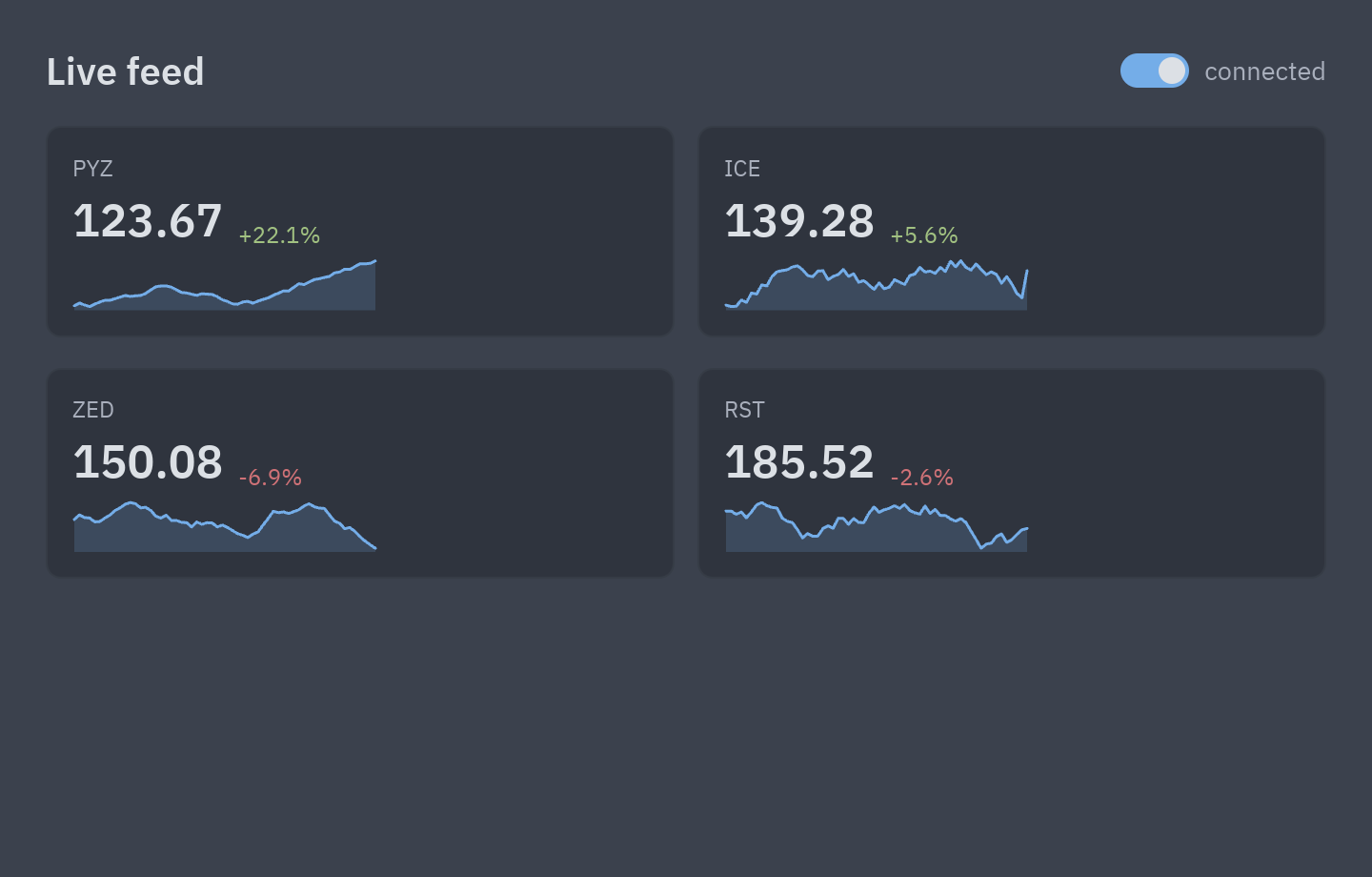
Section titled “Live data”A price ticker fed by pz.listen: a subscription backed by an async generator. It runs while subscriptions()
returns it and sends every value it yields to update.
async def feed():                       # a real app would read a websocket here    prices = {s: random.uniform(50, 150) for s in SYMBOLS}    while True:        await asyncio.sleep(0.25)        symbol = random.choice(SYMBOLS)        prices[symbol] *= 1 + random.gauss(0, 0.01)        yield symbol, prices[symbol]    # each value goes to update()
class Ticker(pz.App):    def subscriptions(self):        return [pz.listen(feed)] if self.connected else []   # the switch pauses the feed
    def update(self, message):        symbol, price = message        self.history[symbol] = (self.history[symbol] + [price])[-60:]
uv run --with pyzed-ui python examples/websocket_stream.pypython3 -m venv .venvsource .venv/bin/activatepython -m pip install pyzed-uipython examples/websocket_stream.pypy -m venv .venv.venv\Scripts\Activate.ps1python -m pip install pyzed-uipython examples\websocket_stream.pypython3 examples/websocket_stream.pypy examples\websocket_stream.pyFull code: examples/websocket_stream.py
"""Live data with ``pz.listen``: a subscription backed by an async generator.
    python examples/websocket_stream.py
``listen`` runs the generator for as long as it is returned from ``subscriptions()``and sends every value it yields to ``update``. Here it simulates a price feed; replacethe body with ``async for message in websocket:`` to consume a real socket."""
import asyncioimport random
import pyzed as pzfrom pyzed import ui
SYMBOLS = ["PYZ", "ICE", "ZED", "RST"]

async def feed():    prices = {s: random.uniform(50, 150) for s in SYMBOLS}    while True:        await asyncio.sleep(0.25)        symbol = random.choice(SYMBOLS)        prices[symbol] *= 1 + random.gauss(0, 0.01)        yield symbol, prices[symbol]

class Ticker(pz.App):    title = "Live feed"    size = (720, 460)
    def __init__(self):        self.connected = True        self.history = {s: [] for s in SYMBOLS}
    def subscriptions(self):        return [pz.listen(feed)] if self.connected else []
    def update(self, message):        symbol, price = message        self.history[symbol] = (self.history[symbol] + [price])[-60:]
    def view(self):        t = self.resolved_theme()        cards = []        for symbol, values in self.history.items():            if len(values) < 2:                cards.append(ui.stat(symbol, "…", width="fill"))                continue            delta = (values[-1] / values[0] - 1) * 100            cards.append(ui.stat(symbol, f"{values[-1]:.2f}", delta=delta, trend=values, width="fill"))        return pz.container(            pz.column([                pz.row([ui.heading("Live feed", level=2), pz.hspace(),                        ui.switch(self.connected, lambda v: setattr(self, "connected", v)),                        ui.muted("connected" if self.connected else "paused")], spacing=8, align="center"),                pz.row(cards[:2], spacing=12),                pz.row(cards[2:], spacing=12),            ], spacing=16),            padding=24, width="fill", height="fill", bg=t.background,        )

if __name__ == "__main__":    pz.run(Ticker)
AI chat
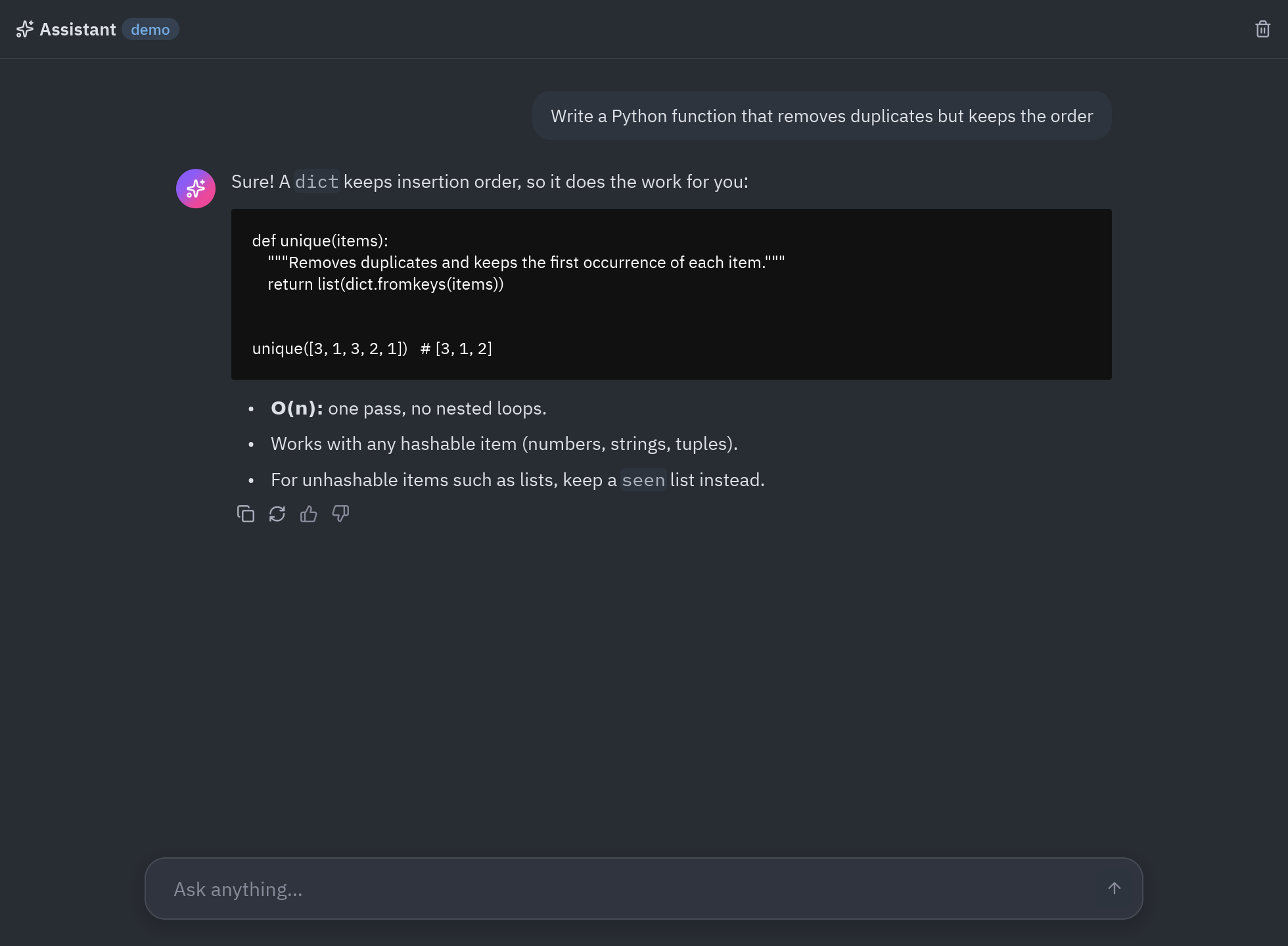
Section titled “AI chat”A chat whose answers appear word by word. It talks to any OpenAI-compatible server (Ollama, LM Studio, OpenAI…)
through httpx, and has a built-in demo mode with canned answers, so it runs offline.
uv run --with pyzed-ui --with httpx python examples/ai_chat.pypython3 -m venv .venvsource .venv/bin/activatepython -m pip install pyzed-ui httpxpython examples/ai_chat.pypy -m venv .venv.venv\Scripts\Activate.ps1python -m pip install pyzed-ui httpxpython examples\ai_chat.pypython3 examples/ai_chat.pypy examples\ai_chat.pyTo use a real model, set three environment variables before running it, for example with
Ollama on your machine: CHAT_BASE_URL=http://localhost:11434/v1 and CHAT_MODEL=llama3.2
(plus CHAT_API_KEY for a hosted service). The AI section explains the rest.
Full code: examples/ai_chat.py
"""A streaming AI chat: any OpenAI-compatible server through httpx, with a built-in demo stream.
    python examples/ai_chat.py                                    # demo: canned answers, no network    CHAT_BASE_URL=http://localhost:11434/v1 CHAT_MODEL=llama3.2 python examples/ai_chat.py     # Ollama    CHAT_BASE_URL=https://api.openai.com/v1 CHAT_API_KEY=sk-... CHAT_MODEL=<model> python examples/ai_chat.py
The answer streams token by token: ``send`` returns an async generator, Pyzed runs it on its asyncioloop and every value it yields goes to ``update``, so the window keeps responding while the model writes."""
import asyncioimport jsonimport osimport time
import pyzed as pzfrom pyzed import ui
BASE_URL = os.environ.get("CHAT_BASE_URL", "")  # empty: demo modeAPI_KEY = os.environ.get("CHAT_API_KEY", "")MODEL = os.environ.get("CHAT_MODEL", "demo" if not BASE_URL else "llama3.2")SYSTEM = "You are a concise assistant inside a desktop app. Answer in Markdown."
SUGGESTIONS = [    ("code", "Write a Python function that removes duplicates but keeps the order"),    ("lightbulb", "Explain async/await like I'm new to Python"),    ("table", "Compare SQLite, PostgreSQL and DuckDB in a table"),]
DEMO_ANSWER = """Sure! A `dict` keeps insertion order, so it does the work for you:
```pythondef unique(items):    \"\"\"Removes duplicates and keeps the first occurrence of each item.\"\"\"    return list(dict.fromkeys(items))

unique([3, 1, 3, 2, 1])   # [3, 1, 2]```
- **O(n)**: one pass, no nested loops.- Works with any *hashable* item (numbers, strings, tuples).- For unhashable items such as lists, keep a `seen` list instead."""

# -- the model ---------------------------------------------------------------------------------async def openai_stream(messages, *, model=MODEL, base_url=BASE_URL, api_key=API_KEY):    """Yields the answer's text pieces from an OpenAI-compatible ``/chat/completions`` endpoint."""    import httpx  # only needed when talking to a real server
    headers = {"Authorization": f"Bearer {api_key}"} if api_key else {}    body = {"model": model, "messages": messages, "stream": True}    async with httpx.AsyncClient(timeout=httpx.Timeout(60, connect=10)) as client:        async with client.stream("POST", f"{base_url.rstrip('/')}/chat/completions", json=body,                                 headers=headers) as response:            if response.status_code >= 400:                detail = (await response.aread()).decode(errors="replace")[:300]                raise RuntimeError(f"HTTP {response.status_code}: {detail}")            async for line in response.aiter_lines():  # server-sent events: "data: {...}"                if not line.startswith("data:"):                    continue                data = line[5:].strip()                if data == "[DONE]":                    break                delta = json.loads(data)["choices"][0].get("delta", {}).get("content")                if delta:                    yield delta

async def demo_stream(messages, *, delay=0.015):    """A stand-in for the model: streams a canned answer a few characters at a time."""    text = DEMO_ANSWER    for i in range(0, len(text), 4):        await asyncio.sleep(delay)        yield text[i:i + 4]

def model_stream(messages):    return demo_stream(messages) if not BASE_URL else openai_stream(messages)

# -- the app -----------------------------------------------------------------------------------class AIChat(pz.App):    title = "AI chat"    size = (980, 720)
    def __init__(self, stream=model_stream):        self.stream = stream            # a function: messages -> async iterator of text        self.messages = []              # [{"role": "user" | "assistant", "content": str}]        self.draft = ""        self.busy = False        self.error = ""        self.turn = 0                   # tags each reply, so pieces of a stopped one are ignored        self.started = 0.0        self.tokens = 0
    # -- actions --------------------------------------------------------------------------------    def send(self, text=None):        text = (text if text is not None else self.draft).strip()        if not text or self.busy:            return None        self.messages += [{"role": "user", "content": text}, {"role": "assistant", "content": ""}]        self.draft, self.error, self.busy = "", "", True        self.turn += 1        self.started, self.tokens = time.monotonic(), 0        history = [{"role": "system", "content": SYSTEM}] + self.messages[:-1]        return [self.reply(self.turn, history), pz.Command.scroll_to_end("thread")]
    async def reply(self, turn, history):        """Runs on Pyzed's asyncio loop; each yield goes to update() on the UI thread."""        try:            async for piece in self.stream(history):                if turn != self.turn:   # stopped or superseded                    return                yield ("delta", turn, piece)        except Exception as error:      # network errors, bad keys... shown in the thread            yield ("error", turn, str(error) or type(error).__name__)        yield ("done", turn, None)
    def stop(self):        self.turn += 1                  # the running reply sees a new turn and ends        self.busy = False
    def clear(self):        self.stop()        self.messages, self.error = [], ""
    def update(self, message):        kind, turn, value = message        if turn != self.turn:            return None        if kind == "delta":            self.messages[-1]["content"] += value            self.tokens += 1            return pz.Command.scroll_to_end("thread")        if kind == "error":            self.error = value        elif kind == "done":            self.busy = False        return None
    # -- view -----------------------------------------------------------------------------------    def bubble(self, index, message):        last = index == len(self.messages) - 1        if message["role"] == "user":            return pz.row([pz.hspace(), pz.container(ui.label(message["content"]), padding=(10, 14),                                                     max_width=560).style(background="element", radius=14)])        content = message["content"]        if last and self.busy:            content += " ▍"        body = [ui.markdown(content) if content.strip() else                pz.row([ui.spinner(size=14), ui.muted("Thinking…")], spacing=8, align="center")]        if not (last and self.busy) and content:            body.append(pz.row([                ui.icon_button("copy", pz.Command.copy(message["content"]), size="sm", tooltip="Copy"),                ui.icon_button("refresh-cw", self.retry, size="sm", tooltip="Regenerate") if last else None,                ui.icon_button("thumbs-up", None, size="sm"), ui.icon_button("thumbs-down", None, size="sm"),            ], spacing=2))        avatar = pz.container(pz.icon("sparkles", size=15, color="#ffffff"), width=30, height=30, center=True).style(            background=pz.Gradient(["#8b5cf6", "#ec4899"], angle=135), radius=15)        return pz.row([avatar, pz.column(body, spacing=6, width="fill")], spacing=12)
    def retry(self):        if self.messages and not self.busy:            question = self.messages[-2]["content"]            self.messages = self.messages[:-2]            return self.send(question)        return None
    def empty(self):        cards = [pz.button(pz.row([pz.icon(icon, size=16), ui.label(text, size="sm")], spacing=10, align="center"),                           lambda text=text: self.send(text), width="fill", padding=(12, 14), radius=10,                           bg=self.resolved_theme().surface, hover_bg=self.resolved_theme().element_hover,                           border_color=self.resolved_theme().border_variant, border_width=1)                 for icon, text in SUGGESTIONS]        return pz.container(pz.column([            pz.container(pz.icon("sparkles", size=26, color="#ffffff"), width=56, height=56, center=True).style(                background=pz.Gradient(["#8b5cf6", "#ec4899"], angle=135), radius=16, glow=("#8b5cf6", 18)),            ui.heading("How can I help?"),            ui.muted(f"Model: {MODEL}" + ("  ·  demo stream, no network" if not BASE_URL else "")),            pz.space(height=8),            pz.column(cards, spacing=8, width=480),        ], spacing=10, align="center"), width="fill", height="fill", center=True)
    def composer(self):        action = (ui.icon_button("square", self.stop, variant="solid", tooltip="Stop") if self.busy else                  ui.icon_button("arrow-up", self.send, variant="solid" if self.draft.strip() else "filled",                                 tooltip="Send", disabled=not self.draft.strip()))        return pz.container(pz.row([            ui.input(self.draft, lambda v: setattr(self, "draft", v), placeholder="Ask anything…",                     on_submit=self.send, borderless=True, id="prompt", size="lg"),            action,        ], spacing=8, align="center"), padding=(6, 8, 6, 12), max_width=760).style(            background="surface", border=(1, "border"), radius=16, shadow=("#00000026", (0, 4), 16))
    def view(self):        speed = ""        if self.tokens and self.busy:            speed = f"{self.tokens / max(time.monotonic() - self.started, 0.001):.0f} chunks/s"        header = ui.toolbar(            [pz.icon("sparkles", size=14),             ui.label("Assistant", weight="semibold"), ui.badge(MODEL, tint="info", variant="soft")],            [ui.muted(speed, size="sm") if speed else None,             ui.icon_button("trash-2", self.clear, size="sm", tooltip="New chat")], height=44)        if self.messages:            thread = pz.column([self.bubble(i, m) for i, m in enumerate(self.messages)], spacing=22, max_width=760,                               padding=(24, 24, 8, 24))            if self.error:                thread = pz.column([thread, pz.container(ui.callout("The model failed", self.error, tint="error",                                                                    icon="circle-alert"), max_width=760,                                                         padding=(0, 24))])            middle = pz.scrollable(pz.container(thread, width="fill", align_x="center"), height="fill", id="thread",                                   anchor_bottom=True)        else:            middle = self.empty()        return pz.column([            header, ui.divider(), middle,            pz.container(self.composer(), width="fill", align_x="center", padding=(8, 24, 20, 24)),        ], height="fill").style(background="editor")

if __name__ == "__main__":    pz.run(AIChat)
Several windows
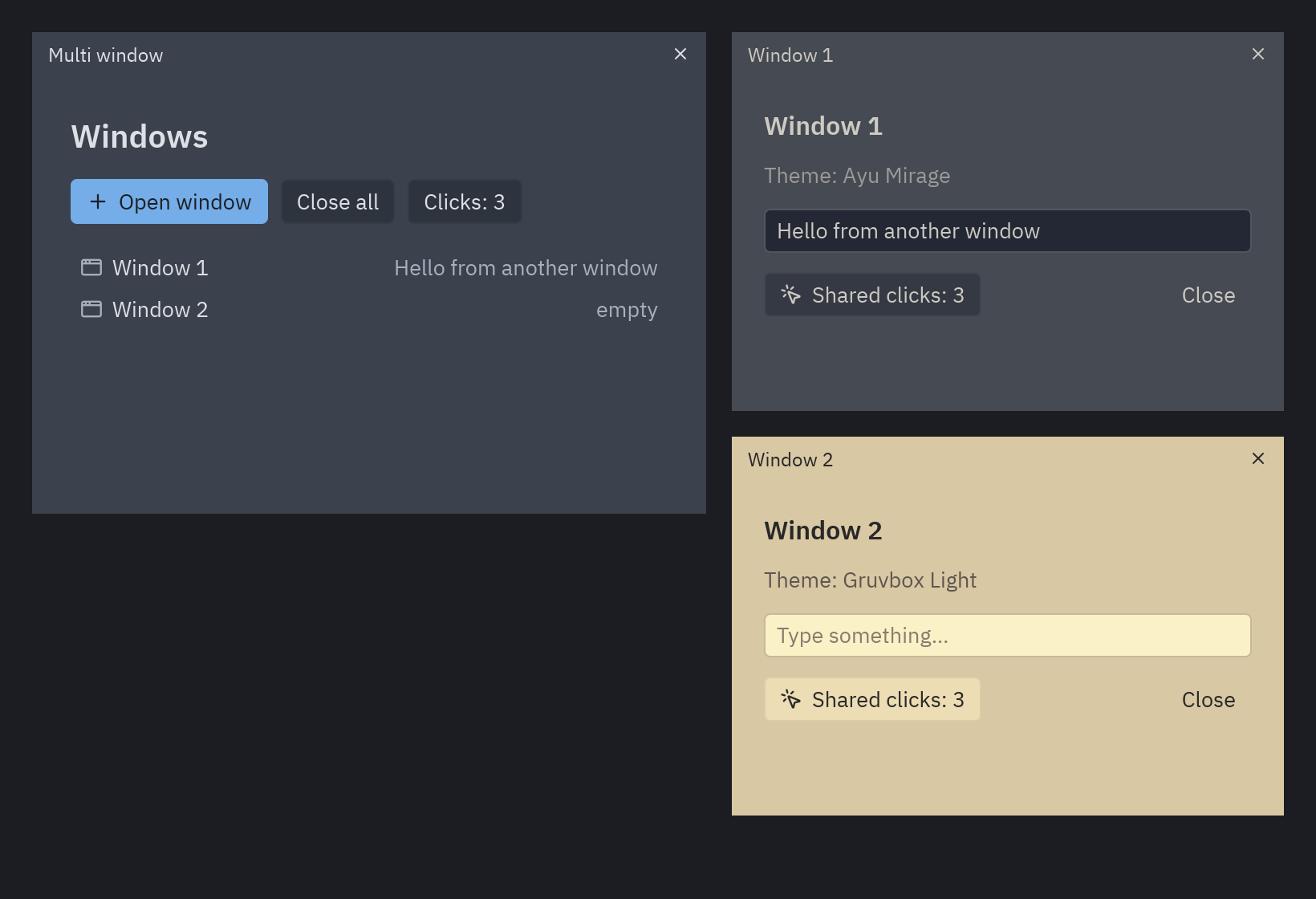
Section titled “Several windows”Open as many windows as you like: each pz.Window has its own view, title, size and theme, but all of them share
the app’s state, so the click counter is the same in every window. Closing the main window quits the app.
uv run --with pyzed-ui python examples/multi_window.pypython3 -m venv .venvsource .venv/bin/activatepython -m pip install pyzed-uipython examples/multi_window.pypy -m venv .venv.venv\Scripts\Activate.ps1python -m pip install pyzed-uipython examples\multi_window.pypython3 examples/multi_window.pypy examples\multi_window.pyFull code: examples/multi_window.py
"""Several windows in one app, after Iced's ``multi_window`` demo.
    python examples/multi_window.py
Every ``pz.Window`` has its own view, title, size and theme, but they all share theapp's state: the counter below is the same in every window. Closing the main windowquits the app."""
import pyzed as pzfrom pyzed import ui

class Note(pz.Window):    size = (360, 260)
    def __init__(self, number, theme):        self.number = number        self.theme = theme        self.title = f"Window {number}"        self.text = ""
    def on_close(self):        # The user clicked the window's close button.        self.app.windows.remove(self)
    def dismiss(self):        self.app.windows.remove(self)        return self.close()
    def view(self):        t = self.resolved_theme()        return pz.container(            pz.column([                ui.heading(self.title, level=3),                ui.muted(f"Theme: {t.name}"),                ui.input(self.text, lambda v: setattr(self, "text", v), placeholder="Type something…"),                pz.row([                    ui.button(f"Shared clicks: {self.app.clicks}", self.app.click, icon="mouse-pointer-click"),                    pz.hspace(),                    ui.button("Close", self.dismiss, variant="ghost"),                ], align="center"),            ], spacing=12),            padding=20, width="fill", height="fill", bg=t.background,        )

class Main(pz.App):    title = "Multi window"    size = (480, 360)
    def __init__(self):        self.clicks = 0        self.windows = []        self.opened = 0
    def click(self):        self.clicks += 1
    def open_window(self):        self.opened += 1        themes = pz.themes.all()        window = Note(self.opened, themes[self.opened % len(themes)])        self.windows.append(window)        return window.open()
    def close_all(self):        commands = [w.close() for w in self.windows]        self.windows = []        return commands
    def view(self):        t = self.resolved_theme()        items = [ui.list_item(w.title, None, icon="app-window", end=ui.muted(w.text or "empty")) for w in self.windows]        return pz.container(            pz.column([                ui.heading("Windows", level=2),                pz.row([ui.button("Open window", self.open_window, icon="plus", variant="solid"),                        ui.button("Close all", self.close_all, disabled=not self.windows),                        ui.button(f"Clicks: {self.clicks}", self.click)], spacing=8),                pz.column(items) if items else ui.muted("No extra windows yet."),            ], spacing=14),            padding=24, width="fill", height="fill", bg=t.background,        )

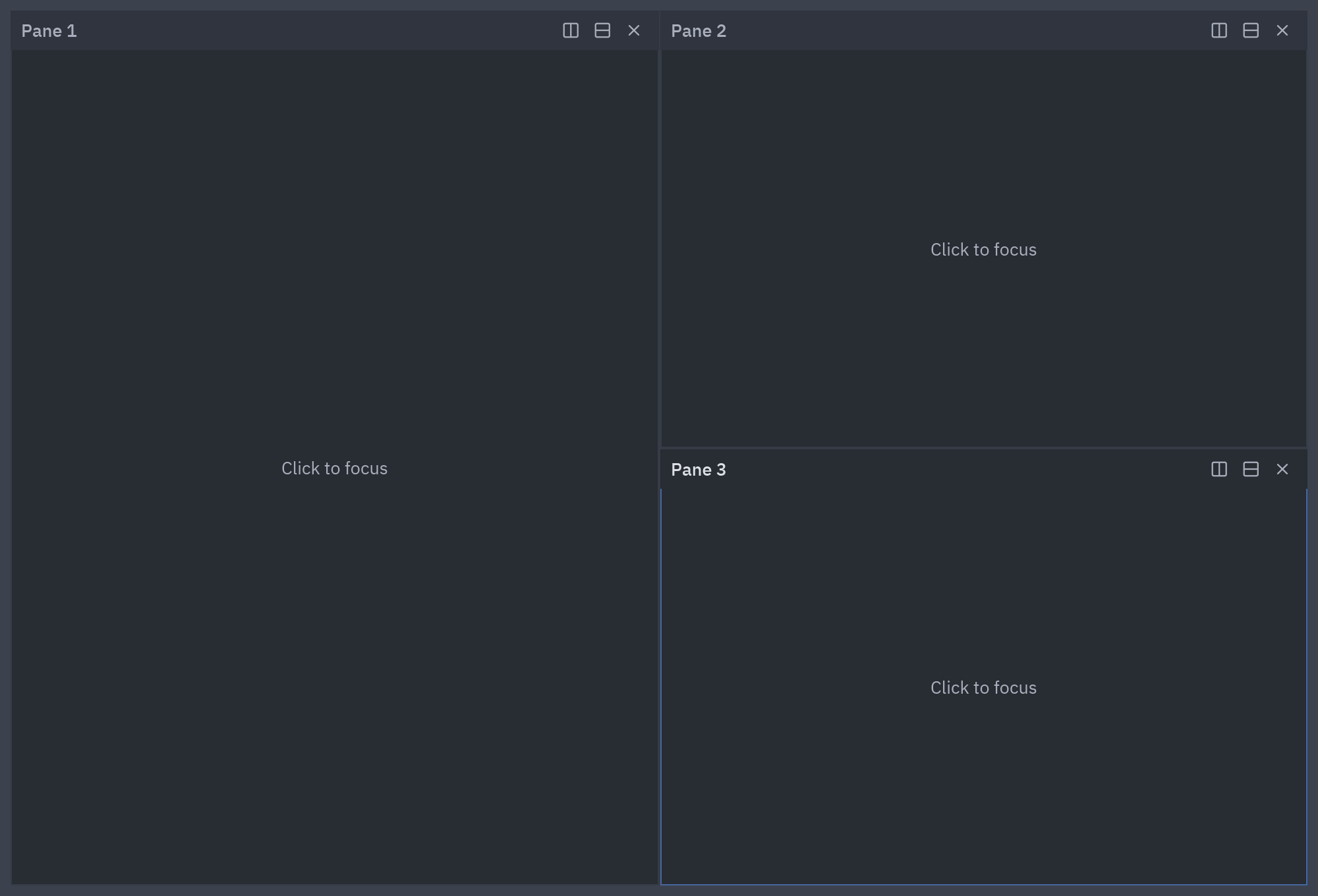
if __name__ == "__main__": pz.run(Main)Resizable panes like an editor’s: split any pane to the right or down, drag the dividers, close panes. The layout
is a small tree of lists kept in the state and drawn with nested ui.split.
uv run --with pyzed-ui python examples/panes.pypython3 -m venv .venvsource .venv/bin/activatepython -m pip install pyzed-uipython examples/panes.pypy -m venv .venv.venv\Scripts\Activate.ps1python -m pip install pyzed-uipython examples\panes.pypython3 examples/panes.pypy examples\panes.pyFull code: examples/panes.py
"""Resizable panes, after Iced's ``pane_grid`` demo, using nested ``ui.split``.
    python examples/panes.py
Drag the dividers; each pane can be split again or closed. The layout is a smalltree of ``("h" | "v", ratio, first, second)`` tuples kept in your state."""
from itertools import count
import pyzed as pzfrom pyzed import ui
_ids = count(1)

class Panes(pz.App):    title = "Panes"    size = (1000, 680)
    def __init__(self):        self.layout = next(_ids)  # a leaf is a pane number        self.focus = self.layout
    def replace(self, node, target, new):        if node == target:            return new        if isinstance(node, list):            node[2] = self.replace(node[2], target, new)            node[3] = self.replace(node[3], target, new)        return node
    def remove(self, node, target):        if isinstance(node, list):            if node[2] == target:                return node[3]            if node[3] == target:                return node[2]            node[2] = self.remove(node[2], target)            node[3] = self.remove(node[3], target)        return node
    def split(self, pane, vertical):        new = next(_ids)        self.layout = self.replace(self.layout, pane, ["v" if vertical else "h", 0.5, pane, new])        self.focus = new
    def close(self, pane):        if self.layout != pane:            self.layout = self.remove(self.layout, pane)            self.focus = None
    def pane(self, number):        t = self.resolved_theme()        focused = number == self.focus        header = pz.container(            pz.row([                ui.label(f"Pane {number}", weight="medium", color="text" if focused else "text_muted"),                pz.hspace(),                ui.icon_button("columns-2", lambda: self.split(number, False), size="sm", tooltip="Split right"),                ui.icon_button("rows-2", lambda: self.split(number, True), size="sm", tooltip="Split down"),                ui.icon_button("x", lambda: self.close(number), size="sm", tooltip="Close",                               disabled=self.layout == number),            ], spacing=2, align="center"),            padding=(4, 8), width="fill", bg=t.tab_active if focused else t.tab_inactive,        )        body = pz.mouse_area(pz.center(ui.muted("Click to focus")), on_press=lambda: setattr(self, "focus", number))        return pz.container(pz.column([header, body]), width="fill", height="fill", bg=t.editor,                            border_color=t.border_focused if focused else t.border_variant, border_width=1)
    def render(self, node):        if not isinstance(node, list):            return self.pane(node)        direction, ratio, first, second = node
        def resize(r, node=node):            node[1] = r
        return ui.split(self.render(first), self.render(second), ratio=ratio, on_resize=resize,                        vertical=direction == "v", min_size=120)
    def view(self):        return pz.container(self.render(self.layout), padding=8, width="fill", height="fill",                            bg=self.resolved_theme().background)

if __name__ == "__main__":    pz.run(Panes)
Context menu
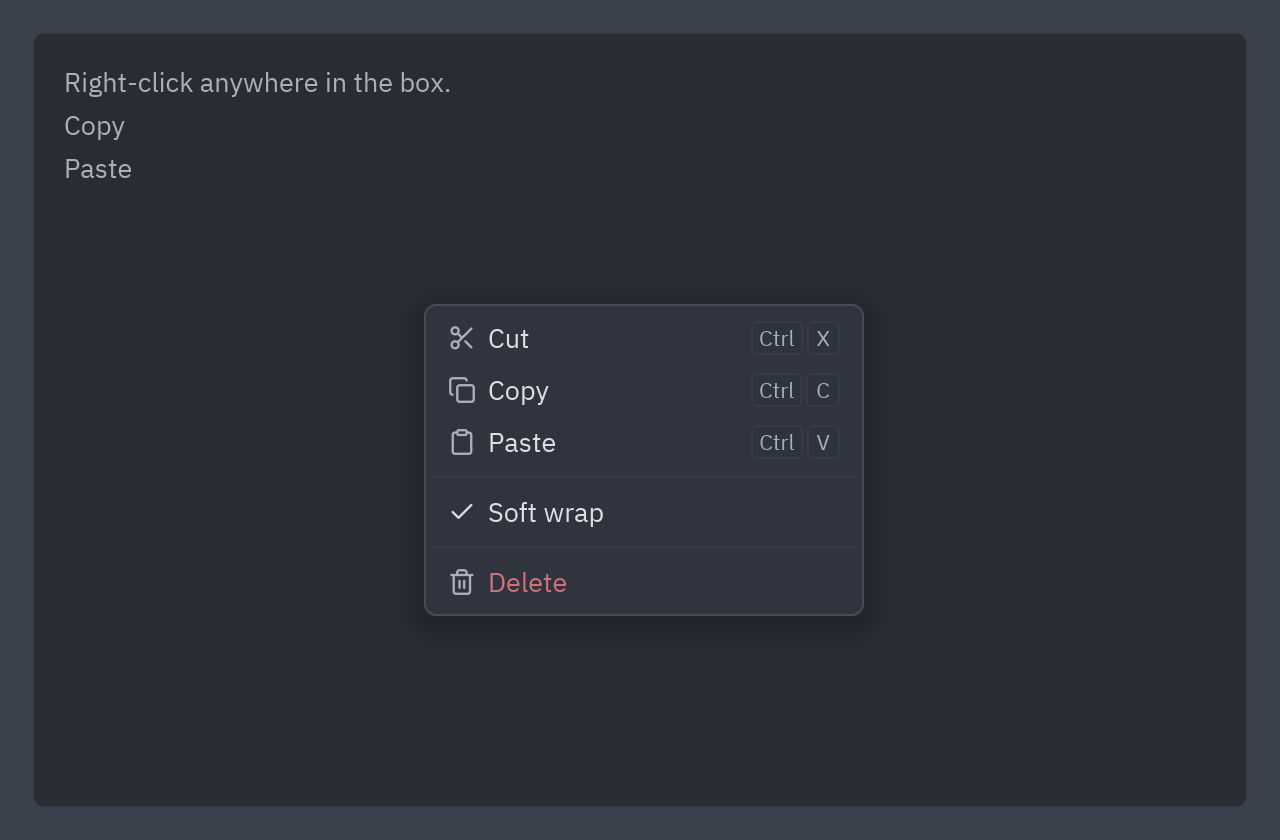
Section titled “Context menu”A right-click menu built from ui.popover and ui.menu. mouse_area(on_move=...) remembers where the pointer
is, so the menu opens right there; clicking elsewhere or pressing Esc closes it.
uv run --with pyzed-ui python examples/context_menu.pypython3 -m venv .venvsource .venv/bin/activatepython -m pip install pyzed-uipython examples/context_menu.pypy -m venv .venv.venv\Scripts\Activate.ps1python -m pip install pyzed-uipython examples\context_menu.pypython3 examples/context_menu.pypy examples\context_menu.pyFull code: examples/context_menu.py
"""A right-click context menu built from ``ui.popover`` and ``ui.menu``.
    python examples/context_menu.py
The pointer position is remembered with ``mouse_area(on_move=...)`` so the menu openswhere you clicked. Clicking anywhere else (or pressing Escape) closes it."""
import pyzed as pzfrom pyzed import ui

class ContextMenu(pz.App):    title = "Context menu"    size = (640, 420)
    def __init__(self):        self.pointer = (0, 0)        self.menu_at = None        self.log = ["Right-click anywhere in the box."]        self.soft_wrap = True
    def act(self, what):        def run():            self.log.append(what)            self.menu_at = None        return run
    def toggle_wrap(self):        self.soft_wrap = not self.soft_wrap        self.menu_at = None
    def on_key(self, combo):        if combo == "escape":            self.menu_at = None
    def view(self):        t = self.resolved_theme()        area = pz.mouse_area(            pz.container(pz.column([ui.muted(line) for line in self.log[-12:]], spacing=4), padding=16,                         width="fill", height="fill", bg=t.editor, border_color=t.border_variant, border_width=1,                         radius=t.radius),            on_move=lambda x, y: setattr(self, "pointer", (x, y)),            on_right_press=lambda: setattr(self, "menu_at", self.pointer),        )        menu = None        if self.menu_at:            menu = ui.menu([                ui.MenuItem("Cut", self.act("cut"), icon="scissors", keys="ctrl-x"),                ui.MenuItem("Copy", self.act("copy"), icon="copy", keys="ctrl-c"),                ui.MenuItem("Paste", self.act("paste"), icon="clipboard", keys="ctrl-v"),                ui.SEPARATOR,                ui.MenuItem("Soft wrap", self.toggle_wrap, checked=self.soft_wrap),                ui.SEPARATOR,                ui.MenuItem("Delete", self.act("delete"), icon="trash-2", danger=True),            ], width=220)        x, y = self.menu_at or (0, 0)        return pz.container(            ui.popover(area, menu, x=x + 16, y=y + 16, on_dismiss=lambda: setattr(self, "menu_at", None)),            padding=16, width="fill", height="fill", bg=t.background,        )

if __name__ == "__main__":    pz.run(ContextMenu)
Custom components
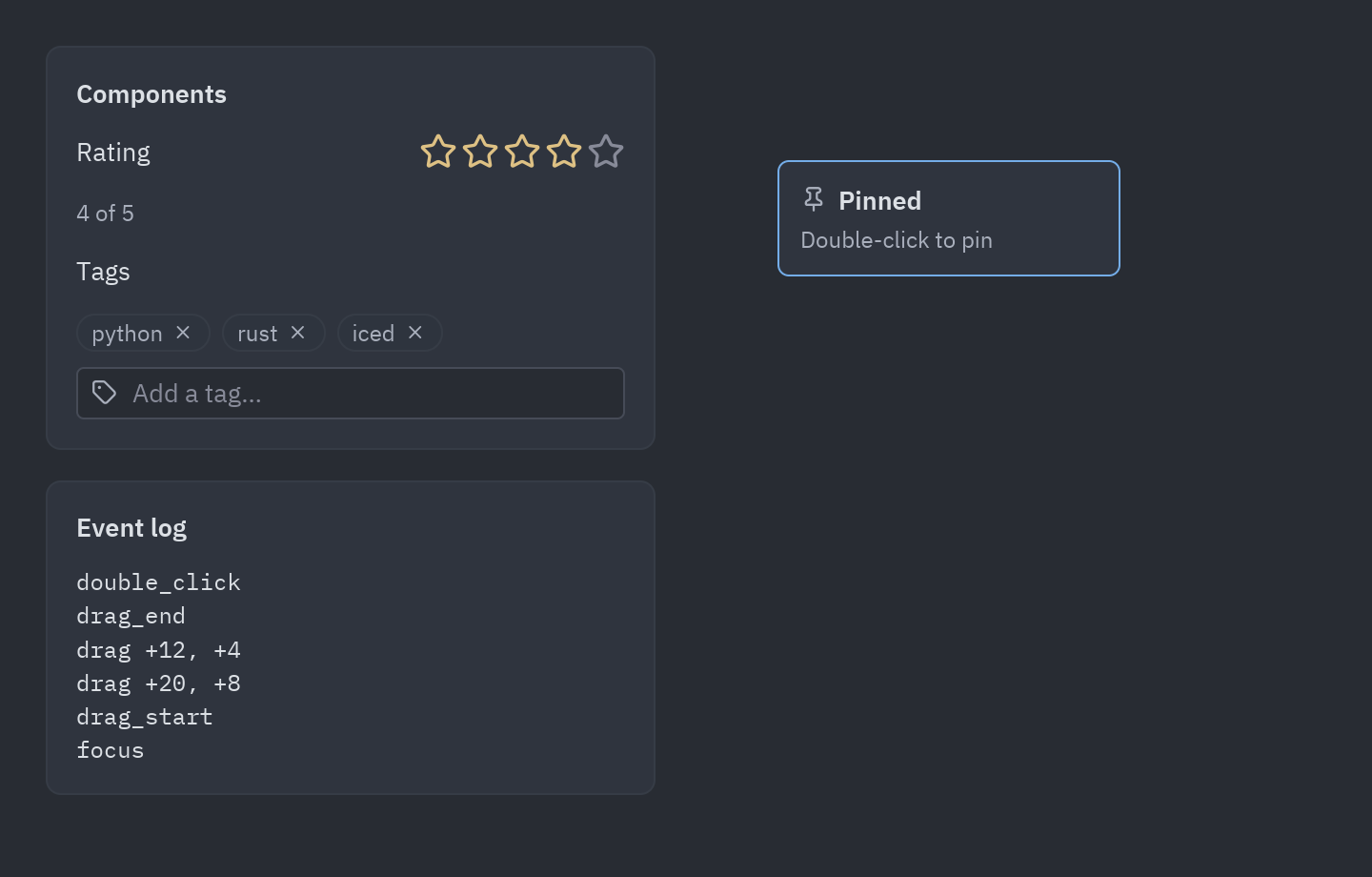
Section titled “Custom components”Three reusable pieces written in code: a star rating and a tag editor (pz.Component classes with properties,
their own state and their own events), and a note you can drag, double-click and type on, which logs the common
events every widget has.
uv run --with pyzed-ui python examples/components.pypython3 -m venv .venvsource .venv/bin/activatepython -m pip install pyzed-uipython examples/components.pypy -m venv .venv.venv\Scripts\Activate.ps1python -m pip install pyzed-uipython examples\components.pypython3 examples/components.pypy examples\components.pyFull code: examples/components.py
"""Custom components and events: a star rating, a tag editor and a draggable note.
    python examples/components.py
- ``Rating`` and ``TagInput`` are ``pz.Component`` classes: props, their own state,  their own events (``change``, ``add``, ``remove``), reusable anywhere.- The note uses the common events every widget has: drag it around, double-click to  pin it, hover it, click it and press keys (they show up in the log)."""
import pyzed as pzfrom pyzed import ui

class Rating(pz.Component):    """Stars the user can click; shows a preview while hovering."""
    value: int = 0    max: int = 5    events = {"change": "A star was picked (``event.value`` is the new rating)."}    icon = "star"    size = (140, 28)
    def setup(self):        self.hover = None  # state: which star is under the pointer
    def render(self):        t = pz.theme.current()        shown = self.hover or self.value        stars = []        for i in range(1, self.max + 1):            color = t.warning if i <= shown else t.text_disabled            stars.append(                pz.icon("star", size=20, color=color).on(                    click=lambda i=i: self.emit("change", i),                    mouse_enter=lambda i=i: setattr(self, "hover", i),                    mouse_leave=lambda: setattr(self, "hover", None),                )            )        return pz.row(stars, spacing=2)

class TagInput(pz.Component):    """A list of tags with a box to add more."""
    tags: list = ()    placeholder: str = "Add a tag…"    events = {"add": "Enter was pressed (``event.value`` is the text).",              "remove": "A tag's x was clicked (``event.value`` is the tag)."}    icon = "tags"    size = (280, 64)
    def setup(self):        self.draft = ""
    def submit(self):        text, self.draft = self.draft.strip(), ""        return self.emit("add", text) if text else None
    def render(self):        chips = [ui.chip(tag, on_remove=lambda tag=tag: self.emit("remove", tag)) for tag in self.tags]        return pz.column([            pz.row(chips, spacing=6, wrap=True, width="fill") if chips            else ui.label("No tags yet", color="text_muted", size="sm"),            ui.input(self.draft, lambda text: setattr(self, "draft", text), placeholder=self.placeholder,                     on_submit=self.submit, icon="tag"),        ], spacing=8)

class Demo(pz.App):    title = "Components and events"    size = (720, 460)
    def __init__(self):        self.rating = 3        self.tags = ["python", "rust"]        self.note = (20, 40)        self.pinned = False        self.log = ["Drag the note, double-click it, click it and type."]
    def record(self, event):        detail = event.key or (f"{event.dx:+.0f}, {event.dy:+.0f}" if event.type == "drag" else "")        self.log = [f"{event.type} {detail}".strip(), *self.log][:9]
    def move(self, event):        if not self.pinned:            x, y = self.note            self.note = (x + event.dx, y + event.dy)
    def view(self):        t = self.resolved_theme()        form = ui.card(pz.column([            ui.field("Rating", Rating(value=self.rating, on_change=lambda e: setattr(self, "rating", e.value))),            ui.label(f"{self.rating} of 5", color="text_muted", size="sm"),            ui.label("Tags"),            TagInput(                tags=self.tags,                on_add=lambda e: setattr(self, "tags", [*self.tags, e.value]),                on_remove=lambda e: setattr(self, "tags", [x for x in self.tags if x != e.value]),            ),        ], spacing=14), title="Components", width=320)
        note = pz.container(            pz.column([                pz.row([pz.icon("pin" if self.pinned else "grip", size=14, color=t.text_muted),                        ui.label("Pinned" if self.pinned else "Drag me", weight="semibold")], spacing=6, align="center"),                ui.label("Double-click to pin", size="sm", color="text_muted"),            ], spacing=4),            width=180, padding=12, bg=t.elevated, border_color=t.accent if self.pinned else t.border, border_width=1,            radius=t.radius,        ).on(            drag=self.move, drag_end=self.record, double_click=lambda: setattr(self, "pinned", not self.pinned),            click=self.record, key_down=self.record, focus=self.record, blur=self.record,            cursor="pointer" if self.pinned else "grab",        )
        log = ui.card(pz.column([ui.label(line, mono=True, size="sm") for line in self.log], spacing=2),                      title="Event log", width=320)        x, y = self.note        canvas = pz.stack([            pz.container(width="fill", height="fill"),            pz.pin(note, x=x, y=y),        ], width="fill", height="fill")        return pz.row([pz.column([form, log], spacing=16), canvas], spacing=24, padding=24)

if __name__ == "__main__":    pz.run(Demo)
To draw components with the mouse instead, follow A custom component.
Component gallery
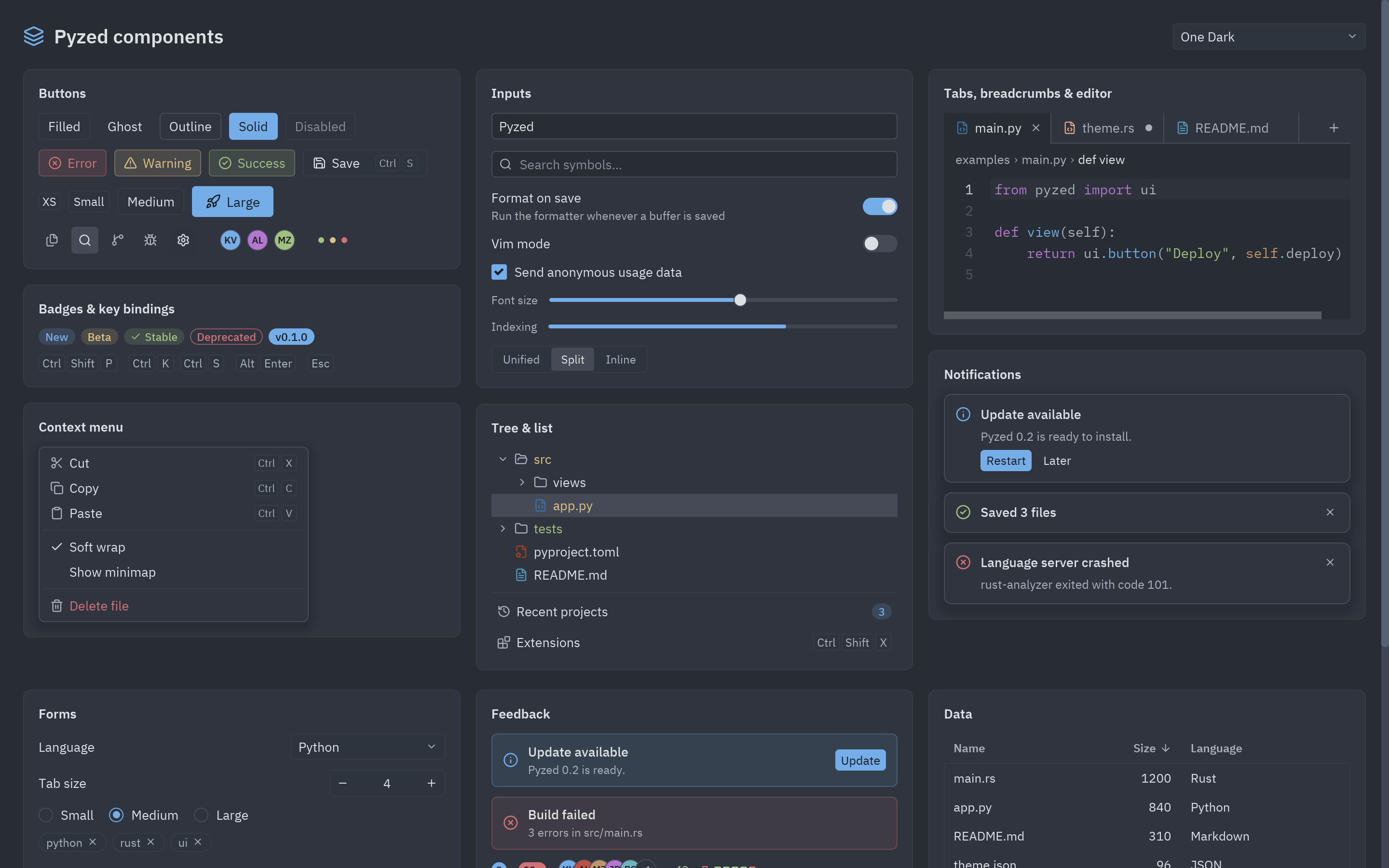
Section titled “Component gallery”A tour of the ready-made components in pyzed.ui: buttons, inputs, tabs, a code editor, menus, trees, notifications,
forms, feedback and data, with a theme picker to see them all in any theme.
uv run --with pyzed-ui python examples/gallery.pypython3 -m venv .venvsource .venv/bin/activatepython -m pip install pyzed-uipython examples/gallery.pypy -m venv .venv.venv\Scripts\Activate.ps1python -m pip install pyzed-uipython examples\gallery.pypython3 examples/gallery.pypy examples\gallery.pyFull code: examples/gallery.py
"""A tour of the ready-made components in ``pyzed.ui``.
    python examples/gallery.py"""
import pyzed as pzfrom pyzed import ui
SNIPPET = '''from pyzed import ui
def view(self):    return ui.button("Deploy", self.deploy)'''

class Gallery(pz.App):    title = "Pyzed components"    size = (1440, 900)
    def __init__(self, theme=pz.themes.ONE_DARK):        self.theme = theme        self.name = "Pyzed"        self.query = ""        self.format_on_save = True        self.vim_mode = False        self.telemetry = True        self.font_size = 0.55        self.view_mode = "Split"        self.active_tab = "main.py"        self.selected_file = "src/app.py"        self.expanded = {"src"}        self.language = "Python"        self.size_choice = "Medium"        self.tab_size = 4        self.tags = {"rust", "python", "ui"}        self.advanced_open = True        self.sort_by = "Size"        self.descending = True        self.selected_row = None
    def set(self, field):        return lambda value: setattr(self, field, value)
    def section(self, title, *children, spacing=10):        return ui.card(pz.column(list(children), spacing=spacing), title=title, width="fill")
    def view(self):        t = self.theme        buttons = self.section(            "Buttons",            pz.row([                ui.button("Filled", lambda: None),                ui.button("Ghost", lambda: None, variant="ghost"),                ui.button("Outline", lambda: None, variant="outline"),                ui.button("Solid", lambda: None, variant="solid"),                ui.button("Disabled", disabled=True),            ], spacing=8),            pz.row([                ui.button("Error", lambda: None, variant="error", icon="circle-x"),                ui.button("Warning", lambda: None, variant="warning", icon="triangle-alert"),                ui.button("Success", lambda: None, variant="success", icon="circle-check"),                ui.button("Save", lambda: None, icon="save", keys="ctrl-s"),            ], spacing=8),            pz.row([                ui.button("XS", lambda: None, size="xs"),                ui.button("Small", lambda: None, size="sm"),                ui.button("Medium", lambda: None, size="md"),                ui.button("Large", lambda: None, size="lg", icon="rocket", variant="solid"),            ], spacing=8, align="center"),            pz.row([                ui.icon_button("files", lambda: None, tooltip="Project"),                ui.icon_button("search", lambda: None, selected=True),                ui.icon_button("git-branch", lambda: None),                ui.icon_button("bug", lambda: None),                ui.icon_button("settings", lambda: None, variant="filled"),                pz.space(width=12),                ui.avatar("KV", index=0), ui.avatar("AL", index=3), ui.avatar("MZ", index=7),                pz.space(width=12),                ui.indicator("success"), ui.indicator("warning"), ui.indicator("error"),            ], spacing=6, align="center"),        )
        badges = self.section(            "Badges & key bindings",            pz.row([                ui.badge("New"),                ui.badge("Beta", tint="warning"),                ui.badge("Stable", tint="success", icon="check"),                ui.badge("Deprecated", tint="error", variant="outline"),                ui.badge("v0.1.0", tint="accent", variant="solid"),            ], spacing=6),            pz.row([ui.kbd("ctrl-shift-p"), ui.kbd("ctrl-k ctrl-s"), ui.kbd("alt-enter"), ui.kbd("escape")],                   spacing=12, align="center"),        )
        inputs = self.section(            "Inputs",            ui.input(self.name, self.set("name"), placeholder="Project name"),            ui.search_input(self.query, self.set("query"), placeholder="Search symbols…"),            ui.field("Format on save", ui.switch(self.format_on_save, self.set("format_on_save")),                     description="Run the formatter whenever a buffer is saved"),            ui.field("Vim mode", ui.switch(self.vim_mode, self.set("vim_mode"))),            ui.checkbox(self.telemetry, self.set("telemetry"), label="Send anonymous usage data"),            pz.row([ui.label("Font size", size="sm", color="text_muted"),                    ui.slider(self.font_size, self.set("font_size"))], spacing=12, align="center"),            pz.row([ui.label("Indexing", size="sm", color="text_muted"), ui.progress(0.68)],                   spacing=12, align="center"),            ui.segmented(["Unified", "Split", "Inline"], self.view_mode, self.set("view_mode")),            spacing=12,        )
        menu = self.section(            "Context menu",            ui.menu([                ui.MenuItem("Cut", lambda: None, icon="scissors", keys="ctrl-x"),                ui.MenuItem("Copy", lambda: None, icon="copy", keys="ctrl-c"),                ui.MenuItem("Paste", lambda: None, icon="clipboard", keys="ctrl-v"),                ui.SEPARATOR,                ui.MenuItem("Soft wrap", lambda: None, checked=True),                ui.MenuItem("Show minimap", lambda: None, checked=False),                ui.SEPARATOR,                ui.MenuItem("Delete file", lambda: None, icon="trash-2", danger=True),            ], width=280),        )
        files = ui.TreeNode.from_paths(            ["src/app.py", "src/views/editor.py", "src/views/panel.py", "tests/test_app.py", "pyproject.toml", "README.md"],            {"src/app.py": "modified", "tests/test_app.py": "created"},        )        tree = self.section(            "Tree & list",            ui.tree(files, expanded=self.expanded, selected=self.selected_file,                    on_toggle=lambda f: self.expanded.symmetric_difference_update({f}),                    on_select=self.set("selected_file")),            ui.divider(),            ui.list_item("Recent projects", icon="history", end=ui.badge("3"), on_press=lambda: None),            ui.list_item("Extensions", icon="blocks", end=ui.kbd("ctrl-shift-x"), on_press=lambda: None),            spacing=6,        )
        tabs = self.section(            "Tabs, breadcrumbs & editor",            pz.container(                pz.column([                    ui.tab_bar(                        [ui.Tab.for_file("main.py"), ui.Tab.for_file("theme.rs", dirty=True),                         ui.Tab.for_file("README.md", preview=True)],                        self.active_tab,                        on_select=self.set("active_tab"),                        on_close=lambda _: None,                        end=[ui.icon_button("plus", lambda: None, size="sm")],                    ),                    ui.toolbar([ui.breadcrumbs(["examples", self.active_tab, "def view"])]),                    pz.container(ui.editor("gallery-snippet", SNIPPET, language="py"), height=150),                ]),                border_color=t.border, border_width=1, radius=t.radius, clip=True,            ),        )
        toasts = self.section(            "Notifications",            ui.toast("Update available", "Pyzed 0.2 is ready to install.", kind="info",                     actions=[ui.button("Restart", lambda: None, size="sm", variant="solid"),                              ui.button("Later", lambda: None, size="sm", variant="ghost")], width=None),            ui.toast("Saved 3 files", kind="success", on_dismiss=lambda: None, width=None),            ui.toast("Language server crashed", "rust-analyzer exited with code 101.", kind="error",                     on_dismiss=lambda: None, width=None),        )
        forms = self.section(            "Forms",            ui.field("Language", ui.select(["Python", "Rust", "TypeScript", "Go"], self.language,                                           self.set("language"), width=160)),            ui.field("Tab size", ui.number_field(self.tab_size, self.set("tab_size"), min=1, max=8)),            ui.radio_group(["Small", "Medium", "Large"], self.size_choice, self.set("size_choice"), horizontal=True),            pz.row([ui.chip(tag, on_remove=lambda tag=tag: self.tags.discard(tag)) for tag in sorted(self.tags)],                   spacing=6),            ui.disclosure("Advanced", ui.muted("Settings that most people never need."), open=self.advanced_open,                          on_toggle=lambda: setattr(self, "advanced_open", not self.advanced_open)),            pz.row([ui.split_button("Run", lambda: None, lambda: None, icon="play"),                    ui.toggle_group([("list", "list"), ("grid", "layout-grid")], "list", lambda v: None)],                   spacing=8),        )        feedback = self.section(            "Feedback",            ui.callout("Update available", "Pyzed 0.2 is ready.", tint="info",                       actions=[ui.button("Update", lambda: None, size="sm", variant="solid")]),            ui.callout("Build failed", "3 errors in src/main.rs", tint="error"),            pz.row([ui.count_badge(3), ui.count_badge(128, tint="error"), ui.facepile(["KV", "AL", "MZ", "JD", "RS", "TT"]),                    ui.diff_stat(42, 7)], spacing=12, align="center"),            ui.keybinding_hint("Open file", "ctrl-p"),        )        files = [dict(name="main.rs", size=1200, lang="Rust"), dict(name="app.py", size=840, lang="Python"),                 dict(name="README.md", size=310, lang="Markdown"), dict(name="theme.json", size=96, lang="JSON")]
        def sort(column):            self.descending = not self.descending if self.sort_by == column else False            self.sort_by = column
        data = self.section(            "Data",            ui.table([ui.Column("Name", "name"), ui.Column("Size", "size", width=70, align="end"),                      ui.Column("Language", "lang")], files, sort_by=self.sort_by, descending=self.descending,                     on_sort=sort, on_row_press=self.set("selected_row"), selected=self.selected_row, height=156),            pz.row([ui.stat("Requests", "12.4k", delta=4.2, trend=[3, 5, 4, 6, 8, 7, 9]),                    ui.donut([5, 3, 2], label="62%", size=88)], spacing=12, align="center"),            ui.bar_chart([4, 8, 6, 9, 3], labels=["Mon", "Tue", "Wed", "Thu", "Fri"], width=300, height=120),        )
        theme_picker = ui.select(pz.themes.names(), t.name, lambda name: setattr(self, "theme", pz.themes.get(name)),                                 width=200)        header = pz.row([            pz.icon("layers", size=22, color=t.accent),            ui.heading("Pyzed components", level=2),            pz.hspace(),            theme_picker,        ], spacing=10, align="center")
        grid = pz.row([            pz.column([buttons, badges, menu], spacing=16, width="fill"),            pz.column([inputs, tree], spacing=16, width="fill"),            pz.column([tabs, toasts], spacing=16, width="fill"),        ], spacing=16)        more = pz.row([            pz.column([forms], width="fill"),            pz.column([feedback], width="fill"),            pz.column([data], width="fill"),        ], spacing=16)
        return pz.container(            pz.scrollable(pz.column([header, grid, more], spacing=20, padding=24), height="fill"),            width="fill",            height="fill",            bg=t.background if not t.is_dark else t.editor,            color=t.text,        )

if __name__ == "__main__":    pz.run(Gallery)
Counter
Section titled “Counter”The smallest Pyzed app: one number, two buttons. It is the best file to start from when you make something new.
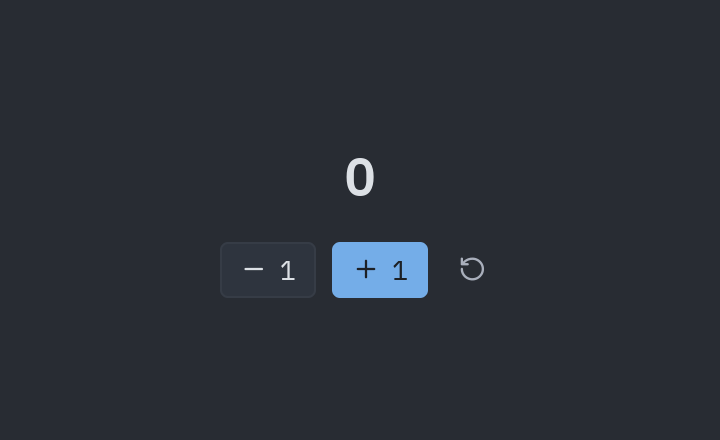
uv run --with pyzed-ui python examples/counter.pypython3 -m venv .venvsource .venv/bin/activatepython -m pip install pyzed-uipython examples/counter.pypy -m venv .venv.venv\Scripts\Activate.ps1python -m pip install pyzed-uipython examples\counter.pypython3 examples/counter.pypy examples\counter.pyFull code: examples/counter.py
"""The smallest Pyzed app: state + update + view."""
import pyzed as pzfrom pyzed import ui

class Counter(pz.App):    title = "Counter"    size = (360, 220)
    def __init__(self):        self.count = 0
    def update(self, message):        if message == "increment":            self.count += 1        elif message == "decrement":            self.count -= 1
    def view(self):        return pz.center(            pz.column(                [                    ui.heading(str(self.count)),                    pz.row(                        [                            ui.button("1", "decrement", icon="minus"),                            ui.button("1", "increment", icon="plus", variant="solid"),                            ui.icon_button("rotate-ccw", lambda: setattr(self, "count", 0), tooltip="Reset"),                        ],                        spacing=8,                    ),                ],                spacing=16,                align="center",            ),            bg=self.theme.editor,        )

if __name__ == "__main__":    pz.run(Counter)
Workspace editor
Section titled “Workspace editor”A full code editor workspace in about 450 lines: a project panel with the files of a folder, tabs, a syntax-highlighted editor (edit, undo, save with Ctrl+S), git status colors, an outline panel, theme switching, a command palette (Ctrl+Shift+P) and a file finder (Ctrl+P). Its look recreates the Zed editor, whose interface inspired Pyzed’s default theme. The terminal panel shows sample output; it does not run a shell.
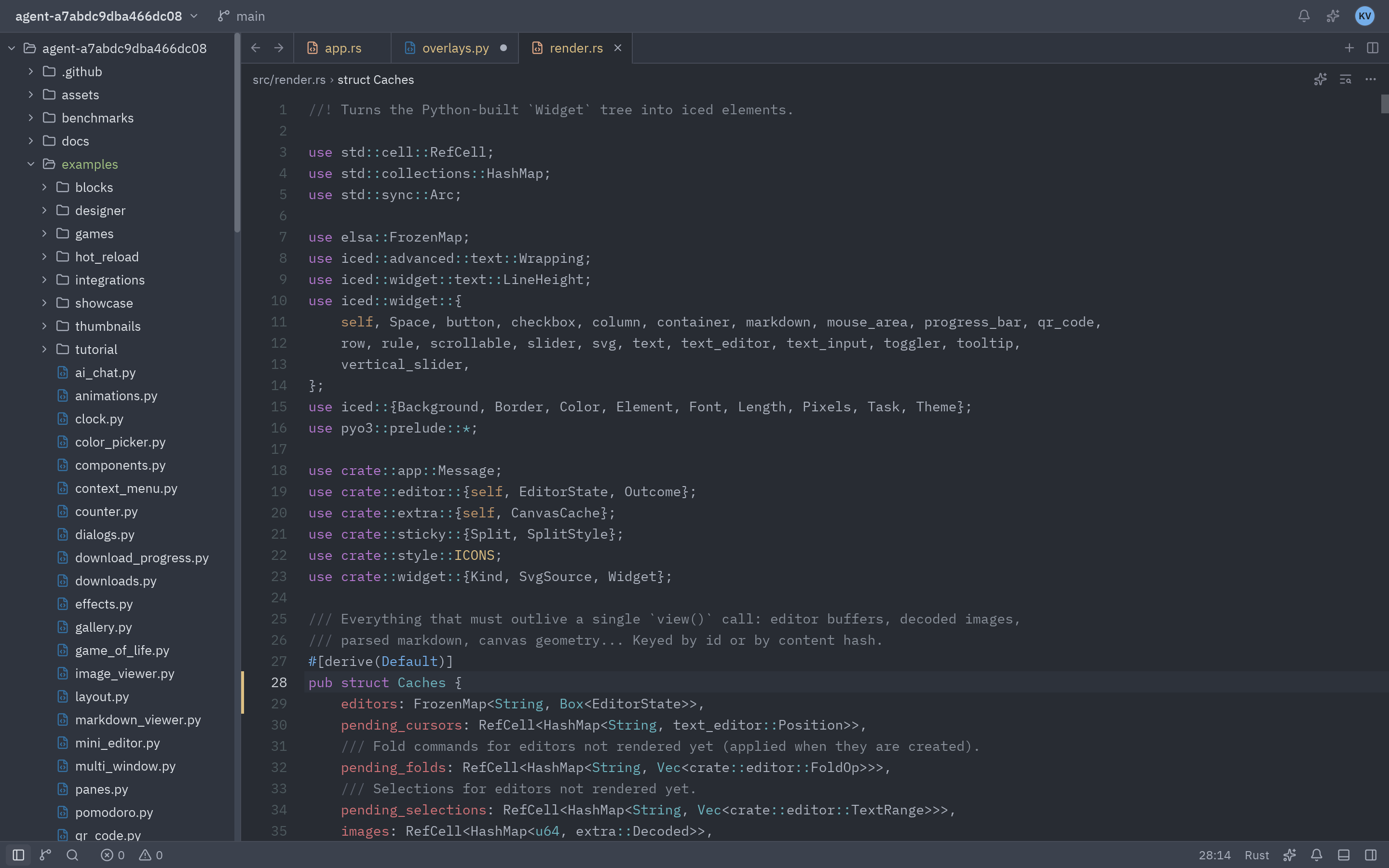
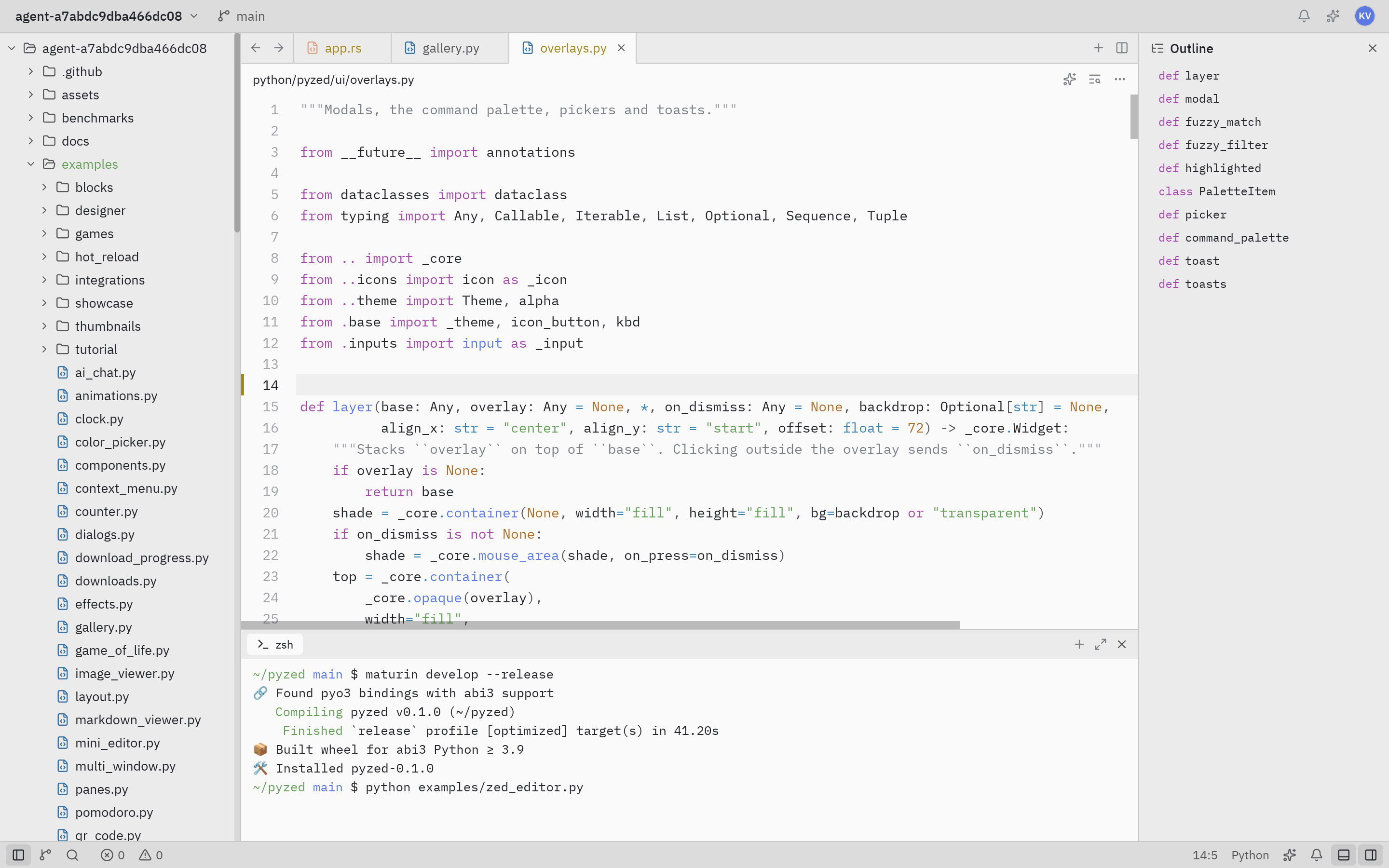
uv run --with pyzed-ui python examples/zed_editor.pypython3 -m venv .venvsource .venv/bin/activatepython -m pip install pyzed-uipython examples/zed_editor.pypy -m venv .venv.venv\Scripts\Activate.ps1python -m pip install pyzed-uipython examples\zed_editor.pypython3 examples/zed_editor.pypy examples\zed_editor.pyPass a folder to open it: python examples/zed_editor.py path/to/project. A smaller version is built step by step
in the mini code editor tutorial.
Full code: examples/zed_editor.py
"""A recreation of the Zed editor written with Pyzed.
    python examples/zed_editor.py [folder]
Real features: project panel over the folder's files, tabs, a syntax-highlightededitor (edit, undo, save with ctrl-s), git status colors, an outline panel, themeswitching, the command palette (ctrl-shift-p) and the file finder (ctrl-p).The terminal panel shows static sample output; it does not run a shell."""
from __future__ import annotations
import reimport subprocessimport sysfrom pathlib import Pathfrom typing import Dict, List, Optional, Tuple
import pyzed as pzfrom pyzed import Command, ui
IGNORED_SUFFIXES = (".so", ".pyd", ".dll", ".dylib", ".pyc")IGNORED = {".git", "target", ".venv", "venv", "__pycache__", "node_modules", ".pytest_cache", "dist", ".mypy_cache"}MAX_FILES = 3000
TERMINAL_SAMPLE = (    "\x1b[32m~/pyzed\x1b[0m \x1b[34mmain\x1b[0m $ maturin develop --release\n"    "🔗 Found pyo3 bindings with abi3 support\n"    "\x1b[32m   Compiling\x1b[0m pyzed v0.1.0 (~/pyzed)\n"    "\x1b[32m    Finished\x1b[0m `release` profile [optimized] target(s) in 41.20s\n"    "📦 Built wheel for abi3 Python ≥ 3.9\n"    "🛠 Installed pyzed-0.1.0\n"    "\x1b[32m~/pyzed\x1b[0m \x1b[34mmain\x1b[0m $ python examples/zed_editor.py\n")

# ---------------------------------------------------------------------------# Project helpers# ---------------------------------------------------------------------------

def scan(root: Path) -> List[str]:    files: List[str] = []    for path in sorted(root.rglob("*")):        rel = path.relative_to(root)        if any(part in IGNORED for part in rel.parts) or path.suffix in IGNORED_SUFFIXES or not path.is_file():            continue        files.append(rel.as_posix())        if len(files) >= MAX_FILES:            break    return files

def git(root: Path, *args: str) -> str:    try:        return subprocess.run(["git", *args], cwd=root, capture_output=True, text=True, timeout=5).stdout    except (OSError, subprocess.SubprocessError):        return ""

def git_status(root: Path) -> Dict[str, str]:    status = {}    for line in git(root, "status", "--porcelain").splitlines():        code, path = line[:2], line[3:].strip()        if "D" in code:            status[path] = "deleted"        elif "?" in code or "A" in code:            status[path] = "created"        elif code.strip():            status[path] = "modified"    return status

def git_markers(root: Path, path: str) -> Dict[int, str]:    markers: Dict[int, str] = {}    for hunk in re.finditer(r"^@@ -\d+(?:,(\d+))? \+(\d+)(?:,(\d+))? @@", git(root, "diff", "-U0", "--", path), re.M):        removed, start, added = int(hunk.group(1) or 1), int(hunk.group(2)), int(hunk.group(3) or 1)        if added == 0:            markers[max(start, 1)] = "deleted"        for line in range(start, start + added):            markers[line] = "created" if removed == 0 else "modified"    return markers

SYMBOLS = re.compile(    r"^\s*(?:pub(?:\([^)]*\))?\s+)?(?:async\s+)?(?P<kind>fn|struct|enum|trait|impl|mod|def|class)\s+(?P<name>[A-Za-z_]\w*)",)

def outline(text: str) -> List[Tuple[int, str, str]]:    out = []    for number, line in enumerate(text.splitlines(), start=1):        match = SYMBOLS.match(line)        if match:            out.append((number, match["kind"], match["name"].strip()))    return out

# ---------------------------------------------------------------------------# The app# ---------------------------------------------------------------------------

class Zed(pz.App):    title = "Pyzed — a Zed-like editor in Python"    size = (1440, 900)    min_size = (800, 500)
    def __init__(self, root: str = ".", *, status: Optional[Dict[str, str]] = None):        self.root = Path(root).resolve()        self.files = scan(self.root)        self.status = git_status(self.root) if status is None else status        self.nodes = [ui.TreeNode(self.root.name, children=ui.TreeNode.from_paths(self.files, self.status), id="")]        self.expanded = {""}        self.selected: Optional[str] = None        self.tabs: List[str] = []        self.active: Optional[str] = None        self.texts: Dict[str, str] = {}        self.markers: Dict[str, Dict[int, str]] = {}        self.dirty: set = set()        self.cursor = (1, 1)        self.show_left, self.show_bottom, self.show_right = True, False, False        self.palette: Optional[str] = None  # "commands" | "files"        self.query, self.choice = "", 0        self.notices: List[Tuple[str, str]] = []        self.theme = pz.themes.ONE_DARK
    def on_start(self):        commands = []        if self.active and self.cursor != (1, 1):            commands.append(Command.set_editor_cursor(self.active, *self.cursor))        if self.palette:            commands.append(Command.focus("palette"))        return commands
    # -- files -------------------------------------------------------------    def open_file(self, path: str):        if path not in self.texts:            try:                self.texts[path] = (self.root / path).read_text(encoding="utf-8")            except (UnicodeDecodeError, OSError):                self.notify("Can't open binary file", "warning")                return            self.markers.setdefault(path, git_markers(self.root, path))        if path not in self.tabs:            self.tabs.append(path)        self.active = self.selected = path        parts = path.split("/")        self.expanded.update("/".join(parts[:i]) for i in range(1, len(parts)))        self.cursor = (1, 1)
    def close_tab(self, path: str):        if path in self.tabs:            index = self.tabs.index(path)            self.tabs.remove(path)            if self.active == path:                self.active = self.tabs[min(index, len(self.tabs) - 1)] if self.tabs else None
    def edited(self, path: str, text: str):        self.texts[path] = text        self.dirty.add(path)
    def save(self):        if self.active:            (self.root / self.active).write_text(self.texts[self.active], encoding="utf-8")            self.dirty.discard(self.active)            self.notify(f"Saved {self.active}", "success")
    def toggle_folder(self, folder: str):        self.expanded.symmetric_difference_update({folder})        self.selected = folder
    def notify(self, text: str, kind: str = "info"):        self.notices = (self.notices + [(text, kind)])[-3:]
    # -- palette -----------------------------------------------------------    def commands(self) -> List[ui.PaletteItem]:        def run(action):            def handler():                self.palette = None                return action()            return handler
        def set_theme(theme):            return run(lambda: setattr(self, "theme", theme))
        return [            ui.PaletteItem("file finder: toggle", run(self.open_finder), keys="ctrl-p"),            ui.PaletteItem("workspace: toggle left dock", run(self.toggle_left), keys="ctrl-b"),            ui.PaletteItem("workspace: toggle bottom dock", run(self.toggle_bottom), keys="ctrl-j"),            ui.PaletteItem("workspace: toggle right dock", run(self.toggle_right), keys="ctrl-alt-b"),            ui.PaletteItem("workspace: save", run(self.save), keys="ctrl-s"),            ui.PaletteItem("pane: close active item", run(lambda: self.active and self.close_tab(self.active)), keys="ctrl-w"),            ui.PaletteItem("theme selector: one dark", set_theme(pz.themes.ONE_DARK)),            ui.PaletteItem("theme selector: one light", set_theme(pz.themes.ONE_LIGHT)),            ui.PaletteItem("theme selector: gruvbox dark", set_theme(pz.themes.GRUVBOX_DARK)),            ui.PaletteItem("terminal panel: toggle focus", run(self.toggle_bottom), keys="ctrl-`"),            ui.PaletteItem("outline panel: toggle", run(self.toggle_right)),            ui.PaletteItem("zed: about", run(lambda: self.notify("Pyzed 0.1 · Iced 0.14 · Python " + sys.version.split()[0]))),            ui.PaletteItem("zed: quit", run(Command.exit), keys="ctrl-q"),        ]
    def palette_matches(self):        if self.palette == "files":            items = [                ui.PaletteItem(path, (lambda p=path: self.pick_file(p)), icon=pz.icons.for_file(path)[0])                for path in self.files            ]            return ui.fuzzy_filter(self.query, items, key=lambda i: i.label)[:200]        return ui.fuzzy_filter(self.query, self.commands(), key=lambda i: i.label)
    def pick_file(self, path: str):        self.palette = None        self.open_file(path)
    def open_palette(self, kind: str = "commands"):        self.palette, self.query, self.choice = kind, "", 0        return Command.focus("palette")
    def open_finder(self):        return self.open_palette("files")
    def set_query(self, query: str):        self.query, self.choice = query, 0
    def submit(self):        matches = self.palette_matches()        if matches:            return matches[min(self.choice, len(matches) - 1)][0].on_press()
    def toggle_left(self):        self.show_left = not self.show_left
    def toggle_bottom(self):        self.show_bottom = not self.show_bottom
    def toggle_right(self):        self.show_right = not self.show_right
    def on_key(self, combo: str):        combo = combo.replace("cmd-", "ctrl-")        if combo == "ctrl-shift-p":            if self.palette == "commands":                self.palette = None                return None            return self.open_palette()        if combo == "ctrl-p":            return self.open_finder()        if self.palette:            if combo == "escape":                self.palette = None            elif combo in ("down", "ctrl-n"):                self.choice += 1            elif combo in ("up", "ctrl-p"):                self.choice = max(0, self.choice - 1)            return None        actions = {            "ctrl-b": self.toggle_left,            "ctrl-j": self.toggle_bottom,            "ctrl-`": self.toggle_bottom,            "ctrl-alt-b": self.toggle_right,            "ctrl-s": self.save,            "ctrl-w": lambda: self.active and self.close_tab(self.active),            "ctrl-q": Command.exit,        }        if combo in actions:            return actions[combo]()
    # -- view --------------------------------------------------------------    def view(self):        t = self.theme        layout = ui.workspace(            self.center(),            title_bar=ui.title_bar(                [                    ui.title_button(self.root.name, chevron=True),                    ui.title_button("main", icon="git-branch", muted=True),                ],                [                    ui.icon_button("bell", tooltip="Notifications"),                    ui.icon_button("sparkles", tooltip="Agent Panel"),                    pz.space(width=4),                    ui.avatar("KV", index=0),                    pz.space(width=4),                ],            ),            left=self.project_panel() if self.show_left else None,            right=self.outline_panel() if self.show_right else None,            bottom=self.terminal_panel() if self.show_bottom else None,            status_bar=self.status_bar(),            left_width=250,            right_width=260,        )        if self.notices:            layout = ui.toasts(layout, [                ui.toast(text, kind=kind, on_dismiss=(lambda i=i: self.notices.pop(i)))                for i, (text, kind) in enumerate(self.notices)            ])        if self.palette:            matches = self.palette_matches()            self.choice = min(self.choice, max(len(matches) - 1, 0))            overlay = ui.picker(                self.query,                self.set_query,                matches,                selected=self.choice,                input_id="palette",                on_submit=self.submit,                placeholder="Execute a command…" if self.palette == "commands" else "Search project files…",            )            layout = ui.layer(layout, overlay, on_dismiss=lambda: setattr(self, "palette", None),                              backdrop=pz.theme.alpha("#000000", 0.12 if t.is_dark else 0.04))        return layout
    def project_panel(self):        return pz.scrollable(            pz.container(                ui.tree(self.nodes, expanded=self.expanded, selected=self.selected,                        on_toggle=self.toggle_folder, on_select=self.open_file),                padding=(4, 0),            ),            height="fill",            scroller=self.theme.scrollbar,            scrollbar_width=6,        )
    def outline_panel(self):        symbols = outline(self.texts.get(self.active or "", ""))        rows = [            ui.list_item(                pz.row([ui.label(kind, color=self.theme.syntax["keyword"], size="sm", mono=True),                        ui.label(name, mono=True, size="sm")], spacing=6),                lambda: None,                height=24,                indent=8,            )            for _, kind, name in symbols        ]        return pz.column([            ui.panel_header("Outline", [ui.icon_button("x", self.toggle_right, size="sm")], icon="list-tree"),            pz.scrollable(pz.column(rows or [ui.muted("No symbols", size="sm")], padding=(0, 0, 8, 0)), height="fill"),        ])
    def terminal_panel(self):        tabs = pz.row([            pz.container(                pz.row([pz.icon("terminal", size=14), ui.label("zsh", size="sm")], spacing=6, align="center"),                padding=(3, 10), bg=self.theme.editor, radius=self.theme.radius_sm,            ),            pz.hspace(),            ui.icon_button("plus", size="sm"),            ui.icon_button("maximize-2", size="sm"),            ui.icon_button("x", self.toggle_bottom, size="sm"),        ], align="center", padding=(4, 6))        return pz.column([tabs, ui.terminal(TERMINAL_SAMPLE)])
    def center(self):        if not self.active:            return self.welcome()        symbols = outline(self.texts.get(self.active, ""))        scope = [f"{kind} {name}" for line, kind, name in symbols if line <= self.cursor[0]][-1:]        tabs = ui.tab_bar(            [ui.Tab.for_file(p, dirty=p in self.dirty, status=self.status.get(p)) for p in self.tabs],            self.active,            on_select=self.select_tab,            on_close=self.close_tab,            start=[ui.icon_button("arrow-left", size="sm"), ui.icon_button("arrow-right", size="sm")],            end=[ui.icon_button("plus", size="sm"), ui.icon_button("columns-2", size="sm")],        )        toolbar = ui.toolbar(            [ui.breadcrumbs([self.active, *scope])],            [                ui.icon_button("sparkles", size="sm", tooltip="Inline Assist"),                ui.icon_button("text-search", size="sm", tooltip="Buffer Search"),                ui.icon_button("ellipsis", size="sm"),            ],        )        editor = ui.editor(            self.active,            self.texts[self.active],            path=self.active,            markers=self.markers.get(self.active),            on_change=lambda text, p=self.active: self.edited(p, text),            on_cursor=self.move_cursor,        )        return pz.column([tabs, toolbar, editor])
    def select_tab(self, path: str):        self.active = self.selected = path
    def move_cursor(self, line: int, column: int):        self.cursor = (line, column)
    def welcome(self):        rows = [            ("Open a File", "file", "ctrl-p", self.open_finder),            ("Command Palette", "command", "ctrl-shift-p", self.open_palette),            ("Toggle Project Panel", "panel-left", "ctrl-b", self.toggle_left),            ("Toggle Terminal", "terminal", "ctrl-j", self.toggle_bottom),        ]        return pz.center(            pz.column(                [                    pz.row([pz.icon("zap", size=30, color=self.theme.accent), ui.heading("Pyzed")], spacing=10, align="center"),                    ui.muted("Code at the speed of thought — now in Python"),                    pz.space(height=18),                    *[                        ui.button(label, action, icon=icon, variant="ghost", full_width=True, keys=keys)                        for label, icon, keys, action in rows                    ],                ],                spacing=4,                width=340,                align="center",            )        )
    def status_bar(self):        language = pz.icons.language_for(self.active) if self.active else None        return ui.status_bar(            [                ui.status_item(icon="panel-left", on_press=self.toggle_left, selected=self.show_left,                               tooltip="Project Panel", keys="ctrl-b"),                ui.status_item(icon="git-branch", on_press=lambda: None),                ui.status_item(icon="search", on_press=self.open_finder, tooltip="File Finder", keys="ctrl-p"),                pz.space(width=6),                ui.status_item("0", icon="circle-x", on_press=lambda: None),                ui.status_item("0", icon="triangle-alert", on_press=lambda: None),            ],            [                ui.status_item(f"{self.cursor[0]}:{self.cursor[1]}", on_press=lambda: None) if self.active else None,                ui.status_item(language, on_press=lambda: None) if language else None,                ui.status_item(icon="sparkles", on_press=lambda: None),                ui.status_item(icon="bell", on_press=lambda: None),                ui.status_item(icon="panel-bottom", on_press=self.toggle_bottom, selected=self.show_bottom,                               tooltip="Terminal", keys="ctrl-j"),                ui.status_item(icon="panel-right", on_press=self.toggle_right, selected=self.show_right,                               tooltip="Outline", keys="ctrl-alt-b"),            ],        )

if __name__ == "__main__":    Zed(sys.argv[1] if len(sys.argv) > 1 else ".").run()