
Choosing a theme
A theme is a named set of colors and sizes. Every pyzed.ui component reads its colors from the current
theme, so changing it restyles the whole interface at once, without touching your views.
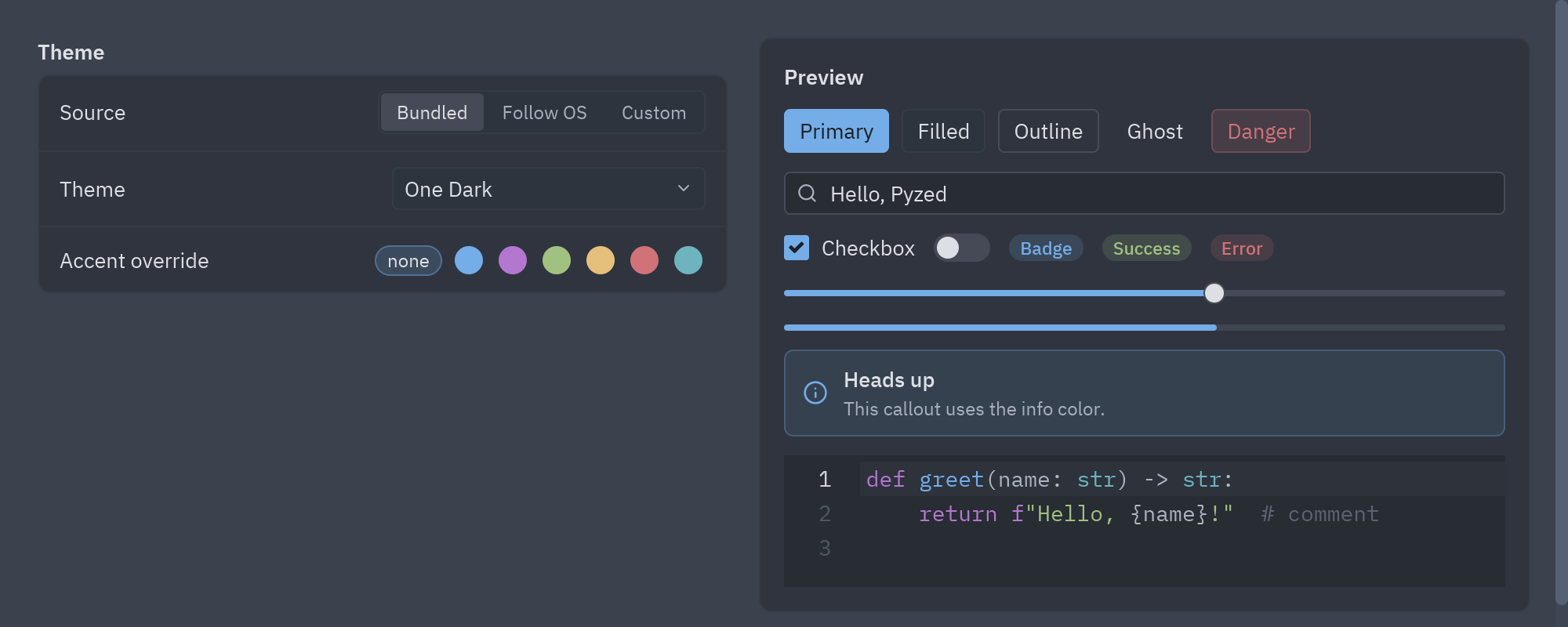
examples/styling.py: the same screen in any bundled theme, following the system, or generated from three colors.Set the theme of your app
Section titled “Set the theme of your app”Give your app a theme with the name of a theme:
import pyzed as pzfrom pyzed import ui

class MyApp(pz.App):    theme = "Ayu Dark"
    def view(self):        return pz.column([ui.heading("Hello"), ui.button("Save", self.save, variant="solid")], padding=24)
    def save(self):        print("saved")

pz.run(MyApp)
theme accepts:
| Value | Example | Meaning |
|---|---|---|
| A theme name | "Gruvbox Light" |
Any name from pz.themes.names(); the lookup ignores case. |
A Theme object |
pz.themes.ONE_LIGHT, or one you made |
Uses exactly that theme. |
pz.themes.auto(light, dark) |
pz.themes.auto("One Light", "One Dark") |
Follows the operating system’s light or dark mode. |
"auto" |
"auto" |
Shortcut for auto("One Light", "One Dark"). |
The bundled themes
Section titled “The bundled themes”Pyzed ships four families of themes, each with light and dark variants:
| Family | Dark | Light |
|---|---|---|
| One (the default) | One Dark |
One Light |
| Ayu | Ayu Dark, Ayu Mirage |
Ayu Light |
| Gruvbox | Gruvbox Dark, Gruvbox Dark Hard, Gruvbox Dark Soft |
Gruvbox Light, Gruvbox Light Hard, Gruvbox Light Soft |
| Pyzed | Pyzed Midnight, Pyzed Graphite, Pyzed Forest, Pyzed Rosé |
Pyzed Dawn, Pyzed Glacier |
The first three are the themes of the Zed editor (MIT license), whose interface inspired much of
Pyzed’s look. The Pyzed family is Pyzed’s own: each one is made from a small palette with
pyzed.theme_palettes.from_palette, which you can call to make yours (see Custom themes). List them from Python:
uv run python -c "import pyzed as pz; print(pz.themes.names())"python3 -c "import pyzed as pz; print(pz.themes.names())"py -c "import pyzed as pz; print(pz.themes.names())"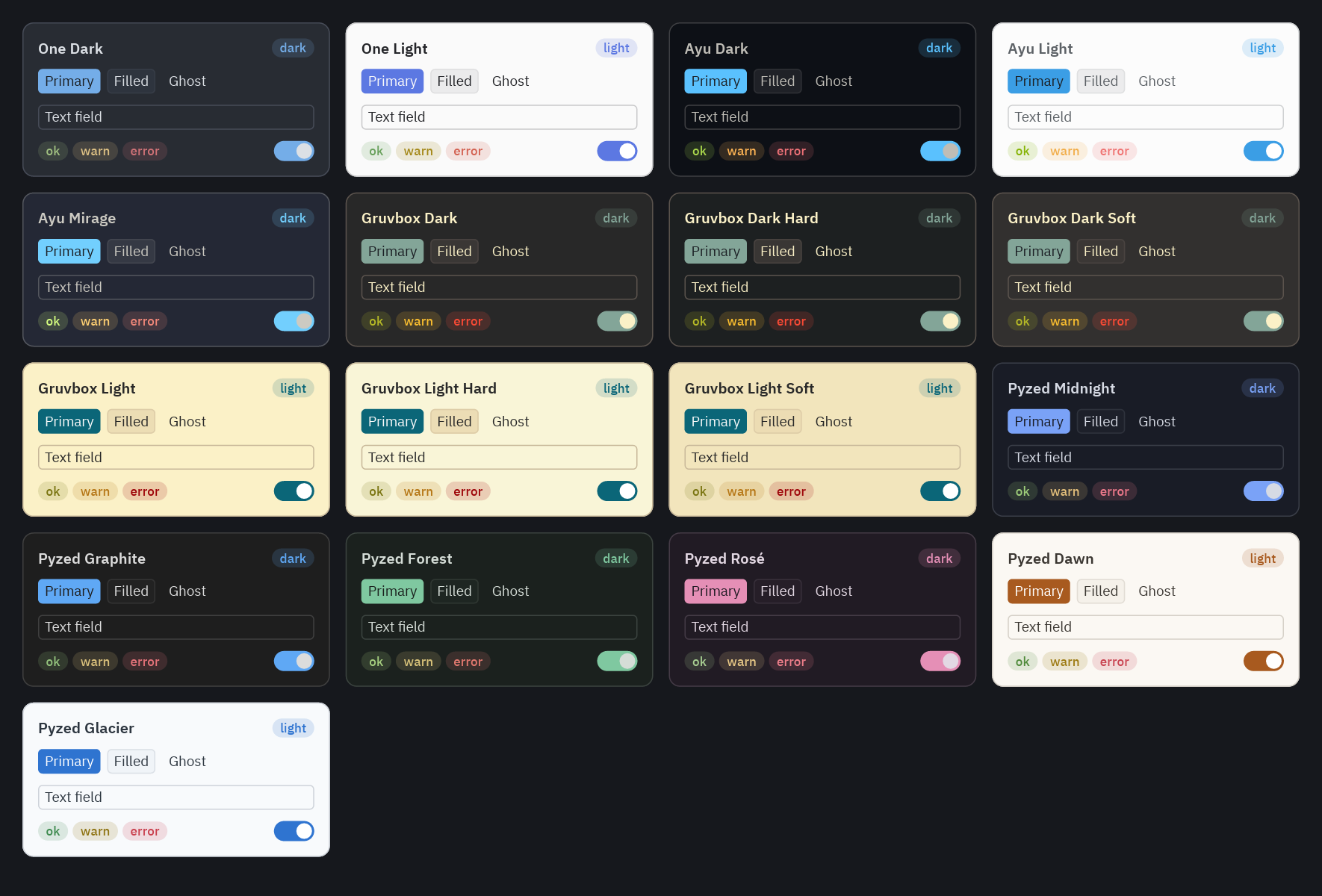
Dark, light or follow the system
Section titled “Dark, light or follow the system”Most people expect an app to follow the light or dark mode of their computer. pz.themes.auto does it: it takes a
light theme and a dark theme (names or Theme objects) and picks one when the system changes.
class MyApp(pz.App): theme = pz.themes.auto("Gruvbox Light", "Gruvbox Dark")self.system_dark tells you which mode the system is in (True in dark mode), and Pyzed updates it, and the theme,
when the user changes it.
To let the user choose, keep their choice in a variable and set self.theme from it:
class MyApp(pz.App):    def __init__(self):        self.mode = "System"        self.theme = pz.themes.auto()
    def set_mode(self, mode):        self.mode = mode        self.theme = {"Light": "One Light", "Dark": "One Dark"}.get(mode, pz.themes.auto())
    def view(self):        return ui.segmented(["System", "Light", "Dark"], self.mode, self.set_mode)
Switch themes at runtime
Section titled “Switch themes at runtime”self.theme is just an attribute: assign it and the next frame uses the new theme. A theme picker is one line:
ui.select(pz.themes.names(), self.resolved_theme().name, lambda name: setattr(self, "theme", name))A light/dark toggle:
def toggle_theme(self): self.theme = "One Light" if self.resolved_theme().is_dark else "One Dark"self.theme while the app runs repaints every component.Read the theme’s colors
Section titled “Read the theme’s colors”self.theme can be a name or an auto(...), so use self.resolved_theme() to get the concrete Theme in use
right now. Its tokens are plain attributes holding #rrggbb strings:
def view(self): t = self.resolved_theme() return pz.container(content, bg=t.surface, border_color=t.border, border_width=1, radius=t.radius)Inside view() (and inside components) pz.theme.current() returns the same theme. Most of the time you do not
need either: write the token name instead of a color, and Pyzed looks it up for you:
pz.text("Saved").style(color="success")pz.container(content).style(background="surface", border=(1, "border"))A theme for one window or one block
Section titled “A theme for one window or one block”Each window can have its own theme (Window.theme); a window without one uses the app’s.
A Theme is also a context manager: components built inside a with block use it. This draws a light preview
inside a dark app:
with pz.themes.get("One Light"): preview = ui.card(ui.label("This is how it looks in light mode"))And every pyzed.ui component accepts theme= to draw just that component with another theme:
ui.button("Light button", on_press, theme=pz.themes.ONE_LIGHT)See examples/theming/mixed.py for a light
sidebar in a dark window, with a picker that remembers the chosen theme.
- Theme tokens: what every color of a theme paints.
- Creating themes: your own colors, in code or in a JSON file.