
Styles
Every widget has a style() method that styles it like CSS: background, borders, radius,
shadow, padding, margin, size and typography.
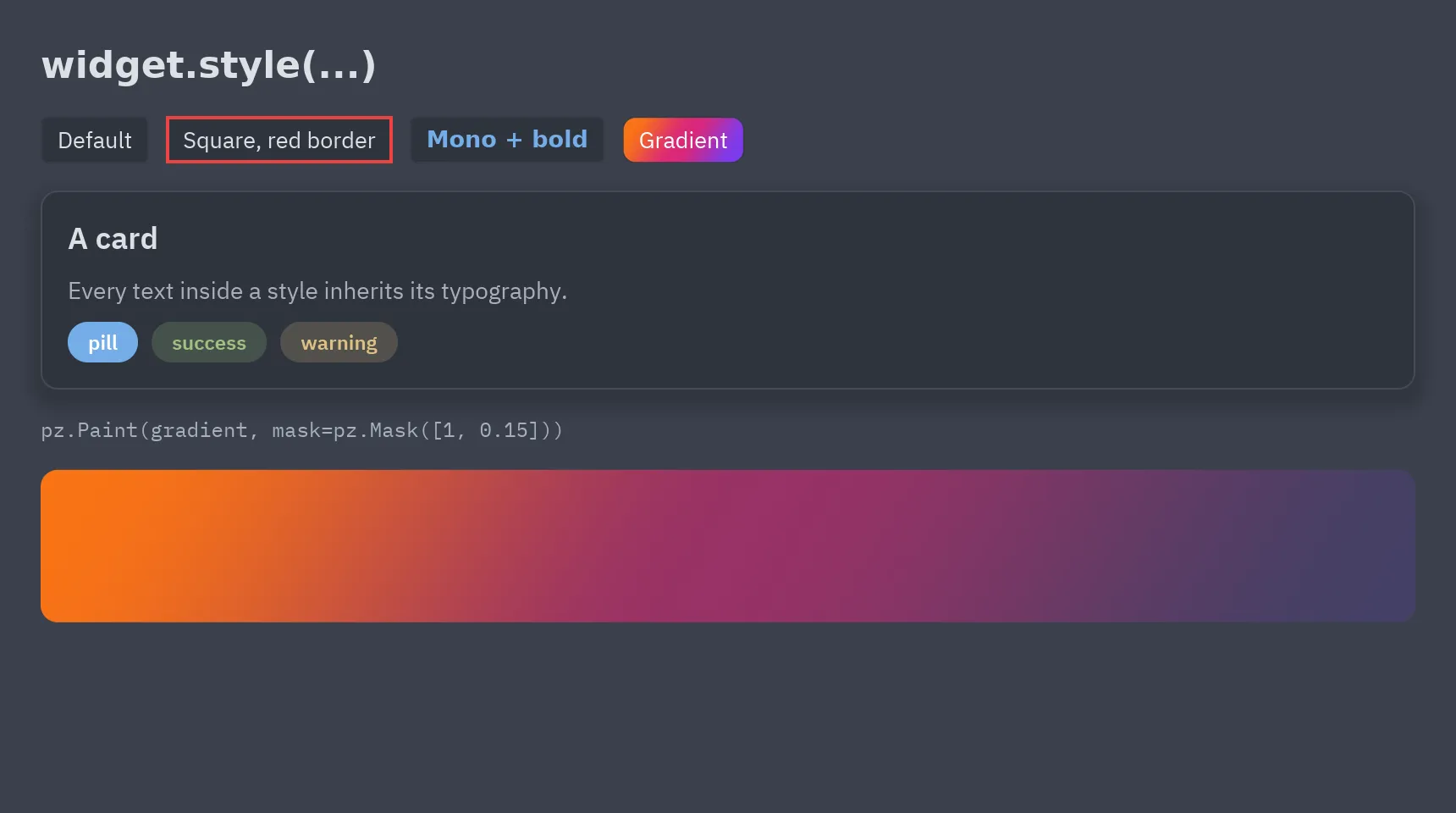
ui.button("Save", self.save).style(radius=0, border=(2, "#ef4444"))pz.text("Title").style(size=20, weight="bold", color="accent")pz.column([...]).style(background="panel", padding=16, radius=10, shadow=("#00000055", (0, 6), 18))On a button or a container, style() changes the widget itself (a square button stays a
button). Other widgets get a box around them that carries the style.
Properties
Section titled “Properties”| Property | Values |
|---|---|
background |
A color, a pz.Gradient or a pz.Paint. |
color |
Text color. |
font |
"sans", "mono", "serif" or a family loaded with pz.load_font. |
weight |
"light", "normal", "medium", "semibold", "bold"… or 100–900. |
italic, size, line_height |
Typography. |
border_color, border_width |
The border; border=(width, color) sets both. |
radius |
A number, or (top_left, top_right, bottom_right, bottom_left). |
shadow |
(color, (x, y), blur). |
padding, margin |
A number, (vertical, horizontal) or (top, right, bottom, left). |
width, height |
Pixels, "fill", "shrink" or "fill:N"; max_width, max_height, min_width and min_height in pixels. |
align_x, align_y |
Where the content sits inside the box. |
clip |
Clips the content to the box. |
position, top, right, bottom, left, z_index |
position="absolute" places a child of a pz.box by its offsets, out of the flow. |
opacity, translate, scale, rotate |
Fades, moves, scales or turns how the widget is drawn, without changing the layout. |
blur, backdrop_blur |
Blurs the widget, or what is behind it. |
glow, bloom, glass |
Visual effects: a halo, light that spills from bright parts and a frosted panel. See Animation and effects. |
Colors can be hex strings (with alpha, "#3b82f680"), (r, g, b[, a]) tuples or theme tokens
such as "accent", "panel" or "text_muted", so styles follow theme switches.
Text properties apply to every text inside the styled widget, including the labels of
pyzed.ui components. The closest style wins.
States and transitions
Section titled “States and transitions”Like CSS :hover, :active and :focus, a style can say how the widget looks while the
pointer is over it (hover), while it is pressed (pressed, or active) and while it has
the keyboard focus (focus). transition animates the change, like CSS transition:
ui.button("Save", self.save).style( background="accent", radius=6, hover={"background": "#4f8cff", "translate": (0, -1)}, pressed={"scale": 0.97}, transition=120, # milliseconds, "0.2s", True or {"duration", "easing", "delay"})A state can change background (a color), color, border_color, border_width,
radius, opacity, translate, scale, rotate and blur. These don’t move the widgets
around, so hovering never shifts the layout. Without transition the state shows at once.
With one, changes of opacity, translate, scale, rotate and blur from one render to
the next animate too. For anything more, see Animation.
Stylesheets
Section titled “Stylesheets”pz.stylesheet adds rules by selector, like a CSS file. widget.classes(...) gives a
widget classes (and an id), and the matching rules style it:
pz.stylesheet({    ".card": {"background": "panel", "padding": 16, "radius": 8, "border": (1, "border")},    ".card:hover": {"border_color": "accent"},    ".card.selected, #featured": {"border": (2, "accent")},    "Rating": {"padding": 4},                       # every Rating component})
pz.column([...]).classes("card", "selected" if self.chosen else None)Rating(value=3, class_="card", id="featured") # components take class_= and id=- Selectors:
.class, several classes (.card.selected),#id, a component’s class name and an optional:hover,:pressed(or:active) or:focus. Commas list several selectors for one rule. - Like CSS, more specific selectors win (an id beats classes, more classes beat fewer, and
classes beat a component name), then the later rule. A
style()call afterclasses()goes on top. - Defining a selector again replaces its rule, so reloading your code doesn’t pile rules up.
pz.clear_stylesheet()removes them all. - Styles named with
pz.define_stylealso work as classes. - Rules for a component’s name are defaults: what its
render()sets wins over them, and rules for theclass_oridit is given win over both.
Responsive styles
Section titled “Responsive styles”Styles can follow the window’s size, like CSS media queries:
pz.stylesheet({ ".sidebar": {"width": 260}, "@media (max_width: 700)": {".sidebar": {"width": 64}}, "@md": {".content": {"padding": 32}}, # a breakpoint: 768 px wide and up})panel.style(padding=24, media={"max_width: 600": {"padding": 8}})- A query is
min_width,max_width,min_heightormax_heightin pixels ("max_width: 600"or"(max_width: 600px)"),orientation(portraitorlandscape) ortheme(darkorlight). Join several withand. - Breakpoints follow Tailwind and apply from that width up:
sm(640),md(768),lg(1024),xl(1280) andxxl(1536). - The styles update when the window is resized.
- In a view,
pz.viewport()returns the window’s size, andpz.media("max_width: 600")says whether a query matches.pz.current_breakpoint()returns"xs","sm","md"and so on.pz.responsive(lambda w, h: ...)builds content from the space a widget actually gets.
Reusing styles
Section titled “Reusing styles”card = pz.Style(background="elevated", border=(1, "border"), radius=10, padding=16)pz.column([...]).style(card)pz.column([...]).style(card | pz.Style(shadow=("#0006", (0, 4), 12))) # the right side wins
pz.define_style("pill", radius=999, padding=(4, 12), size=12, weight="semibold")pz.text("new").style("pill", background="accent")widget.style(a, b, color=...) merges in order, and calling style() again merges with what
the widget already has. Passing None for a property removes it. Style.to_dict() and
Style.from_dict() turn a style into JSON-friendly data and back.
Components take style= too: Rating(value=3, style="card").
Gradients, opacity and masks
Section titled “Gradients, opacity and masks”sunset = pz.Gradient(["#f97316", "#db2777", "#7c3aed"], angle=120)box.style(background=sunset)box.style(background=pz.Paint("success", opacity=0.2)) # a translucent tokenbox.style(background=pz.Paint(sunset, mask=pz.Mask([1, 0.15]))) # fades outpz.Gradient(stops, angle=180): colors spread evenly, or(offset, color)pairs. Angles follow CSS (0 up, 90 right). Up to 8 stops.pz.Mask(stops): opacities along the fill’s direction (on a plain color, along its ownangle).pz.Paint(fill, opacity=, mask=): a color or gradient with an overall opacity and a mask.
Color picker
Section titled “Color picker”ui.ColorPicker edits any of these: a color with alpha, a gradient (click the bar to add a
stop, drag stops, trash removes the selected one) or a mask. It sends back a hex string, a
pz.Gradient or a pz.Paint, ready for background:
ui.ColorPicker(value=self.fill, on_change=lambda e: setattr(self, "fill", e.value))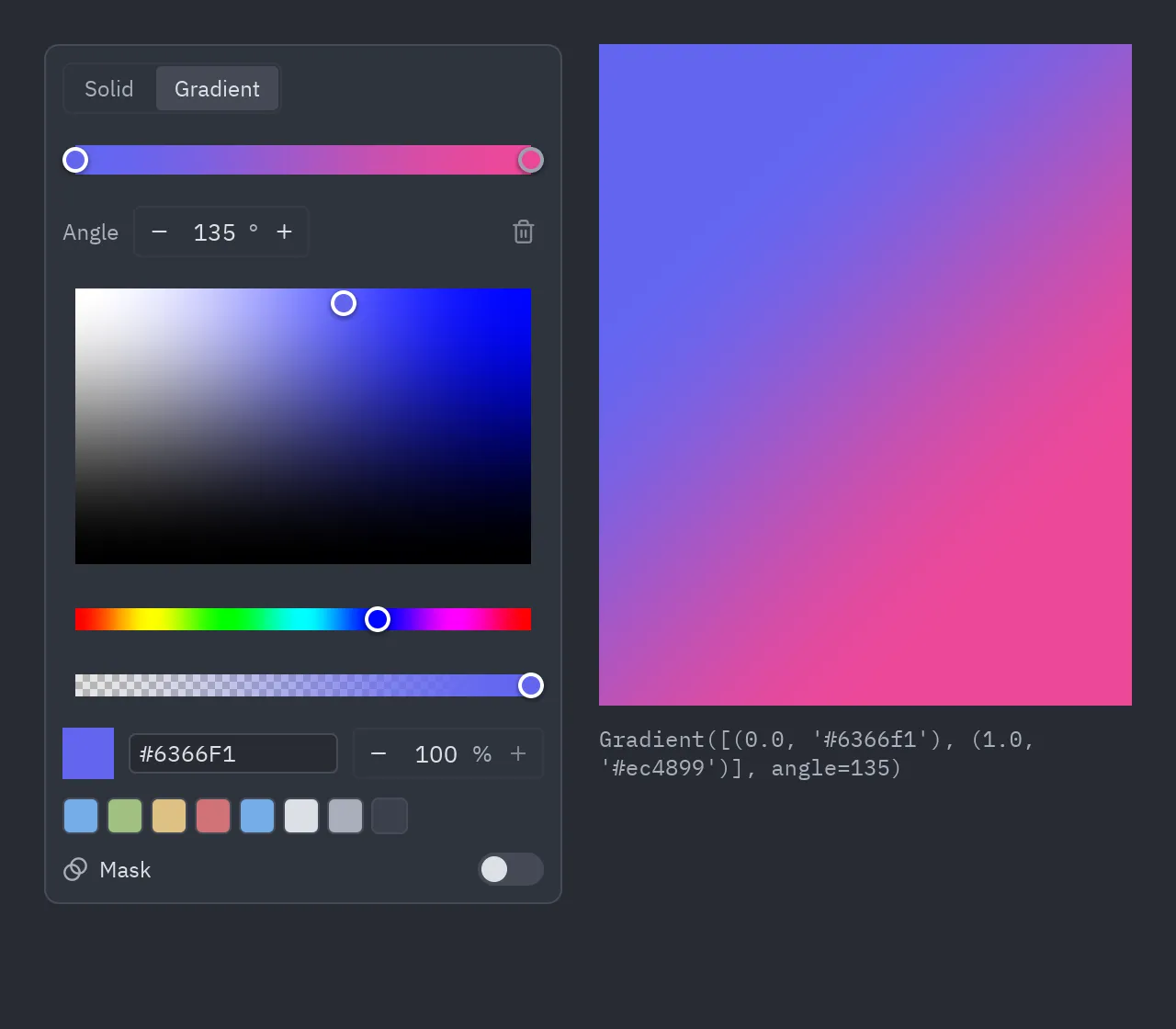
alpha=False, gradients=False and masks=False hide those parts; swatches=[...] sets the
quick colors. ui.color_swatch(value) shows a value as a small square. See
examples/color_picker.py.
The global style
Section titled “The global style”App.style styles the whole window, and pz.set_style(...) sets a style for every window
(each window’s style goes on top of it):
class MyApp(pz.App): style = pz.Style(font="serif", size=15, color="#e6e1cf", radius=2)Its text properties fill in what texts don’t set themselves, and its color, size,
background, border_color and radius also become the theme’s text, ui_font_size,
background, border and radius tokens, so pyzed.ui components follow them. Change
self.style at any time to restyle the app. For other theme colors, derive a theme:
self.theme = themes.get("One Dark").with_accent("#ff6b6b") (see Themes).
See examples/styles.py.