
Overview
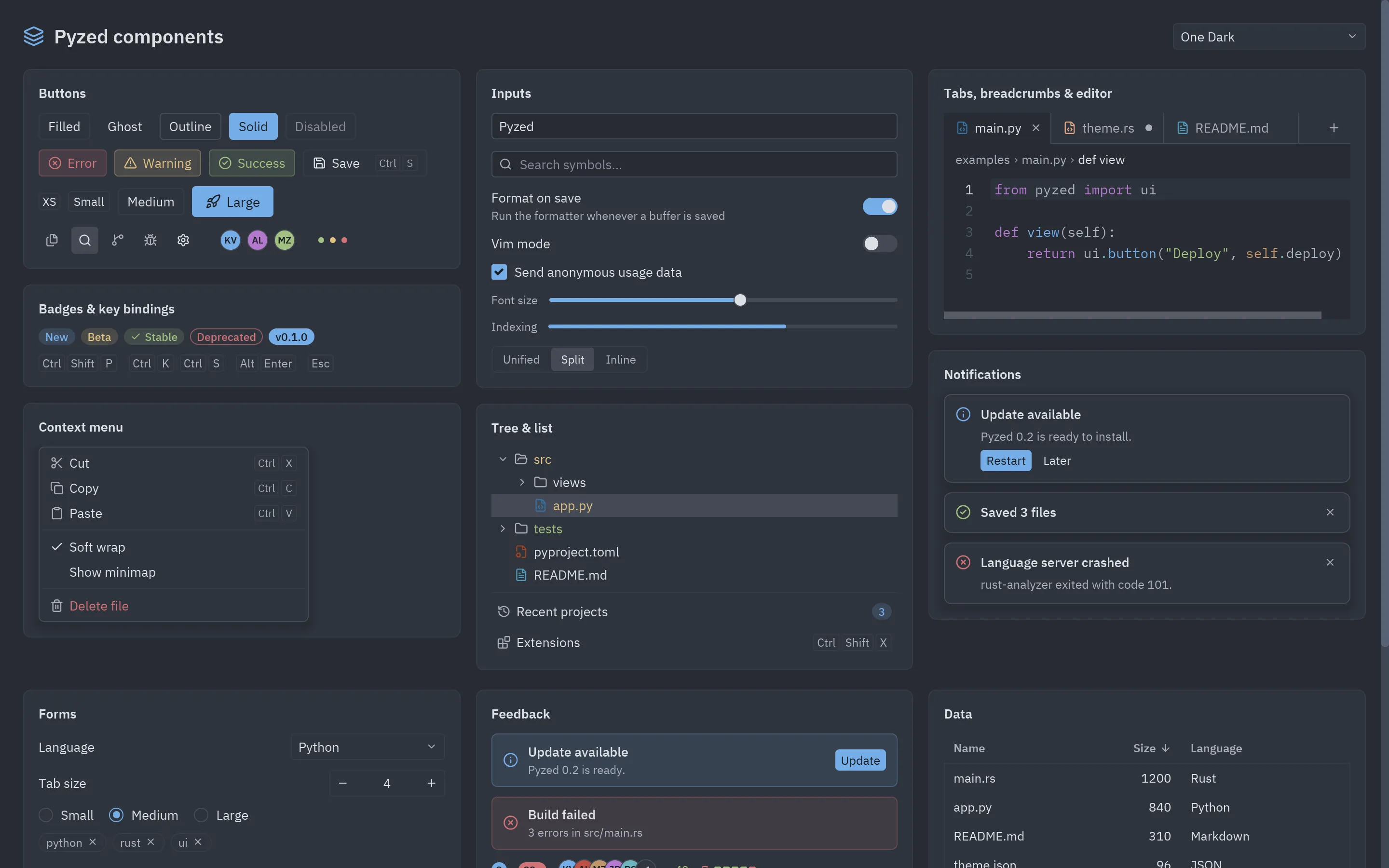
pyzed.ui is a collection of ready-to-use components that reproduce the look of the
Zed editor. They are functions that return widgets, so they combine freely
with the base widgets and with each other.
import pyzed as pzfrom pyzed import ui
ui.button("Save", self.save, icon="save", variant="solid", keys="ctrl-s")
Common rules
Section titled “Common rules”- Theme colors. Every component reads the current theme (
App.theme, or the window’s theme in multi-window apps). Changing the theme restyles the whole UI. All of them accepttheme=to use a different one. - Tokens or hex. Color parameters (
color,icon_color,tint…) accept a theme token such as"accent","text_muted"or"error", or a"#rrggbb"color. - Messages or callables.
on_press,on_select,on_toggle… accept a message forupdateor a callable. Those that produce a value (text,bool, id) call the callable with that value. - Icons. The
icon=parameter accepts any Lucide name. - Shortcuts.
keys="ctrl-shift-p"displays the shortcut (with symbols on macOS).
Groups
Section titled “Groups”| Group | Components |
|---|---|
| Basics | button, icon_button, label, muted, heading, badge, indicator, kbd, avatar, tooltip, divider, card |
| Forms | input, search_input, switch, checkbox, slider, progress, segmented, field |
| Lists and tree | list_item, list_header, tree + TreeNode, menu + MenuItem |
| Navigation | tab_bar + Tab, breadcrumbs, toolbar |
| Workspace | workspace, title_bar, title_button, status_bar, status_item, panel, panel_header |
| Overlays | layer, modal, command_palette, picker, fuzzy_filter, toast, toasts |
| Code | editor, terminal, ansi |
| More controls | select, radio_group, number_field, split_button, toggle_group, chip, disclosure |
| Data and feedback | table + Column, callout, empty_state, settings_group, stat, sparkline, bar_chart, donut, spinner, count_badge, facepile, diff_stat, keybinding_hint |
| Content and panels | markdown, split, popover; base widgets pz.image, pz.image_viewer, pz.rich_text, pz.qr_code, pz.grid |
| Dialogs and tools | dialog_layer, alert, confirm, prompt, choice, unsaved_changes, accordion, Log + console, shortcuts, about, ColorPicker, color_swatch |
To see them all in action, run the gallery:
python examples/gallery.py