
Forms
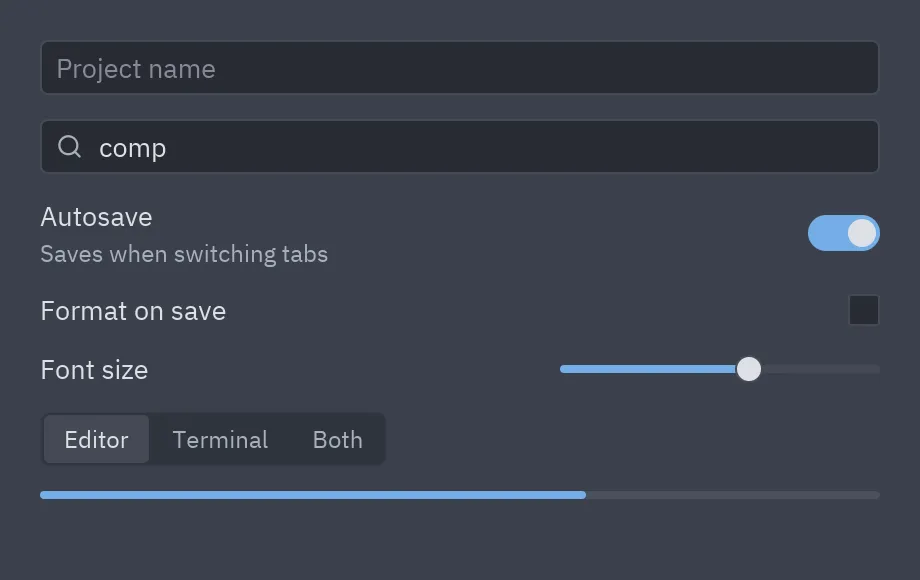
class Settings(pz.App):    def __init__(self):        self.name = ""        self.query = ""        self.autosave = True        self.format_on_save = False        self.font = 0.6        self.mode = "Editor"
    def view(self):        return pz.column([            ui.input(self.name, lambda t: setattr(self, "name", t), placeholder="Project name"),            ui.search_input(self.query, lambda t: setattr(self, "query", t)),            ui.field("Autosave", ui.switch(self.autosave, lambda v: setattr(self, "autosave", v)),                     description="Save when switching tabs"),            ui.field("Format on save", ui.checkbox(self.format_on_save, lambda v: setattr(self, "format_on_save", v))),            ui.field("Font size",                     pz.container(ui.slider(self.font, lambda v: setattr(self, "font", v)), width=160)),            ui.segmented(["Editor", "Terminal", "Both"], self.mode, lambda m: setattr(self, "mode", m)),            ui.progress(0.65),        ], spacing=12, padding=20, width=420)
Text fields
Section titled “Text fields”Fields are controlled: they show value and notify you of every change through on_input.
Store the text in your state and pass it back in view().
ui.input(self.email, self.set_email, placeholder="you@example.com", icon="mail", on_submit=self.send, id="email")ui.input(self.password, self.set_password, secure=True) # passwordui.input(self.query, self.set_query, borderless=True, size="lg")To focus a field from code, give it an id and return Command.focus("email").
Switches and checkboxes
Section titled “Switches and checkboxes”on_toggle receives the new bool:
ui.switch(self.wifi, lambda on: setattr(self, "wifi", on), label="Wi-Fi")ui.checkbox(self.accepted, lambda v: setattr(self, "accepted", v), label="I accept the terms")Slider and progress
Section titled “Slider and progress”ui.slider(self.volume, self.set_volume, min=0, max=100, step=1)ui.progress(self.downloaded, max=self.total, tint="success", height=6)Segmented group
Section titled “Segmented group”Mutually exclusive buttons, one selected at a time. on_select receives the chosen option:
ui.segmented(["Day", "Week", "Month"], self.view_mode, lambda v: setattr(self, "view_mode", v))Settings rows
Section titled “Settings rows”ui.field(title, control, description=...) aligns a title on the left and the control on the
right, like a settings screen.
Full reference: Forms.