
Settings
A settings screen in the style of modern desktop apps: a section list on the left and grouped rows on the right, with profile fields, a language select, light / dark / system theme, accent swatches, a font size slider, notification switches and a danger zone that asks before deleting.
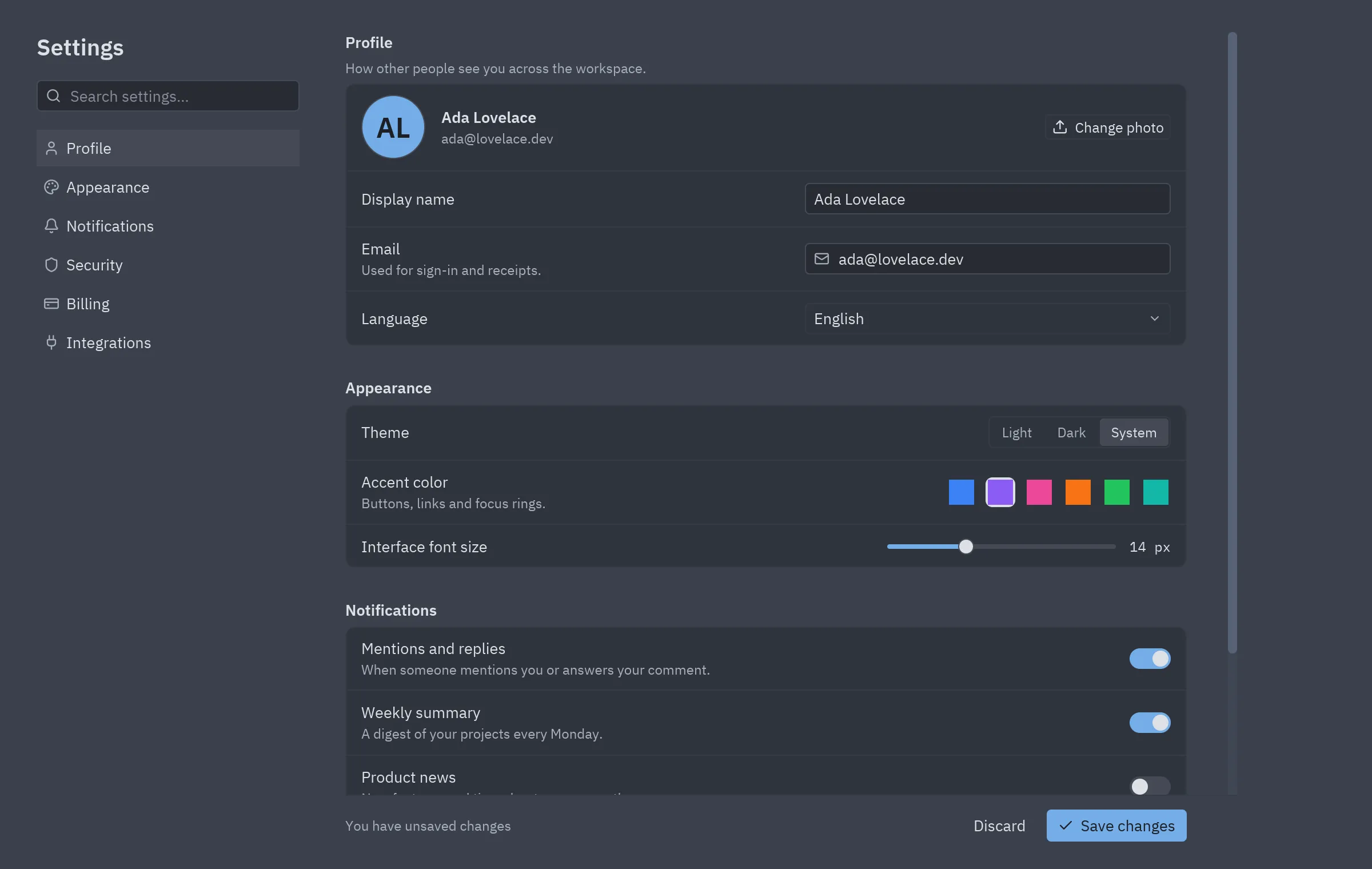
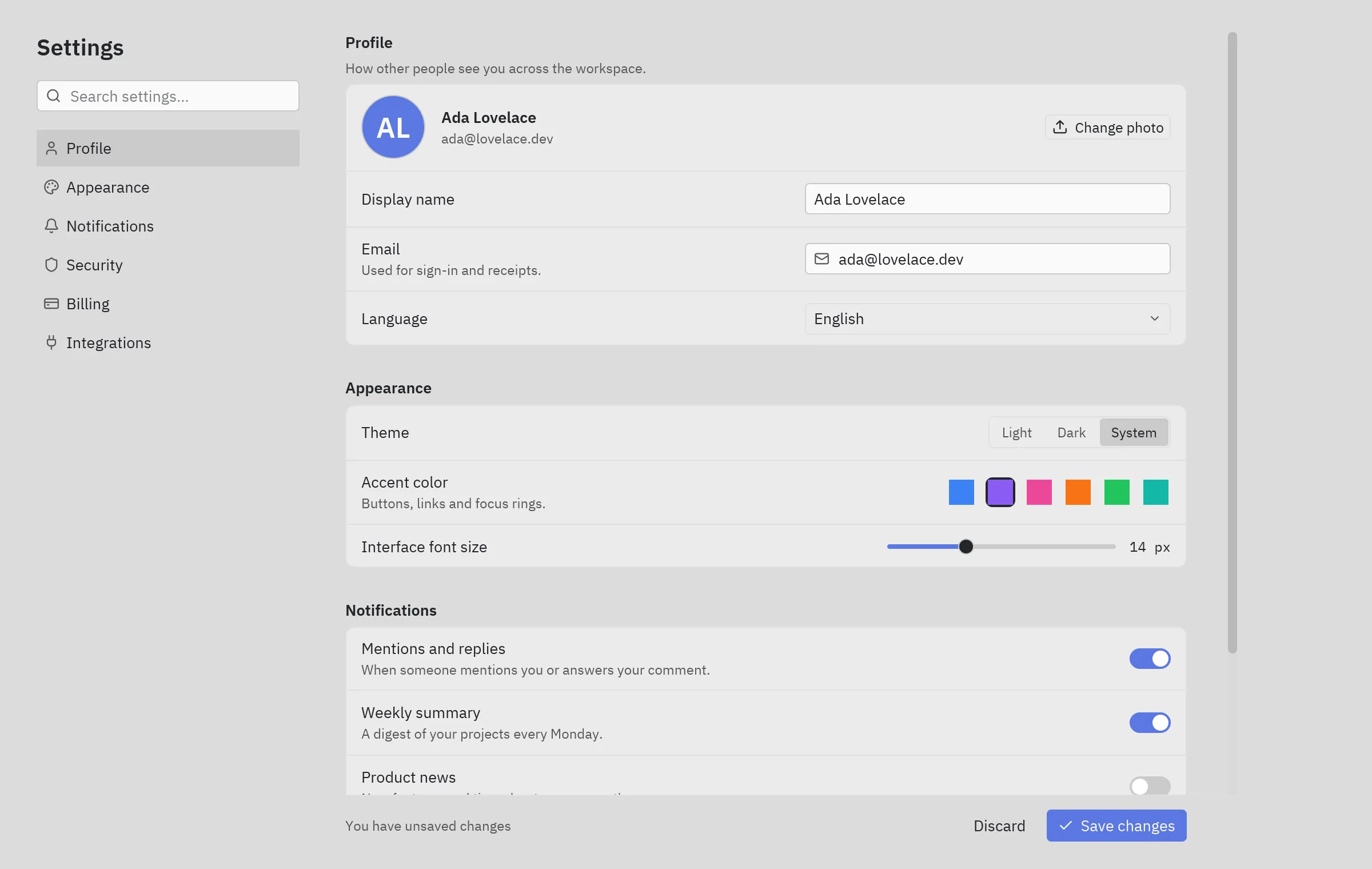
The screenshot follows the site’s theme: switch between light and dark at the top of the page to see the block in One Light and One Dark.
Run it
Section titled “Run it”From the repository root:
python examples/blocks/settings.pyWhat it shows
Section titled “What it shows”ui.settings_group+ui.field: titled groups of rows with descriptions.- A sticky footer with unsaved changes and Save / Discard.
ui.confirminsideui.dialog_layerfor the destructive action.- Accent swatches with a ring on the selected one.
Components used
Section titled “Components used”| Component | Used for |
|---|---|
| Settings group | Groups of rows |
| Field | Each setting |
| Input | Name and email |
| Select | Language |
| Segmented | Theme |
| Color picker | Accent swatches |
| Slider | Font size |
| Switch | Notifications |
| Confirm | Delete account |
| Dialog layer | The dialog over the page |
| List item | Sections |
The whole block, ready to copy. It only needs pip install pyzed-ui.
"""Settings block: a sectioned settings page with profile, appearance, notifications and a danger zone."""
import pyzed as pzfrom pyzed import ui
SECTIONS = [    ("user", "Profile"),    ("palette", "Appearance"),    ("bell", "Notifications"),    ("shield", "Security"),    ("credit-card", "Billing"),    ("plug", "Integrations"),]
LANGUAGES = ["English", "Español", "Português", "Deutsch", "日本語"]ACCENTS = ["#3b82f6", "#8b5cf6", "#ec4899", "#f97316", "#22c55e", "#14b8a6"]

class Settings(pz.App):    title = "Settings"    size = (1200, 760)
    def __init__(self):        self.section = "Profile"        self.name = "Ada Lovelace"        self.email = "ada@lovelace.dev"        self.bio = "Writing the first programs for engines that don't exist yet."        self.mode = "System"        self.accent = ACCENTS[1]        self.font_size = 14.0        self.language = "English"        self.notify = {"mentions": True, "weekly": True, "product": False}        self.saved = False        self.confirm_delete = False
    def toggle(self, key):        self.notify[key] = not self.notify[key]        self.saved = False
    def discard(self):        self.__init__()  # back to the saved values
    def save(self):        self.saved = True
    # -- pieces ----------------------------------------------------------------------------    def nav(self):        items = [ui.list_item(label, lambda label=label: setattr(self, "section", label), icon=icon,                              selected=label == self.section, height=32) for icon, label in SECTIONS]        return pz.column([            ui.label("Settings", size="xl", weight="semibold"),            ui.search_input("", None, placeholder="Search settings…"),            pz.column(items, spacing=2),        ], spacing=16, width=230)
    def profile(self):        return ui.settings_group("Profile", [            pz.row([                ui.avatar("AL", size=56),                pz.column([ui.label(self.name, weight="semibold"), ui.muted(self.email, size="sm")], spacing=2,                          width="fill"),                ui.button("Change photo", self.save, icon="upload", size="sm"),            ], spacing=14, align="center"),            ui.field("Display name", pz.container(ui.input(self.name, lambda v: setattr(self, "name", v)),                                                  width=320)),            ui.field("Email", pz.container(ui.input(self.email, lambda v: setattr(self, "email", v), icon="mail"),                                           width=320),                     description="Used for sign-in and receipts."),            ui.field("Language", ui.select(LANGUAGES, self.language, lambda v: setattr(self, "language", v),                                           width=320)),        ], description="How other people see you across the workspace.")
    def appearance(self):        swatches = pz.row([            pz.container(ui.color_swatch(color, size=22, on_press=lambda color=color: setattr(self, "accent", color)),                         padding=2).style(border=(2, "text" if color == self.accent else "#00000000"), radius=6)            for color in ACCENTS], spacing=8)        return ui.settings_group("Appearance", [            ui.field("Theme", ui.segmented(["Light", "Dark", "System"], self.mode,                                           lambda v: setattr(self, "mode", v))),            ui.field("Accent color", swatches, description="Buttons, links and focus rings."),            ui.field("Interface font size", pz.row([                pz.container(ui.slider(self.font_size, lambda v: setattr(self, "font_size", round(v)),                                       min=11, max=20, step=1), width=200),                ui.label(f"{self.font_size:.0f} px", size="sm", mono=True),            ], spacing=12, align="center")),        ])
    def notifications(self):        rows = [            ("mentions", "Mentions and replies", "When someone mentions you or answers your comment."),            ("weekly", "Weekly summary", "A digest of your projects every Monday."),            ("product", "Product news", "New features and tips, about once a month."),        ]        return ui.settings_group("Notifications", [            ui.field(title, ui.switch(self.notify[key], lambda _=None, key=key: self.toggle(key)),                     description=text)            for key, title, text in rows])
    def danger(self):        return ui.settings_group("Danger zone", [            ui.field("Delete account", ui.button("Delete account", lambda: setattr(self, "confirm_delete", True),                                                 variant="error", icon="trash-2"),                     description="Deletes your workspaces and data. This can't be undone."),        ])
    def view(self):        footer = pz.row([            ui.muted("All changes saved" if self.saved else "You have unsaved changes", size="sm"),            pz.hspace(),            ui.button("Discard", self.discard, variant="ghost"),            ui.button("Save changes", self.save, variant="solid", icon="check"),        ], spacing=8, align="center")        content = pz.column([            self.profile(), self.appearance(), self.notifications(), self.danger(),        ], spacing=28, padding=(0, 24, 24, 0), max_width=760)        page = pz.column([            pz.scrollable(content, height="fill"),            ui.divider(),            pz.container(footer, padding=(12, 0), max_width=736),        ], width=780, height="fill")        base = pz.row([self.nav(), page], spacing=40, padding=(28, 32, 12, 32), width="fill", height="fill").style(            background="background")        dialog = None        if self.confirm_delete:            dialog = ui.confirm("Your workspaces and data will be deleted for good.",                                lambda: setattr(self, "confirm_delete", False),                                lambda: setattr(self, "confirm_delete", False),                                title="Delete your account?", confirm_label="Delete", danger=True)        return ui.dialog_layer(base, dialog, on_dismiss=lambda: setattr(self, "confirm_delete", False))

if __name__ == "__main__":    pz.run(Settings)
Make it yours
Section titled “Make it yours”Change theme (or self.theme = pz.themes.get("One Dark").with_accent("#e11d48")), replace the sample data with your own and split pieces into components when they grow. An AI agent with the MCP server can read this block with read_example("blocks/settings") and adapt it for you.