
Data table
A team members table: filter by name or email, toggle statuses with chips, pick a role, sort by any column, select rows with checkboxes, page through results, copy them as CSV and invite people from a dialog.
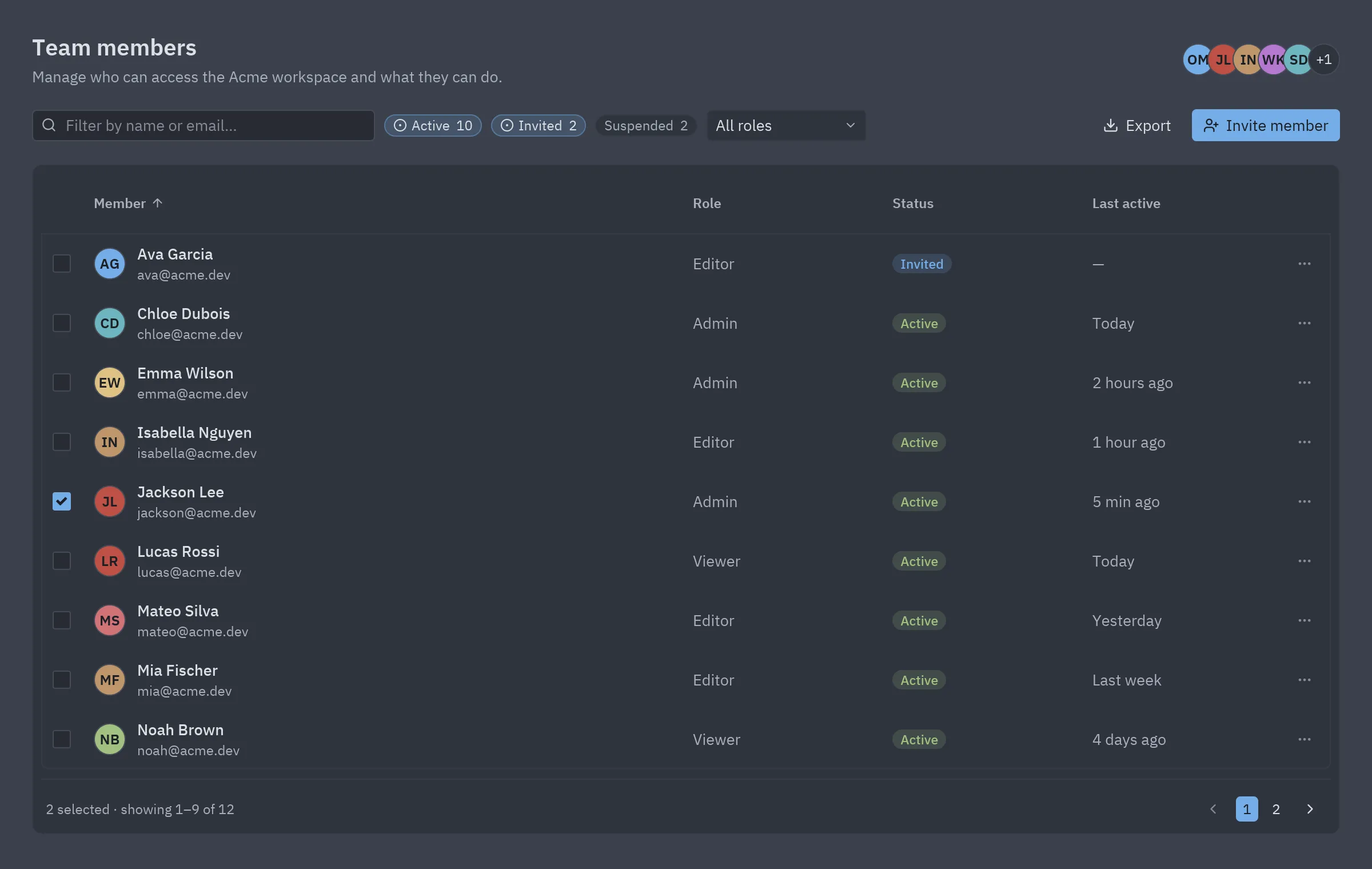
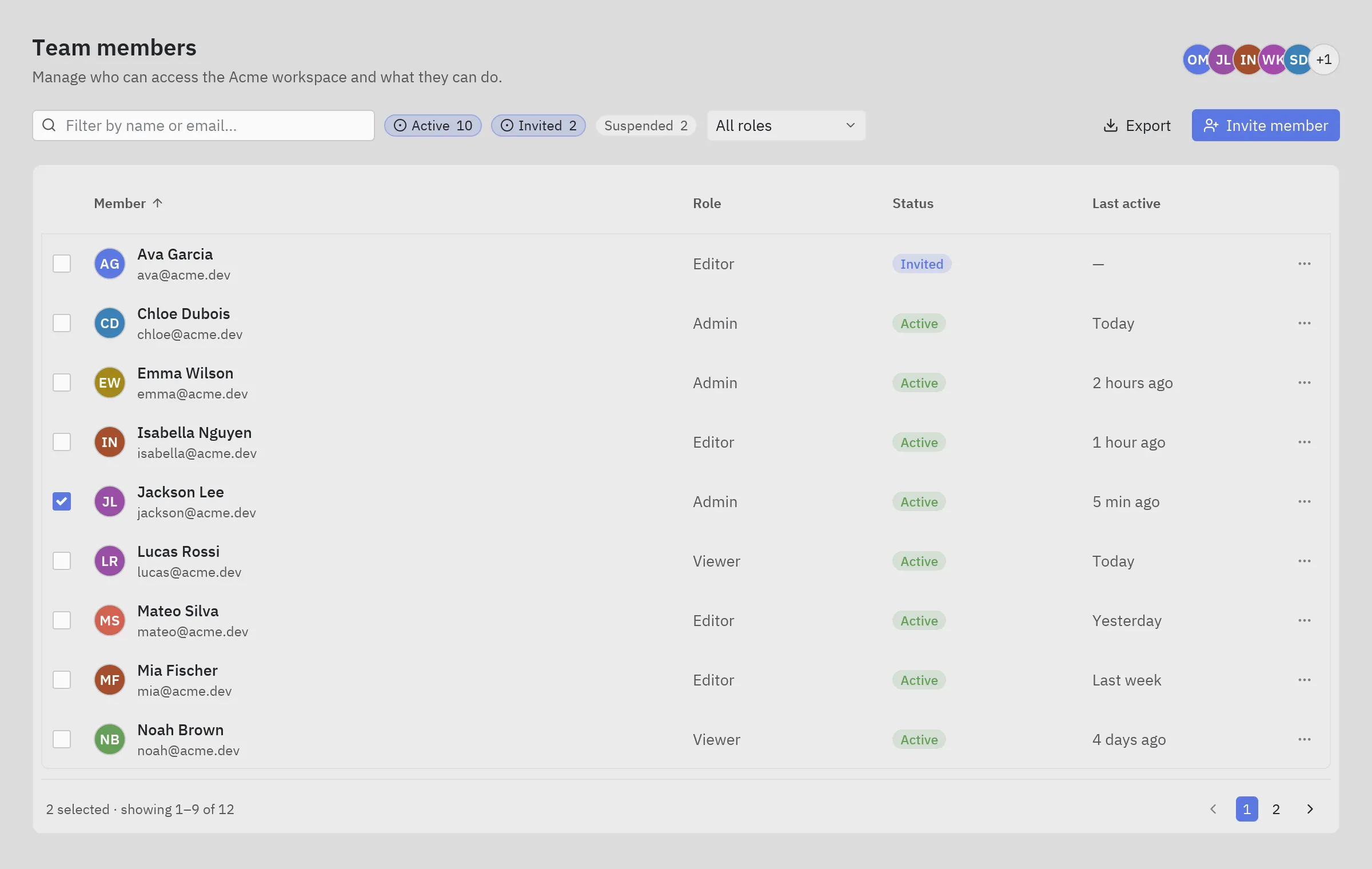
The screenshot follows the site’s theme: switch between light and dark at the top of the page to see the block in One Light and One Dark.
Run it
Section titled “Run it”From the repository root:
python examples/blocks/data_table.pyWhat it shows
Section titled “What it shows”- Filtering, sorting and paging done in plain Python, so it is easy to swap in a database query.
- Two-line cells (avatar, name and email) through
ui.Column(render=...). pz.Command.copyputs the CSV on the clipboard.ui.promptfor the invite, with Enter to send.
Components used
Section titled “Components used”| Component | Used for |
|---|---|
| Table | The table |
| Chip | Status filters |
| Search input | Text filter |
| Select | Role filter |
| Checkbox | Row selection |
| Badge | Statuses |
| Avatar | Members |
| Facepile | Team |
| Prompt | Invite dialog |
| Icon button | Pagination and row menu |
The whole block, ready to copy. It only needs pip install pyzed-ui.
"""Data table block: a team members table with search, status filters, sorting, selection and paging."""
import pyzed as pzfrom pyzed import ui
PEOPLE = [    ("Olivia Martin", "olivia@acme.dev", "Owner", "Active", "Just now"),    ("Jackson Lee", "jackson@acme.dev", "Admin", "Active", "5 min ago"),    ("Isabella Nguyen", "isabella@acme.dev", "Editor", "Active", "1 hour ago"),    ("William Kim", "will@acme.dev", "Viewer", "Invited", "—"),    ("Sofia Davis", "sofia@acme.dev", "Editor", "Active", "Yesterday"),    ("Liam Johnson", "liam@acme.dev", "Editor", "Suspended", "3 weeks ago"),    ("Emma Wilson", "emma@acme.dev", "Admin", "Active", "2 hours ago"),    ("Noah Brown", "noah@acme.dev", "Viewer", "Active", "4 days ago"),    ("Ava Garcia", "ava@acme.dev", "Editor", "Invited", "—"),    ("Lucas Rossi", "lucas@acme.dev", "Viewer", "Active", "Today"),    ("Mia Fischer", "mia@acme.dev", "Editor", "Active", "Last week"),    ("Ethan Clark", "ethan@acme.dev", "Viewer", "Suspended", "2 months ago"),    ("Chloe Dubois", "chloe@acme.dev", "Admin", "Active", "Today"),    ("Mateo Silva", "mateo@acme.dev", "Editor", "Active", "Yesterday"),]ROWS = [{"id": i, "name": n, "email": e, "role": r, "status": s, "seen": seen}        for i, (n, e, r, s, seen) in enumerate(PEOPLE)]
BY_NAME = {r["name"]: r for r in ROWS}
STATUS_TINT = {"Active": "success", "Invited": "info", "Suspended": "error"}ROLES = ["All roles", "Owner", "Admin", "Editor", "Viewer"]PAGE_SIZE = 9SORT_KEYS = {"Member": "name", "Role": "role", "Status": "status", "Last active": "seen"}

class DataTable(pz.App):    title = "Team members"    size = (1200, 760)
    def __init__(self):        self.query = ""        self.statuses = {"Active", "Invited"}        self.role = "All roles"        self.sort_by, self.descending = "Member", False  # a column title        self.selected = {1, 4}        self.page = 0        self.notice = ""        self.inviting, self.invite_email = False, ""
    # -- data ------------------------------------------------------------------------------    def visible(self):        q = self.query.lower()        rows = [r for r in ROWS                if r["status"] in self.statuses                and (self.role == "All roles" or r["role"] == self.role)                and (q in r["name"].lower() or q in r["email"].lower())]        return rows
    # -- actions ---------------------------------------------------------------------------    def toggle_status(self, status):        self.statuses ^= {status}        self.page = 0
    def toggle_row(self, row_id):        self.selected ^= {row_id}
    def sort(self, key):        self.descending = not self.descending if key == self.sort_by else False        self.sort_by = key
    def export(self):        rows = self.visible()        self.notice = f"Copied {len(rows)} rows as CSV"        lines = ["name,email,role,status"] + [f"{r['name']},{r['email']},{r['role']},{r['status']}" for r in rows]        return pz.Command.copy("\n".join(lines))
    def invite(self):        if "@" in self.invite_email:            self.notice = f"Invitation sent to {self.invite_email}"        self.inviting, self.invite_email = False, ""
    def set_query(self, value):        self.query, self.page = value, 0
    # -- view ------------------------------------------------------------------------------    def person(self, row):        return pz.row([            ui.avatar("".join(p[0] for p in row["name"].split()), size=28, index=row["id"]),            pz.column([ui.label(row["name"], weight="medium"), ui.muted(row["email"], size="sm")], spacing=1),        ], spacing=10, align="center")
    def toolbar(self):        chips = [ui.chip(f"{status}  {sum(r['status'] == status for r in ROWS)}",                         on_press=lambda status=status: self.toggle_status(status),                         selected=status in self.statuses, icon="circle-dot" if status in self.statuses else None)                 for status in STATUS_TINT]        return pz.row([            pz.container(ui.search_input(self.query, self.set_query, placeholder="Filter by name or email…"),                         width=300),            *chips,            ui.select(ROLES, self.role, lambda v: setattr(self, "role", v), width=140),            pz.hspace(),            ui.button("Export", self.export, icon="download", variant="ghost"),            ui.button("Invite member", lambda: setattr(self, "inviting", True), icon="user-plus", variant="solid"),        ], spacing=8, align="center")
    def table(self, rows):        columns = [            ui.Column("", "id", width=36, sortable=False,                      render=lambda i: ui.checkbox(i in self.selected, lambda _=None, i=i: self.toggle_row(i))),            ui.Column("Member", "name", width=("fill", 3), render=lambda name: self.person(BY_NAME[name])),            ui.Column("Role", "role", width=("fill", 1), render=lambda role: ui.label(role, color="text_muted")),            ui.Column("Status", "status", width=("fill", 1),                      render=lambda s: ui.badge(s, tint=STATUS_TINT[s])),            ui.Column("Last active", "seen", width=("fill", 1), render=lambda s: ui.muted(s)),            ui.Column("", "id", width=44, sortable=False,                      render=lambda i: ui.icon_button("ellipsis", None, size="sm", tooltip="More")),        ]        return ui.table(columns, rows, sort_by=self.sort_by, descending=self.descending, on_sort=self.sort,                        row_height=52)
    def view(self):        rows = self.visible()        pages = max(1, -(-len(rows) // PAGE_SIZE))        page_rows = sorted(rows, key=lambda r: r[SORT_KEYS[self.sort_by]], reverse=self.descending)        page_rows = page_rows[self.page * PAGE_SIZE:(self.page + 1) * PAGE_SIZE]        start = self.page * PAGE_SIZE + 1 if rows else 0        footer = pz.row([            ui.muted(self.notice or f"{len(self.selected)} selected · showing {start}–{start + len(page_rows) - 1 if rows else 0} "                     f"of {len(rows)}", size="sm"),            pz.hspace(),            ui.icon_button("chevron-left", lambda: setattr(self, "page", max(0, self.page - 1)),                           disabled=self.page == 0, variant="filled"),            *[ui.button(str(n + 1), lambda n=n: setattr(self, "page", n), size="sm",                        variant="solid" if n == self.page else "ghost") for n in range(pages)],            ui.icon_button("chevron-right", lambda: setattr(self, "page", min(pages - 1, self.page + 1)),                           disabled=self.page >= pages - 1, variant="filled"),        ], spacing=6, align="center")        page = pz.column([            pz.row([                pz.column([ui.heading("Team members", level=2),                           ui.muted("Manage who can access the Acme workspace and what they can do.")],                          spacing=4),                pz.hspace(),                ui.facepile(["OM", "JL", "IN", "WK", "SD", "LJ"], size=28),            ], align="center"),            self.toolbar(),            ui.card(pz.column([self.table(page_rows), ui.divider(), pz.container(footer, padding=(4, 4, 0, 4))],                              spacing=8), padding=8),        ], spacing=20, padding=28, height="fill").style(background="background")        dialog = None        if self.inviting:            dialog = ui.prompt("Invite a member", self.invite_email, lambda v: setattr(self, "invite_email", v),                               self.invite, lambda: setattr(self, "inviting", False),                               message="They get an email with a link to join the workspace.",                               placeholder="name@company.com", submit_label="Send invite", id="invite")        return ui.dialog_layer(page, dialog, on_dismiss=lambda: setattr(self, "inviting", False))

if __name__ == "__main__":    pz.run(DataTable)
Make it yours
Section titled “Make it yours”Change theme (or self.theme = pz.themes.get("One Dark").with_accent("#e11d48")), replace the sample data with your own and split pieces into components when they grow. An AI agent with the MCP server can read this block with read_example("blocks/data_table") and adapt it for you.