
Dashboard
An admin dashboard: sidebar navigation with an upgrade card, a header with search and notifications, four KPI cards with trend lines, a revenue chart with a 7 days / 30 days / 12 months switch, traffic sources with a donut and a monthly goal, and a sortable table of recent orders.
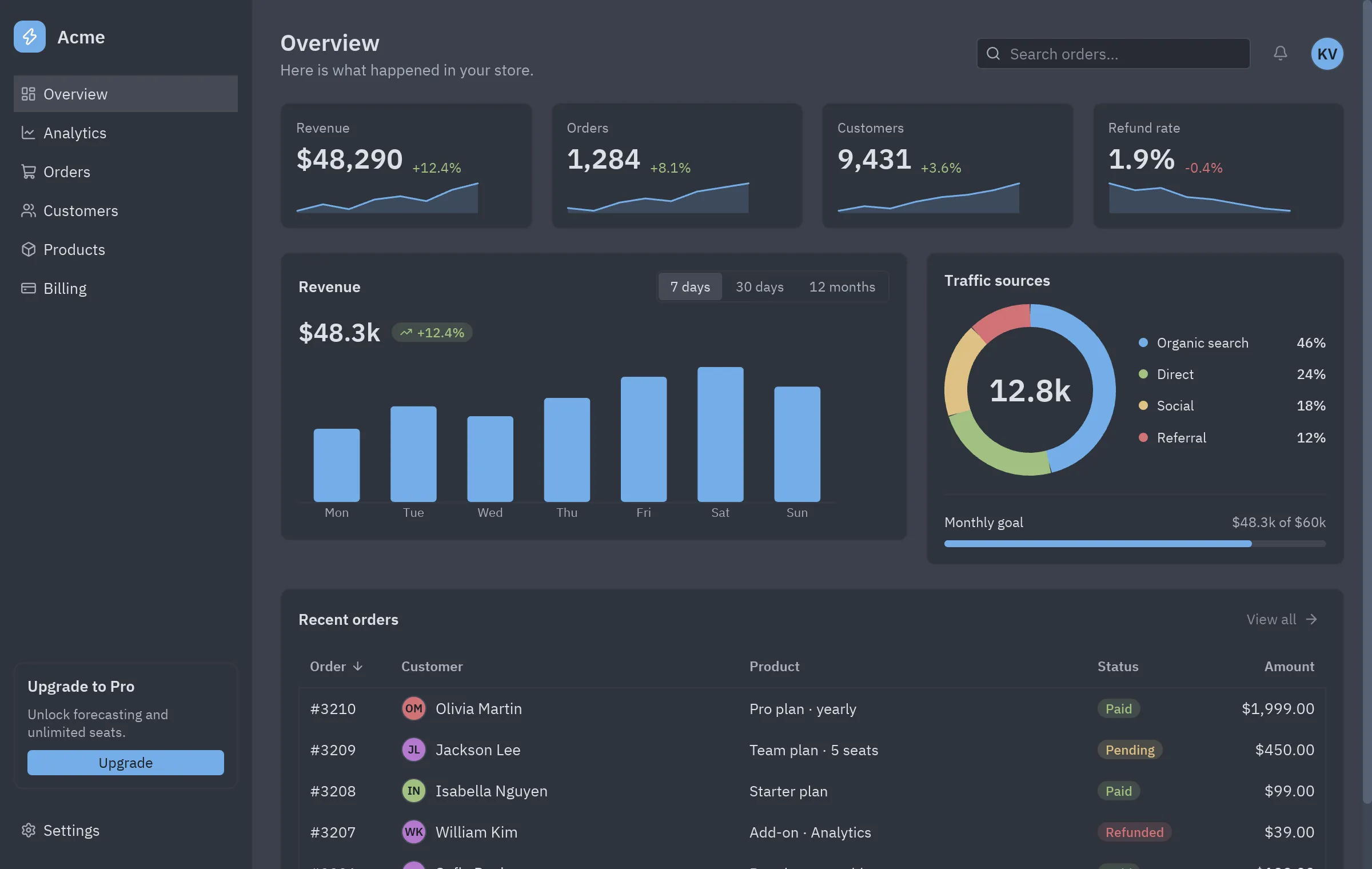
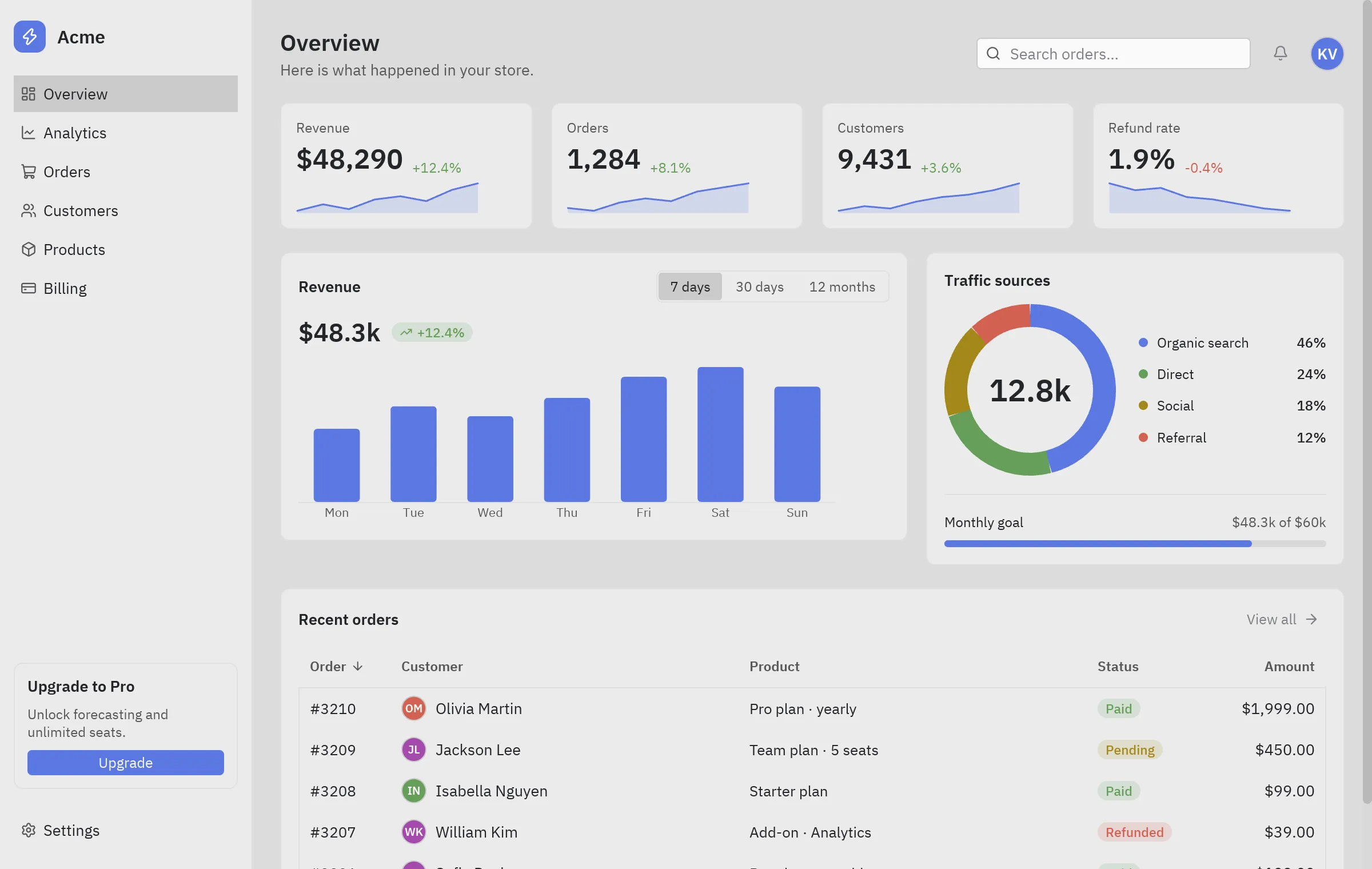
The screenshot follows the site’s theme: switch between light and dark at the top of the page to see the block in One Light and One Dark.
Run it
Section titled “Run it”From the repository root:
python examples/blocks/dashboard.pyWhat it shows
Section titled “What it shows”ui.statcards: value, change and sparkline in one call.ui.bar_chartandui.donuttake plain lists of numbers; colors come from the theme.- Custom cells in
ui.table: avatars and status badges throughrender=. - Click a column header to sort; the search filters the orders as you type.
Components used
Section titled “Components used”| Component | Used for |
|---|---|
| Stat | KPI cards |
| Bar chart | Revenue |
| Donut | Traffic sources |
| Table | Recent orders |
| Card | Every panel |
| Segmented | Date range |
| List item | Navigation |
| Search input | Search |
| Progress | Monthly goal |
| Badge | Statuses |
| Avatar | Customers |
| Sparkline | Trends |
The whole block, ready to copy. It only needs pip install pyzed-ui.
"""Dashboard block: sidebar navigation, KPI cards, a revenue chart, traffic sources and recent orders."""
import pyzed as pzfrom pyzed import ui
NAV = [    ("layout-dashboard", "Overview"),    ("chart-line", "Analytics"),    ("shopping-cart", "Orders"),    ("users", "Customers"),    ("box", "Products"),    ("credit-card", "Billing"),]
STATS = [    ("Revenue", "$48,290", 12.4, [18, 22, 19, 25, 27, 24, 31, 35]),    ("Orders", "1,284", 8.1, [40, 38, 44, 47, 45, 52, 55, 58]),    ("Customers", "9,431", 3.6, [70, 72, 71, 74, 76, 77, 79, 82]),    ("Refund rate", "1.9%", -0.4, [3.1, 2.8, 2.9, 2.5, 2.4, 2.2, 2.0, 1.9]),]
REVENUE = {    "7 days": ([5.2, 6.8, 6.1, 7.4, 8.9, 9.6, 8.2], ["Mon", "Tue", "Wed", "Thu", "Fri", "Sat", "Sun"]),    "30 days": ([28, 31, 26, 35, 39, 42], ["W1", "W2", "W3", "W4", "W5", "W6"]),    "12 months": ([31, 29, 36, 40, 38, 45, 51, 49, 55, 58, 62, 70],                  ["J", "F", "M", "A", "M", "J", "J", "A", "S", "O", "N", "D"]),}
TRAFFIC = [("Organic search", 46, "accent"), ("Direct", 24, "success"), ("Social", 18, "warning"),           ("Referral", 12, "error")]
ORDERS = [    {"id": "#3210", "customer": "Olivia Martin", "product": "Pro plan · yearly", "status": "Paid", "amount": 1999.00},    {"id": "#3209", "customer": "Jackson Lee", "product": "Team plan · 5 seats", "status": "Pending", "amount": 450.00},    {"id": "#3208", "customer": "Isabella Nguyen", "product": "Starter plan", "status": "Paid", "amount": 99.00},    {"id": "#3207", "customer": "William Kim", "product": "Add-on · Analytics", "status": "Refunded", "amount": 39.00},    {"id": "#3206", "customer": "Sofia Davis", "product": "Pro plan · monthly", "status": "Paid", "amount": 199.00},]
STATUS_TINT = {"Paid": "success", "Pending": "warning", "Refunded": "error"}

class Dashboard(pz.App):    title = "Dashboard"    size = (1200, 760)
    def __init__(self):        self.page = "Overview"        self.range = "7 days"        self.query = ""        self.sort_by, self.descending = "Order", True  # a column title
    def sort(self, key):        self.descending = not self.descending if key == self.sort_by else False        self.sort_by = key
    # -- pieces ----------------------------------------------------------------------------    def sidebar(self):        items = [ui.list_item(label, lambda label=label: setattr(self, "page", label), icon=icon,                              selected=label == self.page, height=32) for icon, label in NAV]        return pz.container(            pz.column([                pz.row([pz.container(pz.icon("zap", size=16, color="#ffffff"), padding=6).style(                    background="accent", radius=8),                        ui.label("Acme", size="lg", weight="semibold")], spacing=10, align="center"),                pz.column(items, spacing=2),                pz.vspace(),                ui.card(pz.column([                    ui.label("Upgrade to Pro", weight="semibold"),                    ui.muted("Unlock forecasting and unlimited seats.", size="sm"),                    ui.button("Upgrade", lambda: setattr(self, "page", "Billing"), variant="solid", size="sm", full_width=True),                ], spacing=8), padding=12),                ui.list_item("Settings", None, icon="settings", height=32),            ], spacing=20, height="fill"),            width=220, height="fill", padding=(18, 12),        ).style(background="panel")
    def header(self):        return pz.row([            pz.column([ui.heading(self.page, level=2), ui.muted("Here is what happened in your store.")],                      spacing=2),            pz.hspace(),            pz.container(ui.search_input(self.query, lambda v: setattr(self, "query", v),                                         placeholder="Search orders…"), width=240),            ui.icon_button("bell", None, tooltip="Notifications"),            ui.avatar("KV", size=30),        ], spacing=12, align="center")
    def revenue(self):        values, labels = REVENUE[self.range]        return ui.card(            pz.column([                pz.row([pz.text("$48.3k", size=22, weight="semibold"), ui.badge("+12.4%", tint="success",                                                                                icon="trending-up")],                       spacing=10, align="center"),                ui.bar_chart(values, labels=labels, width=470, height=140),            ], spacing=12),            title="Revenue",            actions=[ui.segmented(list(REVENUE), self.range, lambda v: setattr(self, "range", v))],            width="fill",        )
    def traffic(self):        legend = [pz.row([ui.indicator(color, size=8), ui.label(name, size="sm"), pz.hspace(),                          ui.label(f"{share}%", size="sm", weight="medium")], spacing=8, align="center")                  for name, share, color in TRAFFIC]        colors = [self.resolved_theme().color(c) for _, _, c in TRAFFIC]        return ui.card(            pz.column([                pz.row([ui.donut([s for _, s, _ in TRAFFIC], colors=colors, size=150, thickness=20, label="12.8k"),                        pz.column(legend, spacing=12, width="fill")], spacing=20, align="center"),                ui.divider(),                pz.column([pz.row([ui.label("Monthly goal", size="sm"), pz.hspace(),                                   ui.muted("$48.3k of $60k", size="sm")]),                           ui.progress(0.805, height=6)], spacing=8),            ], spacing=16),            title="Traffic sources", width="fill",        )
    def orders(self):        rows = [o for o in ORDERS if self.query.lower() in (o["customer"] + o["product"]).lower()]        columns = [            ui.Column("Order", "id", width=80),            ui.Column("Customer", "customer", render=lambda name: pz.row(                [ui.avatar("".join(p[0] for p in name.split()), size=22, index=len(name)), ui.label(name)], spacing=8,                align="center")),            ui.Column("Product", "product"),            ui.Column("Status", "status", width=110,                      render=lambda s: ui.badge(s, tint=STATUS_TINT[s])),            ui.Column("Amount", "amount", width=100, align="end", render=lambda a: ui.label(f"${a:,.2f}")),        ]        return ui.card(            ui.table(columns, rows, sort_by=self.sort_by, descending=self.descending, on_sort=self.sort,                     row_height=36),            title="Recent orders", actions=[ui.button("View all", None, variant="ghost", size="sm",                                                       icon="arrow-right", icon_position="end")],            width="fill",        )
    def view(self):        stats = [ui.stat(title, value, delta=delta, trend=trend, width="fill")                 for title, value, delta, trend in STATS]        body = pz.column([            self.header(),            pz.row(stats, spacing=16),            pz.row([pz.container(self.revenue(), width="fill:3"), pz.container(self.traffic(), width="fill:2")],                   spacing=16),            self.orders(),        ], spacing=20, padding=24)        return pz.row([self.sidebar(), ui.divider(vertical=True), pz.scrollable(body, height="fill")], height="fill").style(            background="background")

if __name__ == "__main__":    pz.run(Dashboard)
Make it yours
Section titled “Make it yours”Change theme (or self.theme = pz.themes.get("One Dark").with_accent("#e11d48")), replace the sample data with your own and split pieces into components when they grow. An AI agent with the MCP server can read this block with read_example("blocks/dashboard") and adapt it for you.