
Dashboards and data apps
Screens full of numbers, tables and lists: the kind of internal tool, admin panel or media app that many desktop programs are. The first six are Blocks, complete screens written with the components library that you can copy and adapt; each block’s page has its full code and notes on what to change. Every capture follows this site’s theme: switch between light and dark at the top of the page to see them in both.
Dashboard
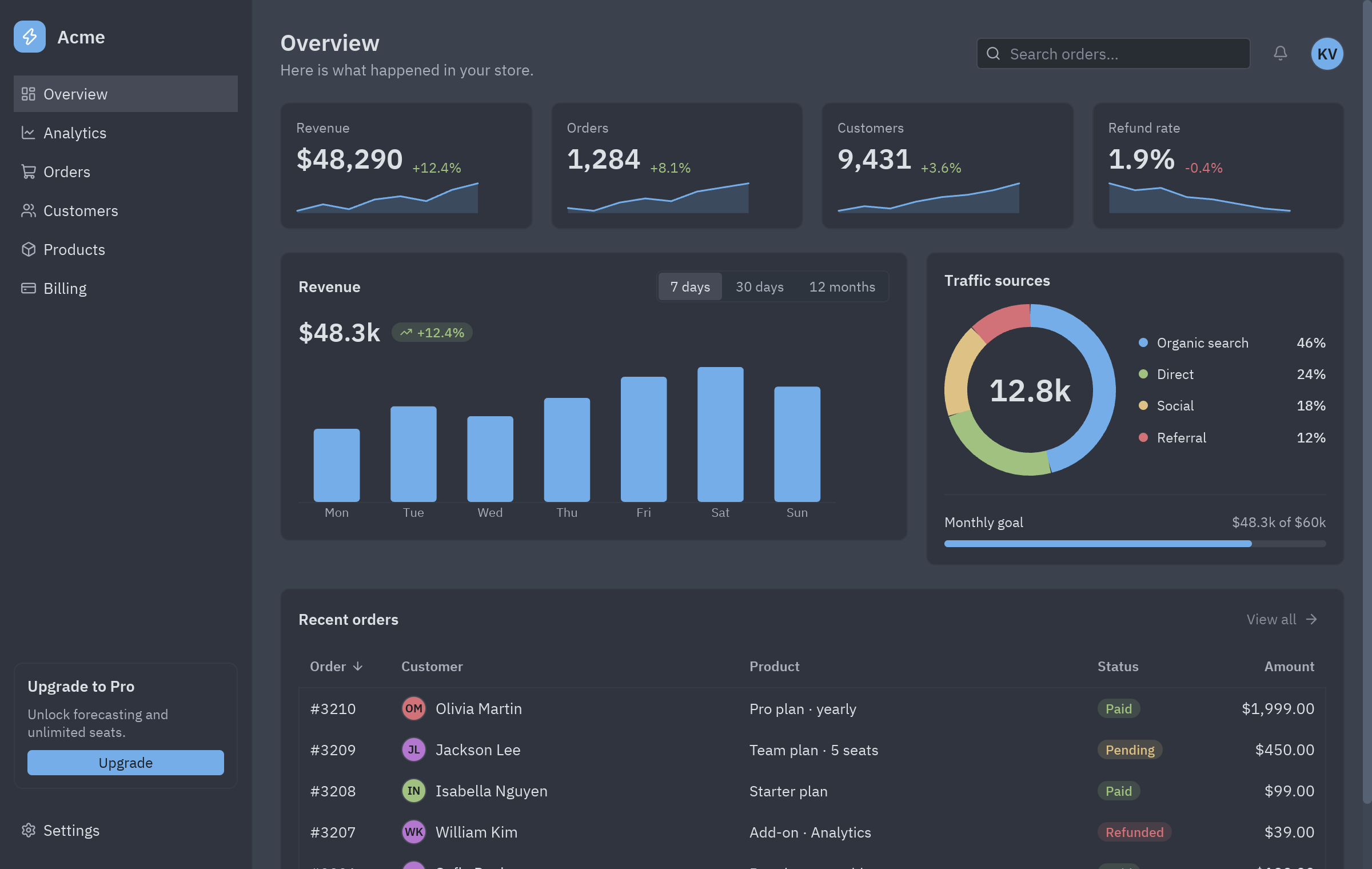
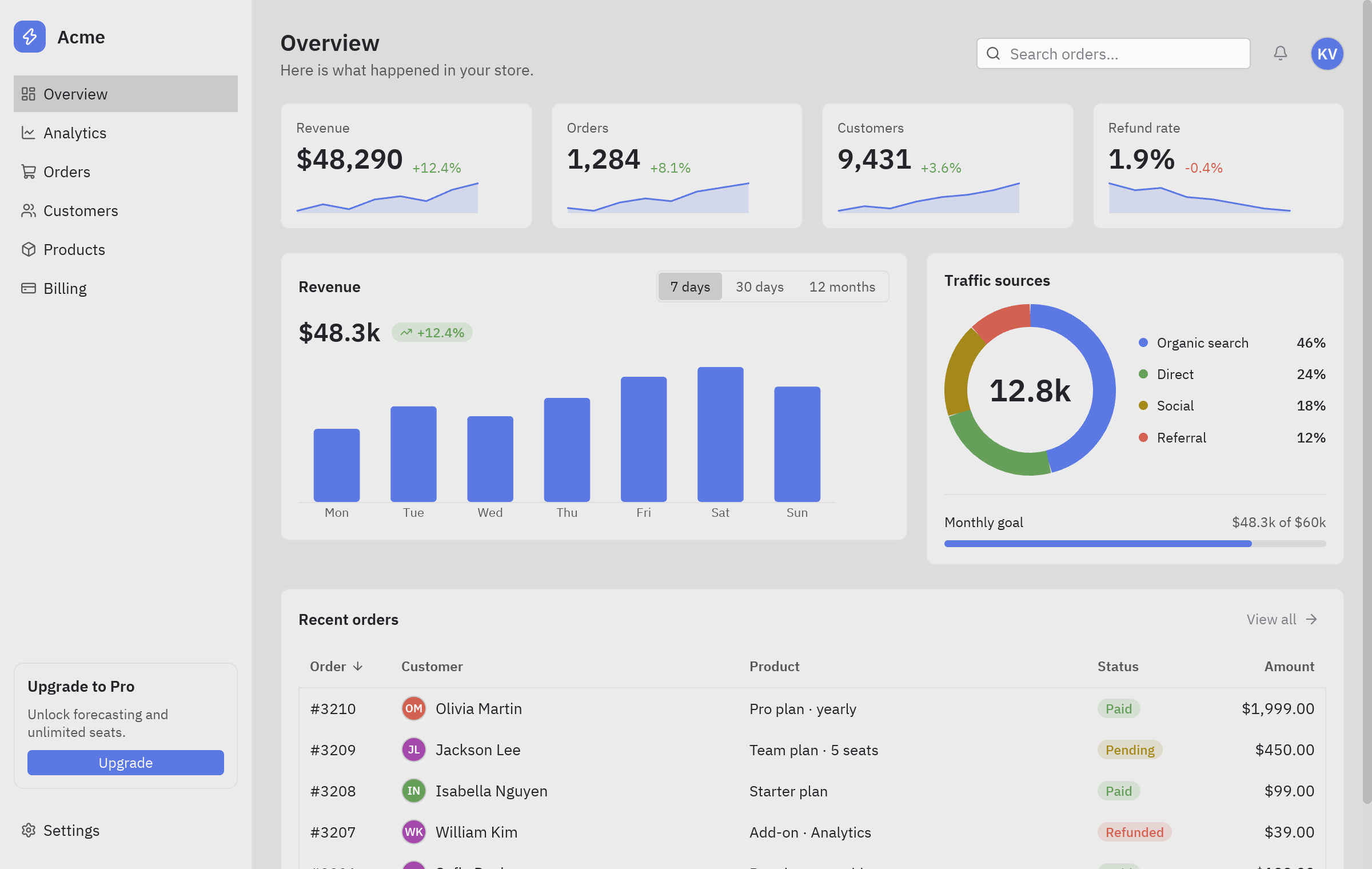
Section titled “Dashboard”An admin dashboard: sidebar navigation, KPI cards with trends, a revenue chart, traffic sources and a table of recent orders.
- KPI cards are
ui.statwith adeltaand a smalltrendline. The charts are ready-made components too:ui.bar_chartfor revenue (its range is aui.segmentedcontrol) andui.donutfor traffic sources, with aui.progressbar for the monthly goal. - The sidebar switches pages by changing one attribute of the state: see A multi-view app.
uv run --with pyzed-ui python examples/blocks/dashboard.pypython3 -m venv .venvsource .venv/bin/activatepython -m pip install pyzed-uipython examples/blocks/dashboard.pypy -m venv .venv.venv\Scripts\Activate.ps1python -m pip install pyzed-uipython examples\blocks\dashboard.pypython3 examples/blocks/dashboard.pypy examples\blocks\dashboard.pyThe code: Dashboard block.
Data table
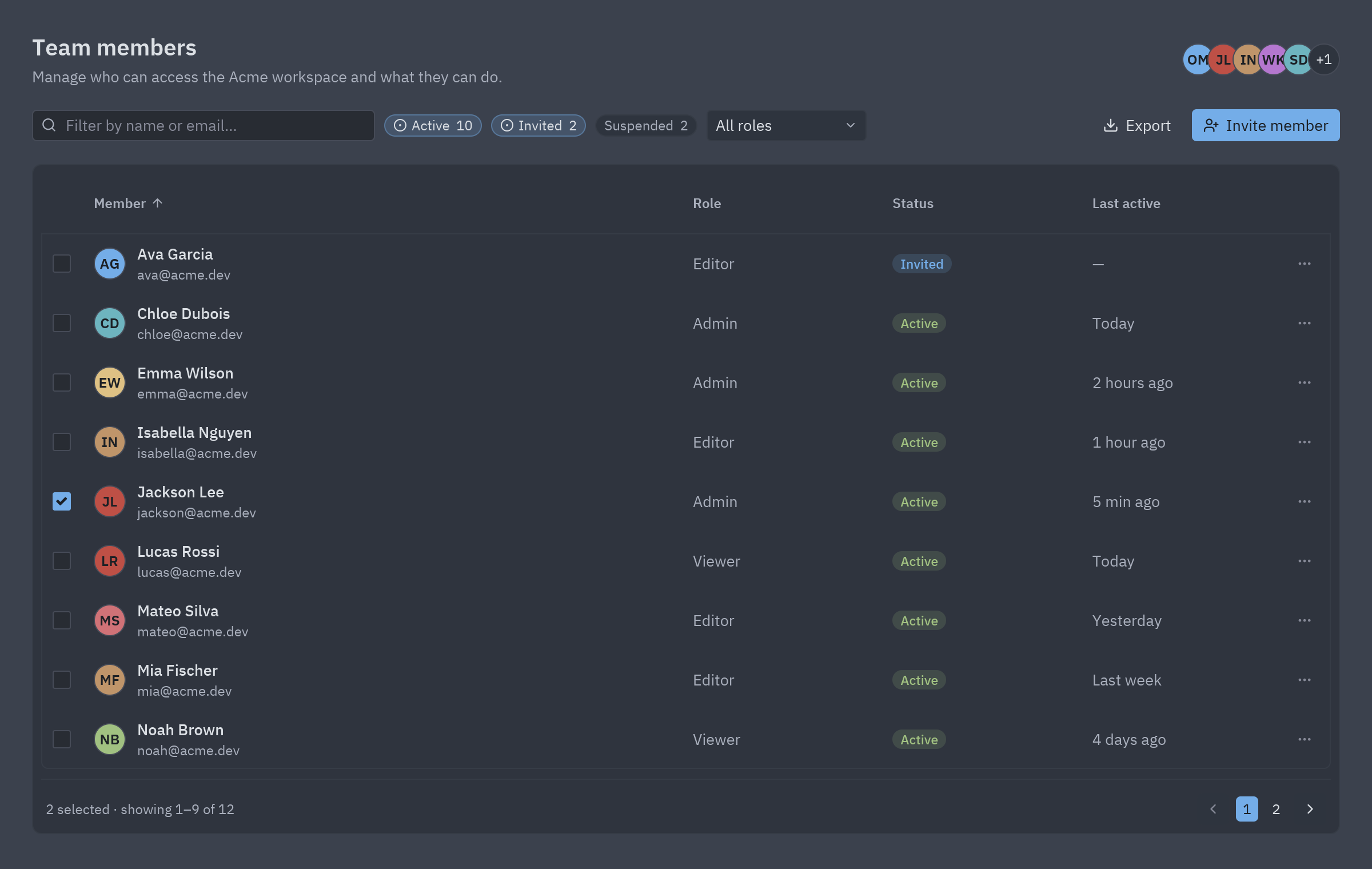
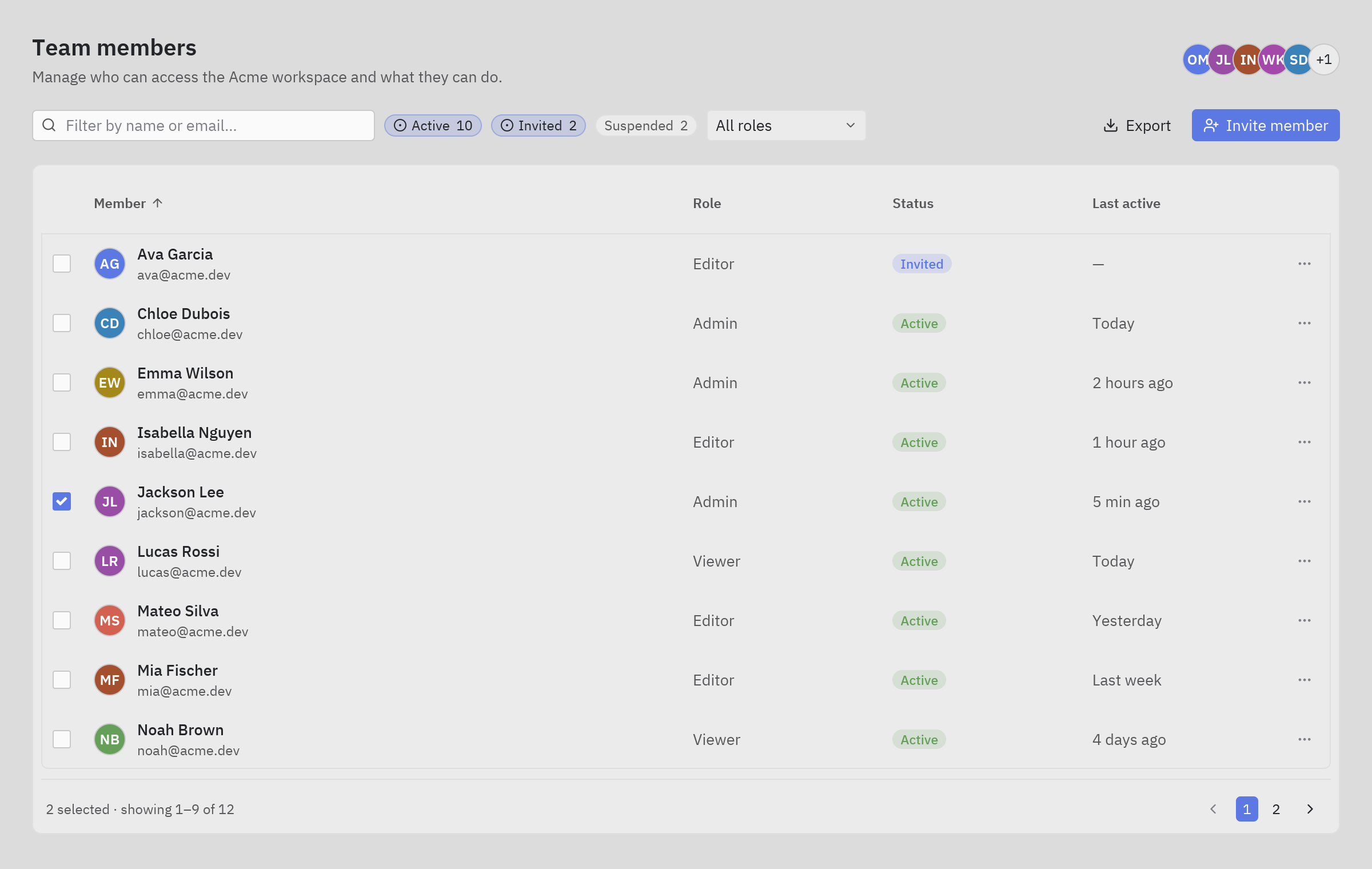
Section titled “Data table”A team members table with search, status filters, sortable columns, row selection, paging and an export action.
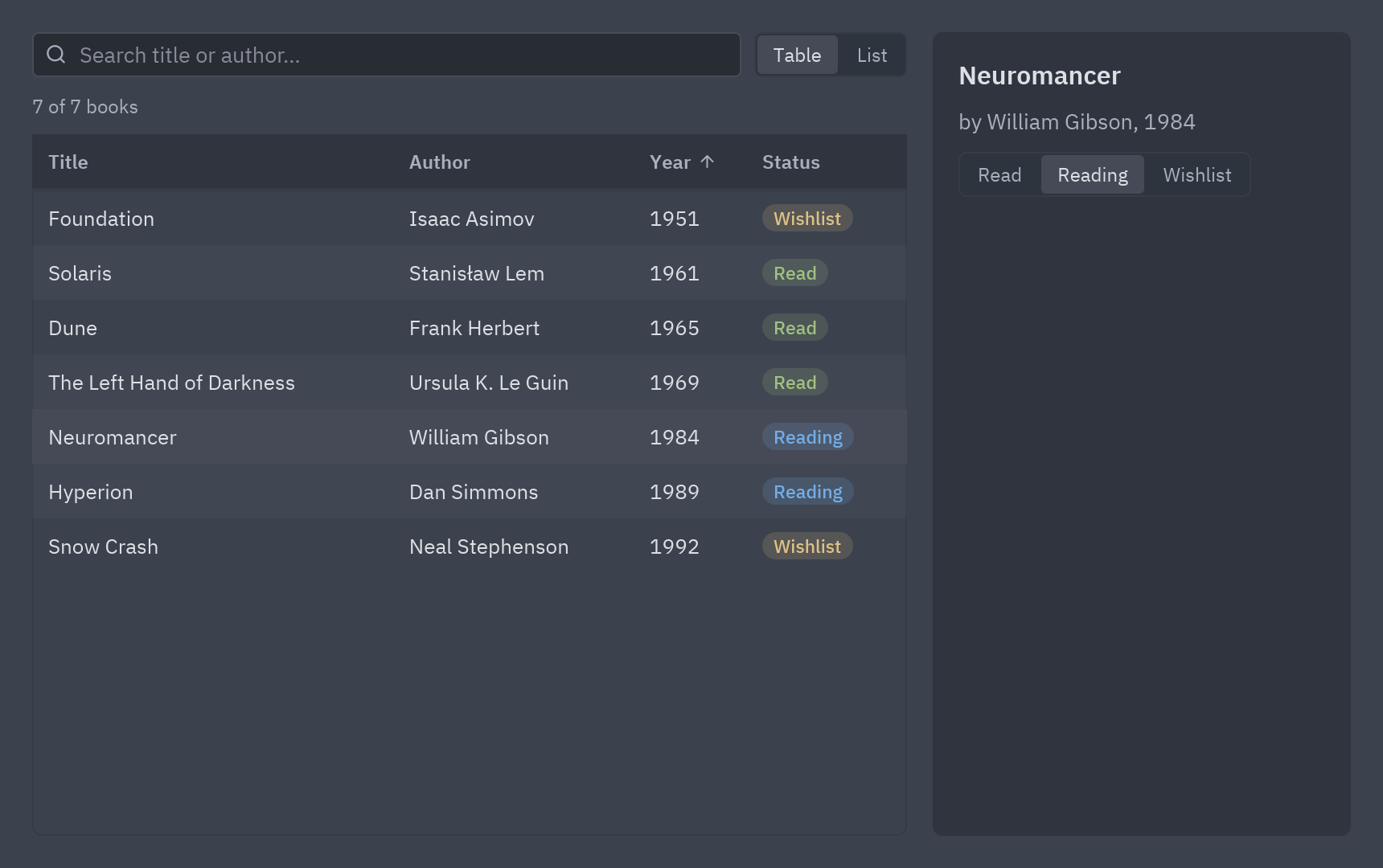
uv run --with pyzed-ui python examples/blocks/data_table.pypython3 -m venv .venvsource .venv/bin/activatepython -m pip install pyzed-uipython examples/blocks/data_table.pypy -m venv .venv.venv\Scripts\Activate.ps1python -m pip install pyzed-uipython examples\blocks\data_table.pypython3 examples/blocks/data_table.pypy examples\blocks\data_table.pyThe code: Data table block. To learn the parts one by one (search, sort, select, show the details), follow Lists and tables with data, which builds this small book library:
Kanban board
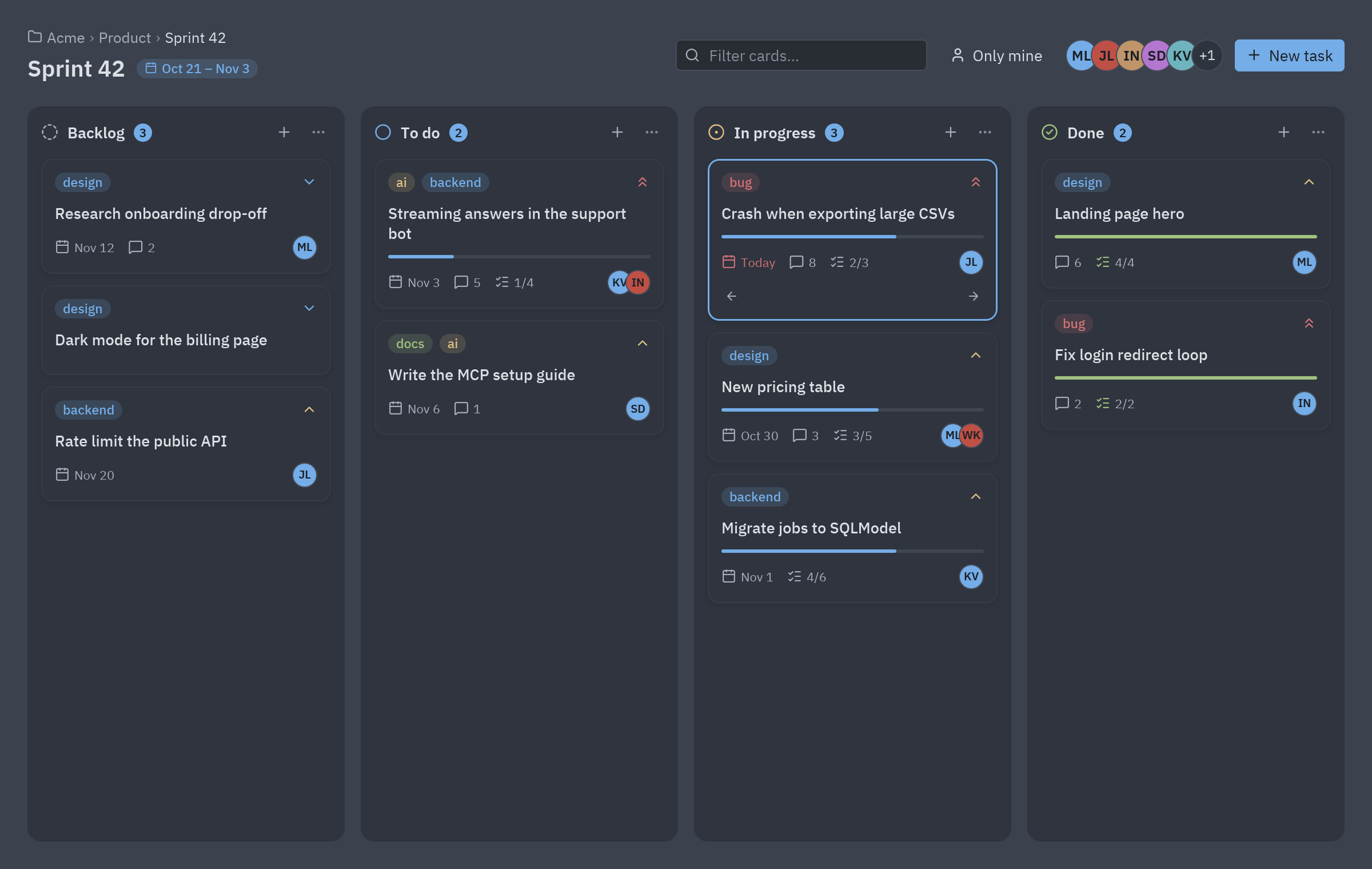
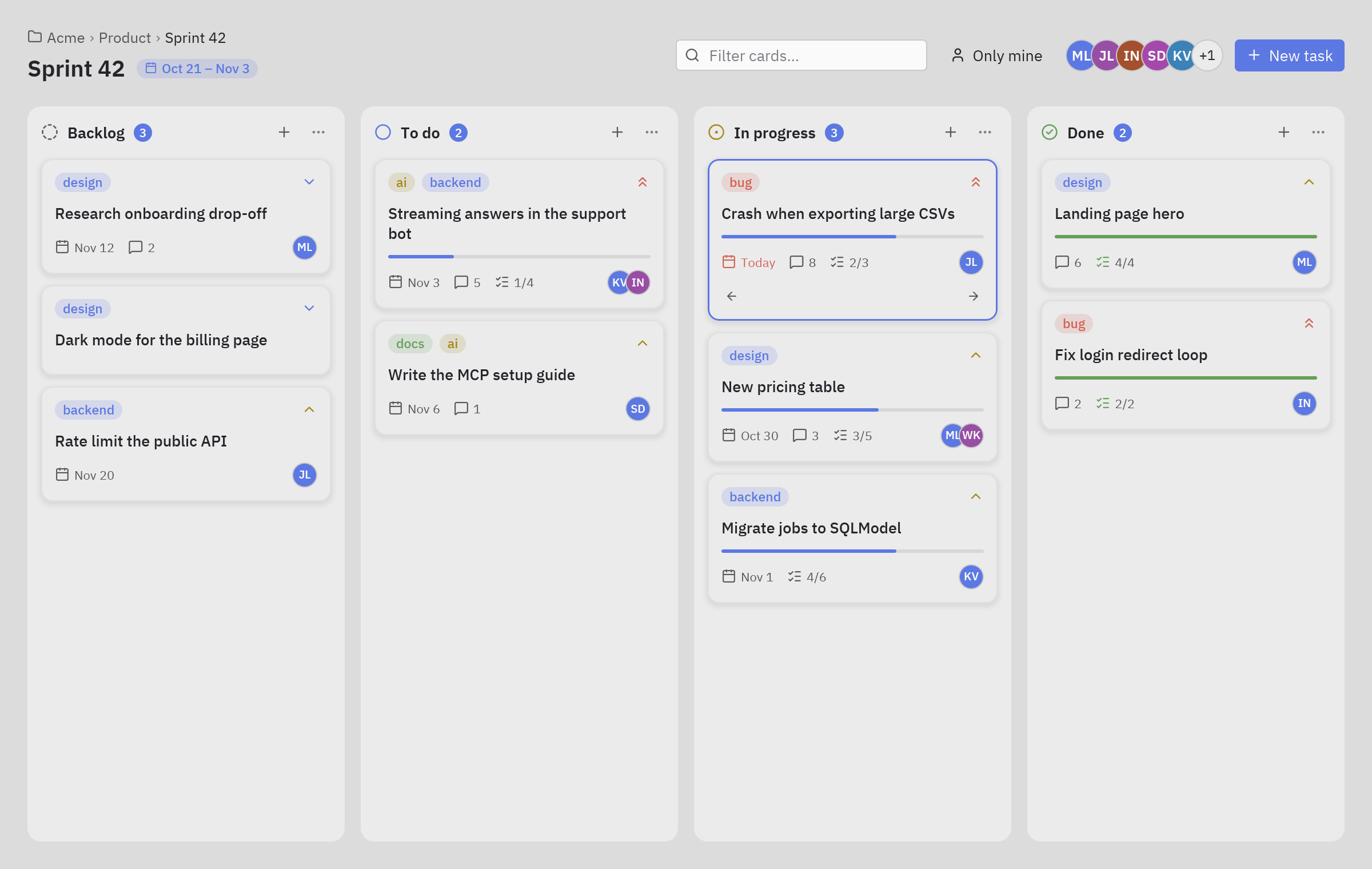
Section titled “Kanban board”A project board with columns, labelled cards, assignees, progress, and buttons to move cards along.
uv run --with pyzed-ui python examples/blocks/kanban.pypython3 -m venv .venvsource .venv/bin/activatepython -m pip install pyzed-uipython examples/blocks/kanban.pypy -m venv .venv.venv\Scripts\Activate.ps1python -m pip install pyzed-uipython examples\blocks\kanban.pypython3 examples/blocks/kanban.pypy examples\blocks\kanban.pyThe code: Kanban block.
Team chat
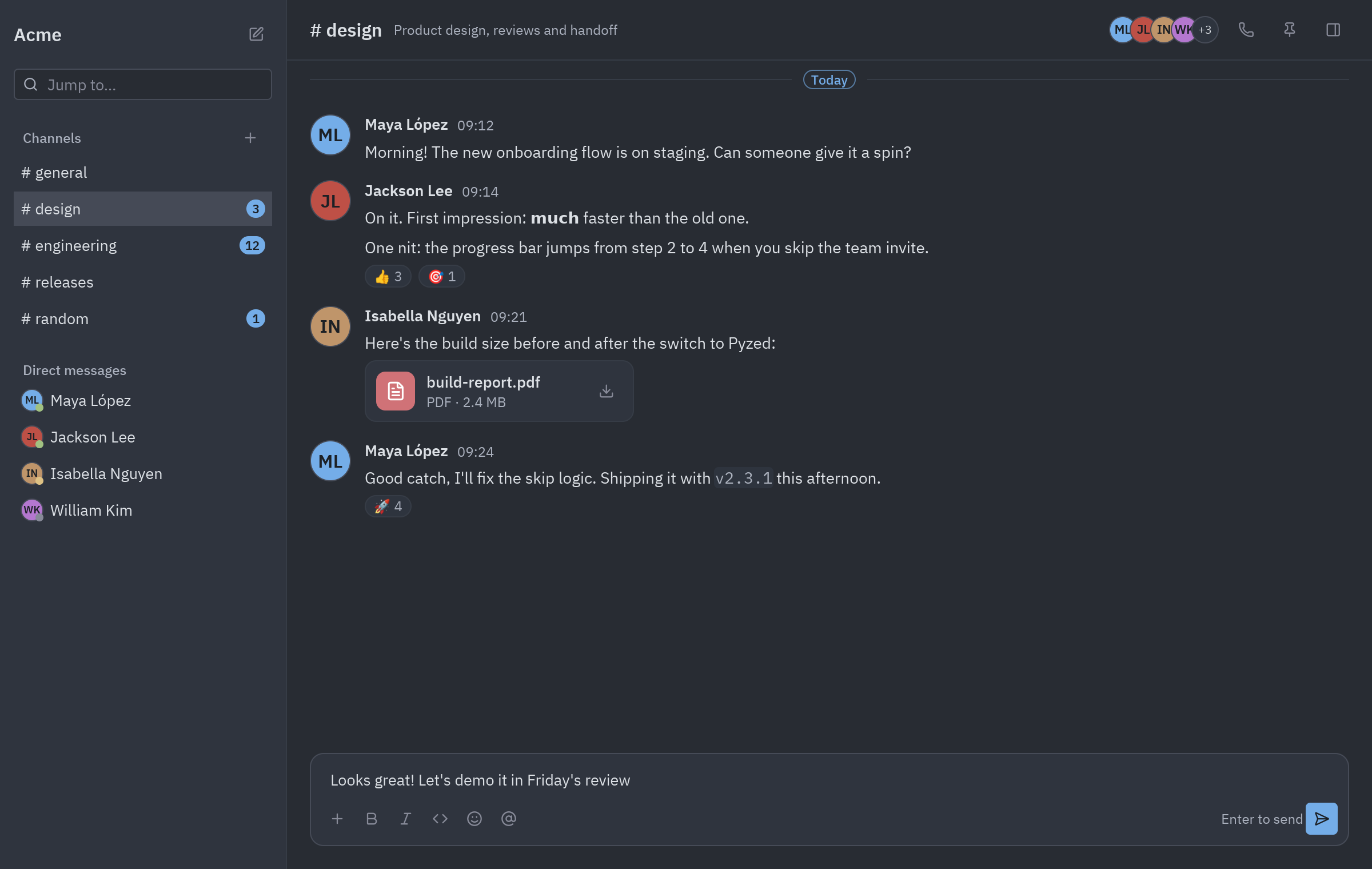
Section titled “Team chat”A messenger with channels, direct messages, a message thread and a composer.
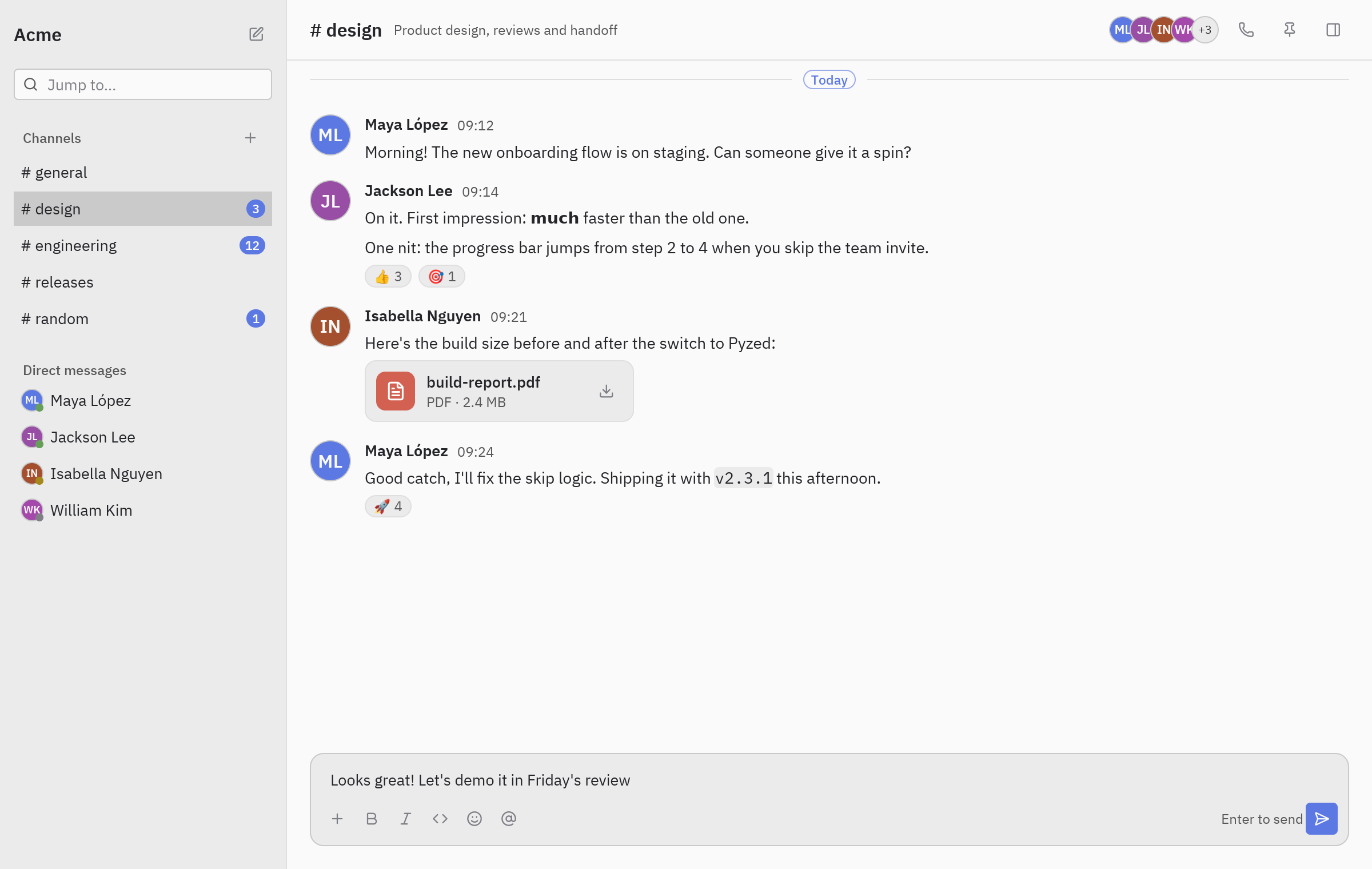
uv run --with pyzed-ui python examples/blocks/chat.pypython3 -m venv .venvsource .venv/bin/activatepython -m pip install pyzed-uipython examples/blocks/chat.pypy -m venv .venv.venv\Scripts\Activate.ps1python -m pip install pyzed-uipython examples\blocks\chat.pypython3 examples/blocks/chat.pypy examples\blocks\chat.pyThe code: Chat block. For a chat that streams answers from an AI model, see the AI chat.
Music player
Section titled “Music player”A library sidebar, an album page with its track list, and a player bar whose progress moves while a song plays.
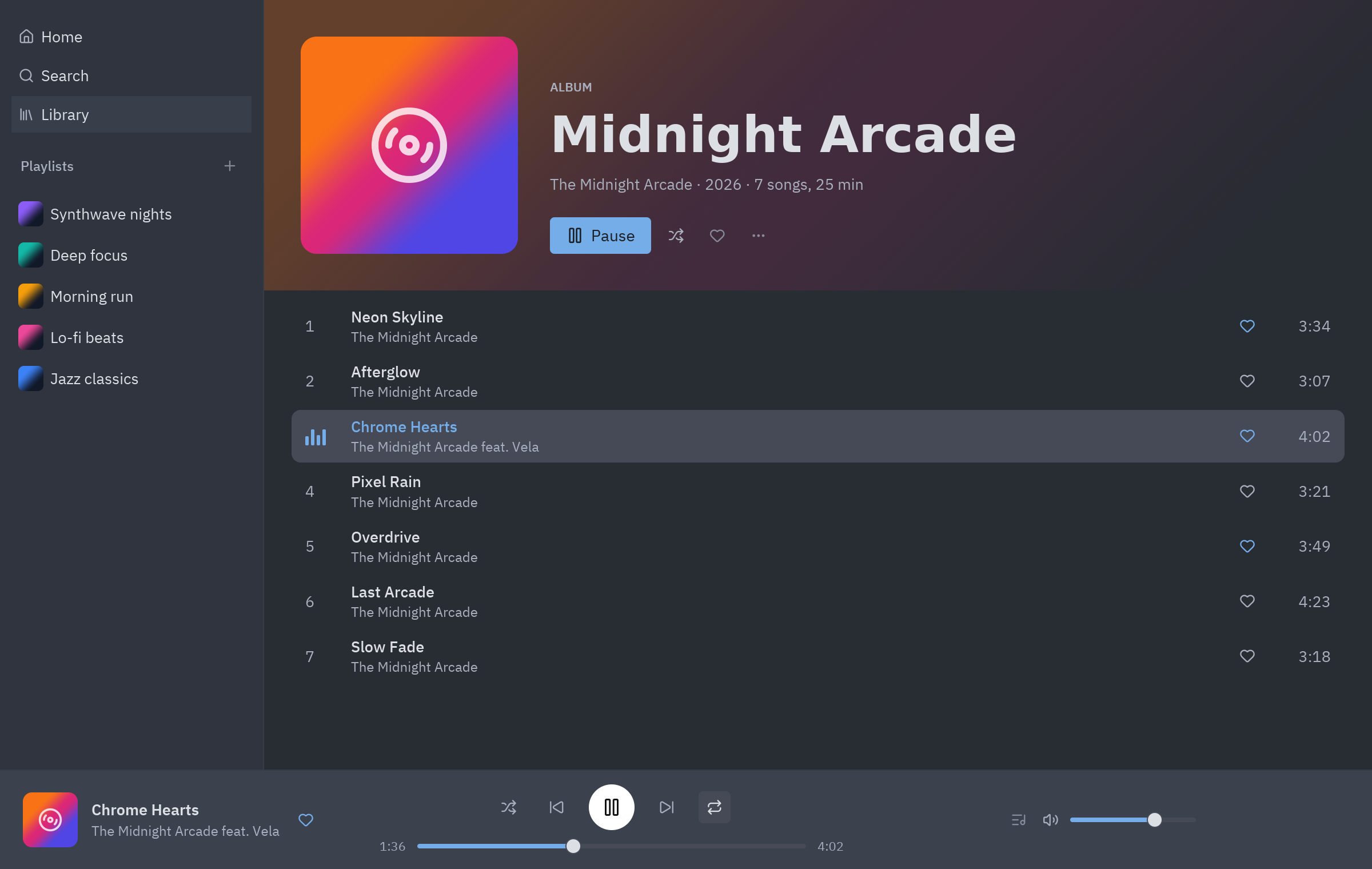
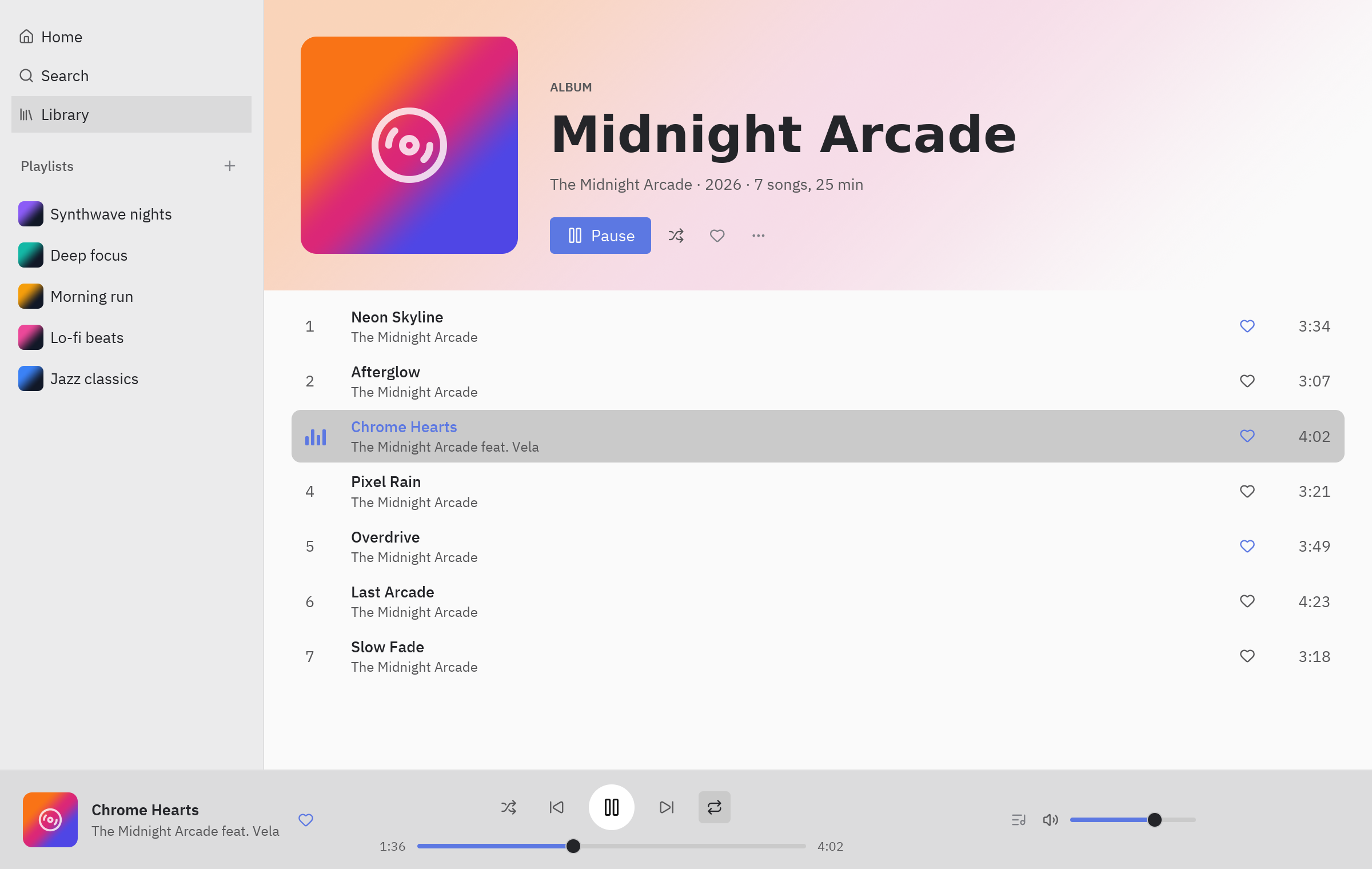
uv run --with pyzed-ui python examples/blocks/music_player.pypython3 -m venv .venvsource .venv/bin/activatepython -m pip install pyzed-uipython examples/blocks/music_player.pypy -m venv .venv.venv\Scripts\Activate.ps1python -m pip install pyzed-uipython examples\blocks\music_player.pypython3 examples/blocks/music_player.pypy examples\blocks\music_player.pyThe code: Music player block.
IDE layout
Section titled “IDE layout”The layout of a code editor: a project tree, editor tabs with breadcrumbs, a terminal, an outline panel and a status bar.
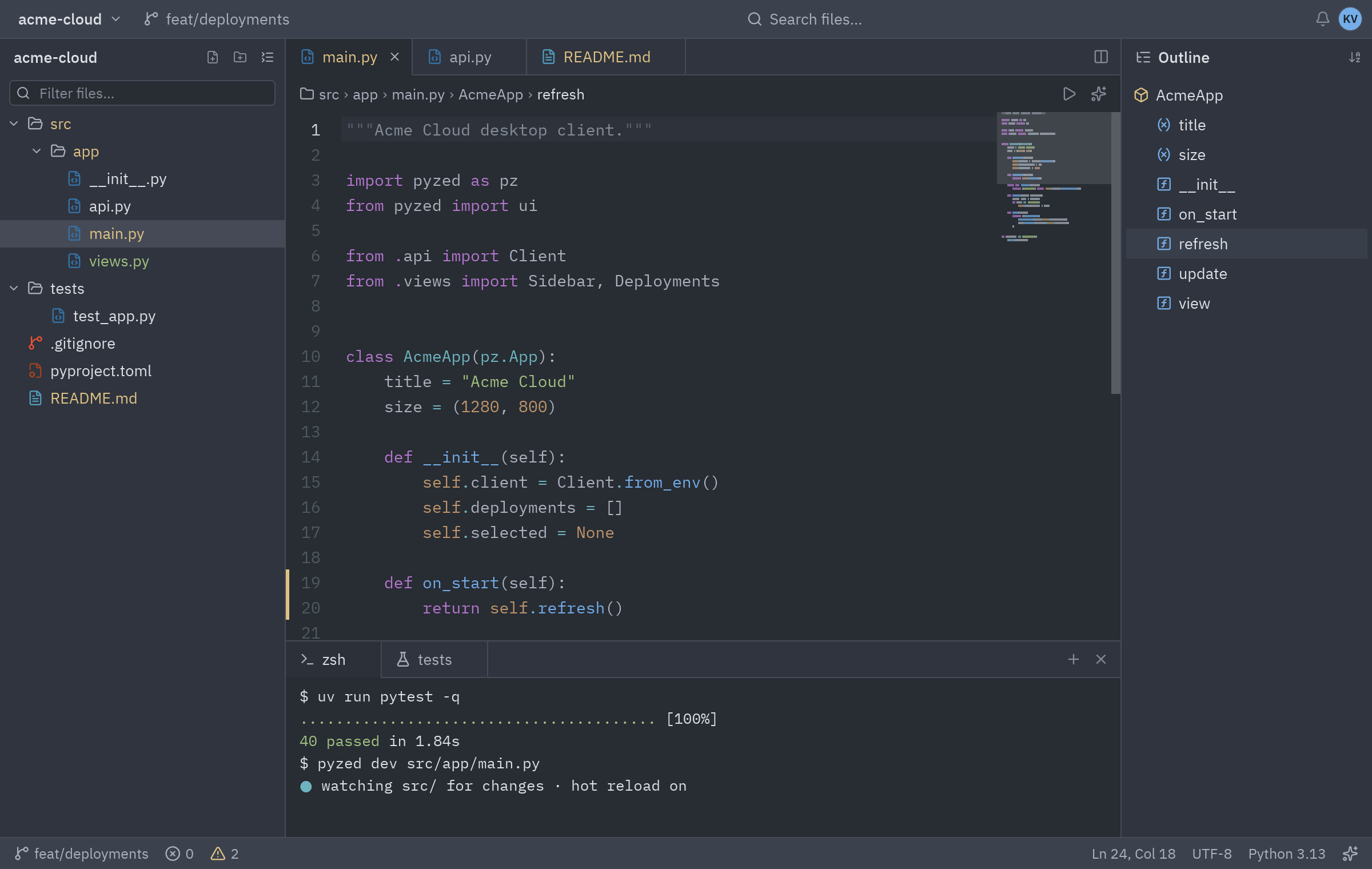
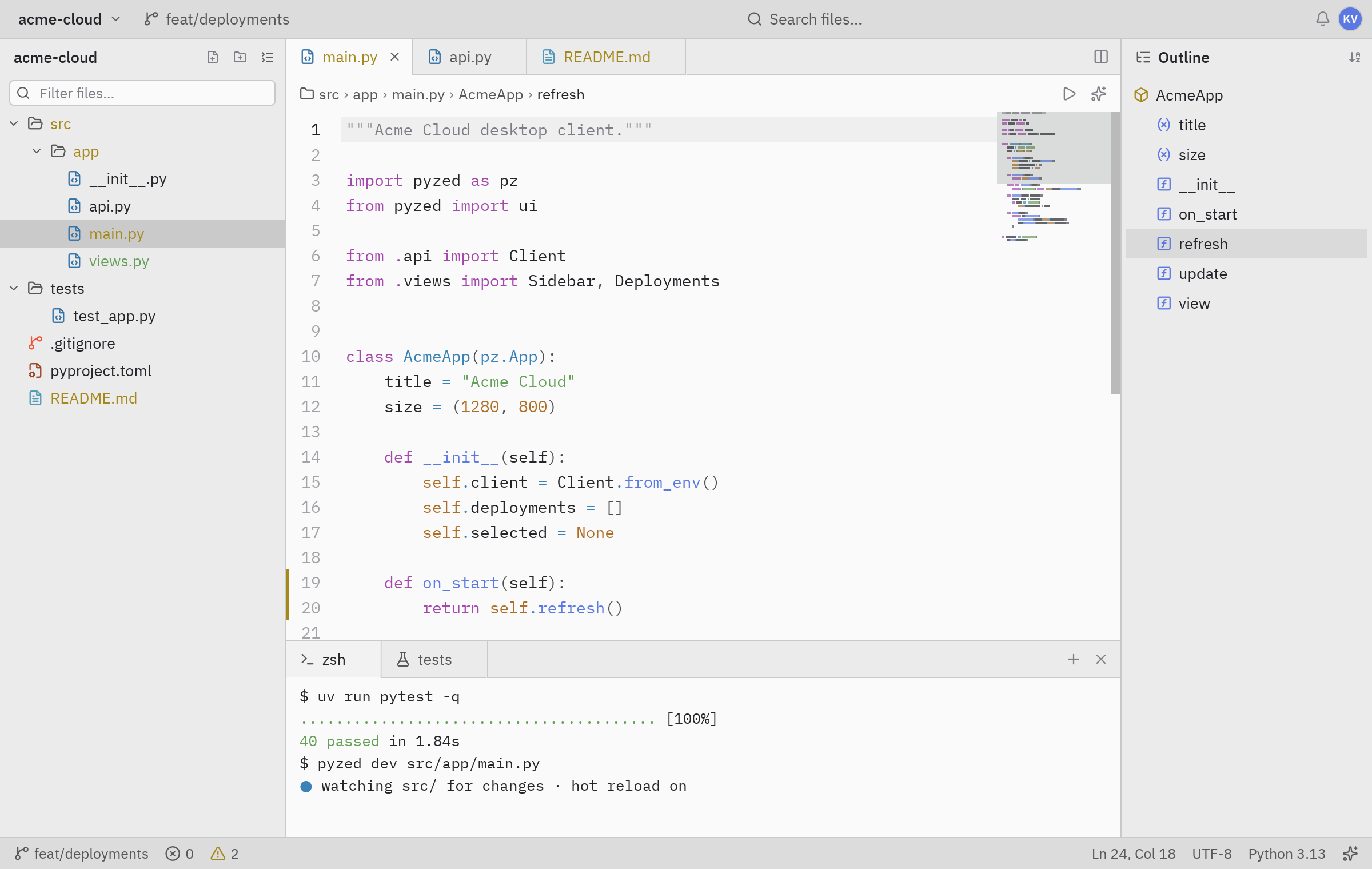
uv run --with pyzed-ui python examples/blocks/file_explorer.pypython3 -m venv .venvsource .venv/bin/activatepython -m pip install pyzed-uipython examples/blocks/file_explorer.pypy -m venv .venv.venv\Scripts\Activate.ps1python -m pip install pyzed-uipython examples\blocks\file_explorer.pypython3 examples/blocks/file_explorer.pypy examples\blocks\file_explorer.pyThe code: File explorer block. A working editor on the same idea is the Workspace editor.
Contacts over SQLite
Section titled “Contacts over SQLite”A contacts app on SQLAlchemy 2.0 with 20,000 rows in a virtual table. Searching and sorting run as SQL queries in a worker thread (Command.perform), so the window never waits
for the database.
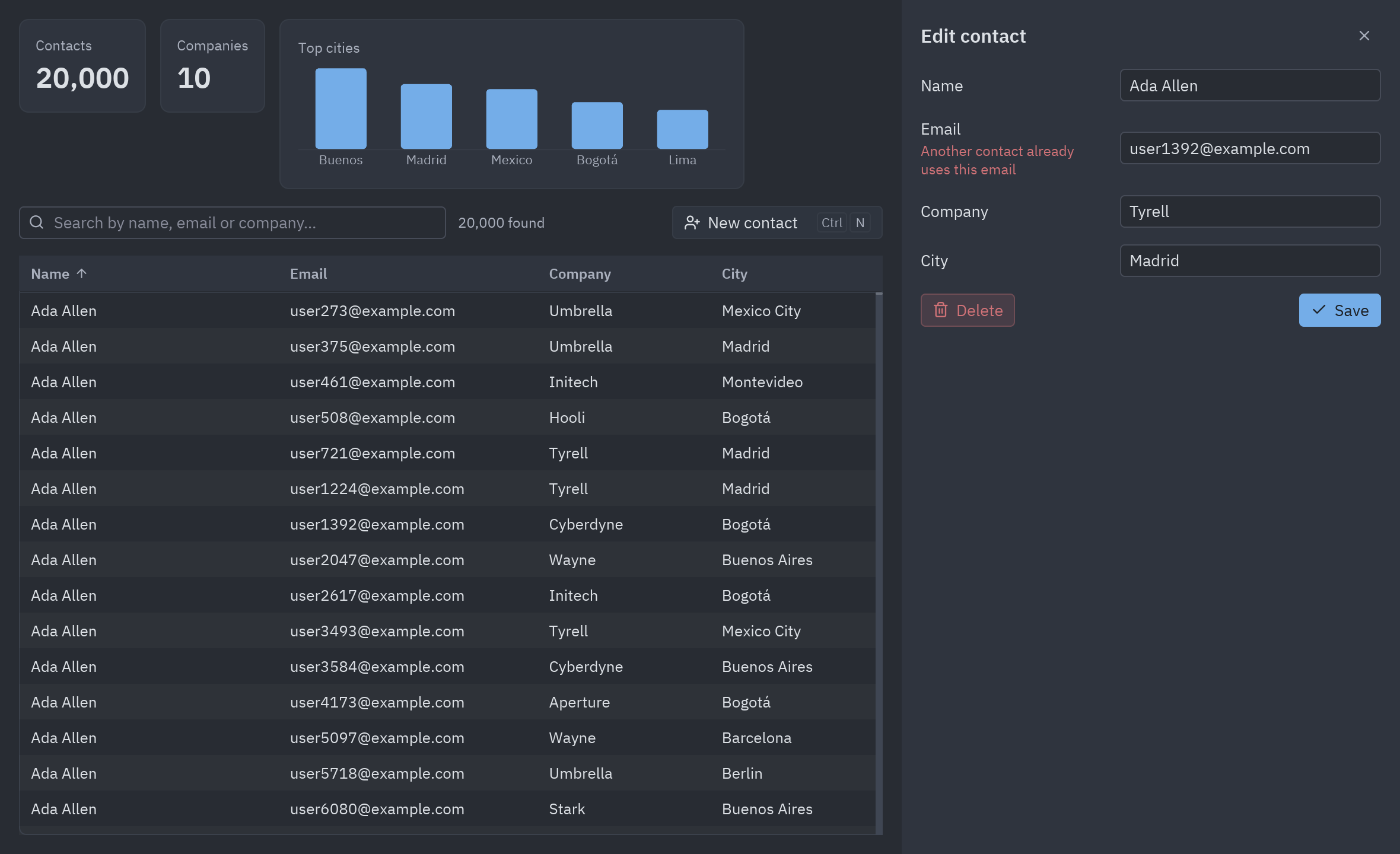
cd examples/integrations/sqlalchemy_contactsuv run main.pycd examples/integrations/sqlalchemy_contactspython3 -m venv .venvsource .venv/bin/activatepython -m pip install pyzed-ui "sqlalchemy>=2.0"python main.pycd examples\integrations\sqlalchemy_contactspy -m venv .venv.venv\Scripts\Activate.ps1python -m pip install pyzed-ui "sqlalchemy>=2.0"python main.pycd examples/integrations/sqlalchemy_contactspython main.pyFull code: db.py and main.py
"""The database: SQLAlchemy 2.0 models on SQLite, plus the queries the window runs."""
from __future__ import annotations
import randomfrom datetime import datetimefrom pathlib import Path
from sqlalchemy import String, create_engine, func, or_, selectfrom sqlalchemy.exc import IntegrityErrorfrom sqlalchemy.orm import DeclarativeBase, Mapped, Session, mapped_column
DATABASE = Path(__file__).with_name("contacts.db")engine = create_engine(f"sqlite:///{DATABASE}")

class Base(DeclarativeBase):    pass

class Contact(Base):    __tablename__ = "contacts"
    id: Mapped[int] = mapped_column(primary_key=True)    name: Mapped[str] = mapped_column(String(80), index=True)    email: Mapped[str] = mapped_column(String(120), unique=True)    company: Mapped[str] = mapped_column(String(80), default="")    city: Mapped[str] = mapped_column(String(60), default="")    created: Mapped[datetime] = mapped_column(default=datetime.now)

# Sorting by a column title of the table is an ORDER BY on this column.COLUMNS = {"Name": Contact.name, "Email": Contact.email, "Company": Contact.company, "City": Contact.city}

def setup(rows: int = 20_000) -> None:    """Creates the table and fills it with made-up contacts the first time."""    Base.metadata.create_all(engine)    with Session(engine) as session:        if session.scalar(select(func.count()).select_from(Contact)):            return        rng = random.Random(7)        first = ["Ada", "Alan", "Grace", "Linus", "Guido", "Margaret", "Ken", "Barbara", "Dennis", "Radia",                 "Tim", "Frances", "Bjarne", "Anita", "John", "Hedy", "Yukihiro", "Sophie", "Brendan", "Katherine"]        last = ["Lovelace", "Turing", "Hopper", "Torvalds", "van Rossum", "Hamilton", "Thompson", "Liskov",                "Ritchie", "Perlman", "Berners-Lee", "Allen", "Stroustrup", "Borg", "McCarthy", "Lamarr",                "Matsumoto", "Wilson", "Eich", "Johnson"]        companies = ["Acme", "Globex", "Initech", "Umbrella", "Hooli", "Stark", "Wayne", "Tyrell", "Cyberdyne", "Aperture"]        cities = ["Buenos Aires", "Madrid", "Mexico City", "Bogotá", "Lima", "Santiago", "Montevideo", "Barcelona",                  "Berlin", "Tokyo", "Toronto", "Lisbon"]        weights = [12, 10, 9, 7, 6, 5, 4, 4, 3, 3, 2, 2]        session.add_all(            Contact(name=f"{rng.choice(first)} {rng.choice(last)}", email=f"user{i}@example.com",                    company=rng.choice(companies), city=rng.choices(cities, weights)[0])            for i in range(rows)        )        session.commit()

def search(text: str, sort: str, descending: bool) -> list[Contact]:    """Contacts whose name, email or company contains ``text``, sorted in SQL."""    column = COLUMNS[sort]    query = select(Contact).order_by(column.desc() if descending else column, Contact.id)    if text:        pattern = f"%{text}%"        query = query.where(or_(Contact.name.ilike(pattern), Contact.email.ilike(pattern),                                Contact.company.ilike(pattern)))    with Session(engine) as session:        return list(session.scalars(query))  # plain objects keep their loaded values after the session closes

def stats() -> dict:    """Totals and the five cities with more contacts, for the header."""    with Session(engine) as session:        total = session.scalar(select(func.count()).select_from(Contact))        companies = session.scalar(select(func.count(func.distinct(Contact.company))))        cities = session.execute(select(Contact.city, func.count()).group_by(Contact.city)                                 .order_by(func.count().desc()).limit(5)).all()    return {"total": total, "companies": companies, "cities": [(city, count) for city, count in cities]}

def save(contact_id: int | None, values: dict) -> Contact | dict:    """Inserts or updates a contact. Returns it, or ``{field: message}`` when it can't be saved."""    errors = {}    if not values["name"].strip():        errors["name"] = "A contact needs a name"    if "@" not in values["email"]:        errors["email"] = "Not an email address"    if errors:        return errors    with Session(engine, expire_on_commit=False) as session:        contact = session.get(Contact, contact_id) if contact_id else Contact()        for key, value in values.items():            setattr(contact, key, value.strip())        session.add(contact)        try:            session.commit()        except IntegrityError:            return {"email": "Another contact already uses this email"}        return contact

def delete(contact_id: int) -> None: with Session(engine) as session: contact = session.get(Contact, contact_id) if contact is not None: session.delete(contact) session.commit()"""A contacts manager on SQLAlchemy 2.0: 20,000 rows in a virtual table, searched and sorted in SQL.
uv run main.py
The database (contacts.db) is created next to this file on the first run.Walkthrough: https://albakore.github.io/pyzed/integrations/sqlalchemy/"""
from __future__ import annotations
import pyzed as pzfrom pyzed import Command, ui
import db
FIELDS = [("name", "Name", "Ada Lovelace"), ("email", "Email", "ada@example.com"), ("company", "Company", "Analytical Engines"), ("city", "City", "London")]
class Contacts(pz.App): title = "Contacts · SQLAlchemy" size = (1180, 720)
def __init__(self): self.rows: list[db.Contact] = [] self.stats = {"total": 0, "companies": 0, "cities": []} self.query = "" self.sort, self.descending = "Name", False self.loading = True self.editing = None # a Contact, "new" or None self.draft: dict[str, str] = {} self.errors: dict[str, str] = {}
# -- database work runs in a thread with Command.perform ------------------------------ def on_start(self): return Command.perform(db.setup, lambda _: self.reload())
def reload(self): self.loading = True query, sort, descending = self.query, self.sort, self.descending return [ Command.perform(lambda: db.search(query, sort, descending), lambda rows: self.loaded(query, rows)), Command.perform(db.stats, lambda stats: setattr(self, "stats", stats)), ]
def loaded(self, query: str, rows: list[db.Contact]): if query == self.query: # a newer search is on its way: keep waiting for it self.rows, self.loading = rows, False
def search(self, text: str): self.query = text return self.reload()
def sort_by(self, title: str): self.descending = not self.descending if title == self.sort else False self.sort = title return self.reload()
# -- the edit panel ------------------------------------------------------------------ def open(self, contact): self.editing, self.errors = contact, {} self.draft = {key: "" if contact == "new" else getattr(contact, key) for key, _, _ in FIELDS}
def save(self): contact_id = None if self.editing == "new" else self.editing.id values = dict(self.draft) return Command.perform(lambda: db.save(contact_id, values), self.saved)
def saved(self, result): if isinstance(result, dict): self.errors = result return None self.editing = None return self.reload()
def delete(self): contact_id = self.editing.id self.editing = None return Command.perform(lambda: db.delete(contact_id), lambda _: self.reload())
def on_key(self, combo): if combo == "escape": self.editing = None elif combo == "ctrl-n": self.open("new")
# -- view ---------------------------------------------------------------------------- def header(self): cities = self.stats["cities"] return pz.row([ ui.stat("Contacts", f"{self.stats['total']:,}"), ui.stat("Companies", self.stats["companies"]), ui.card(pz.column([ui.muted("Top cities", size="sm"), ui.bar_chart([count for _, count in cities], labels=[c.split()[0] for c, _ in cities], width=360, height=90)], spacing=6)), ], spacing=12)
def panel(self, t): if self.editing is None: return None rows = [ui.field(title, ui.input(self.draft[key], lambda v, k=key: self.draft.__setitem__(k, v), placeholder=hint, width=220), error=self.errors.get(key)) for key, title, hint in FIELDS] new = self.editing == "new" return pz.container( pz.column([ pz.row([ui.heading("New contact" if new else "Edit contact", level=3), pz.hspace(), ui.icon_button("x", lambda: setattr(self, "editing", None), tooltip="Close (Esc)")], align="center"), *rows, pz.row([None if new else ui.button("Delete", self.delete, icon="trash-2", variant="ghost", tint="error"), pz.hspace(), ui.button("Save", self.save, icon="check", variant="solid")], spacing=8), ], spacing=14), padding=16, width=420, height="fill", bg=t.panel, )
def view(self): t = self.resolved_theme() columns = [ ui.Column("Name", "name", width="fill:3"), ui.Column("Email", "email", width="fill:3"), ui.Column("Company", "company", width="fill:2"), ui.Column("City", "city", width="fill:2"), ] toolbar = pz.row([ ui.search_input(self.query, self.search, placeholder="Search by name, email or company…", width=360), ui.spinner() if self.loading else ui.muted(f"{len(self.rows):,} found", size="sm"), pz.hspace(), ui.button("New contact", lambda: self.open("new"), icon="user-plus", keys="ctrl-n"), ], spacing=10, align="center") # Rows come sorted from SQL; sort_by only draws the arrow (re-sorting a sorted list is cheap). table = ui.table(columns, self.rows, sort_by=self.sort, descending=self.descending, on_sort=self.sort_by, on_row_press=self.open, selected=self.editing, striped=True, height="fill") main = pz.column([self.header(), toolbar, table], spacing=14, padding=16) return pz.container(pz.row([main, self.panel(t)]), width="fill", height="fill", bg=t.editor)
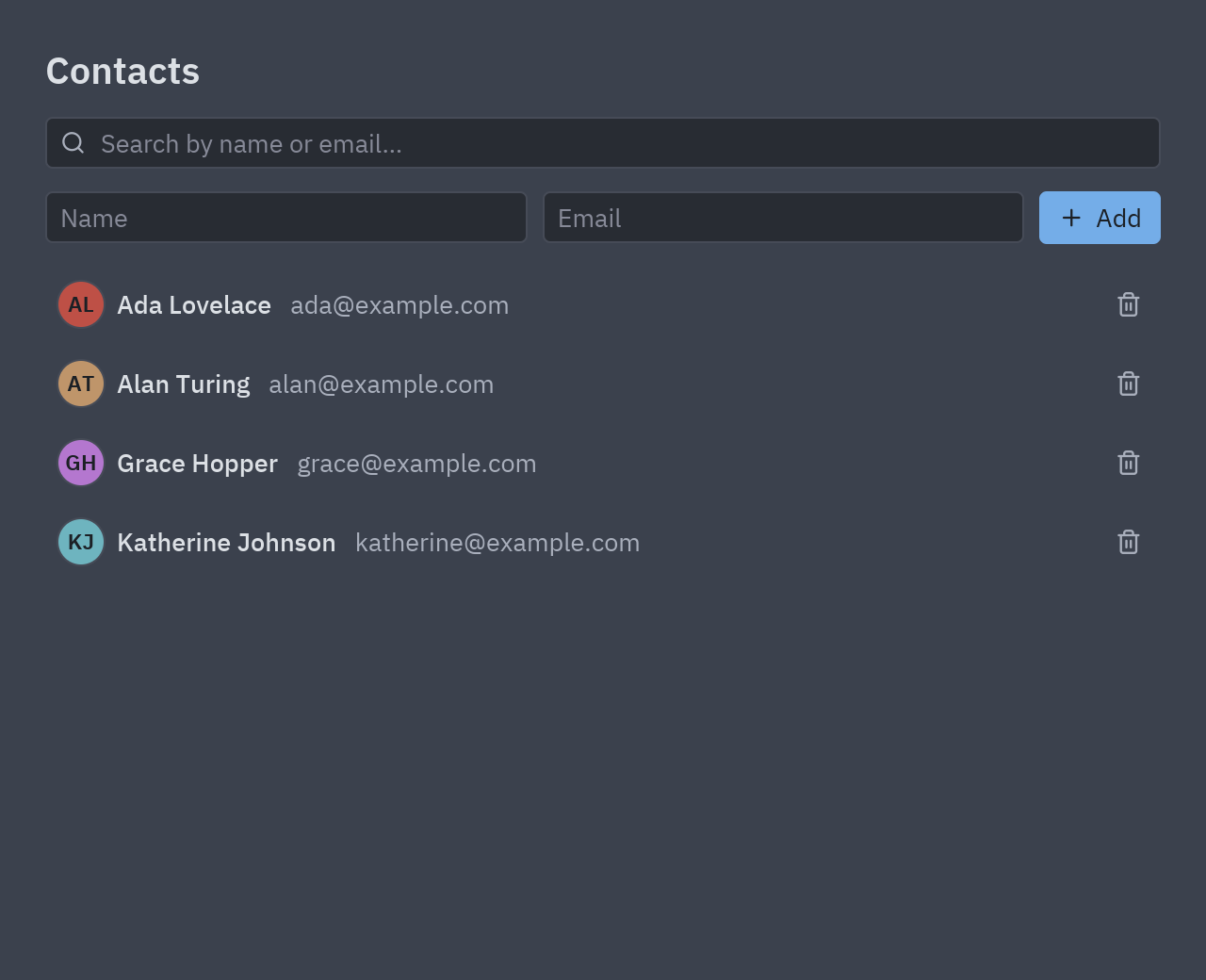
if __name__ == "__main__": pz.run(Contacts)The walkthrough is in SQLAlchemy. Without any library at all, the
Connecting a backend tutorial builds a smaller contacts app over the
sqlite3 module that comes with Python, with a repository class, a spinner and friendly errors:
- Live data: a price ticker fed by an async generator.
- Glass control center: a dashboard with frosted-glass cards over a moving shader.
- Integrations: FastAPI, Django, SQLModel, httpx and more, each with a desktop app.