
Game main menu
A title screen in the style of a synthwave racer. The sun, the stars and the endless grid are one shader graph, shaders/synthwave.pzshad, that scrolls with time and leans towards the pointer.
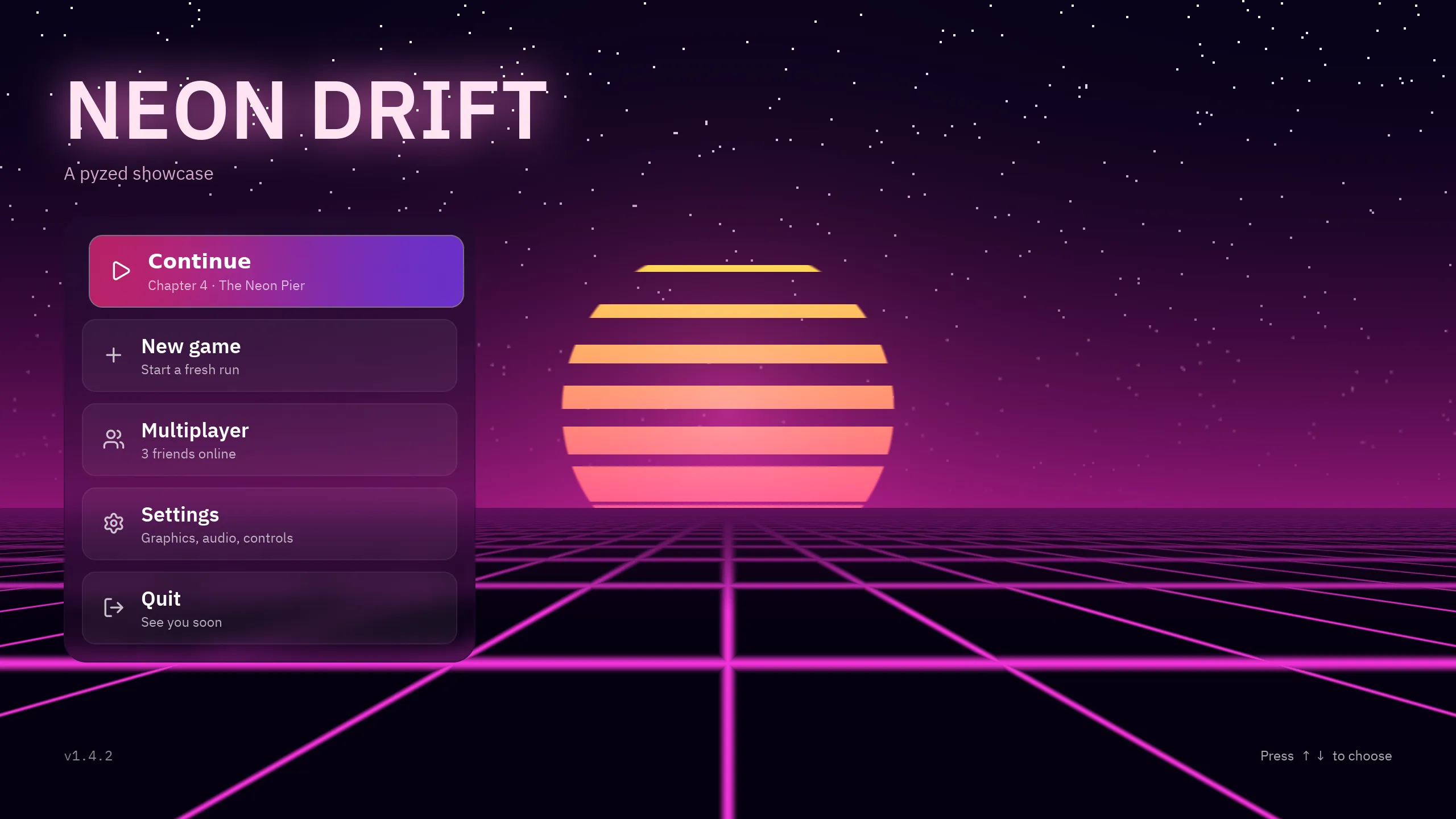
uv run --with pyzed-ui python examples/showcase/main_menu.pypython3 -m venv .venvsource .venv/bin/activatepython -m pip install pyzed-uipython examples/showcase/main_menu.pypy -m venv .venv.venv\Scripts\Activate.ps1python -m pip install pyzed-uipython examples\showcase\main_menu.pypython3 examples/showcase/main_menu.pypy examples\showcase\main_menu.pyUse ↑ and ↓ (or W and S) to choose.
How it is made
Section titled “How it is made”Interactive shader
Section titled “Interactive shader”The graph has a Mouse node: the pointer position over the widget, from 0 to 1. A few math nodes move the horizon a little with it, so the scene leans as you move. In Python it is one widget behind the content:
pz.stack([ pz.shader(SHADER, width="fill", height="fill", fallback=pz.Gradient(["#08021a", "#4a0d5e", "#d9468f"], angle=180)), content,])Glowing title
Section titled “Glowing title”bloom on a bare text lights it from its own strokes.
pz.text("NEON DRIFT", size=72, weight="black").style(bloom=("#f472b6", 1.0))Menu motion
Section titled “Menu motion”Buttons lift on hover, shrink on press and the selected one slides with a transition.
button.animate("lift", on="hover").animate("shrink", on="press").transition(x=6 if selected else 0)Try this
Section titled “Try this”- Add an item to the menu and give it its own action.
- Change the title’s
bloomcolor and intensity. - Open
shaders/synthwave.pzshadin Pyzed Design and change the sun’s colors.
Full code
Section titled “Full code”"""A game's main menu: a synthwave shader backdrop, a glowing title and glass buttons.
python examples/showcase/main_menu.py
- The sun, the grid and the stars are one shader graph, ``shaders/synthwave.pzshad``, made of nodes in Pyzed Design: it scrolls with Time and follows the pointer with Mouse.- The title uses ``bloom``; the menu is a ``glass`` panel whose buttons lift and glow on hover (``animate("lift", on="hover")``) and play ``shrink`` on press.- The arrow keys (or W and S) move the selection."""
from pathlib import Path
import pyzed as pz
SHADER = Path(__file__).parent / "shaders" / "synthwave.pzshad"
ITEMS = ( ("play", "Continue", "Chapter 4 · The Neon Pier"), ("plus", "New game", "Start a fresh run"), ("users", "Multiplayer", "3 friends online"), ("settings", "Settings", "Graphics, audio, controls"), ("log-out", "Quit", "See you soon"),)PINK = "#f472b6"
class MainMenu(pz.App): title = "Main menu" size = (1280, 720) theme = pz.themes.ONE_DARK
def __init__(self): self.selected = 0
def pick(self, index): self.selected = index
def on_key(self, combo): if combo in ("down", "s"): self.selected = (self.selected + 1) % len(ITEMS) return True if combo in ("up", "w"): self.selected = (self.selected - 1) % len(ITEMS) return True
def item(self, index): icon, label, hint = ITEMS[index] selected = index == self.selected body = pz.row([ pz.icon(icon, size=20, color="#ffffff" if selected else "#ffffffbb"), pz.column([ pz.text(label, size=18, weight="bold" if selected else "semibold", color="#ffffff"), pz.text(hint, size=12, color="#ffffffaa"), ], spacing=1), ], spacing=14, align="center") style = dict(radius=12, padding=(12, 18), width=330) if selected: style.update(background=pz.Gradient(["#db2777cc", "#7c3aedcc"], angle=90), border=(1, "#ffffff66"), bloom=(PINK, 0.6)) else: style.update(background="#ffffff0d", border=(1, "#ffffff1a")) button = pz.mouse_area(body.style(**style), on_press=lambda: self.pick(index)) return button.animate("lift", on="hover").animate("shrink", on="press").transition( x=6 if selected else 0, duration=160, easing="ease_out_cubic")
def view(self): title = pz.column([ pz.text("NEON DRIFT", size=72, weight="black", color="#ffe4f3").style(bloom=(PINK, 1.0)), pz.text("A pyzed showcase", size=16, color="#fbcfe8").style(opacity=0.8), ], spacing=0).animate("fade_in_down", duration=600) menu = pz.column([self.item(i) for i in range(len(ITEMS))], spacing=10).style( glass={"tint": "#1e0b2e", "strength": 0.35, "blur": 22}, radius=20, padding=16) footer = pz.row([ pz.text("v1.4.2", size=12, color="#ffffff88", font="mono"), pz.space(width="fill"), pz.text("Press ↑ ↓ to choose", size=12, color="#ffffffaa").animate( "blink", repeat="infinite", duration=2200), ], width="fill") content = pz.column([ title, pz.row(pz.stagger([menu], "fade_in_left", step=80)), pz.space(height="fill"), footer, ], spacing=28, width="fill", height="fill", padding=(48, 56)) return pz.stack([ pz.shader(SHADER, width="fill", height="fill", fallback=pz.Gradient(["#08021a", "#4a0d5e", "#d9468f"], angle=180)), content, ])
if __name__ == "__main__": pz.run(MainMenu)