
Forms
Forms are where most desktop apps start: fields, buttons, rules and messages. Pyzed gives you two ways to make them, and you can mix both in one app:
- Draw them in Pyzed Design, the visual designer: drag controls onto a window, set their
properties, and write only the Python that runs when something happens (a
.pzformfile plus a.pyfile with the handlers). If you have used Visual Basic, Qt Designer or the editors of Godot and Unreal Engine, it will feel familiar. - Write them in Python with the components library:
ui.field,ui.input,ui.select,ui.switch… in aview()method.
Sign-in form
Section titled “Sign-in form”Drawn in the designer: an email and a password, a “remember me” check box, and a button that shows a progress bar while it “signs in”. The Python file is just four small functions, one per event.
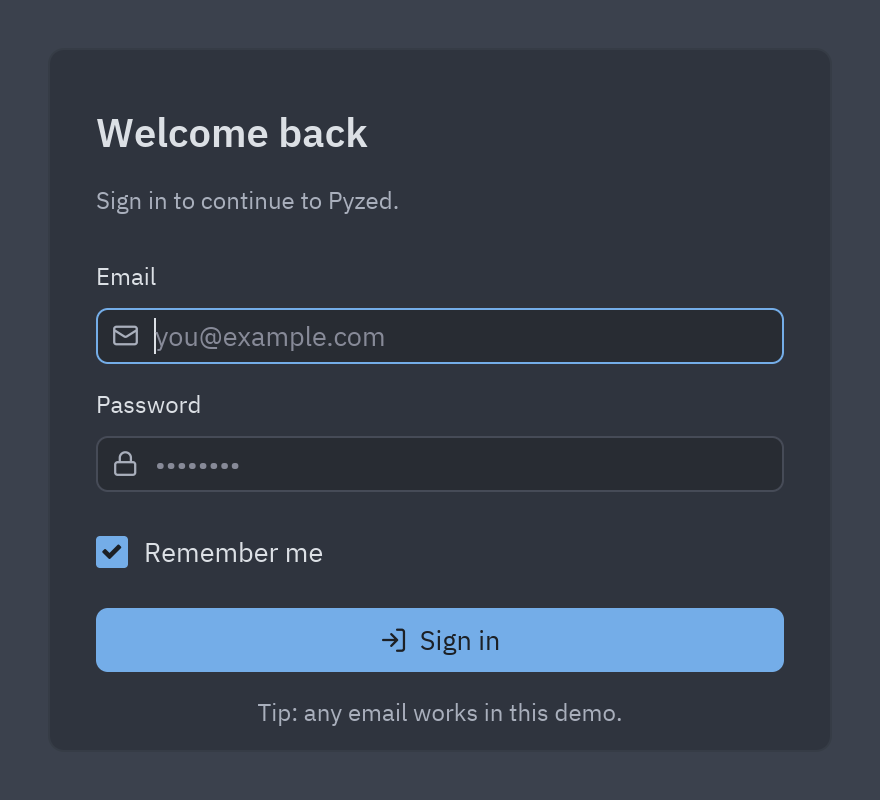
- Controls are attributes of
form:form.email.text,form.status.color = "error",form.progress.show(). - A Timer control (
ticker) callsticker_tickevery few milliseconds while it runs; that is how the progress bar fills up without blocking the window.
uv run --with pyzed-ui pyzed run examples/designer/login.pzformpython3 -m venv .venvsource .venv/bin/activatepython -m pip install pyzed-uipyzed run examples/designer/login.pzformpy -m venv .venv.venv\Scripts\Activate.ps1python -m pip install pyzed-uipyzed run examples\designer\login.pzformpython3 -m pyzed run examples/designer/login.pzformpy -m pyzed run examples\designer\login.pzformEvent handlers: examples/designer/login.py
"""Event handlers for the login form.
Each function receives the running ``form`` (controls are attributes: ``form.button1.text``)and an ``event`` with ``event.sender``, ``event.name`` and ``event.value``."""

def sign_in_click(form, event):    """Runs when sign_in is clicked."""    if "@" not in form.email.text:        form.status.text = "Enter a valid email address."        form.status.color = "error"        return form.email.focus()    form.status.text = ""    form.sign_in.enabled = False    form.progress.value = 0    form.progress.show()    form.ticker.running = True

def ticker_tick(form, event):    """Runs every ``interval`` milliseconds while ticker is enabled."""    form.progress.value += 4    if form.progress.value >= 100:        form.ticker.running = False        form.progress.hide()        form.status.color = "success"        form.status.text = f"Signed in as {form.email.text}"        form.sign_in.enabled = True

def password_submit(form, event):    """Runs when Enter is pressed in password."""    return sign_in_click(form, event)

def form_load(form, event):    """Runs once when login opens."""    form.status.text = "Tip: any email works in this demo."    return form.email.focus()
Sign-up with validation
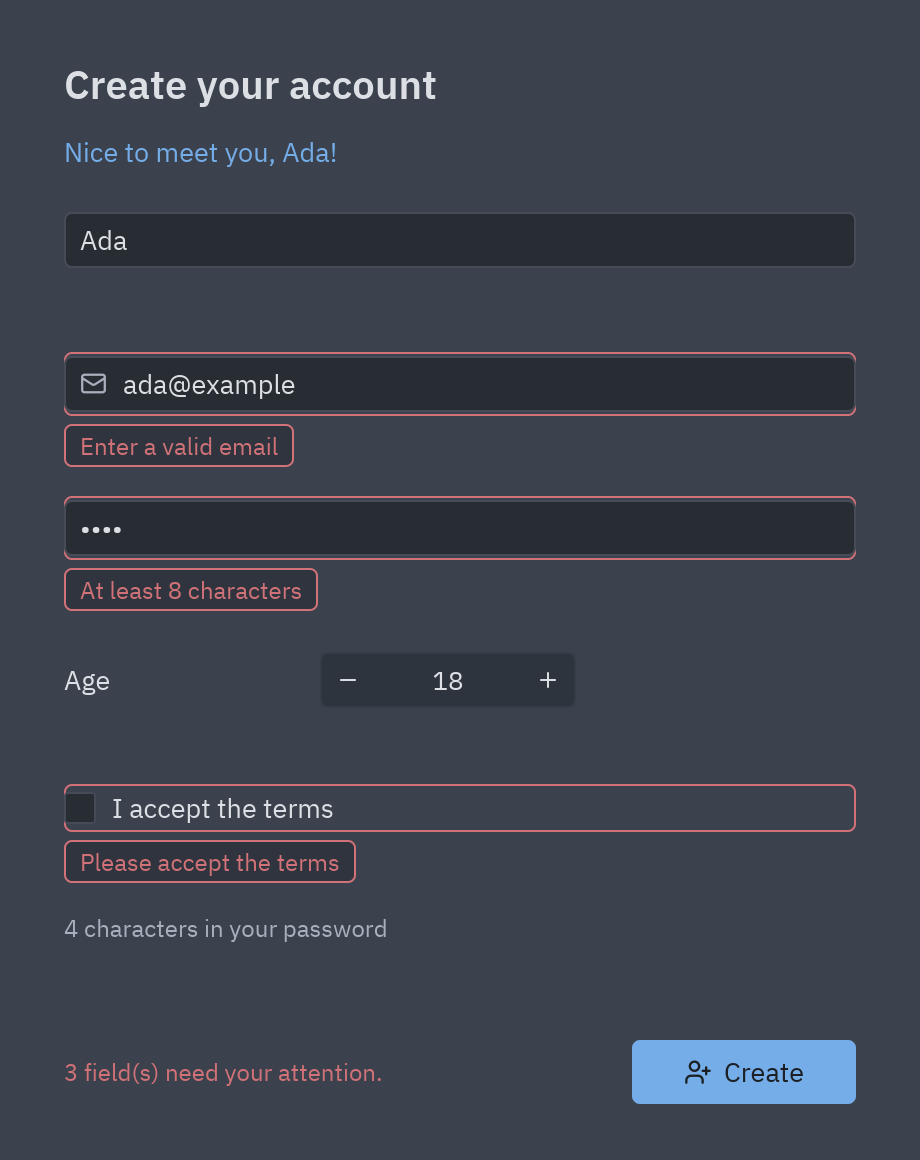
Section titled “Sign-up with validation”Every field is bound to form.data and has rules set in the Properties panel (required, an email, at least
8 characters, the same as another field). One line, form.validate(), checks them all and shows the messages
next to the fields; the greeting and the summary update by themselves as you type.
uv run --with pyzed-ui pyzed run examples/tutorial/designer/signup.pzformpython3 -m venv .venvsource .venv/bin/activatepython -m pip install pyzed-uipyzed run examples/tutorial/designer/signup.pzformpy -m venv .venv.venv\Scripts\Activate.ps1python -m pip install pyzed-uipyzed run examples\tutorial\designer\signup.pzformpython3 -m pyzed run examples/tutorial/designer/signup.pzformpy -m pyzed run examples\tutorial\designer\signup.pzformEvent handlers: examples/tutorial/designer/signup.py
"""Event handlers for the sign-up form (tutorial: Data binding and validation).
    pyzed run examples/tutorial/designer/signup.pzform
The controls are bound to fields of ``form.data`` (Properties → Data → Bind to) and carry theirvalidation rules, so the handler only has to call ``form.validate()`` and read ``form.data``."""

def create_click(form, event):    """Runs when create is clicked."""    if not form.validate():  # checks every rule and shows the messages under the controls        form.status.color = "error"        form.status.text = f"{len(form.errors)} field(s) need your attention."        return    data = form.data  # {"name": ..., "email": ..., "password": ..., "age": ..., "terms": True}    print("New account:", {k: v for k, v in data.items() if k != "password"})    form.status.color = "success"    form.status.text = f"Welcome aboard, {data['name']}!"
Built step by step in Data binding and validation.
Contact form
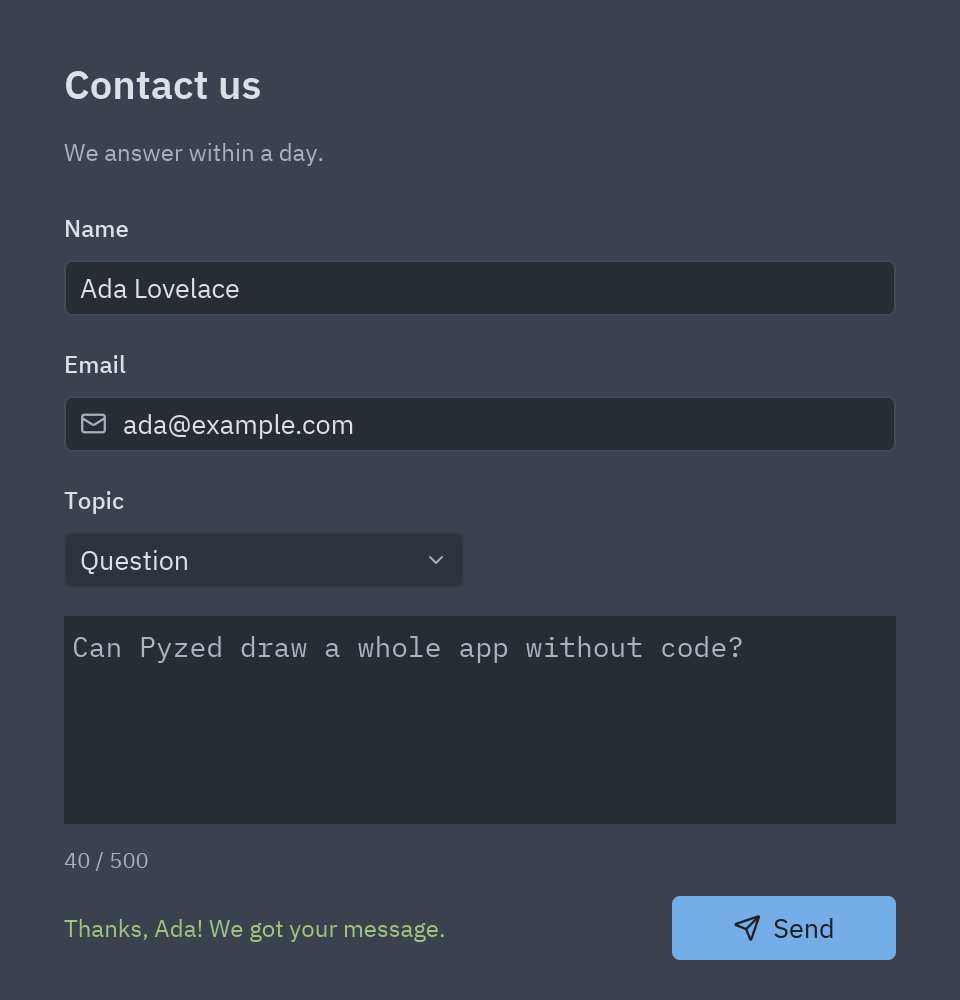
Section titled “Contact form”Name, email, a topic drop-down and a message with a live character counter. The Send button checks the fields and writes the message to the console.
uv run --with pyzed-ui pyzed run examples/tutorial/designer/contact.pzformpython3 -m venv .venvsource .venv/bin/activatepython -m pip install pyzed-uipyzed run examples/tutorial/designer/contact.pzformpy -m venv .venv.venv\Scripts\Activate.ps1python -m pip install pyzed-uipyzed run examples\tutorial\designer\contact.pzformpython3 -m pyzed run examples/tutorial/designer/contact.pzformpy -m pyzed run examples\tutorial\designer\contact.pzformEvent handlers: examples/tutorial/designer/contact.py
"""Event handlers for the contact form (tutorial: A form with inputs and a button).
    pyzed run examples/tutorial/designer/contact.pzform
Each function receives the running ``form`` and an ``event`` (``event.value`` holds the newvalue of a ``change`` event)."""
LIMIT = 500

def form_load(form, event):    """Runs once when contact opens: put the cursor in the first box."""    return form.your_name.focus()

def message_change(form, event):    """Runs on every keystroke in message: update the character counter."""    count = len(event.value)    form.counter.text = f"{count} / {LIMIT}"    form.counter.color = "error" if count > LIMIT else "text_muted"

def send_click(form, event):    """Runs when send is clicked: check the fields, then 'send' the message."""    if not form.your_name.text.strip():        form.status.color = "error"        form.status.text = "Please tell us your name."        return form.your_name.focus()    if "@" not in form.email.text:        form.status.color = "error"        form.status.text = "That email does not look right."        return form.email.focus()    if len(form.message.text) > LIMIT:        form.status.color = "error"        form.status.text = f"Keep the message under {LIMIT} characters."        return None    # print() shows up in the designer's console (and in the terminal)    print(f"New {form.topic.selected.lower()} from {form.email.text}: {form.message.text!r}")    form.status.color = "success"    form.status.text = f"Thanks, {form.your_name.text.split()[0]}! We got your message."    form.message.text = ""    form.counter.text = f"0 / {LIMIT}"    return None
Built step by step in A form that does something.
Reviews with custom components
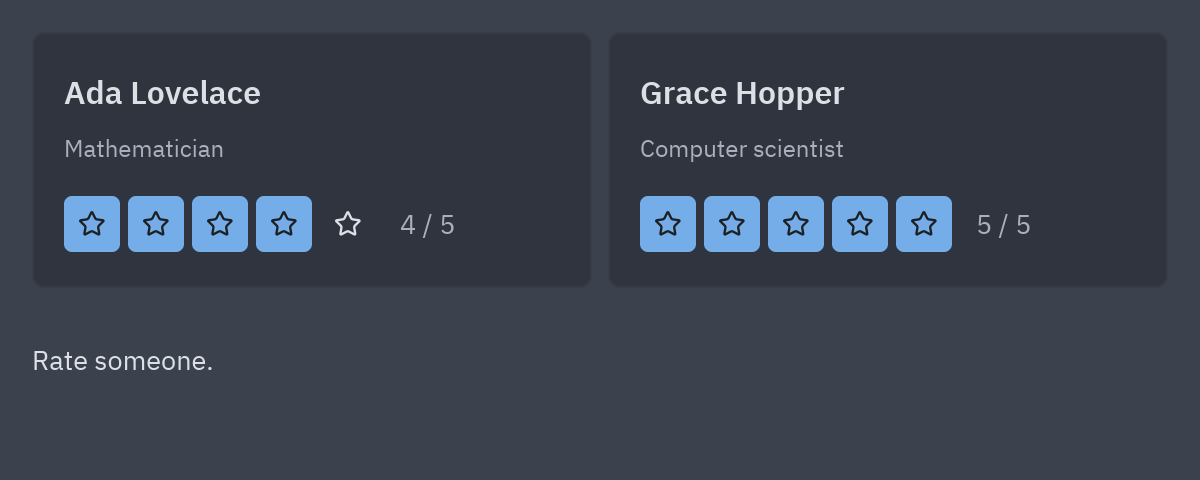
Section titled “Reviews with custom components”Two profile cards, each with a five-star Rating component, side by side in a flex row that grows and shrinks
with the window. Rating, ProfileCard and TeamCard are components drawn in the designer’s component mode
(.pzcomp files): they have their own properties, events and code, and TeamCard inherits everything from
ProfileCard.
uv run --with pyzed-ui pyzed run examples/designer/components/reviews.pzformpython3 -m venv .venvsource .venv/bin/activatepython -m pip install pyzed-uipyzed run examples/designer/components/reviews.pzformpy -m venv .venv.venv\Scripts\Activate.ps1python -m pip install pyzed-uipyzed run examples\designer\components\reviews.pzformpython3 -m pyzed run examples/designer/components/reviews.pzformpy -m pyzed run examples\designer\components\reviews.pzformEvent handlers: examples/designer/components/reviews.py
"""Event handlers for the Reviews form.
Each function receives the running ``form`` (controls are attributes: ``form.button1.text``)and an ``event`` with ``event.sender``, ``event.name`` and ``event.value``."""

def ada_rated(form, event):    """Runs when the card of ada is rated."""    event.sender.score = event.value    form.status.text = f"{event.sender.person} now has {event.value} stars"

def grace_rated(form, event):    """Runs when the card of grace is rated."""    event.sender.score = event.value    form.status.text = f"{event.sender.person} now has {event.value} stars"
Built step by step in A custom component.
Login screen
Section titled “Login screen”A full sign-in screen written in code: a brand panel, single sign-on buttons, a passkey option and an email form. It is one of the Blocks, screens you can copy into your app and adapt.
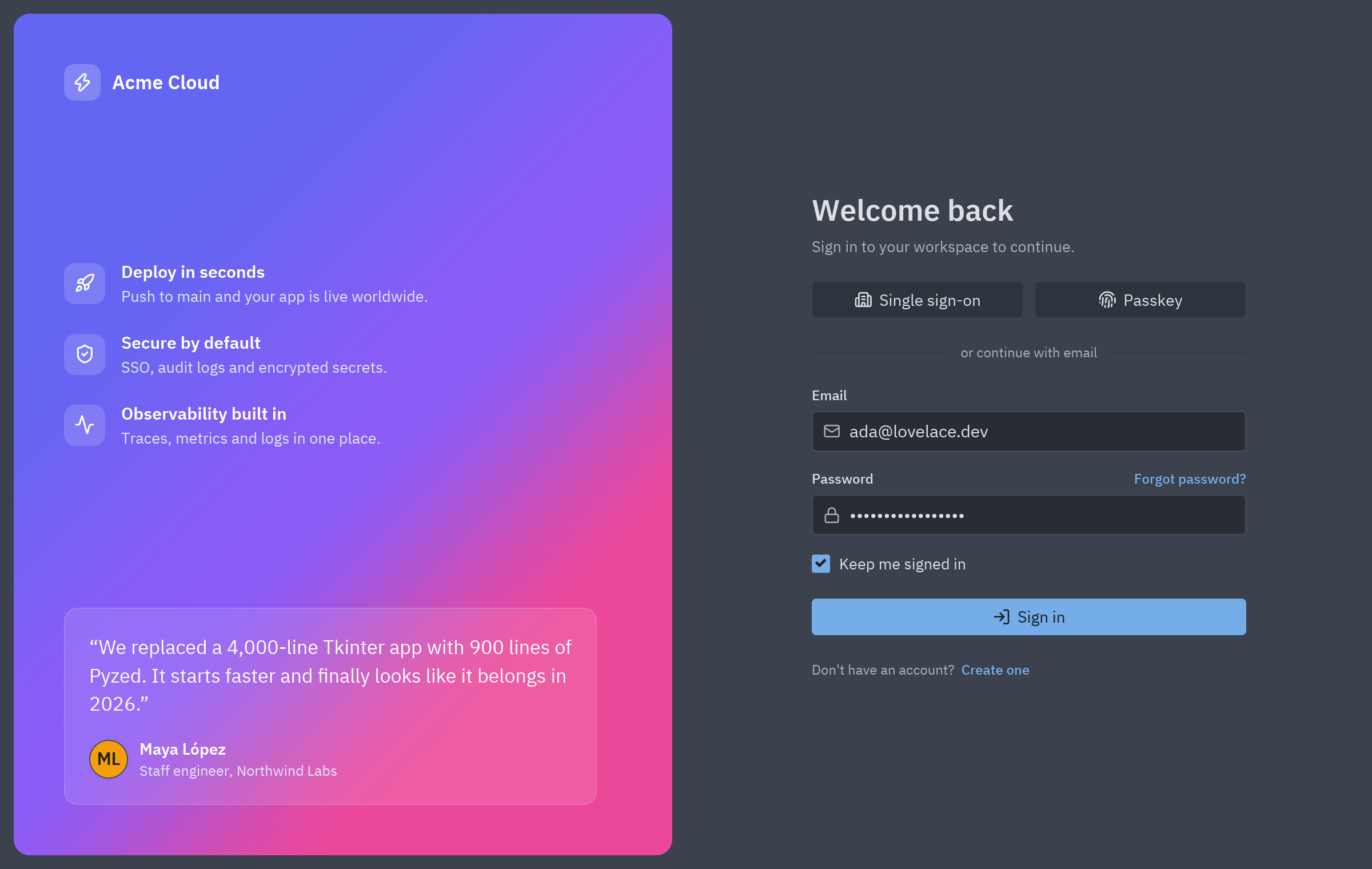
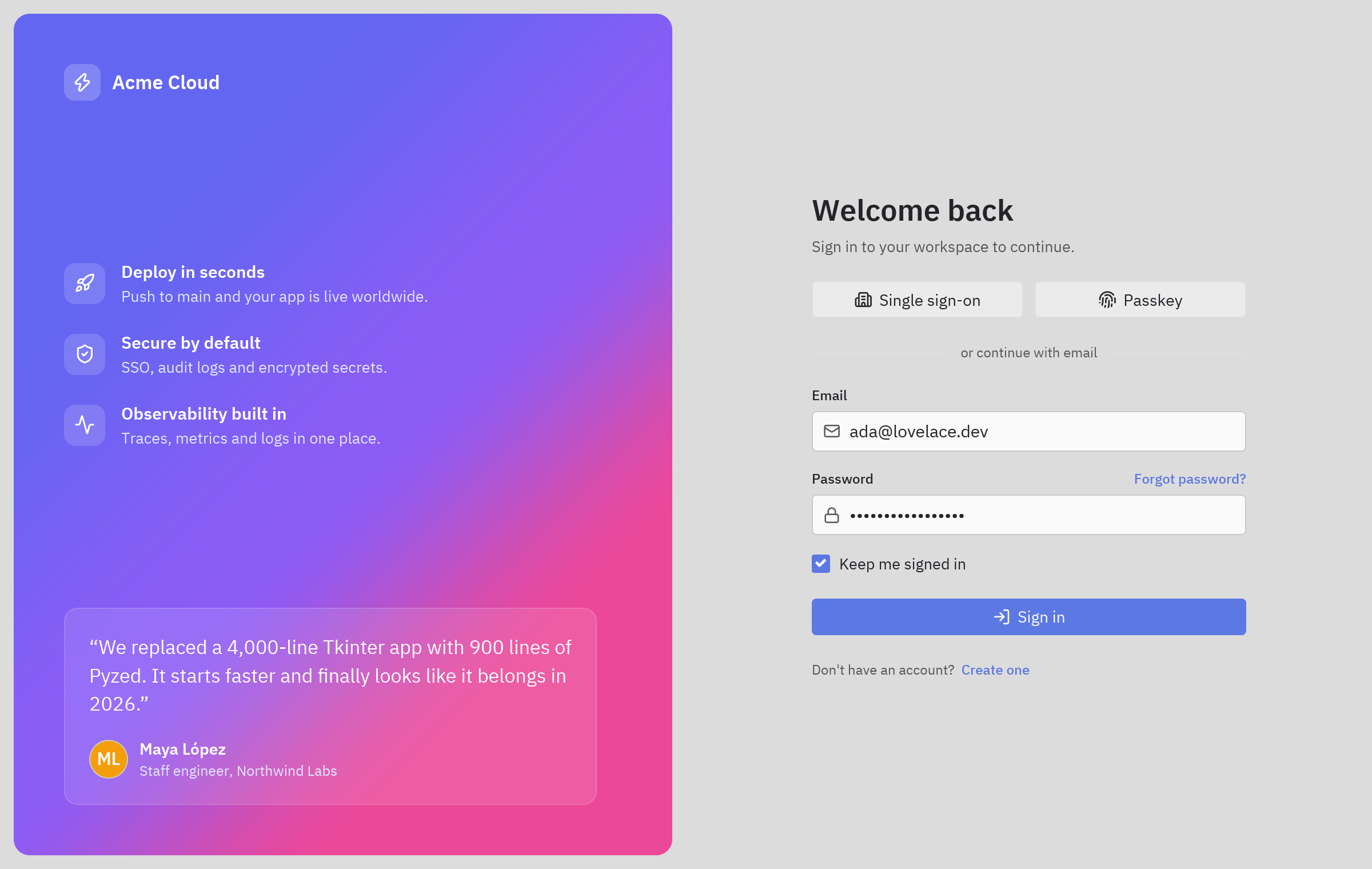
uv run --with pyzed-ui python examples/blocks/login.pypython3 -m venv .venvsource .venv/bin/activatepython -m pip install pyzed-uipython examples/blocks/login.pypy -m venv .venv.venv\Scripts\Activate.ps1python -m pip install pyzed-uipython examples\blocks\login.pypython3 examples/blocks/login.pypy examples\blocks\login.pyThe code and what to change in it: Login block.
Onboarding wizard
Section titled “Onboarding wizard”A multi-step setup: a stepper at the top, choice cards, per-step validation and a summary before finishing.
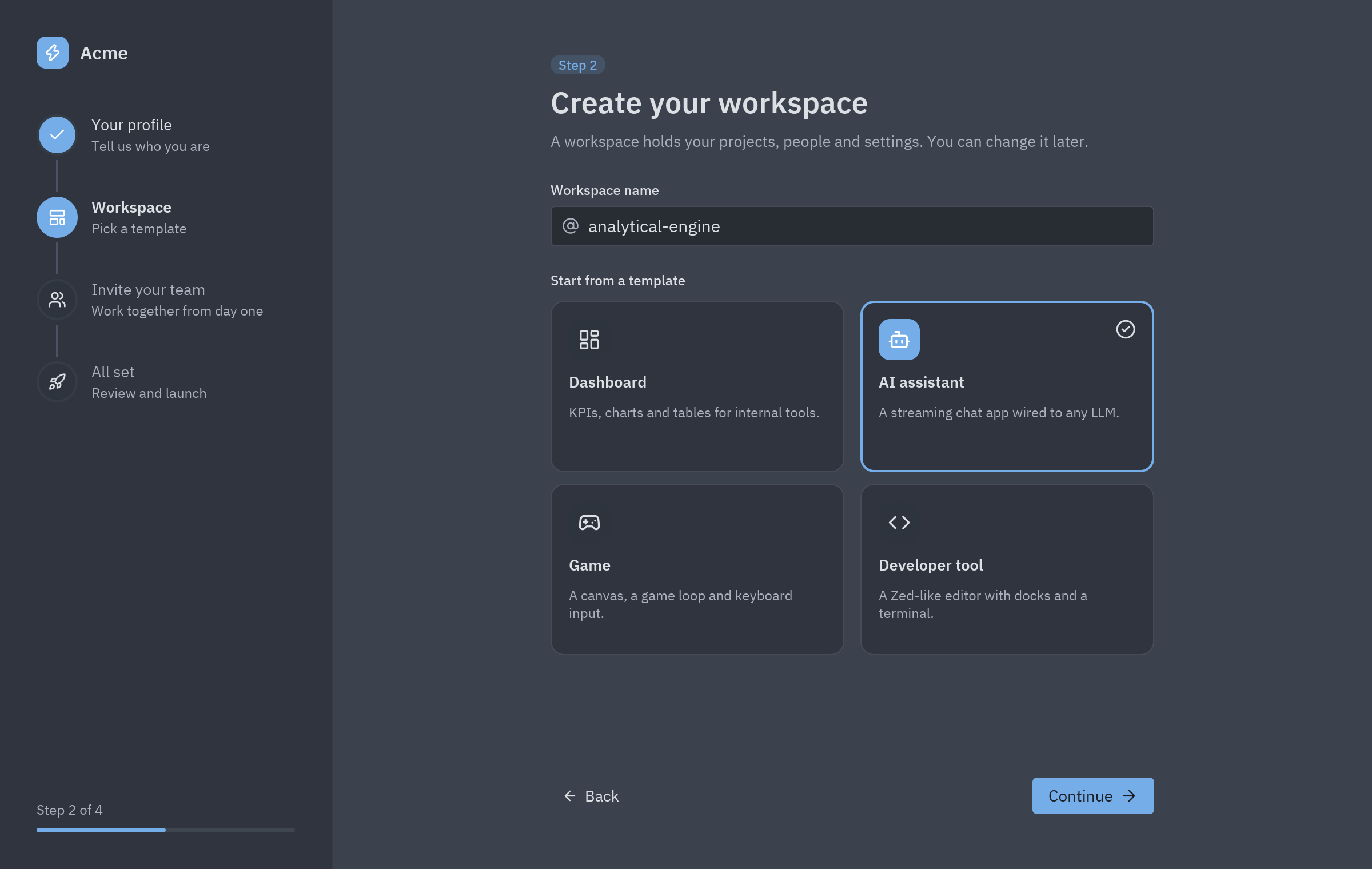
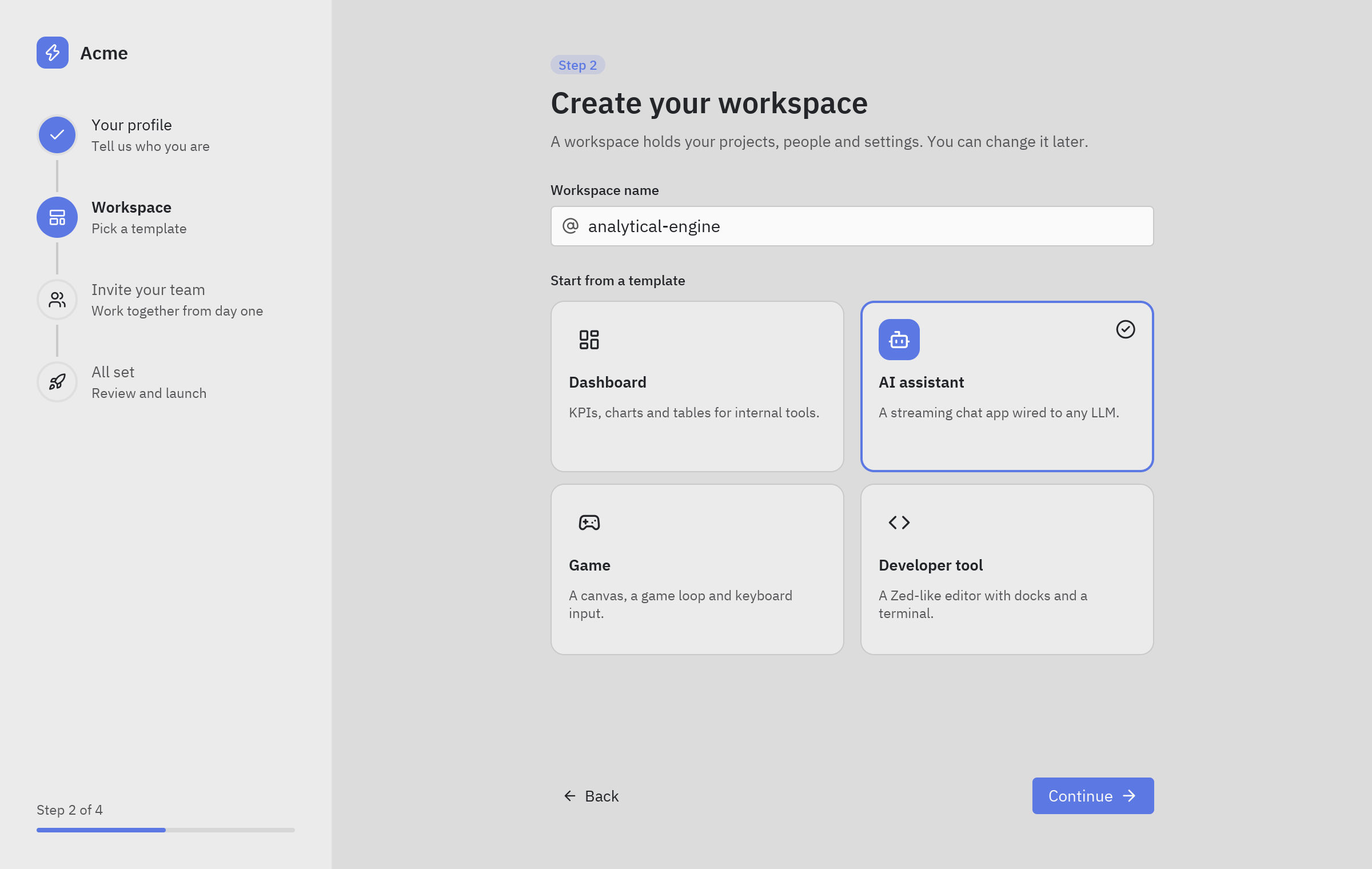
uv run --with pyzed-ui python examples/blocks/onboarding.pypython3 -m venv .venvsource .venv/bin/activatepython -m pip install pyzed-uipython examples/blocks/onboarding.pypy -m venv .venv.venv\Scripts\Activate.ps1python -m pip install pyzed-uipython examples\blocks\onboarding.pypython3 examples/blocks/onboarding.pypy examples\blocks\onboarding.pyThe code: Onboarding block.
Settings page
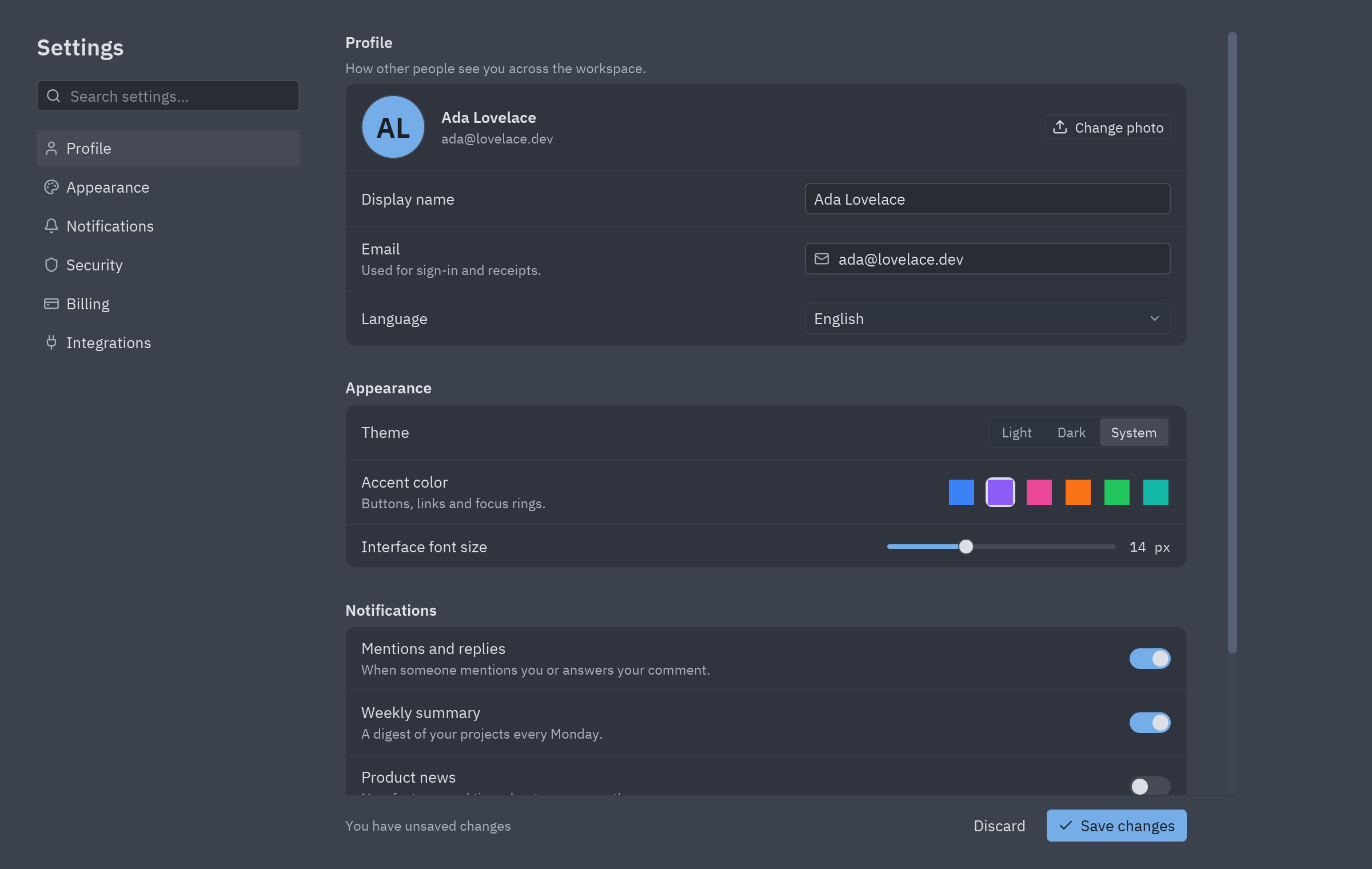
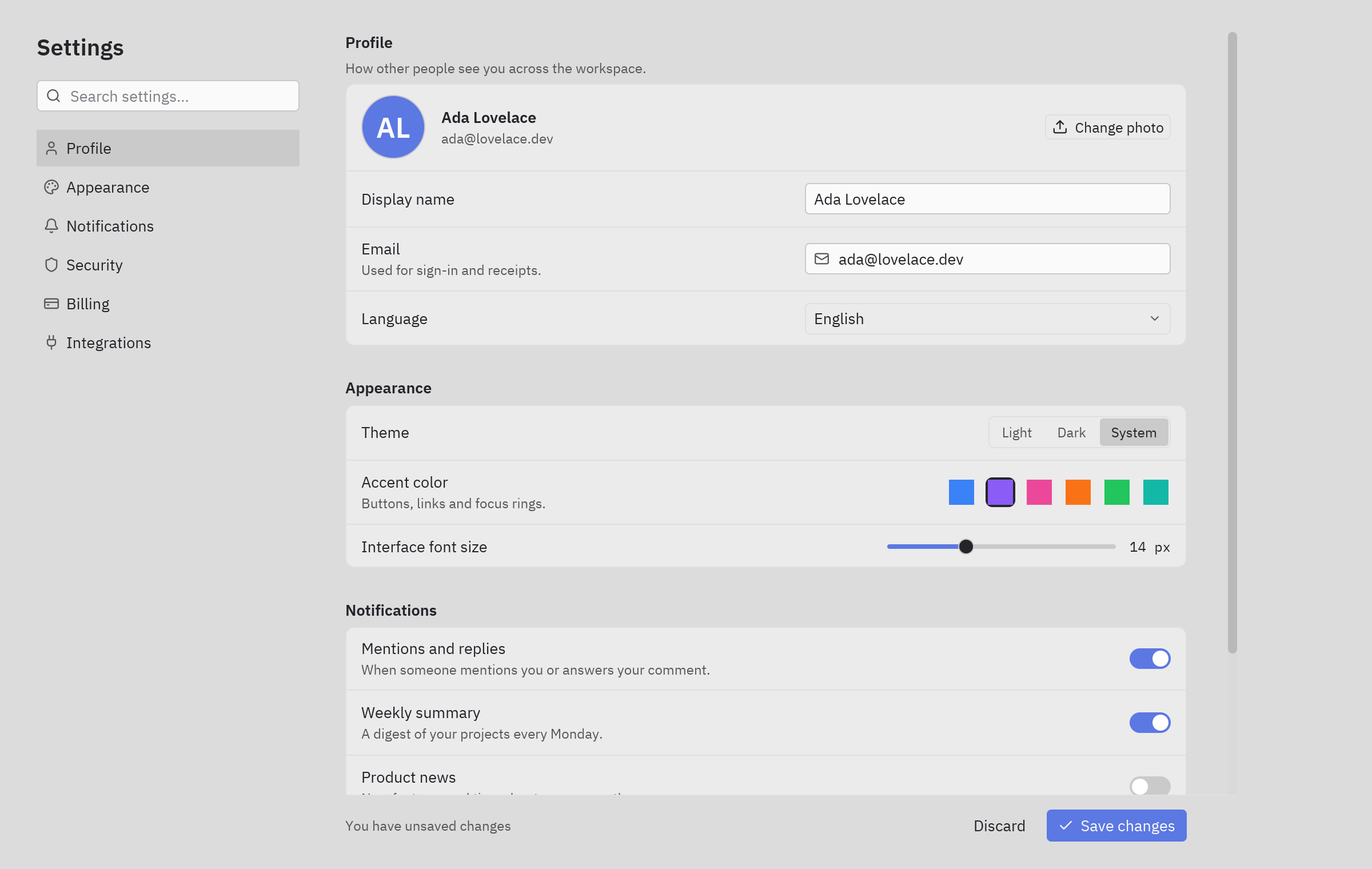
Section titled “Settings page”Sections on the left, grouped rows on the right: profile fields, a language select, light, dark or system theme, accent swatches, a font size slider, notification switches, and a danger zone that asks before deleting.
uv run --with pyzed-ui python examples/blocks/settings.pypython3 -m venv .venvsource .venv/bin/activatepython -m pip install pyzed-uipython examples/blocks/settings.pypy -m venv .venv.venv\Scripts\Activate.ps1python -m pip install pyzed-uipython examples\blocks\settings.pypython3 examples/blocks/settings.pypy examples\blocks\settings.pyThe code: Settings block.
Dialogs and languages
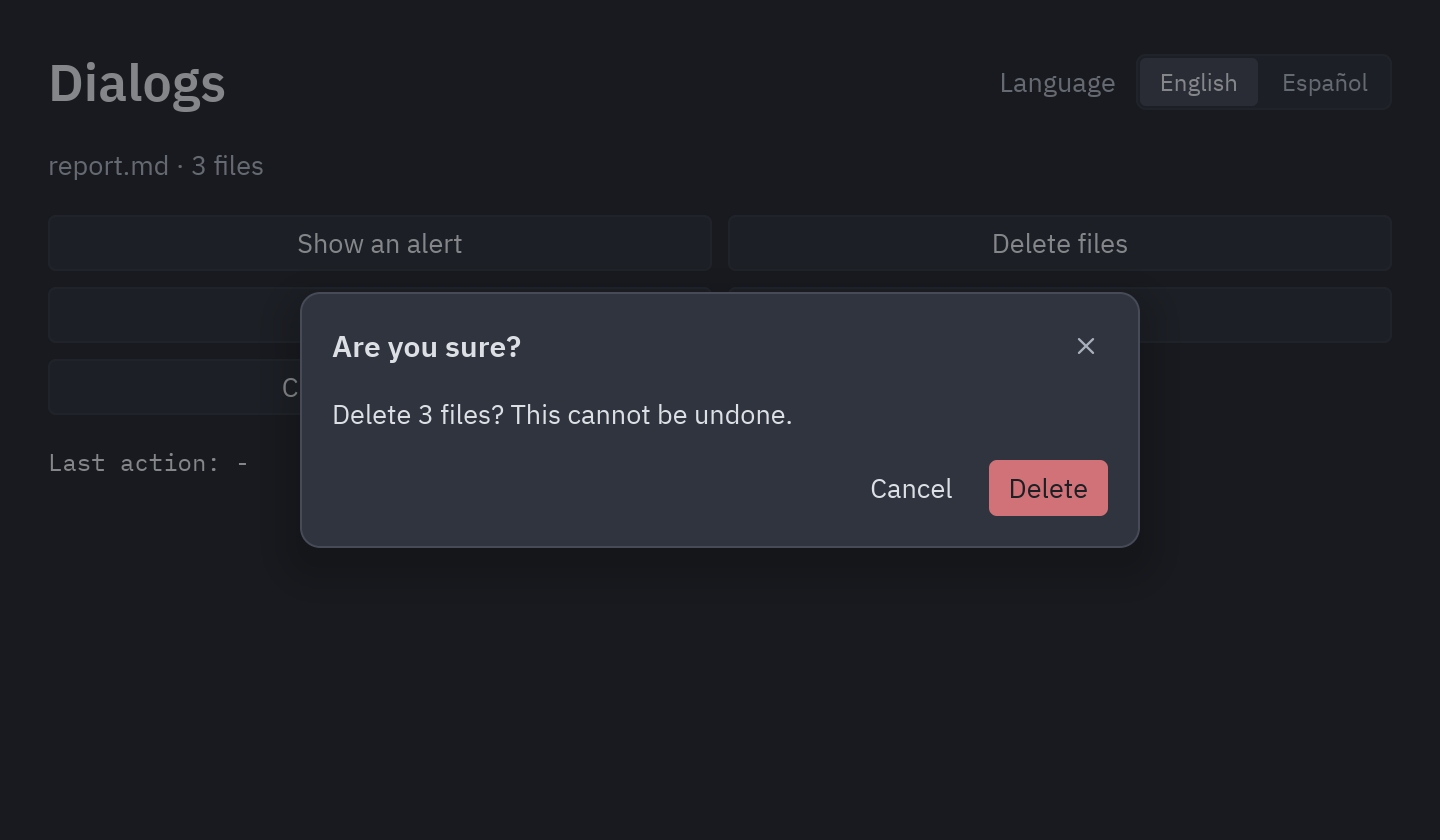
Section titled “Dialogs and languages”Each button opens one of the ready-made dialogs of pyzed.ui (an alert, a confirmation, a prompt, a choice and “unsaved changes”). Pick a language in the
toolbar and every text, including the dialogs’ buttons, changes while the app runs.
uv run --with pyzed-ui python examples/dialogs.pypython3 -m venv .venvsource .venv/bin/activatepython -m pip install pyzed-uipython examples/dialogs.pypy -m venv .venv.venv\Scripts\Activate.ps1python -m pip install pyzed-uipython examples\dialogs.pypython3 examples/dialogs.pypy examples\dialogs.pyFull code: examples/dialogs.py
"""Dialogs and languages: ready-made dialogs and switching the app's language while it runs.
    python examples/dialogs.py
- Pick a language in the toolbar; every text (and the dialogs' buttons) follows it.- Each button opens one of the dialogs in ``pyzed.ui``."""
import pyzed as pzfrom pyzed import i18n, ui
i18n.add("en", {    "title": "Dialogs",    "language": "Language",    "files": {"zero": "No files", "one": "{count} file", "other": "{count} files"},    "actions": {"alert": "Show an alert", "confirm": "Delete files", "prompt": "Rename", "choice": "Export",                "unsaved": "Close document"},    "delete_question": "Delete {files}? This cannot be undone.",    "saved": "Your changes were saved.",    "rename": "Rename file",    "new_name": "New name",    "export": "Export the report as…",    "last": "Last action: {action}",})i18n.add("es", {    "title": "Diálogos",    "language": "Idioma",    "files": {"zero": "Ningún archivo", "one": "{count} archivo", "other": "{count} archivos"},    "actions": {"alert": "Mostrar un aviso", "confirm": "Eliminar archivos", "prompt": "Renombrar", "choice": "Exportar",                "unsaved": "Cerrar documento"},    "delete_question": "¿Eliminar {files}? No se puede deshacer.",    "saved": "Tus cambios se guardaron.",    "rename": "Renombrar archivo",    "new_name": "Nombre nuevo",    "export": "Exportar el informe como…",    "last": "Última acción: {action}",})
LANGUAGES = {"en": "English", "es": "Español"}

class DialogsDemo(pz.App):    size = (720, 460)
    def __init__(self):        self.dialog = None        self.files = 3        self.name = "report.md"        self.last = "-"
    def title(self):        return pz.t("title")
    def open(self, kind):        self.dialog = kind
    def done(self, action):        self.last = action        self.dialog = None
    def delete(self):        self.files = 0        self.done("delete")
    def dialog_view(self):        close = lambda: self.done("cancel")  # noqa: E731        if self.dialog == "alert":            return ui.alert(pz.t("saved"), close, kind="success")        if self.dialog == "confirm":            return ui.confirm(pz.t("delete_question", files=pz.t("files", count=self.files)), self.delete, close,                              danger=True)        if self.dialog == "prompt":            return ui.prompt(pz.t("rename"), self.name, lambda v: setattr(self, "name", v),                             lambda: self.done(f"rename → {self.name}"), close, message=pz.t("new_name"))        if self.dialog == "choice":            return ui.choice(pz.t("export"), [(f, lambda f=f: self.done(f"export {f}")) for f in ("CSV", "PDF")], close)        if self.dialog == "unsaved":            return ui.unsaved_changes(self.name, lambda: self.done("save"), lambda: self.done("discard"), close)        return None
    def view(self):        toolbar = pz.row([            ui.heading(pz.t("title")),            pz.space(width="fill"),            ui.label(pz.t("language"), color="text_muted"),            ui.segmented([LANGUAGES[k] for k in LANGUAGES], LANGUAGES[i18n.language()[:2]],                         lambda name: i18n.set_language(next(k for k, v in LANGUAGES.items() if v == name))),        ], align="center", spacing=10)        buttons = pz.grid(            [ui.button(pz.t(f"actions.{kind}"), lambda kind=kind: self.open(kind), full_width=True)             for kind in ("alert", "confirm", "prompt", "choice", "unsaved")],            columns=["1fr", "1fr"], spacing=8,        )        body = pz.column([            toolbar,            ui.label(f"{self.name} · {pz.t('files', count=self.files)}", color="text_muted"),            buttons,            ui.label(pz.t("last", action=self.last), mono=True, size="sm"),        ], spacing=16, padding=24)        return ui.dialog_layer(body, self.dialog_view(), on_dismiss=lambda: self.done("cancel"))

if __name__ == "__main__":    pz.run(DialogsDemo)
For field errors, confirmations and toasts in your own forms, see Dialogs, notifications and validation.
Sign-up validated by Pydantic
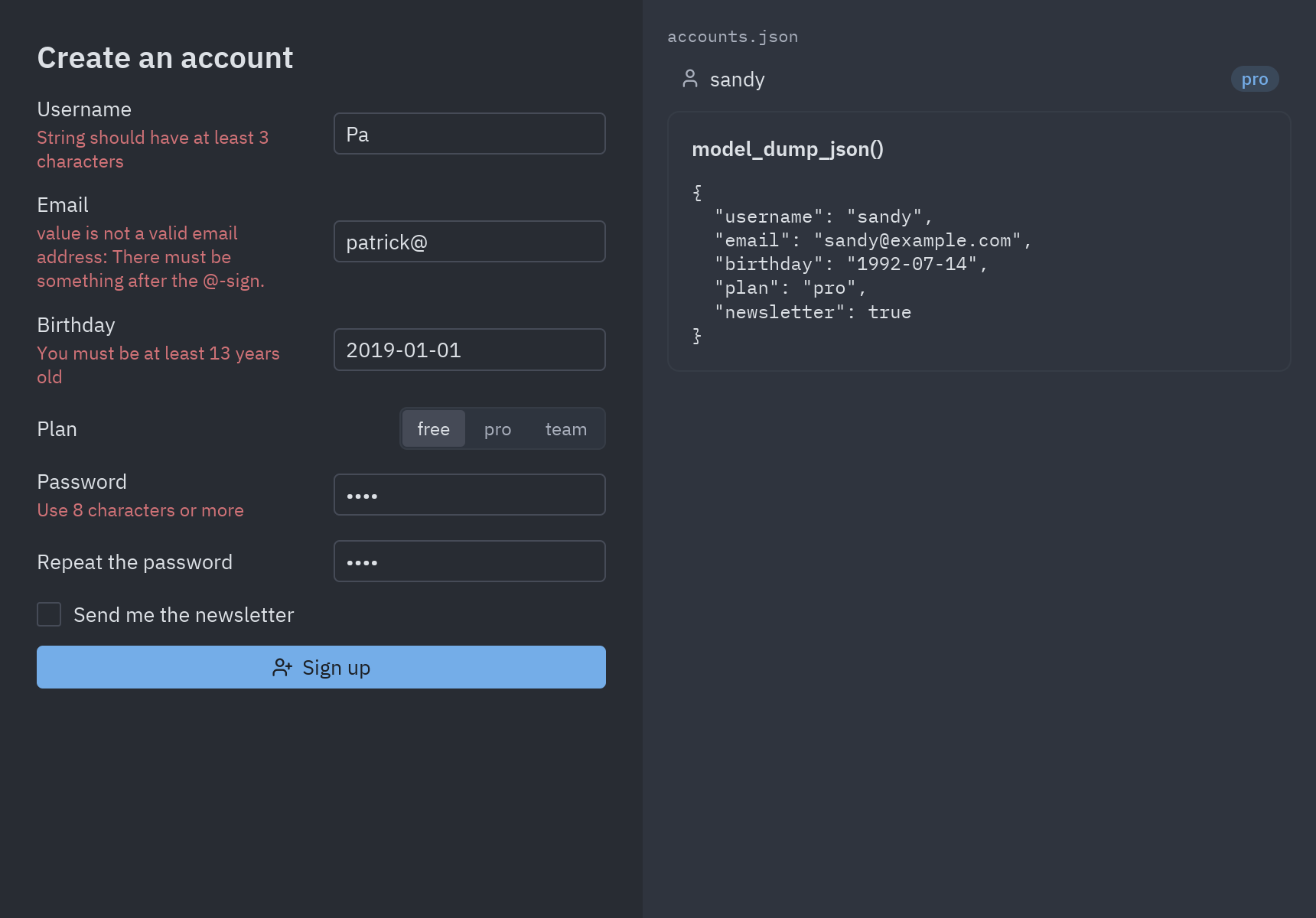
Section titled “Sign-up validated by Pydantic”The rules of this form live in a Pydantic model, the same kind of model a web API
would use. The window keeps what the user types as plain text and hands it to SignUp.model_validate; Pydantic
converts the values (a date, an email, a yes/no), checks every rule, and pz.validation_errors turns its errors
into a message per field. Accounts are saved to accounts.json.
It is a small project with its own dependencies, so run it from its folder:
cd examples/integrations/pydantic_signupuv run main.pycd examples/integrations/pydantic_signuppython3 -m venv .venvsource .venv/bin/activatepython -m pip install pyzed-ui "pydantic[email]>=2.6"python main.pycd examples\integrations\pydantic_signuppy -m venv .venv.venv\Scripts\Activate.ps1python -m pip install pyzed-ui "pydantic[email]>=2.6"python main.pycd examples/integrations/pydantic_signuppython main.pyFull code: main.py and models.py
"""The form's rules, written as Pydantic models (https://docs.pydantic.dev/latest/concepts/models/)."""
from __future__ import annotations
from datetime import datefrom typing import Literal
from pydantic import BaseModel, EmailStr, Field, SecretStr, TypeAdapter, field_validator, model_validator

class SignUp(BaseModel):    username: str = Field(min_length=3, max_length=20, pattern=r"^[a-z0-9_]+$")    email: EmailStr    birthday: date    plan: Literal["free", "pro", "team"] = "free"    password: SecretStr  # repr() and str() show ********    password_repeat: SecretStr    newsletter: bool = False
    @field_validator("username", mode="before")    @classmethod    def lowercase(cls, value: str) -> str:        return value.strip().lower()
    @field_validator("birthday")    @classmethod    def old_enough(cls, value: date) -> date:        today = date.today()        age = today.year - value.year - ((today.month, today.day) < (value.month, value.day))        if age < 13:            raise ValueError("You must be at least 13 years old")        return value
    @field_validator("password")    @classmethod    def long_enough(cls, value: SecretStr) -> SecretStr:        if len(value.get_secret_value()) < 8:            raise ValueError("Use 8 characters or more")        return value
    @model_validator(mode="after")    def passwords_match(self) -> SignUp:        if self.password.get_secret_value() != self.password_repeat.get_secret_value():            raise ValueError("The passwords don't match")        return self

class Account(BaseModel):    """What gets saved: the sign-up without the passwords."""
    username: str    email: EmailStr    birthday: date    plan: Literal["free", "pro", "team"]    newsletter: bool

Accounts = TypeAdapter(list[Account]) # validates and serializes a whole list at once"""A sign-up form whose rules live in a Pydantic model; accounts are saved to accounts.json.
uv run main.py
The window keeps what the user types as plain strings and hands them to``SignUp.model_validate``: Pydantic converts them (a date, an email, a bool), checks every ruleand reports the errors per field, which ``pz.validation_errors`` turns into ``{field: message}``.Walkthrough: https://albakore.github.io/pyzed/integrations/pydantic/"""
from __future__ import annotations
from pathlib import Path
from pydantic import ValidationError
import pyzed as pzfrom pyzed import ui
from models import Account, Accounts, SignUp
FILE = Path(__file__).with_name("accounts.json")EMPTY = {"username": "", "email": "", "birthday": "", "plan": "free", "password": "", "password_repeat": "", "newsletter": False}
def load() -> list[Account]: return Accounts.validate_json(FILE.read_bytes()) if FILE.exists() else []
class SignUpForm(pz.App): title = "Sign up · Pydantic" size = (860, 600)
def __init__(self): self.draft = dict(EMPTY) self.errors: dict[str, str] = {} self.accounts = load() self.preview = "" # the JSON Pydantic produced for the last account
def edit(self, key): return lambda value: self.draft.__setitem__(key, value)
def submit(self, *_): try: signup = SignUp.model_validate(self.draft) except ValidationError as error: self.errors = pz.validation_errors(error) # the model validator's error has the key "" return account = Account.model_validate(signup.model_dump(exclude={"password", "password_repeat"})) if any(a.username == account.username for a in self.accounts): self.errors = {"username": "That username is taken"} return self.accounts.append(account) FILE.write_bytes(Accounts.dump_json(self.accounts, indent=2)) self.preview = account.model_dump_json(indent=2) self.draft, self.errors = dict(EMPTY), {}
def form(self): e, d = self.errors.get, self.draft
def text(key, title, placeholder="", **kwargs): return ui.field(title, ui.input(d[key], self.edit(key), placeholder=placeholder, on_submit=self.submit, **kwargs), error=e(key))
return pz.column([ ui.heading("Create an account", level=2), text("username", "Username", "lowercase letters, digits and _"), text("email", "Email", "you@example.com"), text("birthday", "Birthday", "YYYY-MM-DD"), ui.field("Plan", ui.segmented(["free", "pro", "team"], d["plan"], self.edit("plan"))), text("password", "Password", "8 characters or more", secure=True), text("password_repeat", "Repeat the password", secure=True), ui.checkbox(d["newsletter"], self.edit("newsletter"), label="Send me the newsletter"), ui.callout(e(""), tint="error") if e("") else None, ui.button("Sign up", self.submit, icon="user-plus", variant="solid", full_width=True), ], spacing=12, padding=24, width=420)
def side(self, t): rows = [ui.list_item(a.username, None, icon="user", end=ui.badge(a.plan), inset=True, height=30) for a in reversed(self.accounts)] return pz.container(pz.column([ ui.muted("accounts.json", size="xs", mono=True), *rows, ui.card(ui.label(self.preview, mono=True, size="sm"), title="model_dump_json()") if self.preview else None, ], spacing=6), padding=16, width="fill", height="fill", bg=t.panel)
def view(self): t = self.resolved_theme() return pz.row([pz.container(pz.scrollable(self.form()), height="fill", bg=t.editor), self.side(t)])
if __name__ == "__main__": pz.run(SignUpForm)The walkthrough is in Pydantic.