
Cambia el tema
Un tema es el conjunto de colores (y algunos tamaños, como el radio de las esquinas) que lee cada componente al dibujarse. Cambias el tema y cambia toda la ventana a la vez: botones, campos, insignias, el editor de código… Nunca coloreas los componentes uno por uno.
| Objetivo | Tiempo | Nivel | Necesitas |
|---|---|---|---|
| Una ventana con un selector de tema | 15 minutos | Básico · Python, o sin código en el diseñador | Bases del diseño de pantallas |
Qué vas a aprender
Sección titulada «Qué vas a aprender»- Elegir un tema en código (
theme = "One Light") y en el diseñador (Propiedades → Aspecto → Tema). - Cambiar solo el color de acento.
- Seguir el modo claro u oscuro del sistema operativo.
- Crear tu propio tema a partir de tres colores y darle un nombre.
- Usar colores del tema (
"accent","text_muted") en lugar de valores#hexfijos.
-
Elige un tema incluido.
themees un atributo de clase de tu app. Sirve cualquier nombre depz.themes.names(): las familias One, Ayu y Gruvbox, claras y oscuras.class ThemeSwitcher(pz.App):theme = "One Dark" -
Cámbialo mientras la app corre. Asigna
self.theme; el siguiente redibujado lo usa. Un desplegable con todos los temas es una línea:ui.select(pz.themes.names(), self.base, lambda name: setattr(self, "theme", name)) -
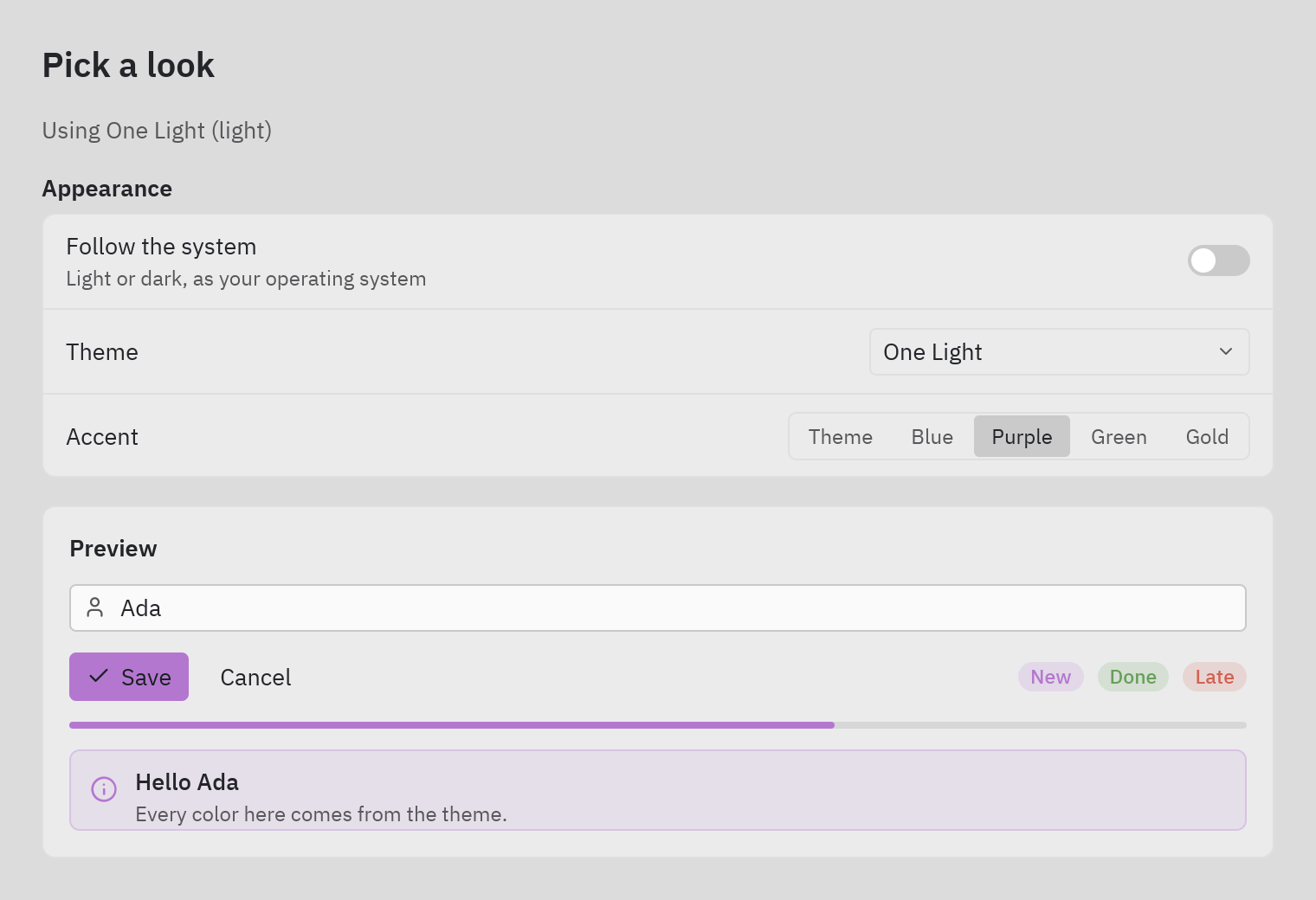
Cambia solo el acento. El acento es el color de los botones principales, los anillos de foco, la selección y los enlaces:
self.theme = pz.themes.get("One Dark").with_accent("#e5c07b") -
Sigue al sistema.
pz.themes.auto(light, dark)cambia solo cuando el usuario pasa su sistema operativo de modo claro a oscuro:self.theme = pz.themes.auto("One Light", "One Dark") -
Crea el tuyo.
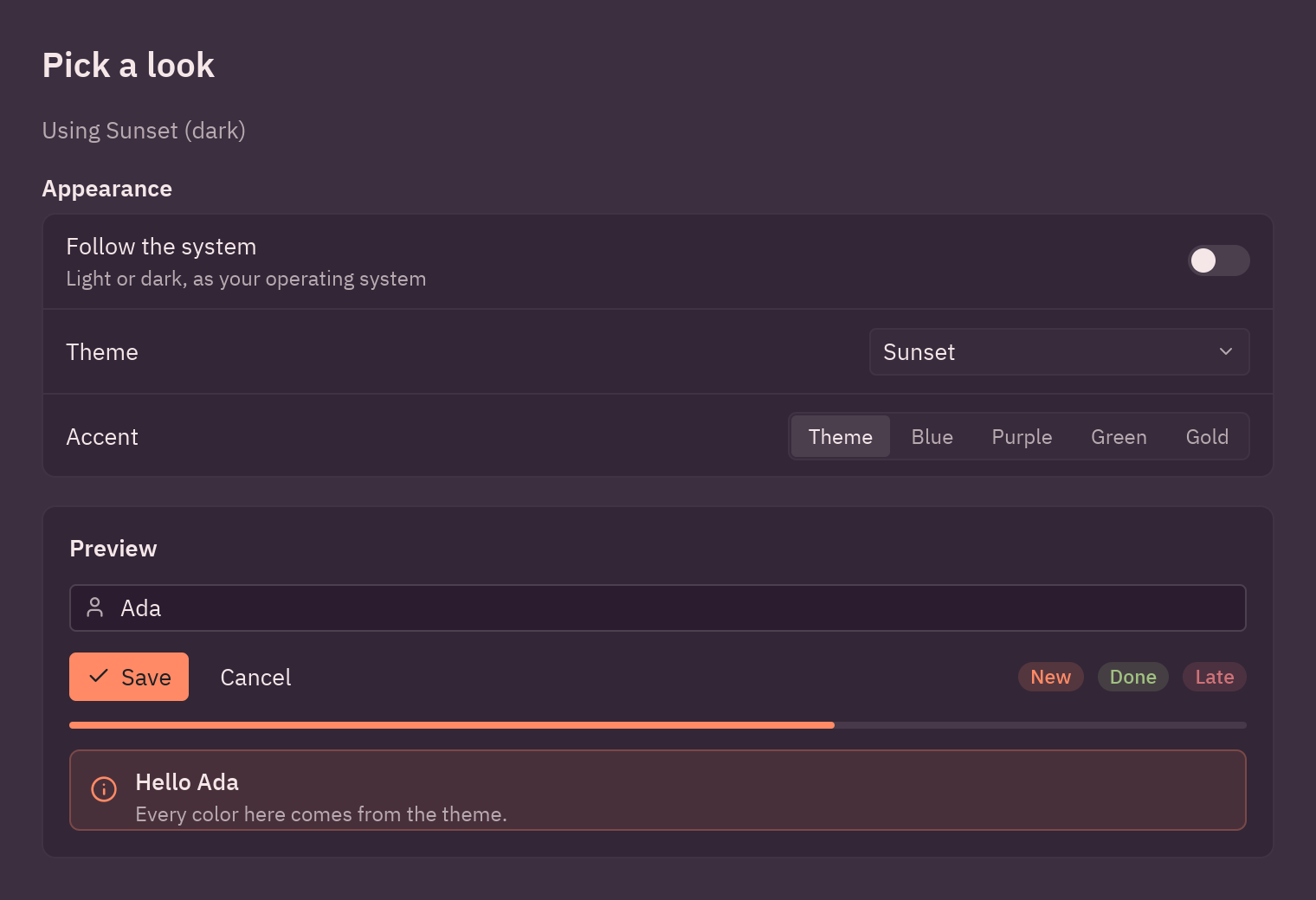
pz.Theme.generatededuce cada superficie, borde, estado hover y texto atenuado a partir de tres colores;pz.themes.registerlo añade a la lista con su nombre:SUNSET = pz.themes.register(pz.Theme.generate("Sunset", background="#2b1d2f", text="#f5e6e8", accent="#ff8a65")) -
Lee el tema en tu vista.
self.resolved_theme()devuelve elThemeen uso, útil para un fondo o para decir “oscuro” o “claro”:t = self.resolved_theme()pz.container(..., bg=t.background)ui.muted(f"Using {t.name} ({'dark' if t.is_dark else 'light'})")
En Pyzed Design
Sección titulada «En Pyzed Design»Selecciona un lugar vacío del lienzo para que el panel Propiedades muestre el formulario y abre la sección Aspecto (Look):
- Tema (Theme): todos los temas registrados.
- Acento (Accent): siete colores predefinidos, o un
#rrggbbpropio. - Fondo, Radio de esquina y Tamaño de letra para todo el formulario.
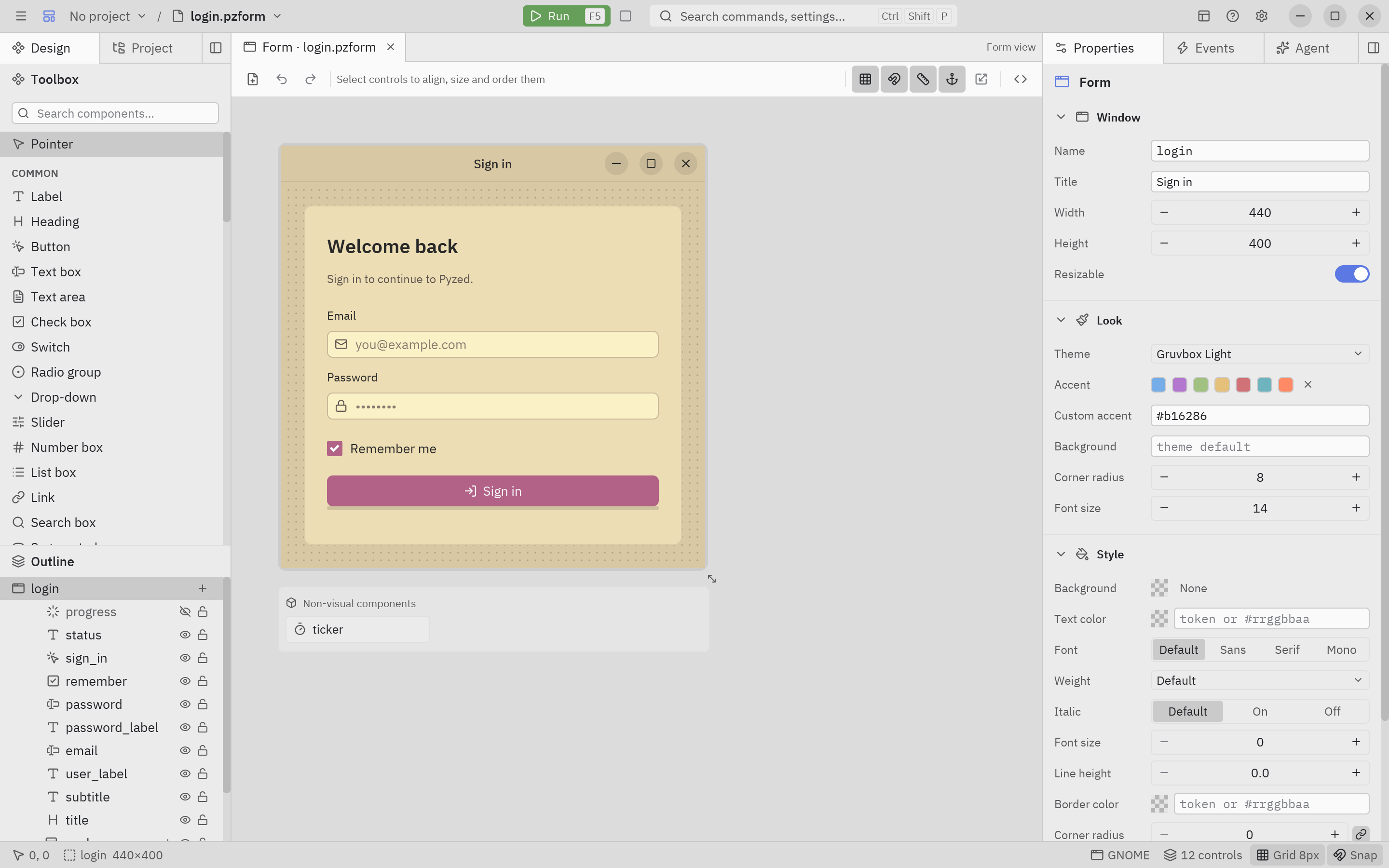
Ver → Vista previa con tema… muestra el lienzo con otro tema sin cambiar el formulario, para revisar los dos aspectos. Cada control también puede cambiar sus propios colores en su sección Estilo.
Código completo
Sección titulada «Código completo»"""Changing the theme: a bundled theme, an accent color, follow the system, or your own.
python examples/tutorial/theme_switcher.py
- ``theme`` (a class attribute or ``self.theme``) takes the name of a bundled theme, a ``pz.Theme`` or ``pz.themes.auto(light, dark)``, which follows the operating system's light/dark setting.- ``theme.with_accent("#e5c07b")`` changes only the accent (primary buttons, focus, selection).- ``pz.Theme.generate(...)`` builds a whole theme from three colors; ``pz.themes.register`` adds it to ``pz.themes.names()``.
Every component reads its colors from the active theme, so the window restyles at once.Walkthrough: https://albakore.github.io/pyzed/tutorials/basic/themes/"""
import pyzed as pzfrom pyzed import ui
# A theme of your own, made from three colors and registered by name.SUNSET = pz.themes.register(pz.Theme.generate("Sunset", background="#2b1d2f", text="#f5e6e8", accent="#ff8a65"))
ACCENTS = {"Theme": None, "Blue": "#74ade8", "Purple": "#b477cf", "Green": "#a1c181", "Gold": "#e5c07b"}
class ThemeSwitcher(pz.App): title = "Themes" size = (760, 520) theme = "One Dark" # the theme the window opens with
def __init__(self): self.base = "One Dark" self.accent = "Theme" self.follow_system = False self.name = "Ada"
def apply(self): """Builds the theme from the choices and assigns it: the next view() uses it.""" if self.follow_system: self.theme = pz.themes.auto("One Light", "One Dark") return theme = pz.themes.get(self.base) color = ACCENTS[self.accent] self.theme = theme.with_accent(color) if color else theme
def choose(self, field): def setter(value): setattr(self, field, value) self.apply() return setter
def controls(self): return ui.settings_group("Appearance", [ ui.field("Follow the system", ui.switch(self.follow_system, self.choose("follow_system")), description="Light or dark, as your operating system"), ui.field("Theme", ui.select(pz.themes.names(), self.base, self.choose("base"), width=220)), ui.field("Accent", ui.segmented(list(ACCENTS), self.accent, self.choose("accent"))), ])
def preview(self): return ui.card(pz.column([ ui.input(self.name, lambda v: setattr(self, "name", v), placeholder="Your name", icon="user"), pz.row([ ui.button("Save", lambda: None, variant="solid", icon="check"), ui.button("Cancel", lambda: None, variant="ghost"), pz.hspace(), ui.badge("New"), ui.badge("Done", tint="success"), ui.badge("Late", tint="error"), ], spacing=8, align="center"), ui.progress(0.65), ui.callout("Hello " + (self.name or "there"), "Every color here comes from the theme.", tint="info"), ], spacing=12), title="Preview", width="fill")
def view(self): t = self.resolved_theme() # the Theme in use right now return pz.container( pz.column([ ui.heading("Pick a look", level=2), ui.muted(f"Using {t.name} ({'dark' if t.is_dark else 'light'})"), self.controls(), self.preview(), ], spacing=16), padding=24, width="fill", height="fill", bg=t.background, )
if __name__ == "__main__": pz.run(ThemeSwitcher)uv run --with pyzed-ui python examples/tutorial/theme_switcher.pypython3 -m venv .venvsource .venv/bin/activatepython -m pip install pyzed-uipython examples/tutorial/theme_switcher.pypy -m venv .venv.venv\Scripts\Activate.ps1python -m pip install pyzed-uipython examples\tutorial\theme_switcher.pypython3 examples/tutorial/theme_switcher.pypy examples\tutorial\theme_switcher.pyEventos de este tutorial
Sección titulada «Eventos de este tutorial»| Widget | Evento | El handler recibe |
|---|---|---|
ui.switch (Seguir al sistema) |
on_toggle |
True o False. |
ui.select (Tema) |
on_select |
El nombre del tema. |
ui.segmented (Acento) |
on_select |
El nombre del acento. |
ui.input (Tu nombre) |
on_input |
El texto. |
self.choose("base") devuelve el handler: una función pequeña que guarda lo que recibe en ese campo. Una sola
fábrica sirve a los tres controles.
Prueba más eventos
Sección titulada «Prueba más eventos»def on_key(self, combo): # un atajo para todas las ventanas de la app if combo == "ctrl-t": # Ctrl+T: alterna claro y oscuro self.base = "One Light" if self.resolved_theme().is_dark else "One Dark" self.follow_system = False
def on_resize(self, width, height): # el evento de tamaño de la propia ventana self.compact = width < 600 # p. ej. ocultar la vista previa en ventanas pequeñasSiguiente
Sección titulada «Siguiente»- Tutorial en 5 pasos: estado, layout, async y una app de notas en Python puro.
- Temas y Estilos en la sección de temas.