
Un grafo de shader propio
En el tutorial intermedio de shaders editaste una plantilla en la vista de shader. Aquí construyes un shader desde cero, en Python, con el mismo grafo que edita la vista de shader: una aurora, cortinas de luz verde que flotan sobre un cielo nocturno, con deslizadores para su velocidad, su altura y su color.
| Objetivo | Tiempo | Nivel | Necesitas |
|---|---|---|---|
| Una aurora animada hecha de nodos, con controles en vivo | 40 minutos | Avanzado · Python | Un efecto de shader |
Qué vas a aprender
Sección titulada «Qué vas a aprender»- Crear un
shading.Graph, añadir nodos llamándolos y elegir sus salidas. - Usar aritmética sobre las salidas (
+,-,*) para que se añadan nodos Math por ti. - Combinar ruido fractal, smoothstep y un degradado en una imagen.
- Añadir variables mutables (uniforms) y cambiarlas en cada fotograma desde deslizadores.
- Guardar el grafo como
.pzshady seguir editándolo visualmente en Pyzed Design.
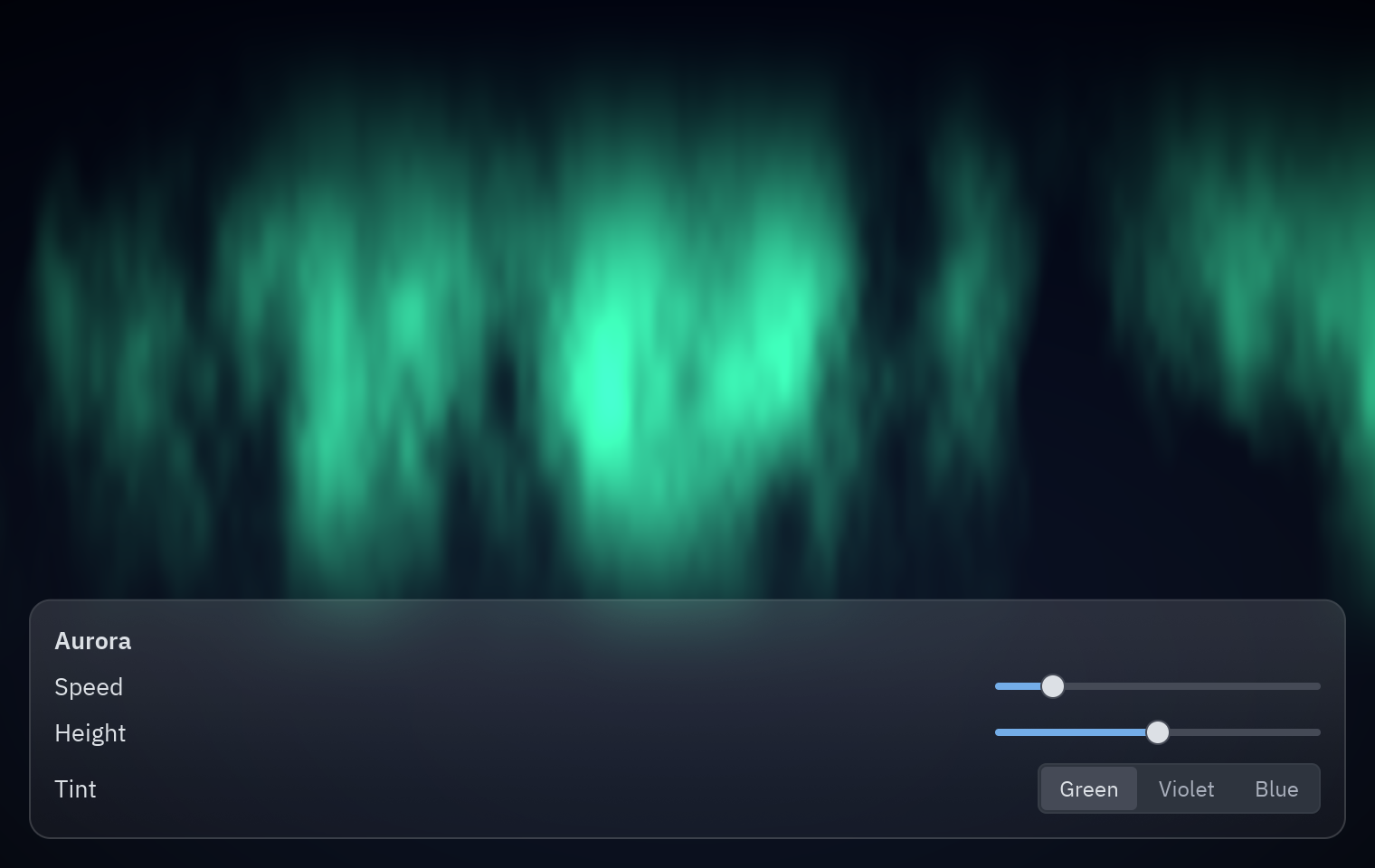
Cómo piensa un shader
Sección titulada «Cómo piensa un shader»Un shader responde a una pregunta, para todos los píxeles a la vez: ¿de qué color es este píxel ahora mismo? Sabe dónde está el píxel (UV: de 0,0 arriba a la izquierda a 1,1 abajo a la derecha) y el tiempo. Todo lo demás son operaciones sobre esas dos cosas. El grafo es esa matemática, dibujada como cajas y cables:
flowchart LR
    UV[UV] --> P["Compose: x·3 + t, y·0.6 − t·0.3"]
    T["Time × speed"] --> P
    P --> N[Ruido fractal]
    N --> S1["Smoothstep 0.35 → 0.8"]
    UV --> B["Banda cerca de arriba (height)"]
    S1 --> L["luz = cortinas × banda"]
    B --> L
    UV --> SKY["Gradient: cielo nocturno"]
    SKY --> M["Mix cielo → tint según la luz"]
    L --> M
    M --> V["× Vignette"] --> O[Output]
-
Un grafo y sus variables.
g.uniformañade una variable mutable (la GPU la lee en cada fotograma, así que cambiarla no cuesta nada) y devuelve un nodo que la lee:from pyzed import shadingg = shading.Graph("aurora")speed = g.uniform("speed", "float", 0.3, min=0, max=2)height = g.uniform("height", "float", 0.55, min=0.2, max=0.9)tint = g.uniform("tint", "color", "#34d399") -
Entradas. Llamar a un tipo de nodo sobre el grafo añade ese nodo.
node["nombre"]elige una salida, y la aritmética añade nodos Math:uv = g.uv()t = g.time()["time"] * speed # un nodo Multiply -
Las cortinas. Estira las coordenadas a lo ancho y muévelas con el tiempo, y luego toma ruido fractal (capas de ruido, cada una más fina que la anterior; el aspecto clásico de nubes y humo):
p = g.compose(uv["x"] * 3.0 + t, uv["y"] * 0.6 - t * 0.3)["vector"]curtains = g.fbm(p, scale=2.5, octaves=5) -
Mantenlas en una banda.
smoothstep(a, b, x)vale 0 por debajo dea, 1 por encima deby sube suave entre medio: la versión de shader de “aparecer gradualmente”. Dos de ellos forman una banda cerca de arriba, controlada porheight:band = g.smoothstep(height - 0.35, height, 1.0 - uv["y"]) * g.smoothstep(1.0, height, 1.0 - uv["y"])light = g.smoothstep(0.35, 0.8, curtains["value"]) * band -
Dale color. Un nodo Gradient hace el cielo; Mix pasa del cielo al tinte donde hay luz; Vignette oscurece las esquinas; Output es el color final:
sky = g.gradient(uv["y"], stops=[[0.0, "#020617"], [1.0, "#0f172a"]])glow = g.mix(sky["rgb"], tint * 1.4, light)g.output(g.rgba(glow * g.vignette(strength=0.6), 1.0)["color"])g.arrange() # ordena los nodos en columnas, como el botón Arrange de la vista de shader -
Muéstralo.
pz.shaderrecibe el grafo, lo compila a WGSL una vez y lo ejecuta en la GPU.uniforms=fija las variables mutables por nombre, así que los deslizadores cambian la imagen sin recompilar nada:pz.shader(AURORA, uniforms={"speed": self.speed, "height": self.height, "tint": TINTS[self.tint]},width="fill", height="fill", fallback=pz.Gradient(["#020617", "#064e3b"], angle=180)) -
Ábrelo en el diseñador. Ejecuta el ejemplo con
--savepara escribirexamples/tutorial/shaders/aurora.pzshad, y luegopyzed design examples/tutorial/shaders/aurora.pzshad: cada nodo que creaste en código está en el lienzo, con su vista previa en vivo, listo para ajustarlo con el mouse.
Código completo
Sección titulada «Código completo»"""A custom shader graph built in Python: an aurora with sliders for its variables.
python examples/tutorial/aurora_graph.py # show it python examples/tutorial/aurora_graph.py --save # also write shaders/aurora.pzshad
- ``shading.Graph`` is the same graph the Shader view of Pyzed Design edits: calling a node type on it (``g.fbm(...)``, ``g.smoothstep(...)``) adds that node, ``node["output"]`` picks an output, and ``+``, ``-``, ``*`` and ``/`` on outputs add Math nodes.- ``g.uniform(...)`` adds a *mutable* variable: the sliders change it every frame without recompiling anything.- ``pz.shader(graph, uniforms=...)`` compiles the graph to WGSL and runs it on the GPU. Without a GPU it draws the ``fallback`` gradient.- ``--save`` writes the graph as a ``.pzshad`` file you can open in Pyzed Design to keep editing.
Walkthrough: https://albakore.github.io/pyzed/tutorials/advanced/shader-graph/"""
import sysfrom pathlib import Path
import pyzed as pzfrom pyzed import shading, ui
HERE = Path(__file__).resolve().parentTINTS = {"Green": "#34d399", "Violet": "#a78bfa", "Blue": "#38bdf8"}
def build_aurora() -> shading.Graph: g = shading.Graph("aurora") g.description = "Curtains of light drifting over a night sky."
# Variables: the knobs your Python code (and the sliders) can turn. speed = g.uniform("speed", "float", 0.3, min=0, max=2) height = g.uniform("height", "float", 0.55, min=0.2, max=0.9) tint = g.uniform("tint", "color", "#34d399")
# 1. Where is this pixel, and what time is it? uv = g.uv() t = g.time()["time"] * speed
# 2. Drifting fractal noise, stretched sideways: the curtains. p = g.compose(uv["x"] * 3.0 + t, uv["y"] * 0.6 - t * 0.3)["vector"] curtains = g.fbm(p, scale=2.5, octaves=5)
# 3. Keep them in a band near the top, fading toward the ground. band = g.smoothstep(height - 0.35, height, 1.0 - uv["y"]) * g.smoothstep(1.0, height, 1.0 - uv["y"]) light = g.smoothstep(0.35, 0.8, curtains["value"]) * band
# 4. Colors: a night sky gradient, plus the tint where there is light. sky = g.gradient(uv["y"], stops=[[0.0, "#020617"], [1.0, "#0f172a"]]) glow = g.mix(sky["rgb"], tint * 1.4, light) g.output(g.rgba(glow * g.vignette(strength=0.6), 1.0)["color"])
g.arrange() # lay the nodes out in columns, as the Arrange button of the Shader view does return g
AURORA = build_aurora()
class Aurora(pz.App): title = "Aurora" size = (760, 480) theme = "One Dark"
def __init__(self): self.speed = 0.3 self.height = 0.55 self.tint = "Green"
def knob(self, label, value, low, high, field): return ui.field(label, pz.container(ui.slider(value, lambda v: setattr(self, field, v), min=low, max=high), width=180))
def view(self): sky = pz.shader(AURORA, uniforms={"speed": self.speed, "height": self.height, "tint": TINTS[self.tint]}, width="fill", height="fill", fallback=pz.Gradient(["#020617", "#064e3b"], angle=180)) panel = pz.container(pz.column([ ui.label("Aurora", weight="semibold"), self.knob("Speed", self.speed, 0, 2, "speed"), self.knob("Height", self.height, 0.2, 0.9, "height"), ui.field("Tint", ui.segmented(list(TINTS), self.tint, lambda c: setattr(self, "tint", c))), ], spacing=8), padding=14).style(glass=True, radius=12) return pz.stack([sky, pz.container(panel, padding=16, width="fill", height="fill", align_x="start", align_y="end")])
if __name__ == "__main__": if "--save" in sys.argv: print("wrote", AURORA.save(HERE / "shaders" / "aurora.pzshad")) pz.run(Aurora)uv run --with pyzed-ui python examples/tutorial/aurora_graph.pypython3 -m venv .venvsource .venv/bin/activatepython -m pip install pyzed-uipython examples/tutorial/aurora_graph.pypy -m venv .venv.venv\Scripts\Activate.ps1python -m pip install pyzed-uipython examples\tutorial\aurora_graph.pypython3 examples/tutorial/aurora_graph.pypy examples\tutorial\aurora_graph.pySiguiente
Sección titulada «Siguiente»- Grafos de shader: toda la API de
pyzed.shadingy el formato.pzshad. - La sección Shading: cada nodo, con ejemplos.
- Conectar un backend.