
Bases del diseño de pantallas
Cualquier pantalla, desde una caja de inicio de sesión hasta un IDE completo, se arma con cuatro ideas: apilar cosas en vertical, ponerlas una al lado de otra, decidir quién ocupa el espacio libre y dejar aire entre ellas. Apréndelas una vez y podrás leer cualquier layout de Pyzed.
| Objetivo | Tiempo | Nivel | Necesitas |
|---|---|---|---|
| Una página de perfil que se adapta bien al tamaño | 20 minutos | Básico · Python | Pyzed instalado (Instalación) |
Qué vas a aprender
Sección titulada «Qué vas a aprender»pz.columnypz.row: pilas vertical y horizontal.spacing(la separación entre hijos) ypadding(el margen interior del borde).width="fill"/height="fill"ypz.hspace(): ocupar el espacio libre.align: alinear los hijos a lo ancho de la pila.pz.grid: celdas iguales.- Las mismas ideas en el diseñador: Fila flexible, Columna flexible, Cuadrícula, Espaciador y anclajes.
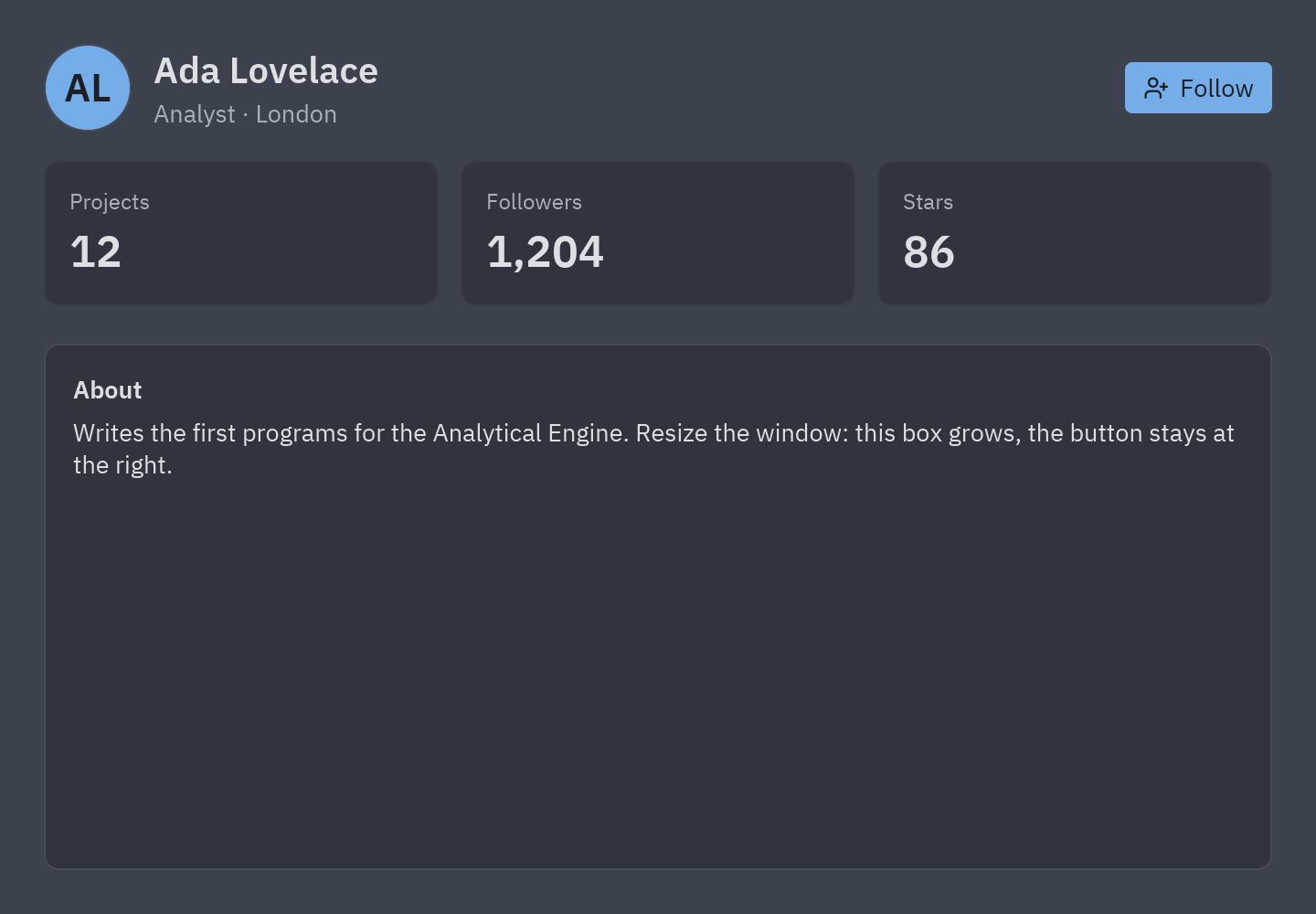
Las cuatro ideas
Sección titulada «Las cuatro ideas»pz.column([...], spacing=16) pz.row([...], spacing=12, align="center")┌──────────────┐ ┌───────────────────────────────────────┐│ header │ │ (AL) Ada Lovelace ⟷fill⟷ [Follow]││ ── 16 px ── │ └───────────────────────────────────────┘│ stats │ pz.hspace() empuja el botón a la derecha│ ── 16 px ── ││ about (fill) │ ← height="fill" ocupa lo que queda└──────────────┘| Valor de tamaño | Significa |
|---|---|
un número (width=200) |
Exactamente esa cantidad de píxeles. |
"shrink" (el valor por defecto de casi todos los widgets) |
Tan pequeño como su contenido. |
"fill" |
Todo el espacio libre; varios hijos fill lo reparten a partes iguales. |
"fill:2" |
El doble de la parte de un hermano fill normal. |
-
La página es una columna.
view()devuelve un widget; aquí unpz.containerconpadding=24alrededor de una columna de tres partes separadas porspacing=16:def view(self):t = self.resolved_theme()return pz.container(pz.column([self.header(), self.stats(), self.about()], spacing=16, height="fill"),padding=24, width="fill", height="fill", bg=t.background,) -
La cabecera es una fila. Un avatar, una columna con el nombre y una línea atenuada, luego
pz.hspace(), una pieza vacía conwidth="fill", y luego el botón.align="center"los centra en vertical:pz.row([ui.avatar("AL", size=48),pz.column([ui.heading("Ada Lovelace", level=2), ui.muted("Analyst · London")], spacing=2),pz.hspace(),ui.button("Follow", self.toggle_follow, variant="solid", icon="user-plus"),], spacing=12, align="center") -
Tres tarjetas iguales: una cuadrícula.
columns=3crea tres celdas del mismo ancho;heightes el alto de cada fila:pz.grid([ui.stat("Projects", "12", width="fill"), ...], columns=3, spacing=12, height=84) -
La última parte rellena.
height="fill"en el recuadro About hace que ocupe cada píxel que dejan las otras partes, así que crece con la ventana. -
Ejecútalo y cambia el tamaño de la ventana. La cabecera mantiene el botón en el borde derecho, las tarjetas siguen iguales y el recuadro About se estira.
Lo mismo en Pyzed Design
Sección titulada «Lo mismo en Pyzed Design»El diseñador tiene las mismas piezas en la categoría Disposición (Layout) de las Herramientas:
| En código | En el diseñador |
|---|---|
pz.row([...], spacing=8) |
Fila flexible (Flex row), con Separación (Gap) 8 |
pz.column([...]) |
Columna flexible (Flex column) |
pz.hspace() |
Espaciador (Spacer, un hijo que crece 1) |
width="fill" en un hijo |
El campo Crecer (Grow) del hijo (sección Posición) en 1 |
pz.grid([...], columns=3) |
Cuadrícula (Grid) con Columnas 3 |
padding=24 |
El Relleno (Padding) del contenedor |
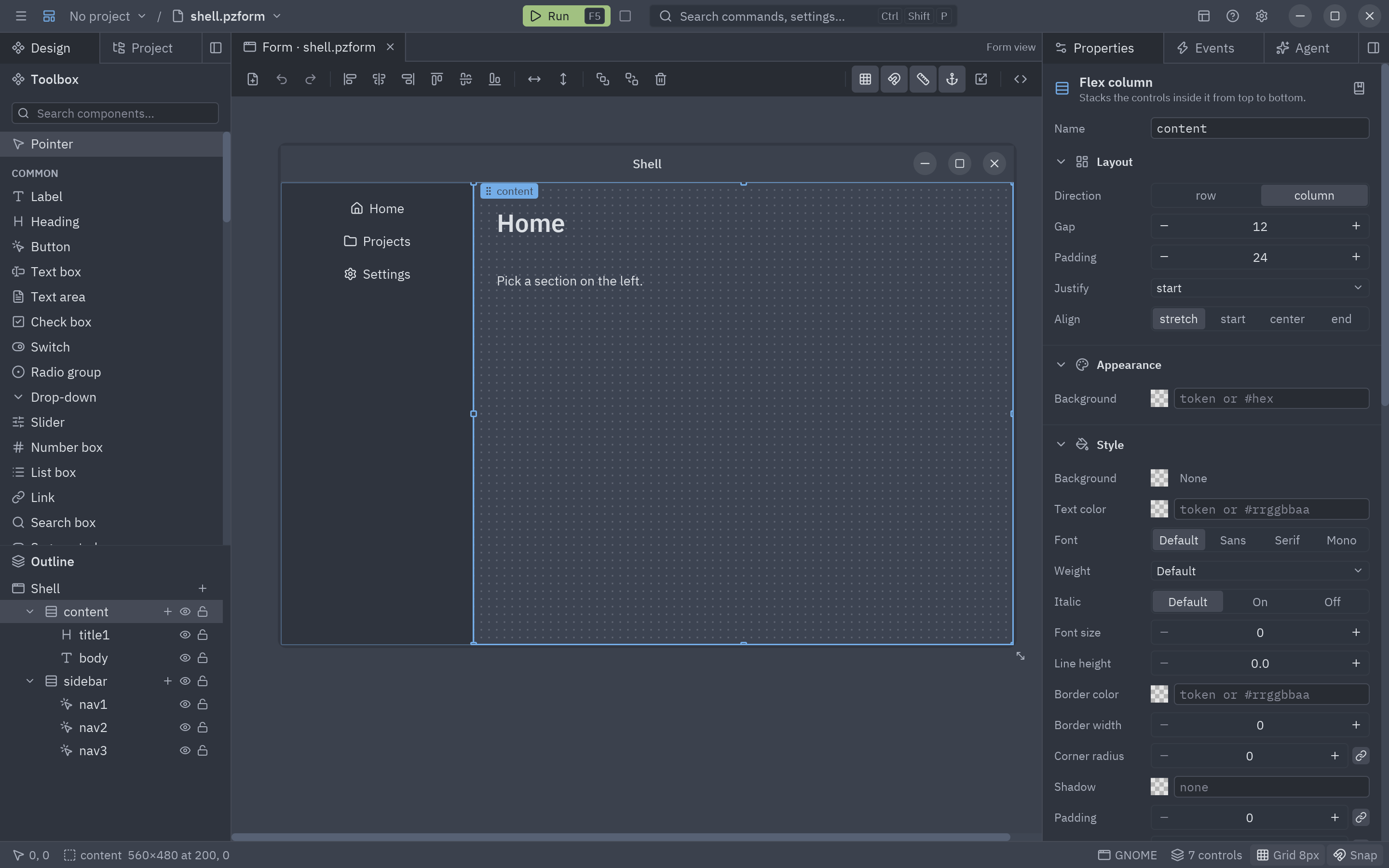
Los controles colocados libremente en el formulario (fuera de un contenedor flexible) usan anclajes: anclado a izquierda y derecha, un control se estira; anclado solo a la derecha, sigue al borde derecho. Selecciona controles y usa Agrupar en una fila / columna / cuadrícula (menú del clic derecho) para convertir una disposición libre en una flexible. Detalles en Layouts y contenedores.
Código completo
Sección titulada «Código completo»"""Layout basics: rows, columns, fill, spacing, padding, alignment and grids.
python examples/tutorial/layout_basics.py
A small profile page laid out with the four ideas behind every Pyzed layout:
- ``pz.column`` stacks children top to bottom, ``pz.row`` puts them side by side.- ``spacing`` is the gap between children, ``padding`` the room inside the edge.- ``width="fill"`` / ``height="fill"`` take the space that is left; ``pz.hspace()`` is an empty piece that fills, so it pushes what follows to the end of the row.- ``pz.grid`` places children in cells of equal width.
Walkthrough: https://albakore.github.io/pyzed/tutorials/basic/layout-basics/"""
import pyzed as pzfrom pyzed import ui
class Profile(pz.App): title = "Layout basics" size = (720, 500)
def __init__(self): self.follows = False
def header(self): # A row: avatar, a column with two lines, a spacer that fills, then a button at the far right. return pz.row([ ui.avatar("AL", size=48), pz.column([ui.heading("Ada Lovelace", level=2), ui.muted("Analyst · London")], spacing=2), pz.hspace(), ui.button("Following" if self.follows else "Follow", self.toggle_follow, variant="outline" if self.follows else "solid", icon="user-plus"), ], spacing=12, align="center")
def stats(self): # A grid: three cells of the same width, whatever the window size. return pz.grid([ ui.stat("Projects", "12", width="fill"), ui.stat("Followers", "1,205" if self.follows else "1,204", width="fill"), ui.stat("Stars", "86", width="fill"), ], columns=3, spacing=12, height=84) # height: the height of each row
def about(self): # A container with height="fill" grows to take the rest of the window. t = self.resolved_theme() return pz.container( pz.column([ ui.label("About", weight="semibold"), ui.label("Writes the first programs for the Analytical Engine. " "Resize the window: this box grows, the button stays at the right."), ], spacing=6), padding=16, width="fill", height="fill", bg=t.surface, border_color=t.border, border_width=1, radius=t.radius + 2, )
def toggle_follow(self): self.follows = not self.follows
def view(self): t = self.resolved_theme() return pz.container( pz.column([self.header(), self.stats(), self.about()], spacing=16, height="fill"), padding=24, width="fill", height="fill", bg=t.background, )
if __name__ == "__main__": pz.run(Profile)uv run --with pyzed-ui python examples/tutorial/layout_basics.pypython3 -m venv .venvsource .venv/bin/activatepython -m pip install pyzed-uipython examples/tutorial/layout_basics.pypy -m venv .venv.venv\Scripts\Activate.ps1python -m pip install pyzed-uipython examples\tutorial\layout_basics.pypython3 examples/tutorial/layout_basics.pypy examples\tutorial\layout_basics.pyEventos de este tutorial
Sección titulada «Eventos de este tutorial»La página tiene un evento: el on_press del botón Follow, que llama a toggle_follow (sin argumentos). Los
widgets de disposición no tienen eventos propios, pero cualquier widget acepta los
eventos comunes con .on().
Prueba más eventos
Sección titulada «Prueba más eventos»def __init__(self): self.follows = False self.narrow = False # nuevo: la ventana es estrecha self.opened = None # nuevo: la cifra que se pulsó
def stats(self): return pz.grid([ ui.stat(name, value, width="fill", on_press=lambda name=name: setattr(self, "opened", name)) for name, value in (("Projects", "12"), ("Followers", "1,204"), ("Stars", "86")) ], columns=1 if self.narrow else 3, spacing=12, height=84)
def view(self): page = pz.column([self.header(), self.stats(), self.about()], spacing=20, padding=24) # resize: una sola columna cuando la ventana mide menos de 560 px return page.on(resize=lambda e: setattr(self, "narrow", e.width < 560), double_click=lambda: setattr(self, "opened", None))Siguiente
Sección titulada «Siguiente»- Cambia el tema de esta ventana.
- Guía de layout: cuadrículas por pistas (
"200 1fr auto"),pz.flex, scroll y layouts anclados. - Row, Column y Grid en la biblioteca de componentes.