
Un bucle de juego
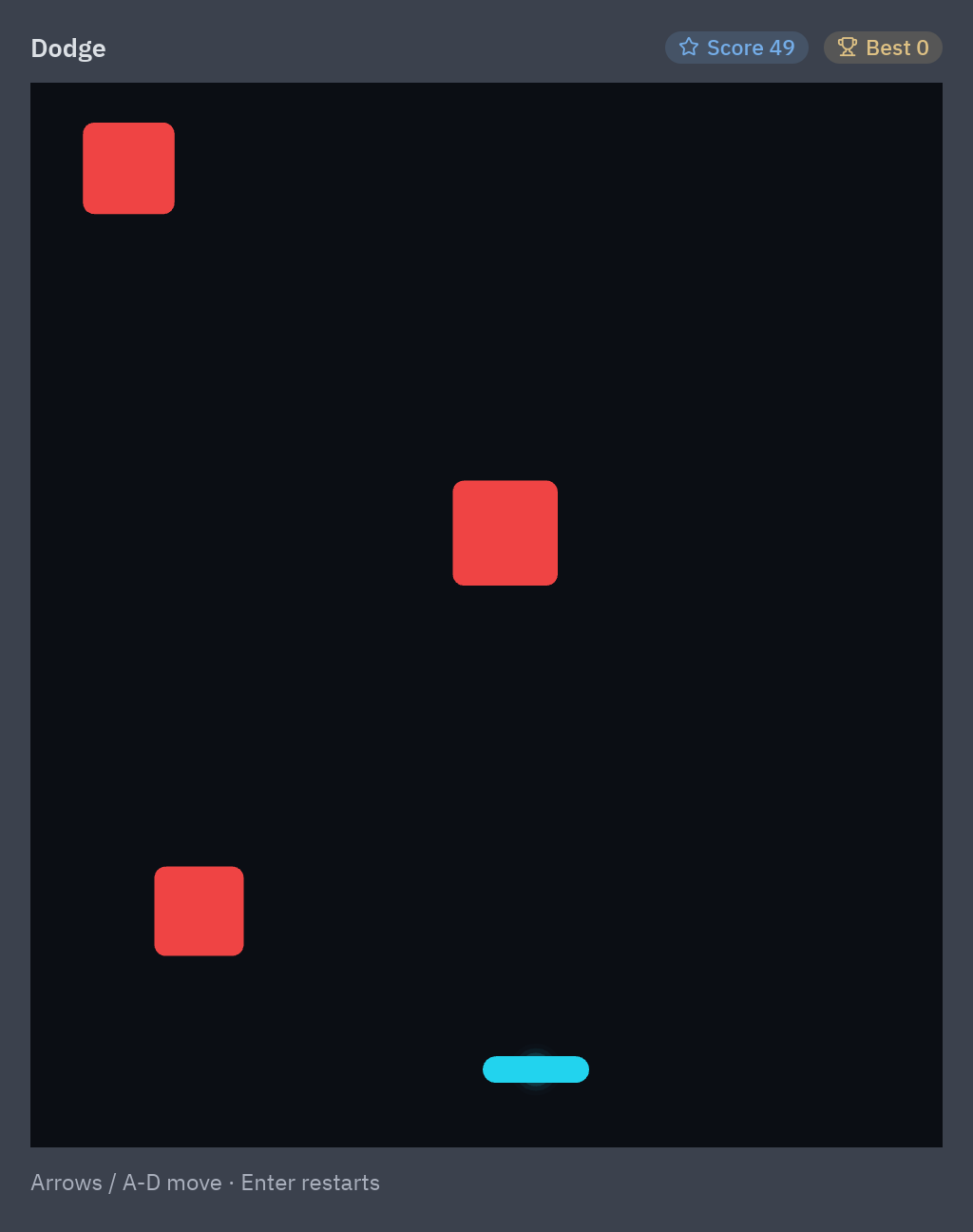
Las apps esperan al usuario; los juegos no. Un juego actualiza el mundo muchas veces por segundo, pulses una tecla o no. Este tutorial construye Dodge: caen bloques, te mueves a izquierda y derecha, recoges estrellas y el juego se acelera. Unas 130 líneas, y cada pieza se puede reutilizar.
| Objetivo | Tiempo | Nivel | Necesitas |
|---|---|---|---|
| Un juego arcade que se puede jugar | 40 minutos | Avanzado · Python | Una app con varias vistas |
Qué vas a aprender
Sección titulada «Qué vas a aprender»- Ejecutar código en cada fotograma con
pz.frames(callback)y mover cosas según velocidad × dt. - Leer las teclas mantenidas (
game.axis) en lugar de pulsaciones sueltas. - Detectar colisiones con
game.Rect. - Dibujar en un
pz.canvasy añadir brillo, partículas y temblor de pantalla. - Apilar un HUD y una tarjeta de Game over, hechos con widgets normales, sobre el canvas.
-
El bucle. Devuelve
pz.frames(self.tick)desdesubscriptions()y Pyzed llama atick(dt)antes de cada fotograma (60, 120 o 144 veces por segundo, sincronizado con la pantalla).dtes el tiempo desde el fotograma anterior, en segundos. Cuando el juego termina no devuelves nada y el bucle se detiene, así un juego en pausa no usa CPU:def subscriptions(self):return [] if self.over else [pz.frames(self.tick)] -
Mueve según velocidad × dt. Las velocidades están en píxeles por segundo. Multiplicar por
dthace que el juego vaya a la misma velocidad en cualquier pantalla:self.x += game.axis(("left", "a"), ("right", "d")) * 380 * dt # -1, 0 o 1 × velocidad × tiempoself.x = game.clamp(self.x, 0, W - PLAYER_W)game.axislee las teclas pulsadas ahora mismo: mantén la flecha y la paleta sigue moviéndose. -
Crea cosas con un temporizador. Una cuenta atrás en segundos que se reinicia al llegar a cero. Se acorta con el tiempo, así que el juego se vuelve más difícil:
self.spawn -= dtif self.spawn <= 0:self.spawn = max(0.25, 0.8 - self.time * 0.01)size = self.random.uniform(24, 60)self.blocks.append(game.Rect(self.random.uniform(0, W - size), -size, size, size)) -
Colisiones.
game.Rectes una caja conoverlaps,containsycenter:player = game.Rect(self.x, PLAYER_Y, PLAYER_W, PLAYER_H)if any(block.overlaps(player) for block in self.blocks):self.over = Trueself.shake.kick(10) # temblor de pantallaself.sparks.burst(*player.center, count=40, color=["#f87171", "#fca5a5"]) -
Dibuja el mundo. Una lista de figuras de
pyzed.drawen unpz.canvas.game.glowañade luz suave,sparks.shapes()dibuja las partículas yshake.shapes()mueve todo un poco después de un golpe:shapes = [draw.background("#0b0e14"), *self.shake.shapes()]shapes += [block.shape(fill="#ef4444", radius=6) for block in self.blocks]for x, y in self.stars:shapes += game.glow(x, y, 6, "#fbbf24", layers=3)shapes.append(draw.rect(self.x, PLAYER_Y, PLAYER_W, PLAYER_H, radius=7, fill="#22d3ee"))shapes += self.sparks.shapes(glow=True)return pz.canvas(shapes, width=W, height=H) -
HUD y Game over. No se dibujan en el canvas: son widgets.
pz.stackpone la tarjeta de Game over (un panel de cristal con un botón) sobre el canvas, y los marcadores van encima:play = pz.stack([self.board(), self.overlay()], width=W, height=H) -
Reinicia.
on_keyrecibe las pulsaciones sueltas; Enter reinicia el estado y, comoovervuelve a ser falso,subscriptions()devuelve el bucle y el juego empieza de nuevo.
Código completo
Sección titulada «Código completo»"""Dodge: a tiny real-time game built with the game loop of ``pyzed.game``.
python examples/tutorial/dodge.py
Move with the arrows or A/D, dodge the falling blocks, collect the stars. Enter starts again.
- ``pz.frames(self.tick)`` in ``subscriptions()`` calls ``tick(dt)`` once per displayed frame.- ``game.axis("left", "right")`` reads the keys held down: -1, 0 or 1.- ``game.Rect.overlaps`` checks collisions; ``game.glow``, ``game.Particles`` and ``game.Shake`` add light, sparks and screen shake.- The score and the "Game over" card are ordinary widgets stacked over the canvas.
Walkthrough: https://albakore.github.io/pyzed/tutorials/advanced/game-loop/"""
import random
import pyzed as pzfrom pyzed import draw, game, ui
W, H = 480, 560PLAYER_W, PLAYER_H, PLAYER_Y = 56, 14, H - 48
class Dodge(pz.App): title = "Dodge" size = (W + 32, H + 88) theme = "One Dark"
def __init__(self, seed=None): self.random = random.Random(seed) self.sparks = game.Particles(gravity=300, seed=seed) self.shake = game.Shake(seed=seed) self.best = 0 self.reset()
def reset(self): self.x = W / 2 - PLAYER_W / 2 self.blocks = [] # game.Rect objects falling down self.stars = [] # (x, y) of the stars to collect self.spawn = 0.0 # seconds until the next block self.time = 0.0 # seconds survived self.bonus = 0 # points from stars self.over = False
@property def score(self): return int(self.time * 10) + self.bonus
# -- the loop ------------------------------------------------------------------------- def subscriptions(self): return [] if self.over else [pz.frames(self.tick)]
def tick(self, dt): dt = min(dt, 0.05) # never jump too far after a pause self.time += dt speed = 220 + self.time * 8 # blocks fall faster over time
# 1. input: move the player by speed x dt, so it goes as fast at 60 Hz as at 144 Hz self.x = game.clamp(self.x + game.axis(("left", "a"), ("right", "d")) * 380 * dt, 0, W - PLAYER_W) player = game.Rect(self.x, PLAYER_Y, PLAYER_W, PLAYER_H)
# 2. spawn new things now and then self.spawn -= dt if self.spawn <= 0: self.spawn = max(0.25, 0.8 - self.time * 0.01) size = self.random.uniform(24, 60) self.blocks.append(game.Rect(self.random.uniform(0, W - size), -size, size, size)) if self.random.random() < 0.3: self.stars.append((self.random.uniform(16, W - 16), -16.0))
# 3. move everything and check collisions for block in self.blocks: block.y += speed * dt self.blocks = [b for b in self.blocks if b.y < H] self.stars = [(x, y + speed * 0.8 * dt) for x, y in self.stars if y < H] for x, y in list(self.stars): if player.overlaps(game.Rect(x - 12, y - 12, 24, 24)): # a star is a 24 px box self.stars.remove((x, y)) self.bonus += 50 self.sparks.burst(x, y, count=18, color=["#fde68a", "#fbbf24"]) if any(block.overlaps(player) for block in self.blocks): self.over = True self.best = max(self.best, self.score) self.shake.kick(10) self.sparks.burst(*player.center, count=40, color=["#f87171", "#fca5a5"])
# 4. effects self.sparks.update(dt) self.shake.update(dt)
def on_key(self, combo): if combo == "enter" and self.over: self.reset()
# -- drawing -------------------------------------------------------------------------- def board(self): shapes = [draw.background("#0b0e14"), *self.shake.shapes()] for block in self.blocks: shapes.append(block.shape(fill="#ef4444", radius=6)) for x, y in self.stars: shapes += game.glow(x, y, 6, "#fbbf24", layers=3) shapes += game.glow(self.x + PLAYER_W / 2, PLAYER_Y + PLAYER_H / 2, 4, "#22d3ee", layers=4, core=False) shapes.append(draw.rect(self.x, PLAYER_Y, PLAYER_W, PLAYER_H, radius=7, fill="#22d3ee")) shapes += self.sparks.shapes(glow=True) return pz.canvas(shapes, width=W, height=H)
def overlay(self): if not self.over: return None card = pz.container(pz.column([ ui.heading("Game over", level=2), ui.muted(f"Score {self.score} · Best {self.best}"), ui.button("Play again", self.reset, variant="solid", icon="rotate-ccw"), ], spacing=10, align="center"), padding=24).style(glass=True, radius=14) return pz.container(card, width="fill", height="fill", align_x="center", align_y="center")
def view(self): t = self.resolved_theme() hud = pz.row([ui.label("Dodge", weight="semibold"), pz.hspace(), ui.badge(f"Score {self.score}", icon="star"), ui.badge(f"Best {self.best}", tint="warning", icon="trophy")], spacing=8, align="center") play = pz.stack([self.board(), self.overlay()], width=W, height=H) return pz.container( pz.column([hud, pz.container(play, radius=10, clip=True), ui.muted("Arrows / A-D move · Enter restarts", size="sm")], spacing=10), padding=16, width="fill", height="fill", bg=t.background, )
if __name__ == "__main__": pz.run(Dodge)uv run --with pyzed-ui python examples/tutorial/dodge.pypython3 -m venv .venvsource .venv/bin/activatepython -m pip install pyzed-uipython examples/tutorial/dodge.pypy -m venv .venv.venv\Scripts\Activate.ps1python -m pip install pyzed-uipython examples\tutorial\dodge.pypython3 examples/tutorial/dodge.pypy examples\tutorial\dodge.pyEventos de este tutorial
Sección titulada «Eventos de este tutorial»| Origen | Evento | Handler |
|---|---|---|
subscriptions() |
cada fotograma | pz.frames(self.tick): tick(dt) recibe los segundos desde el anterior. |
| El teclado | teclas mantenidas | game.axis(("left", "a"), ("right", "d")) las lee dentro de tick. |
| La app | on_key |
Enter vuelve a empezar después de chocar. |
Un juego lee en cada fotograma las teclas que están pulsadas en lugar de reaccionar a cada pulsación; on_key es
para acciones puntuales.
Prueba más eventos
Sección titulada «Prueba más eventos»def on_key(self, combo): if combo == "enter" and self.over: self.reset() elif combo == "p": # pausa: deja de devolver la suscripción de fotogramas self.paused = not self.paused
def subscriptions(self): return [] if self.over or self.paused else [pz.frames(self.tick)]
def board(self): ... return pz.canvas(shapes, width=W, height=H, on_press=lambda x, y: self.reset() if self.over else None) # clic para reiniciarSiguiente
Sección titulada «Siguiente»- Hacer videojuegos: Snake, Breakout y Neon Invaders, paso a paso.
- Un grafo de shader propio para un fondo por GPU.