
Tareas en segundo plano
Una interfaz nunca debe bloquearse esperando a la red o al disco. Pyzed ofrece dos herramientas:
Command.perform(fn, then)ejecuta una función bloqueante en otro hilo y te entrega el resultado.pz.post(mensaje)envía mensajes a la app desde cualquier hilo (progreso, eventos).
| Objetivo | Tiempo | Nivel | Necesitas |
|---|---|---|---|
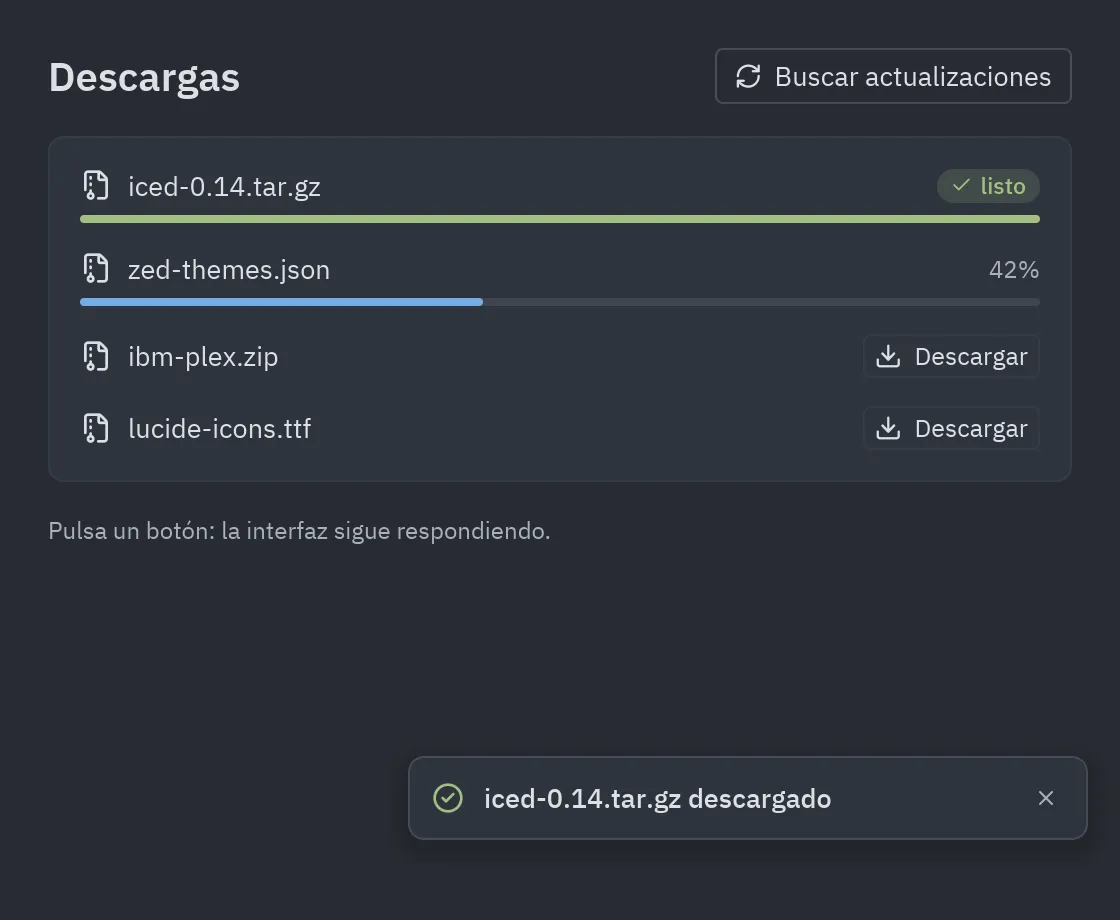
| Descargas con barras de progreso y notificaciones que nunca congelan la ventana | 30 minutos | Intermedio · Python | Diálogos y notificaciones |
Qué vas a aprender
Sección titulada «Qué vas a aprender»- Por qué el trabajo lento debe salir del hilo de la interfaz, y las dos formas de sacarlo.
- Recibir un resultado con
Command.perform. - Informar del progreso desde un hilo con
pz.posty manejarlo enupdate. - Mostrar notificaciones que se cierran solas.
-
Un resultado:
Command.perform. Para “haz esto y avísame cuando termine”:def check_updates(self):self.checking = Truereturn Command.perform(self.fetch_latest_version, self.got_version)@staticmethoddef fetch_latest_version():time.sleep(1.5) # por ejemplo, una petición HTTPreturn "0.2.0"def got_version(self, version): # se ejecuta en el hilo de la interfazself.checking, self.latest = False, versionMientras
self.checkingesTrue, el botón se dibuja deshabilitado (on_press=None). -
Muchos resultados:
pz.post. Un hilo propio informa del progreso con mensajes que llegan aupdate:def start(self, name):self.progress[name] = 0.0def worker():done = 0.0while done < 1.0:time.sleep(0.05)done = min(1.0, done + 0.05)pz.post(("progress", name, done))pz.post(("finished", name))threading.Thread(target=worker, daemon=True).start()def update(self, message):kind, name, *rest = messageif kind == "progress":self.progress[name] = rest[0]elif kind == "finished":self.notify(f"{name} descargado", kind="success") -
Notificaciones que se cierran solas. Un
threading.Timerpublica el mensaje de cierre:def notify(self, title, message=None, kind="info"):toast_id = f"{time.monotonic()}"self.toasts.append((toast_id, title, message, kind))threading.Timer(4, pz.post, args=(("dismiss", toast_id),)).start()# en view():return ui.toasts(body, [ui.toast(t, m, kind=k, on_dismiss=("dismiss", i)) for i, t, m, k in self.toasts])
Código completo
Sección titulada «Código completo»"""Background work without freezing the UI: Command.perform, pz.post from threads, progress bars and toasts.
python examples/downloads.py
The "downloads" are simulated with sleep so the example works offline.Walkthrough: https://albakore.github.io/pyzed/tutorials/intermediate/background-tasks/"""
import randomimport threadingimport time
import pyzed as pzfrom pyzed import Command, ui
FILES = ["iced-0.14.tar.gz", "zed-themes.json", "ibm-plex.zip", "lucide-icons.ttf"]
class Downloads(pz.App): title = "Descargas" size = (560, 460)
def __init__(self): self.progress = {} # name -> 0..1 self.toasts = [] # (id, title, message, kind) self.checking = False self.latest = None
# -- pz.post: a worker thread reports progress through update() ----------------- def start(self, name): self.progress[name] = 0.0
def worker(): done = 0.0 while done < 1.0: time.sleep(random.uniform(0.03, 0.12)) done = min(1.0, done + random.uniform(0.02, 0.08)) pz.post(("progress", name, done)) pz.post(("finished", name))
threading.Thread(target=worker, daemon=True).start()
def update(self, message): kind, name, *rest = message if kind == "progress": self.progress[name] = rest[0] elif kind == "finished": self.notify(f"{name} descargado", kind="success") elif kind == "dismiss": self.toasts = [t for t in self.toasts if t[0] != name]
def notify(self, title, message=None, kind="info"): toast_id = f"{time.monotonic()}" self.toasts.append((toast_id, title, message, kind)) threading.Timer(4, pz.post, args=(("dismiss", toast_id),)).start()
# -- Command.perform: run a blocking function and get its result back -------------- def check_updates(self): self.checking = True return Command.perform(self.fetch_latest_version, self.got_version)
@staticmethod def fetch_latest_version(): time.sleep(1.5) # e.g. an HTTP request return "0.2.0"
def got_version(self, version): self.checking, self.latest = False, version self.notify("Hay una versión nueva", f"Pyzed {version} está disponible.")
# -- view ---------------------------------------------------------------------------- def row(self, name): value = self.progress.get(name) if value is None: action = ui.button("Descargar", lambda: self.start(name), size="sm", icon="download") elif value < 1: action = ui.muted(f"{value:.0%}", size="sm") else: action = ui.badge("listo", tint="success", icon="check") return pz.column([ pz.row([pz.icon("file-archive", size=16), ui.label(name), pz.hspace(), action], spacing=8, align="center"), ui.progress(value or 0, tint="success" if value == 1 else "accent") if value is not None else None, ], spacing=6)
def view(self): body = pz.container( pz.column([ pz.row([ui.heading("Descargas", level=2), pz.hspace(), ui.button("Buscar actualizaciones", None if self.checking else self.check_updates, icon="loader" if self.checking else "refresh-cw", variant="outline")], align="center"), ui.card(pz.column([self.row(n) for n in FILES], spacing=14)), ui.muted(f"Última versión: {self.latest}" if self.latest else "Pulsa un botón: la interfaz sigue respondiendo.", size="sm"), ], spacing=16), padding=24, width="fill", height="fill", bg=self.resolved_theme().editor, ) items = [ui.toast(title, msg, kind=kind, on_dismiss=("dismiss", tid)) for tid, title, msg, kind in self.toasts] return ui.toasts(body, items)
if __name__ == "__main__": pz.run(Downloads)uv run --with pyzed-ui python examples/downloads.pypython3 -m venv .venvsource .venv/bin/activatepython -m pip install pyzed-uipython examples/downloads.pypy -m venv .venv.venv\Scripts\Activate.ps1python -m pip install pyzed-uipython examples\downloads.pypython3 examples/downloads.pypy examples\downloads.pyEventos de este tutorial
Sección titulada «Eventos de este tutorial»Esta app es declarativa: los eventos de los hilos son mensajes. pz.post(("progress", name, done)) desde un hilo
y el on_dismiss=("dismiss", tid) de cada aviso llegan a update(message), que desempaqueta la tupla.
| Origen | Evento | Mensaje o handler |
|---|---|---|
| Botón Descargar | on_press |
lambda: self.start(name) |
| El hilo de trabajo | progreso, terminado | pz.post(("progress", name, done)), pz.post(("finished", name)) |
| Buscar actualizaciones | on_press |
self.check_updates, que devuelve Command.perform(trabajo, hecho) |
Command.perform |
terminó el trabajo | self.got_version(resultado) |
| Un aviso | on_dismiss |
el mensaje ("dismiss", tid) |
Prueba más eventos
Sección titulada «Prueba más eventos»def row(self, name): ... return pz.column([...]).on(double_click=lambda: self.start(name)) # doble clic: descargar otra vez
def subscriptions(self): # un evento por segundo mientras algo se descarga busy = any(v < 1 for v in self.progress.values()) return [pz.every(1, ("tick", "", None))] if busy else []update recibe ("tick", "", None) cada segundo mientras hay una descarga y nada cuando terminan: la suscripción que
dejas de devolver se detiene.
Siguiente
Sección titulada «Siguiente»- Un efecto de shader desde la vista de shader.
- Conectar un backend: una base de datos detrás de una clase repositorio.
- Async y suscripciones: corrutinas, generadores async y streams.