
Shader recipes
Each recipe is a small shader you can build in the Shader view by following its chain of nodes, or create in Python by running its code. The first six are also templates of the New dialog (New → Shader), so you can open them ready-made and take them apart.
Every code block below is a complete script: save it as recipe.py, run it, and it writes a .pzshad next to it.
uv run recipe.pyuv run pyzed run sky.pzshad # look at the resultpython recipe.pypyzed run sky.pzshadpython3 recipe.py && python3 -m pyzed run sky.pzshadpy recipe.py; py -m pyzed run sky.pzshadGradient background
Section titled “Gradient background”Template: Blank · Level: first steps
A smooth color ramp from top to bottom: the simplest useful shader, and a nicer backdrop than a flat color.
Chain: UV.y → Gradient → Output. Click the Gradient node and edit its stops in Properties: drag a stop to move
it, click the bar to add one.
from pyzed import shading
g = shading.Graph("sky")sky = g.gradient(g.uv()["y"], stops=[[0.0, "#0b1026"], [0.6, "#3b2a6b"], [1.0, "#f08a5d"]])g.output(sky)g.save("sky.pzshad")
Try UV.x for a horizontal ramp, or a Linear gradient node before the Gradient for any angle.
Neon glow ring
Section titled “Neon glow ring”Template: Glow ring · Level: first steps
A ring that breathes, with a soft light around it, in a color your code can change: loading screens, status indicators, game power-ups.
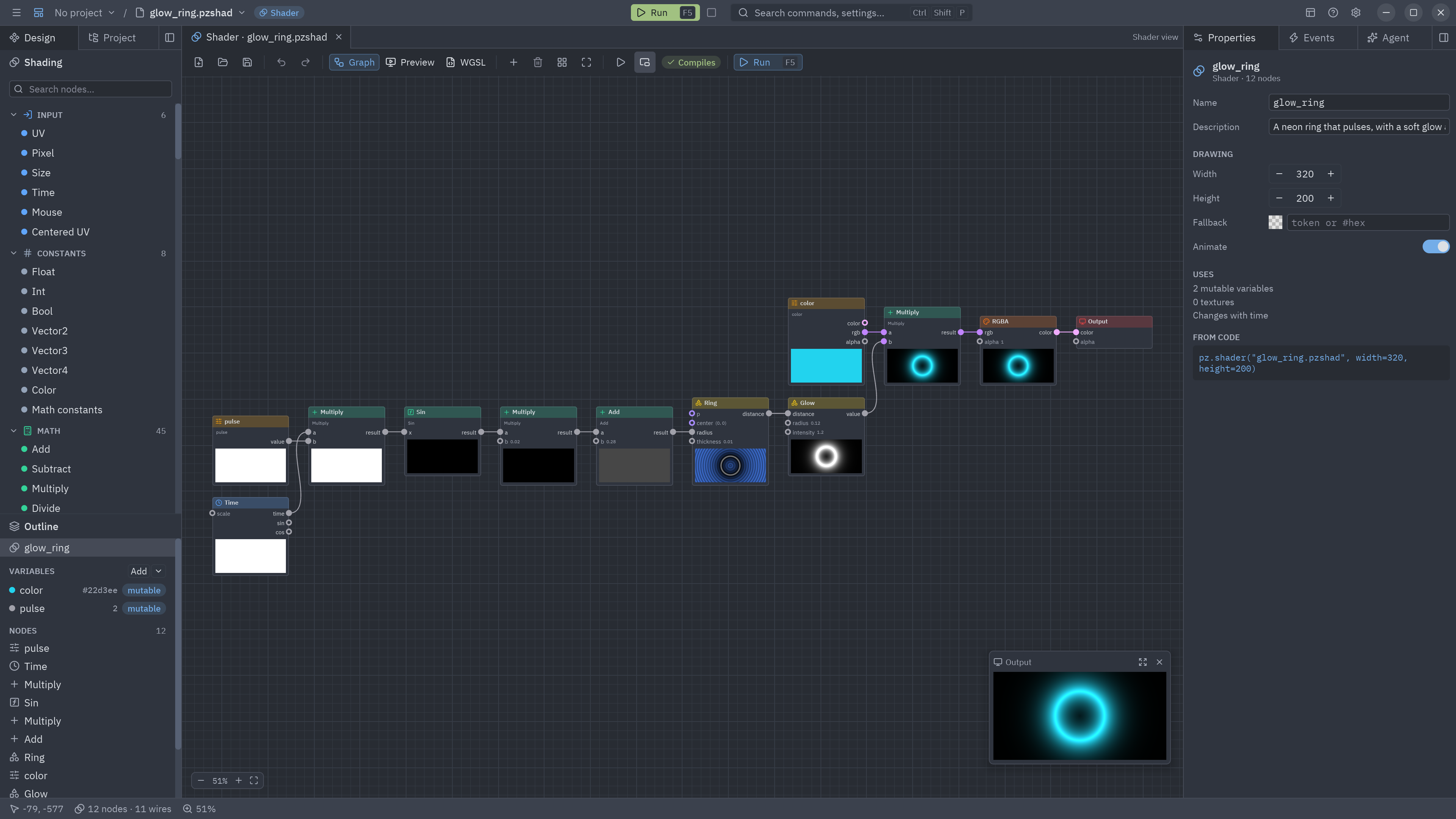
Chain: Time × pulse → Sin × 0.02 + 0.28 → Ring.radius, Ring → Glow (radius 0.12) × color.rgb → RGBA → Output.
from pyzed import shading
g = shading.Graph("glow_ring")color = g.uniform("color", "color", "#22d3ee")pulse = g.uniform("pulse", "float", 2.0, min=0, max=6)
wobble = g.sin(g.time()["time"] * pulse) * 0.02ring = g.ring(radius=0.28 + wobble, thickness=0.01)light = g.glow(ring, radius=0.12, intensity=1.2)g.output(g.rgba(color["rgb"] * light, 1.0))g.save("glow_ring.pzshad")
Change the Ring for a Star or a Box and you have a neon sign.
Plasma
Section titled “Plasma”Template: Plasma · Level: basic math
Three sine waves (across, down and around the center) added together and colored with a Palette: the classic demo-scene effect.
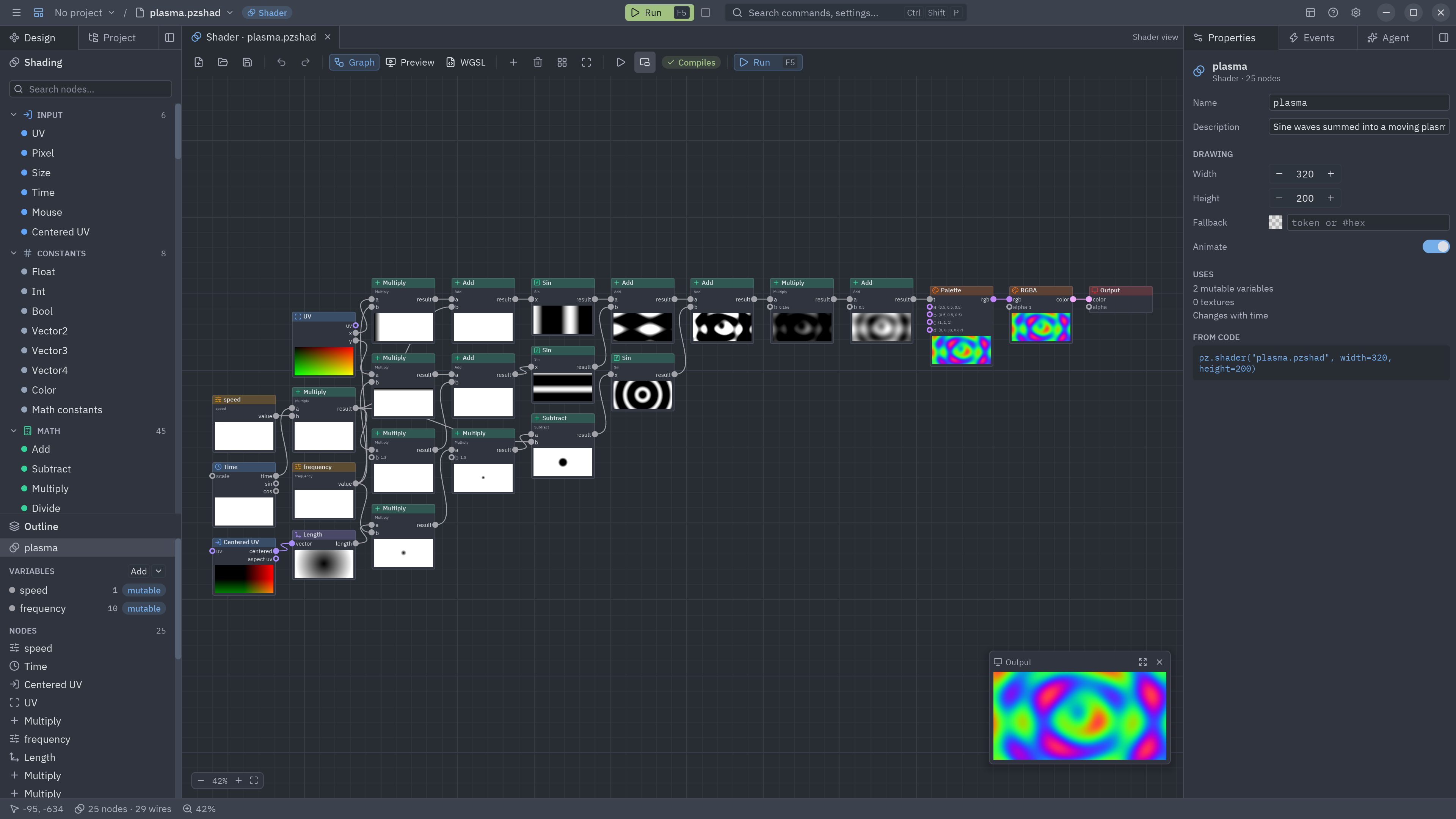
Chain: sin(UV.x × frequency + time) + sin(UV.y × frequency + time × 1.3) + sin(length(Centered UV) × frequency × 1.5 − time), then × 0.166 + 0.5 → Palette → RGBA → Output.
from pyzed import shading
g = shading.Graph("plasma")speed = g.uniform("speed", "float", 1.0, min=0, max=4)freq = g.uniform("frequency", "float", 10.0, min=1, max=30)
t = g.time()["time"] * speeduv = g.uv()a = g.sin(uv["x"] * freq + t)b = g.sin(uv["y"] * freq + t * 1.3)c = g.sin(g.length(g.centered_uv()["centered"]) * freq * 1.5 - t)v = (a + b + c) * 0.166 + 0.5                       # three waves from −1..1, brought into 0..1g.output(g.rgba(g.palette(v), 1.0))g.save("plasma.pzshad")
Drifting clouds
Section titled “Drifting clouds”Template: Clouds · Level: noise
Fractal noise that scrolls with the wind, cut into clouds by a Smoothstep over a sky gradient. cover decides how
cloudy it is.
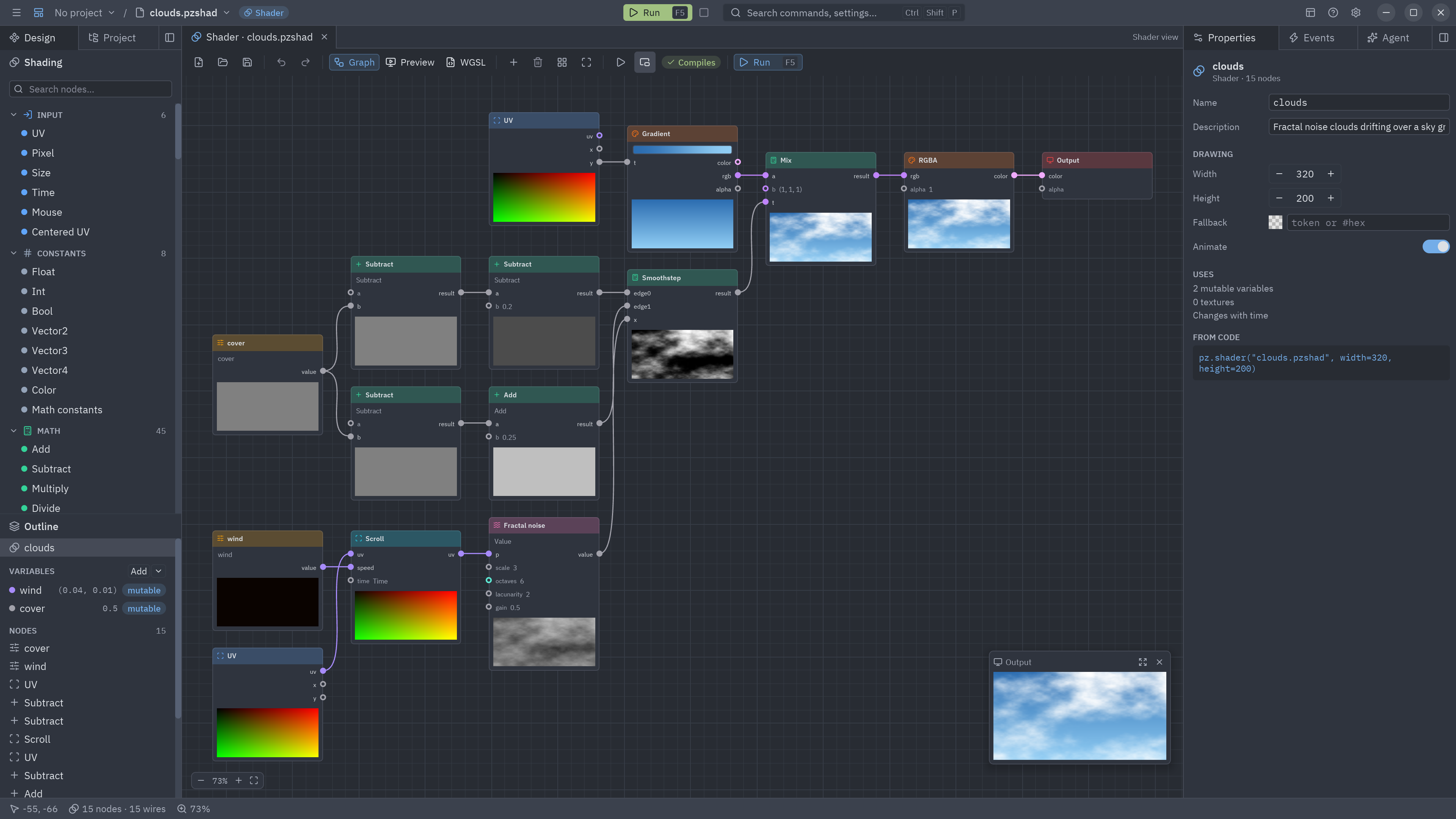
Chain: Scroll (speed: wind) → Fractal noise → Smoothstep (edges from cover), then Mix (sky, white, clouds) → RGBA → Output.
from pyzed import shading
g = shading.Graph("clouds")wind = g.uniform("wind", "vec2", [0.04, 0.01])cover = g.uniform("cover", "float", 0.5, min=0, max=1)
n = g.fbm(g.scroll(speed=wind)["uv"], scale=3.0, octaves=6)edge = 1.0 - coverclouds = g.smoothstep(edge - 0.2, edge + 0.25, n)sky = g.gradient(g.uv()["y"], stops=[[0.0, "#2b6cb0"], [1.0, "#90cdf4"]])g.output(g.rgba(g.mix(sky["rgb"], [1.0, 1.0, 1.0], clouds), 1.0))g.save("clouds.pzshad")Living cells
Section titled “Living cells”Template: Cells · Level: noise
Voronoi cells that wander, each with its own color, separated by glowing borders: organic backgrounds, microscope views, stained glass.
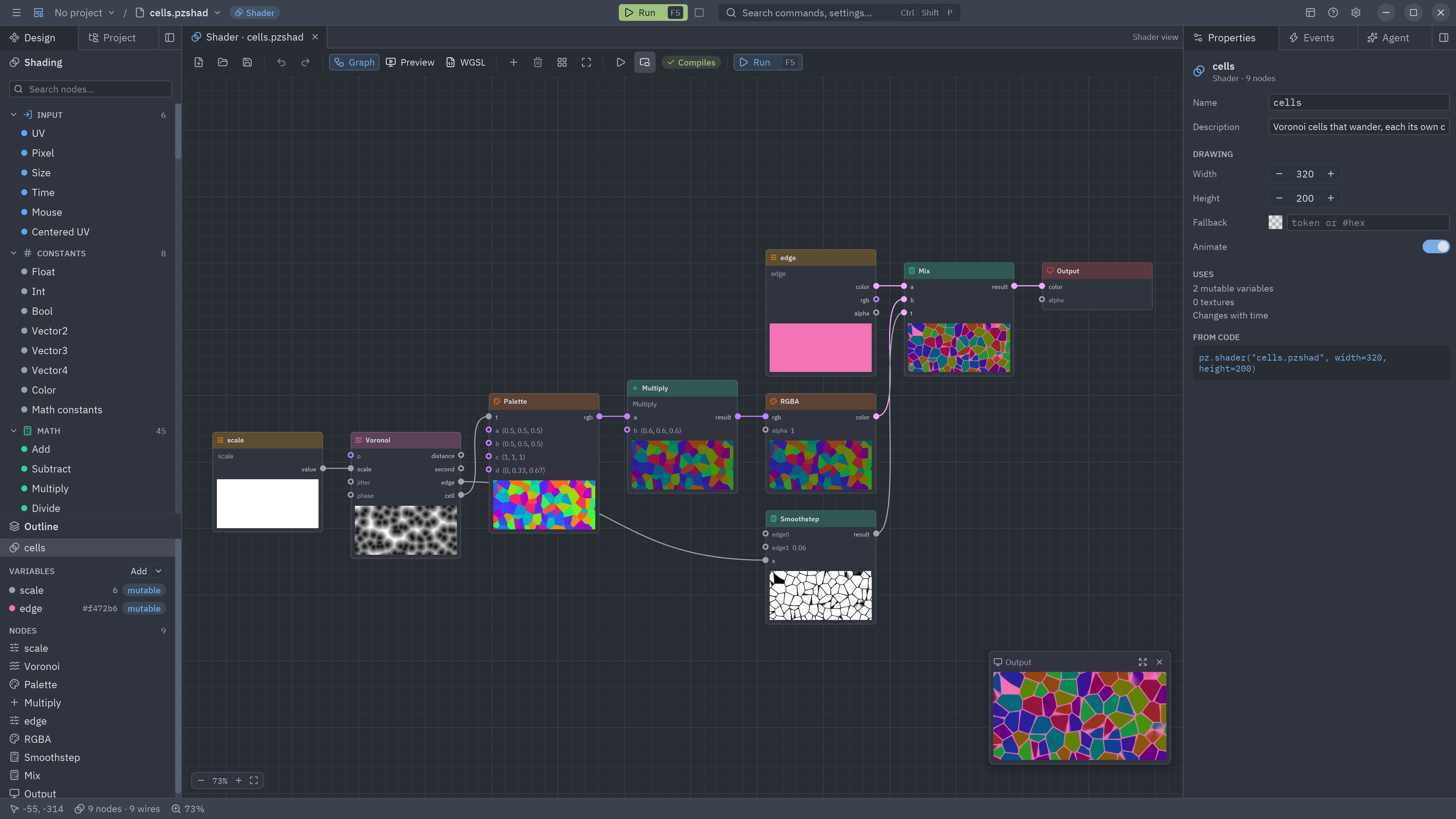
Chain: Voronoi (scale) → cell → Palette × 0.6 → RGBA; Voronoi → edge → Smoothstep (0, 0.06); then
Mix (edge color, cells, border) → Output.
from pyzed import shading
g = shading.Graph("cells")scale = g.uniform("scale", "float", 6.0, min=1, max=20)edge_color = g.uniform("edge", "color", "#f472b6")
v = g.voronoi(scale=scale)                          # its phase follows the time: the cells moveinside = g.rgba(g.palette(v["cell"]) * 0.6, 1.0)border = g.smoothstep(0.0, 0.06, v["edge"])g.output(g.mix(edge_color["color"], inside, border))g.save("cells.pzshad")
Retro CRT screen
Section titled “Retro CRT screen”Template: Retro screen · Level: effects
A synthwave gradient seen through an old television: rolling scanlines, dark corners and film grain. The effect nodes return numbers around 1, so you multiply your color by them.
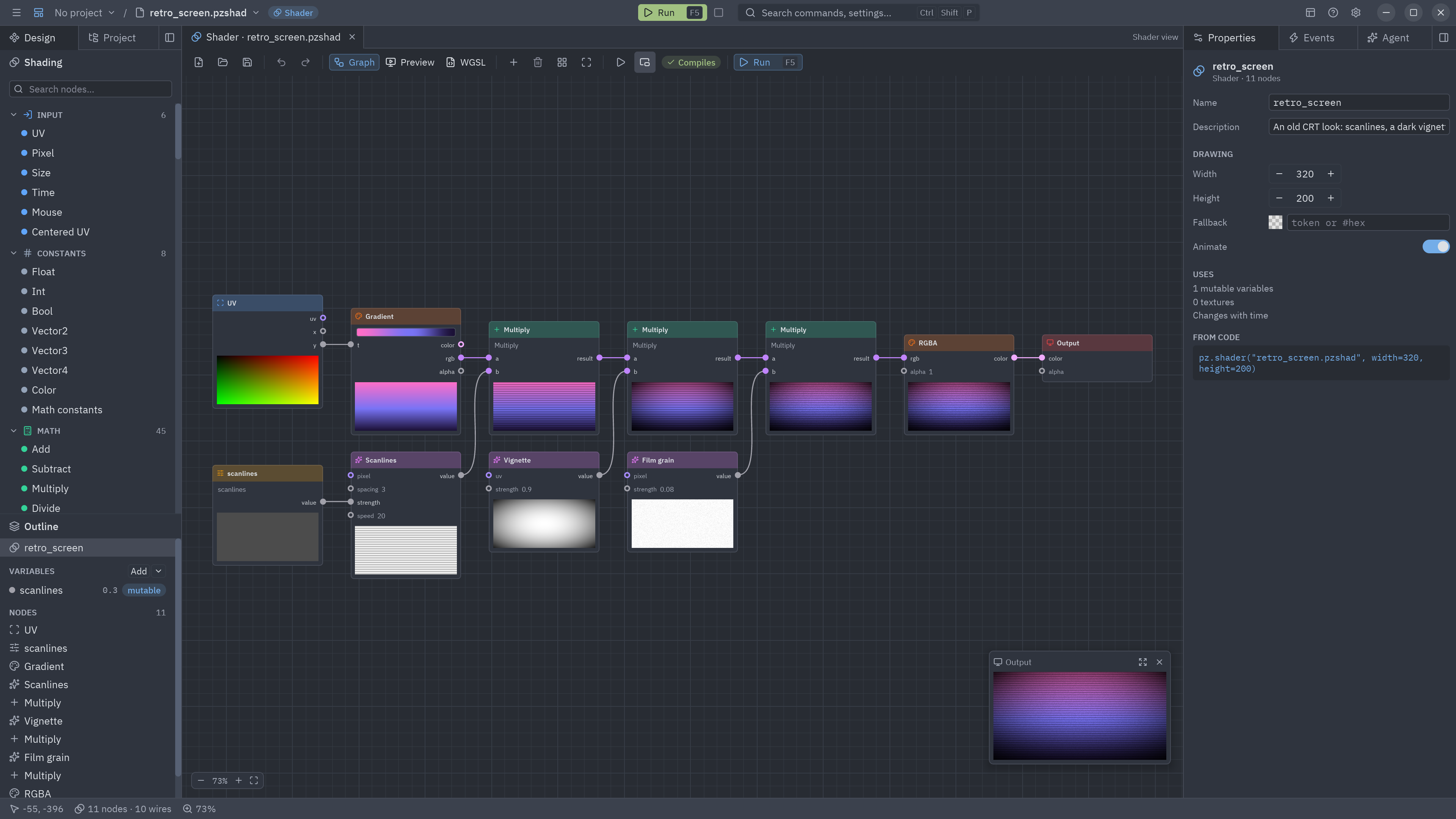
Chain: UV.y → Gradient → rgb × Scanlines × Vignette × Film grain → RGBA → Output.
from pyzed import shading
g = shading.Graph("retro_screen")lines = g.uniform("scanlines", "float", 0.3, min=0, max=1)
base = g.gradient(g.uv()["y"], stops=[[0.0, "#ff6ec7"], [0.55, "#7873f5"], [1.0, "#1b1035"]])color = base["rgb"] * g.scanlines(strength=lines, speed=20.0) * g.vignette(strength=0.9) * g.grain(strength=0.08)g.output(g.rgba(color, 1.0))g.save("retro_screen.pzshad")
Add a Barrel node in front of the gradient’s UV (and multiply by its inside) to curve the glass, as in the
crt.pzshad of the showcase.
Mouse spotlight
Section titled “Mouse spotlight”Level: first steps
A dark room lit where the pointer is. When the pointer leaves the shader, the light rests in the center.
Chain: Mouse.position → Radial gradient.center, Mix (dark, warm, light) → RGBA → Output.
from pyzed import shading
g = shading.Graph("spotlight")light = g.radial_gradient(center=g.mouse()["position"], radius=0.35)room = g.mix([0.03, 0.03, 0.06], [1.0, 0.85, 0.6], light)g.output(g.rgba(room, 1.0))g.save("spotlight.pzshad")
Loading spinner
Section titled “Loading spinner”Level: basic math
A ring with a bright head and a fading tail that turns forever. The transparent background lets it sit on any card.
Chain: Polar.angle01 − Time × 0.8 → Fract (the tail), Ring → Fill (the shape), and the Output’s alpha from
Fill × tail.
from pyzed import shading
g = shading.Graph("spinner")tail = g.fract(g.polar()["angle01"] - g.time()["time"] * 0.8)ring = g.fill(g.ring(radius=0.3, thickness=0.06))g.output(g.rgba(g.compose(0.4, 0.6, 1.0) * tail, ring * tail)) # alpha: only the ring showsg.save("spinner.pzshad")Level: noise
Fractal noise that scrolls upward, faded toward the top and colored by a black → red → orange → yellow ramp.
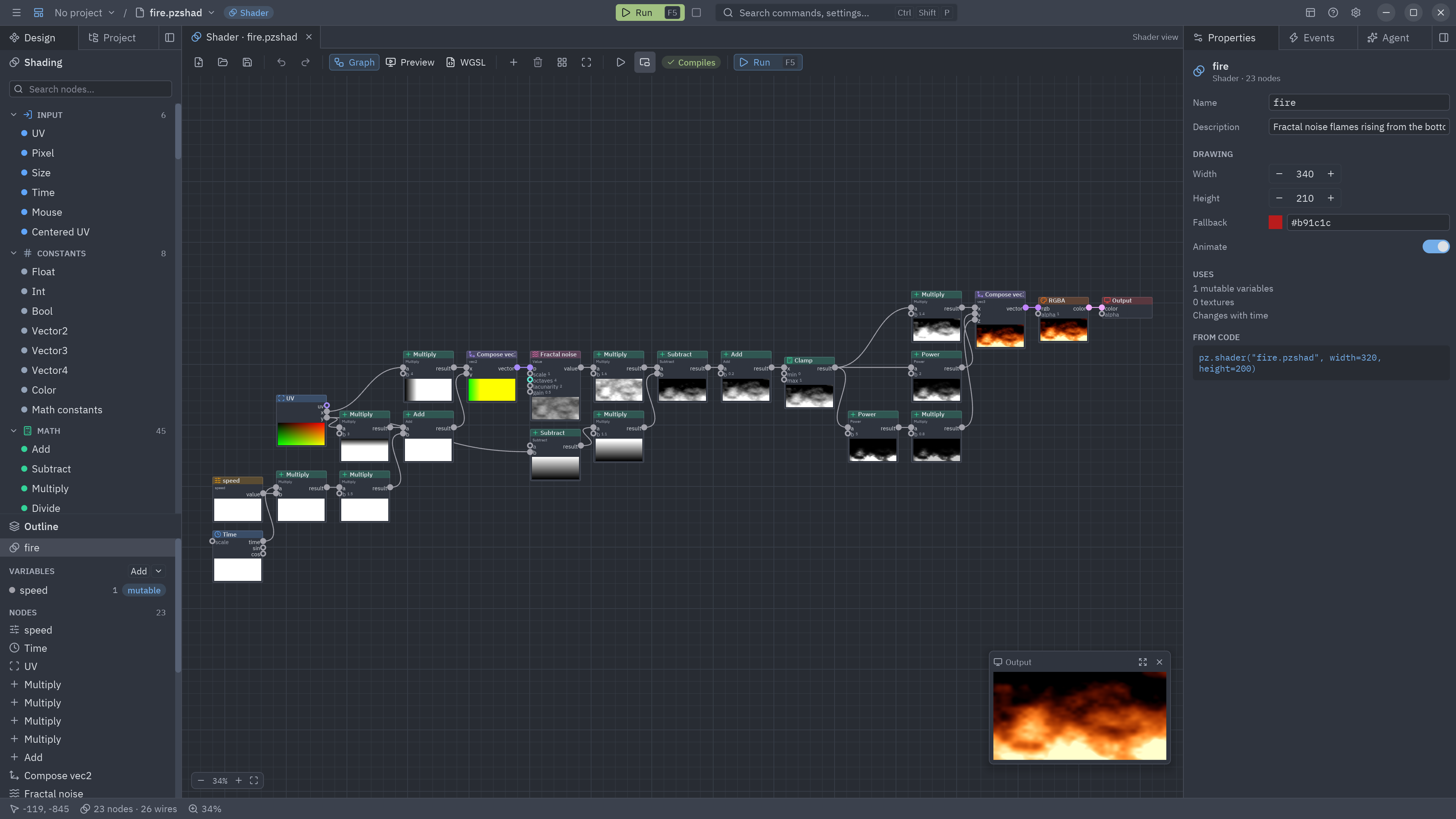
examples/showcase/shaders, built on the same idea: rising noise through a color ramp.Chain: Scroll (speed: 0, speed × 0.6) → Fractal noise × UV.y × 1.6 → Gradient → Output.
from pyzed import shading
g = shading.Graph("fire")speed = g.uniform("speed", "float", 1.0, min=0, max=4)
rising = g.scroll(speed=g.compose(0.0, speed * 0.6, type="vec2"))heat = g.fbm(rising["uv"], scale=4.0, octaves=5) * g.uv()["y"] * 1.6g.output(g.gradient(heat, stops=[[0.0, "#000000"], [0.35, "#7f1d1d"], [0.6, "#f97316"], [0.85, "#fde047"], [1.0, "#ffffff"]]))g.save("fire.pzshad")Moving stripes
Section titled “Moving stripes”Level: first steps
Diagonal stripes that slide sideways, like a barber pole or an “in progress” bar.
Chain: Scroll (0.2, 0) → Stripes (count 10, angle 0.785) → Mix (white, red) → RGBA → Output.
from pyzed import shading
g = shading.Graph("barber")s = g.stripes(g.scroll(speed=[0.2, 0.0])["uv"], count=10.0, angle=0.785, width=0.5)g.output(g.rgba(g.mix([0.95, 0.95, 0.95], [0.85, 0.15, 0.2], s), 1.0))g.save("barber.pzshad")
Put a recipe to work
Section titled “Put a recipe to work”import pyzed as pz
class Splash(pz.App): title = "Loading"
def view(self): return pz.stack([ pz.shader("clouds.pzshad", uniforms={"cover": 0.6}, width="fill", height="fill", fallback="#2b6cb0"), pz.center(pz.shader("spinner.pzshad", width=96, height=96, fallback="#1e293b")), ])
pz.run(Splash)