
Prompting guide
Agents write much better Pyzed code when the prompt gives them three things: what the screen is for, what it must do, and how to check the result. This page has prompt patterns that work and a full session, with the real outputs of the MCP tools, of an agent building a small app.
Anatomy of a good prompt
Section titled “Anatomy of a good prompt”Build a Pomodoro timer as a Pyzed app. (what) It has Focus (25 min) and Break (5 min) modes, a big countdown, a progress bar, Start/Pause and Reset, and counts finished sessions. (behavior) Use
pyzed.uicomponents and theme tokens, keepview()free of side effects. (constraints) Use the pyzed MCP tools: check signatures withdescribe_component, runvalidate_code, and look at ascreenshotbefore you answer. (how to check)
| Include | Why |
|---|---|
| The purpose and the user | “A settings screen for a note-taking app” gets better defaults than “a form”. |
| Behavior as a list | Each item becomes state and a method; nothing is forgotten. |
| Constraints | Theme, window size, components to use or avoid, Python version. |
| A starting point | “Start from the settings block” or “follow examples/todo.py”. |
| The check | Validation and a screenshot close the loop. Without them the agent stops at “it should work”. |
Prompts that work
Section titled “Prompts that work”New app
Create a Pyzed app to browse a folder of Markdown notes: a searchable list on the left, the rendered note on the right, Ctrl+N for a new note. Read the best practices with get_guide first. Validate and screenshot it.
From a block
Start from the dashboard block (
read_example("blocks/dashboard")). Replace the sample data with numbers read fromsales.csvwith the csv module, loaded in a coroutine so the window never blocks.
Component
Make a reusable
pz.Componentcalled TagInput: a text input that turns comma-separated words into removable chips. Props:tags: list[str]; eventchangewith the new list. Show it in apreview()screenshot.
Designer form
Create a designer form “invoice” with customer, date, a table of lines and a total; the total updates when a line changes. Use new_form and validate_form.
Fixing
This list doesn’t scroll and the window freezes while it loads. Read guides/layout and guides/async with read_docs, explain the cause, then fix it.
Styling
Make this screen feel like a game launcher: dark theme with a purple accent, a glass panel over a gradient, a glowing Play button. Check the effects in animation/effects.
Things to avoid
Section titled “Things to avoid”- “Use tkinter-style code” or pasting code from another toolkit: Pyzed has no
pack(),grid()or widget objects to mutate. Describe the behavior instead and let the agent write it the Pyzed way. - Asking for everything at once in a large app. Build the screen, check it, then add features: each step is validated and looked at.
- Skipping the check. An agent that never runs
validate_codewill sometimes invent a parameter; one call catches it.
A worked example
Section titled “A worked example”What follows is a real session with the Pyzed MCP server (python -m pyzed.mcp), driven by an MCP client. The
outputs are exactly what the tools returned, shortened where marked.
The prompt: Build a Pomodoro timer with Focus and Break modes, a progress bar, Start/Pause and Reset. Use the pyzed MCP tools to check what you use, validate the code and look at a screenshot.
1. Look up the components
Section titled “1. Look up the components”The agent needs a progress bar, so it searches for one:
list_components(query="progress")[ {"name": "pz.progress_bar", "kind": "widget", "category": "Controls", "summary": "A progress bar."}, {"name": "ui.progress", "kind": "ui", "category": "Inputs", "summary": "A thin rounded progress bar filled to ``value`` out of ``max``, in the ``tint`` color."}, {"name": "designer:progress", "kind": "designer", "category": "Display", "summary": "Shows how far a task has got."}]It prefers the ui component and asks for its exact signature:
describe_component(name="ui.progress"){ "name": "ui.progress", "signature": "ui.progress(value: 'float', *, max: 'float' = 1.0, tint: 'str' = 'accent', height: 'float' = 4, width: 'Any' = 'fill', theme: 'Optional[Theme]' = None) -> '_core.Widget'", "parameters": [ {"name": "value", "required": true, "description": "Current value."}, {"name": "max", "default": "1.0", "description": "Maximum value."}, {"name": "height", "default": "4", "description": "Thickness."}, "…" ], "docs": "https://albakore.github.io/pyzed/reference/ui/"}And an icon name, since icons are Lucide names:
search_icons(query="timer", limit=8){"total": 3, "icons": ["timer", "timer-off", "timer-reset"]}2. A first draft, and what the validator says
Section titled “2. A first draft, and what the validator says”The first draft has three mistakes typical of generated code: a mutable class attribute, a state change inside
view() and a misspelled keyword argument.
import pyzed as pzfrom pyzed import ui

class Pomodoro(pz.App):    title = "Pomodoro"    size = (420, 360)    tasks = []
    def __init__(self):        self.left = 25 * 60        self.running = False
    def subscriptions(self):        return [pz.every(1, self.tick)] if self.running else []
    def tick(self):        self.left -= 1
    def view(self):        self.running = self.left > 0        return pz.column([            ui.heading(f"{self.left // 60:02d}:{self.left % 60:02d}"),            ui.progress(1 - self.left / 1500, heigth=8),            ui.button("Start", lambda: setattr(self, "running", True), icon="play"),        ], spacing=16, padding=24)

pz.run(Pomodoro)validate_code(code=…){ "ok": false, "issues": [ {"line": 8, "column": 5, "severity": "warning", "message": "mutable class attribute tasks on an App is shared state; initialize it in __init__"}, {"line": 21, "column": 9, "severity": "warning", "message": "view() changes self.running; view() runs after every message and must not change state"}, {"line": 24, "column": 47, "severity": "error", "message": "ui.progress() has no parameter 'heigth'; it takes: height, max, theme, tint, value, width"} ]}3. The fixed app
Section titled “3. The fixed app”The agent fixes the three issues, adds the modes and the session counter, and validates again:
{"ok": true, "issues": []}"""A Pomodoro timer: the app built step by step in the AI prompting guide."""
import pyzed as pzfrom pyzed import ui
WORK, BREAK = 25 * 60, 5 * 60
class Pomodoro(pz.App): title = "Pomodoro" size = (420, 380)
def __init__(self): self.mode = "Focus" self.left = WORK self.running = False self.done = 0
def subscriptions(self): return [pz.every(1, self.tick, key="timer")] if self.running else []
def tick(self): self.left -= 1 if self.left <= 0: if self.mode == "Focus": self.done += 1 self.mode = "Break" if self.mode == "Focus" else "Focus" self.left = BREAK if self.mode == "Break" else WORK
def switch(self, mode): self.mode, self.running = mode, False self.left = WORK if mode == "Focus" else BREAK
def toggle(self): self.running = not self.running
def reset(self): self.running, self.left = False, WORK if self.mode == "Focus" else BREAK
def view(self): total = WORK if self.mode == "Focus" else BREAK return pz.center(pz.column([ ui.segmented(["Focus", "Break"], self.mode, self.switch), pz.text(f"{self.left // 60:02d}:{self.left % 60:02d}", size=64, weight="bold"), ui.progress(1 - self.left / total, height=8, width=280), pz.row([ ui.button("Pause" if self.running else "Start", self.toggle, icon="pause" if self.running else "play", variant="solid", size="lg"), ui.icon_button("rotate-ccw", self.reset, tooltip="Reset"), ], spacing=8, align="center"), ui.muted(f"{self.done} sessions today", size="sm"), ], spacing=18, align="center")).style(background="editor")
if __name__ == "__main__": pz.run(Pomodoro)4. Looking at the result
Section titled “4. Looking at the result”screenshot(code=…, width=420, height=380, scale=2)The tool rendered the app off-screen and returned this PNG, which the agent checks before answering:
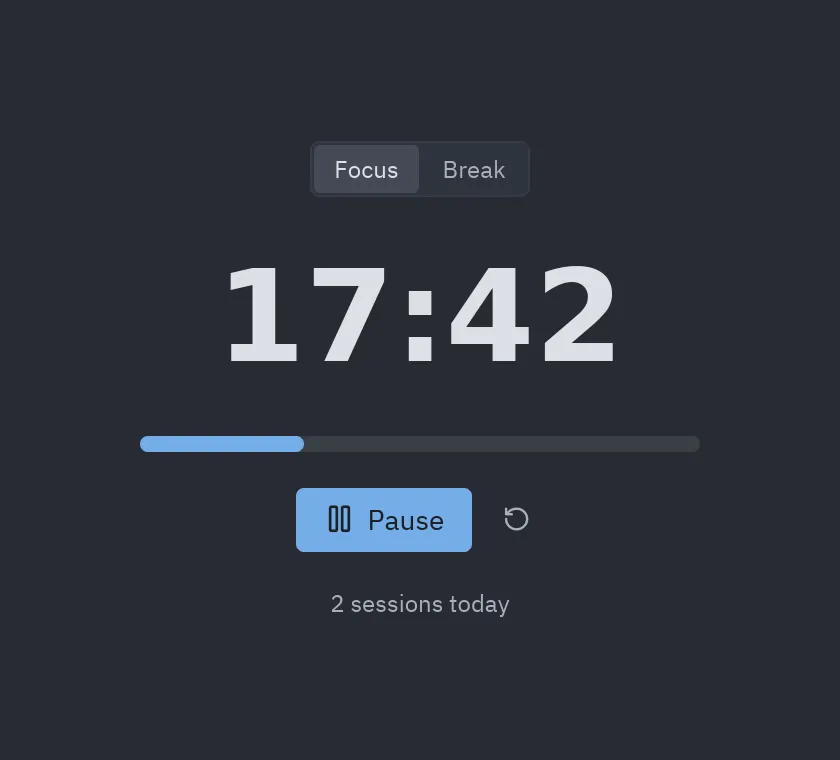
The whole loop (look up, write, validate, look) took five tool calls. The app is in the repository as
examples/pomodoro.py and runs with
python examples/pomodoro.py.
Reproduce the session
Section titled “Reproduce the session”The session above can be run with the MCP Python SDK, which is useful to test your own prompts or tools:
import asyncio, sysfrom mcp import ClientSession, StdioServerParametersfrom mcp.client.stdio import stdio_client

async def main():    server = StdioServerParameters(command=sys.executable, args=["-m", "pyzed.mcp"])    async with stdio_client(server) as (read, write), ClientSession(read, write) as session:        await session.initialize()        result = await session.call_tool("describe_component", {"name": "ui.progress"})        print(result.content[0].text)

asyncio.run(main())