
Theme cookbook
Six complete themes, ready to copy into your app. Each one is a file in
examples/theming/ and draws the same screen
(preview.py: buttons in every variant, a small form, badges, a callout and two stats), so you can compare how each
theme changes it.
Run them
Section titled “Run them”From a clone of the repository (see Running the examples):
uv run python examples/theming/brand.pypython3 examples/theming/brand.pypy examples\theming\brand.pyReplace brand.py with high_contrast.py, retro_terminal.py, glassy_dark.py, pastel.py or mixed.py.
Brand theme, light and dark
Section titled “Brand theme, light and dark”A company palette in two versions that follow the system’s light or dark mode. Theme.generate builds each version
from three colors; derive sets the brand’s own green for success.
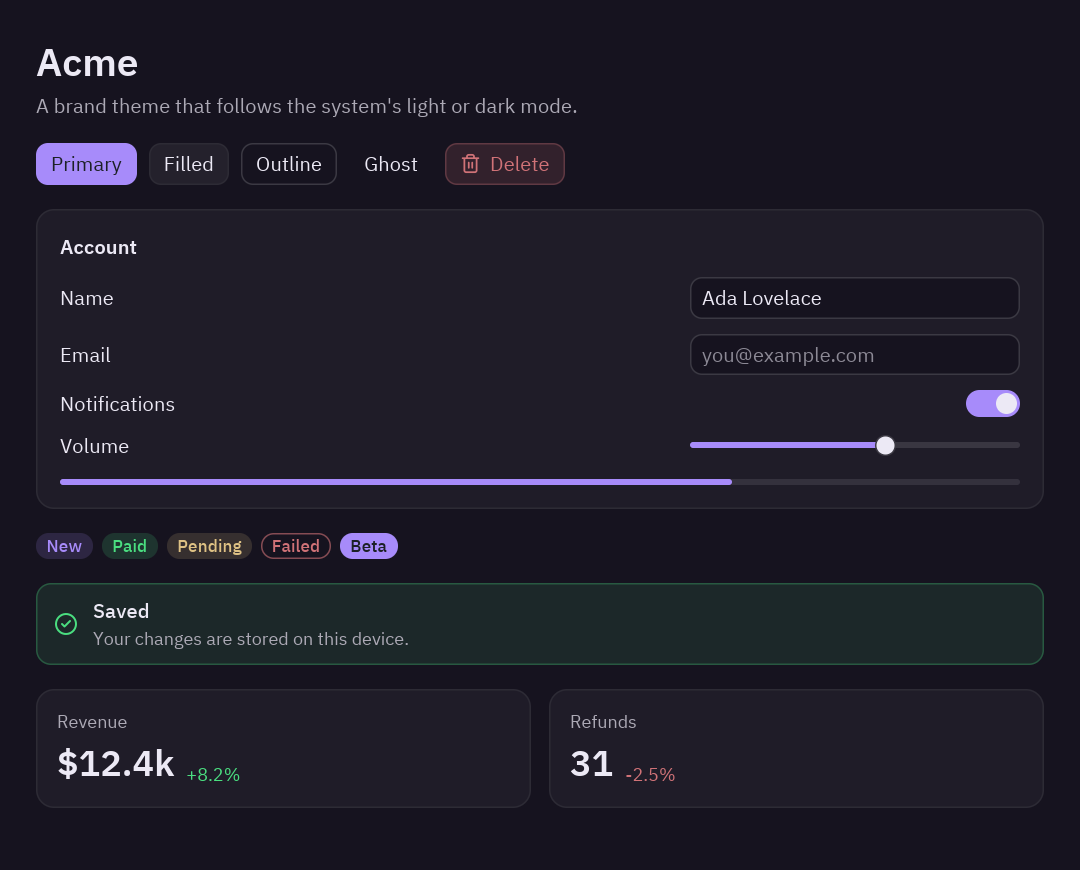
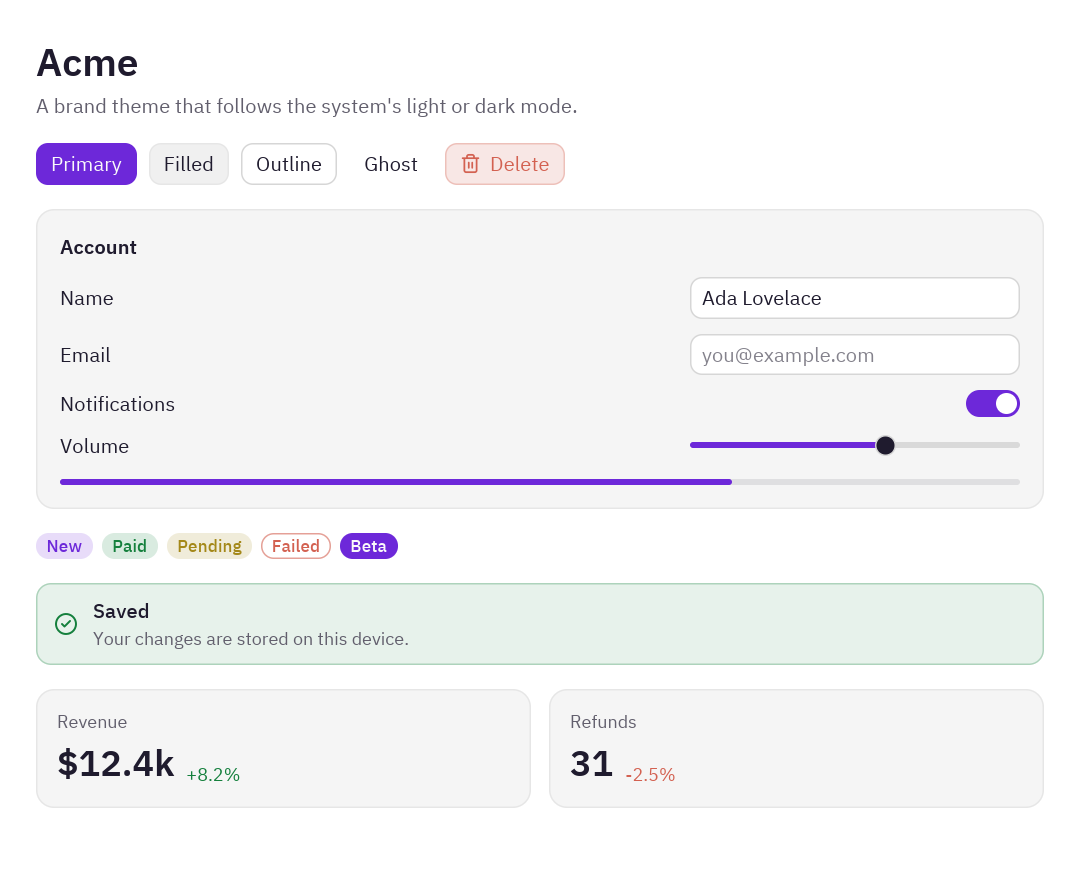
"""A brand theme in light and dark that follows the operating system.
    python examples/theming/brand.py
- ``Theme.generate`` builds a whole theme from a background, a text and an accent color.- ``derive`` changes a few tokens on top (rounder corners, the brand's own green for success).- ``themes.register`` gives the themes a name, and ``themes.auto`` picks light or dark like the OS."""
import pyzed as pzfrom preview import preview
BRAND = "#6d28d9"  # the brand's purple
ACME_LIGHT = pz.Theme.generate(    "Acme Light", background="#ffffff", text="#1f1b2e", accent=BRAND, radius=10,).derive(success="#15803d")
ACME_DARK = pz.Theme.generate(    "Acme Dark", background="#16131f", text="#ece9f5", accent="#a78bfa", radius=10,).derive(success="#4ade80")
pz.themes.register(ACME_LIGHT)pz.themes.register(ACME_DARK)

class BrandApp(pz.App):    title = "Acme"    size = (720, 580)    theme = pz.themes.auto("Acme Light", "Acme Dark")  # light or dark, like the system
    def view(self):        return pz.container(preview("Acme", "A brand theme that follows the system's light or dark mode."),                            padding=24, width="fill", height="fill")

if __name__ == "__main__":    pz.run(BrandApp)
What to change: the three colors of each generate, and radius for rounder or squarer corners.
High contrast
Section titled “High contrast”Pure black and white with yellow focus, for people who need strong contrast (and a good test of how your app looks
with large, clear borders). Theme.from_dict lists every token that changes; the rest come from One Dark. The
script prints the contrast ratio of the main colors when it starts.
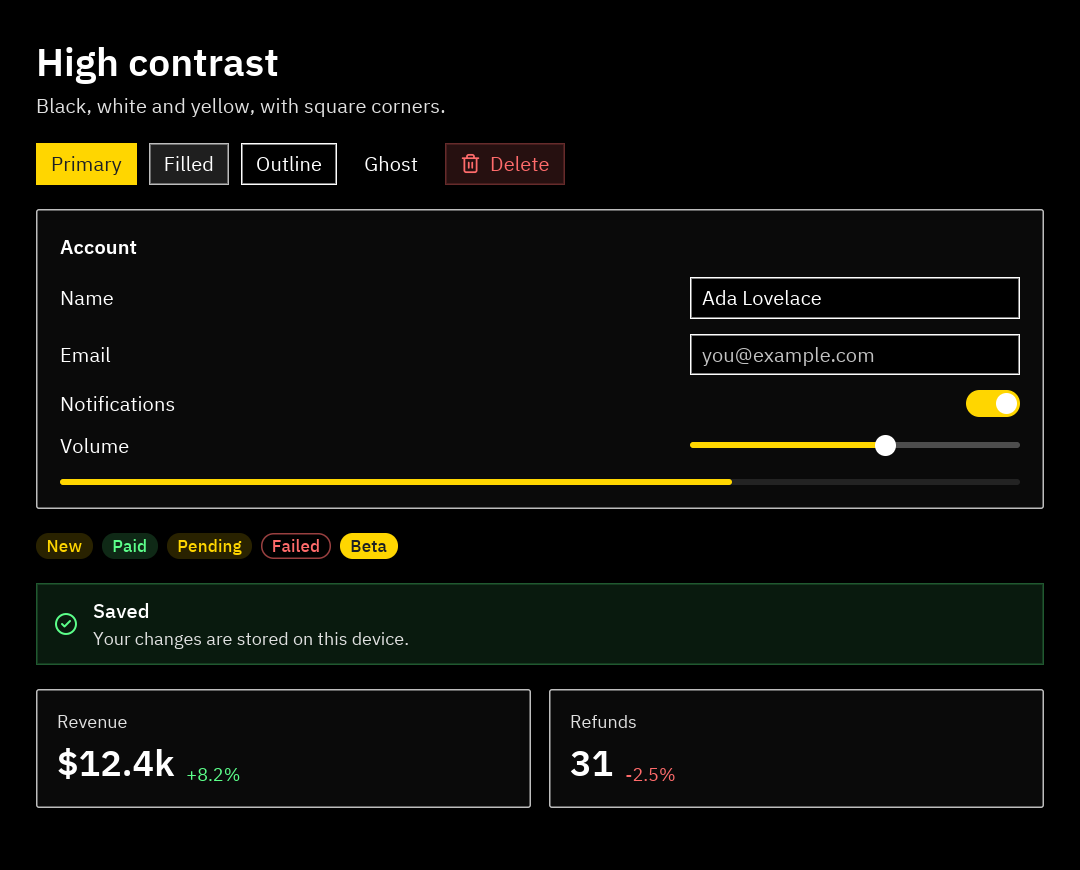
"""A high-contrast theme for readers who need strong colors and clear edges.
    python examples/theming/high_contrast.py
- ``Theme.from_dict`` starts from One Dark and replaces only the tokens you list.- ``pz.theme.contrast`` checks the WCAG contrast ratio of two colors (7:1 or more is "AAA").- A global ``style`` makes every text bigger."""
import pyzed as pzfrom preview import preview
HIGH_CONTRAST = pz.Theme.from_dict({    "name": "High Contrast",    "appearance": "dark",    # surfaces: pure black, panels a touch lighter so they stay visible    "background": "#000000", "surface": "#0a0a0a", "elevated": "#141414", "editor": "#000000",    "panel": "#0a0a0a", "title_bar": "#000000", "status_bar": "#000000",    # strong white borders    "border": "#ffffff", "border_variant": "#bdbdbd",    # text: white, and muted text that is still very readable    "text": "#ffffff", "text_muted": "#e0e0e0", "text_placeholder": "#c2c2c2", "text_disabled": "#9e9e9e",    "icon": "#ffffff", "icon_muted": "#e0e0e0",    # buttons and list rows    "element": "#1f1f1f", "element_hover": "#333333", "element_active": "#4d4d4d",    "ghost_hover": "#262626", "ghost_active": "#3d3d3d", "ghost_selected": "#3d3d3d",    # status colors that stay readable on black    "error": "#ff6b6b", "warning": "#ffd600", "success": "#5cff8a", "info": "#6bc8ff",    # square corners    "radius": 0, "radius_sm": 0,}).with_accent("#ffd600")  # yellow focus rings, selection and primary buttons
pz.themes.register(HIGH_CONTRAST)

def report(theme):    """Prints the contrast ratio of the main text colors against the background."""    for token in ("text", "text_muted", "accent", "error"):        ratio = pz.theme.contrast(theme.color(token), theme.background)        print(f"{token:>10} on background: {ratio:4.1f}:1")

class HighContrastApp(pz.App):    title = "High contrast"    size = (720, 580)    theme = "High Contrast"    style = pz.Style(size=15)  # every text that does not set its own size
    def view(self):        return pz.container(preview("High contrast", "Black, white and yellow, with square corners."),                            padding=24, width="fill", height="fill")

if __name__ == "__main__": report(HIGH_CONTRAST) pz.run(HighContrastApp)Retro terminal
Section titled “Retro terminal”Green phosphor on black. One green becomes the text, the accent and the success color; the global style makes every text monospaced.
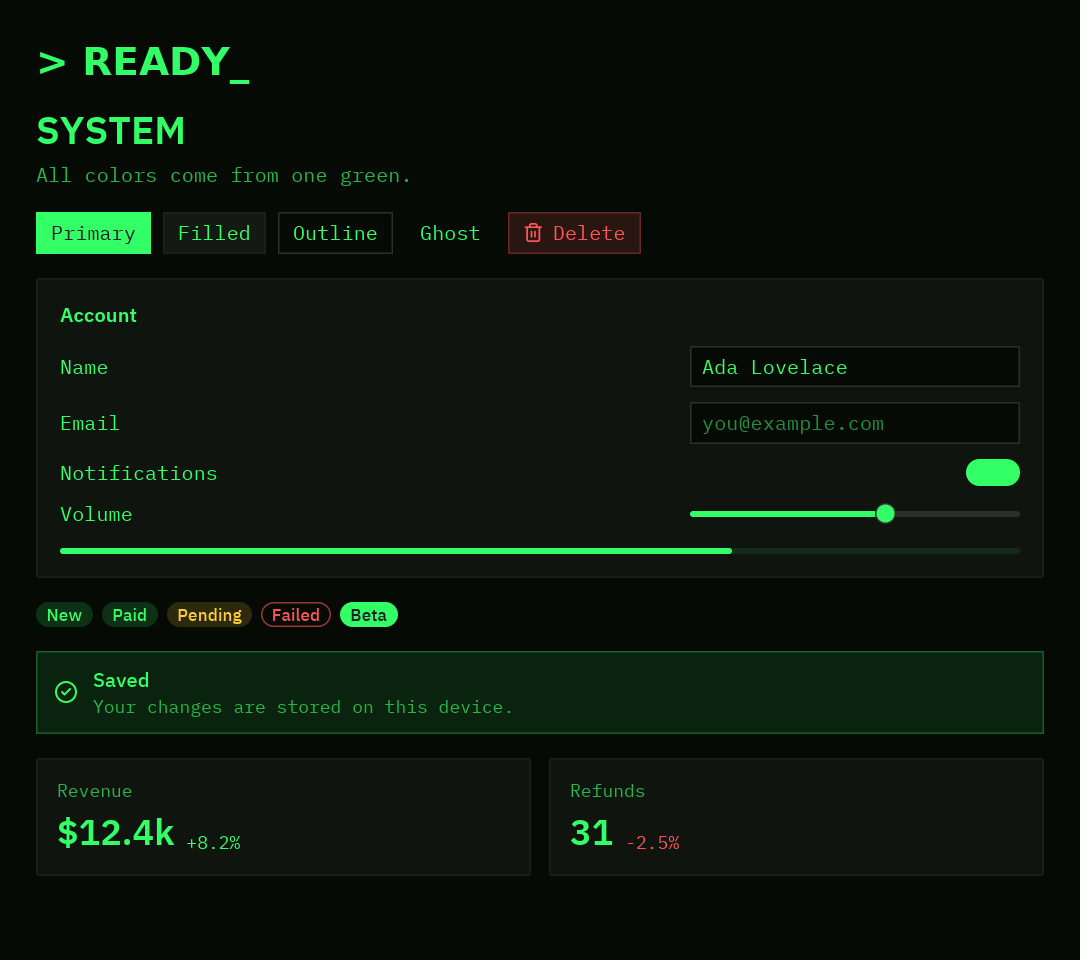
"""A retro terminal theme: green phosphor on black, monospaced and square.
    python examples/theming/retro_terminal.py
- ``Theme.generate`` with a green text color and a green accent.- ``syntax`` and ``ansi`` recolor code and the terminal to match.- The global style switches every text to the monospaced font."""
import pyzed as pzfrom preview import preview
PHOSPHOR = "#33ff66"
RETRO = pz.Theme.generate(    "Retro Terminal",    background="#050a05",    text=PHOSPHOR,    accent=PHOSPHOR,    error="#ff5555",    warning="#ffcc33",    success=PHOSPHOR,    radius=0,    syntax={"keyword": ("#a6ff00", "bold"), "string": "#7dffb0", "comment": ("#1f7a3a", "italic")},).derive(ansi={"green": PHOSPHOR, "bright_black": "#1f7a3a"})
pz.themes.register(RETRO)

class RetroApp(pz.App):    title = "Retro terminal"    size = (720, 640)    theme = "Retro Terminal"    style = pz.Style(font="mono", size=13)  # every text in the window is monospaced
    def view(self):        title = pz.text("> READY_").style(size=26, weight="bold", color="accent")        return pz.container(pz.column([title, preview("SYSTEM", "All colors come from one green.")], spacing=12),                            padding=24, width="fill", height="fill")

if __name__ == "__main__":    pz.run(RetroApp)
Glassy dark
Section titled “Glassy dark”A gradient behind the window and a frosted glass panel on top. The theme is One Dark with a cyan accent; the look
comes from the global style (background= a gradient) and the glass effect.
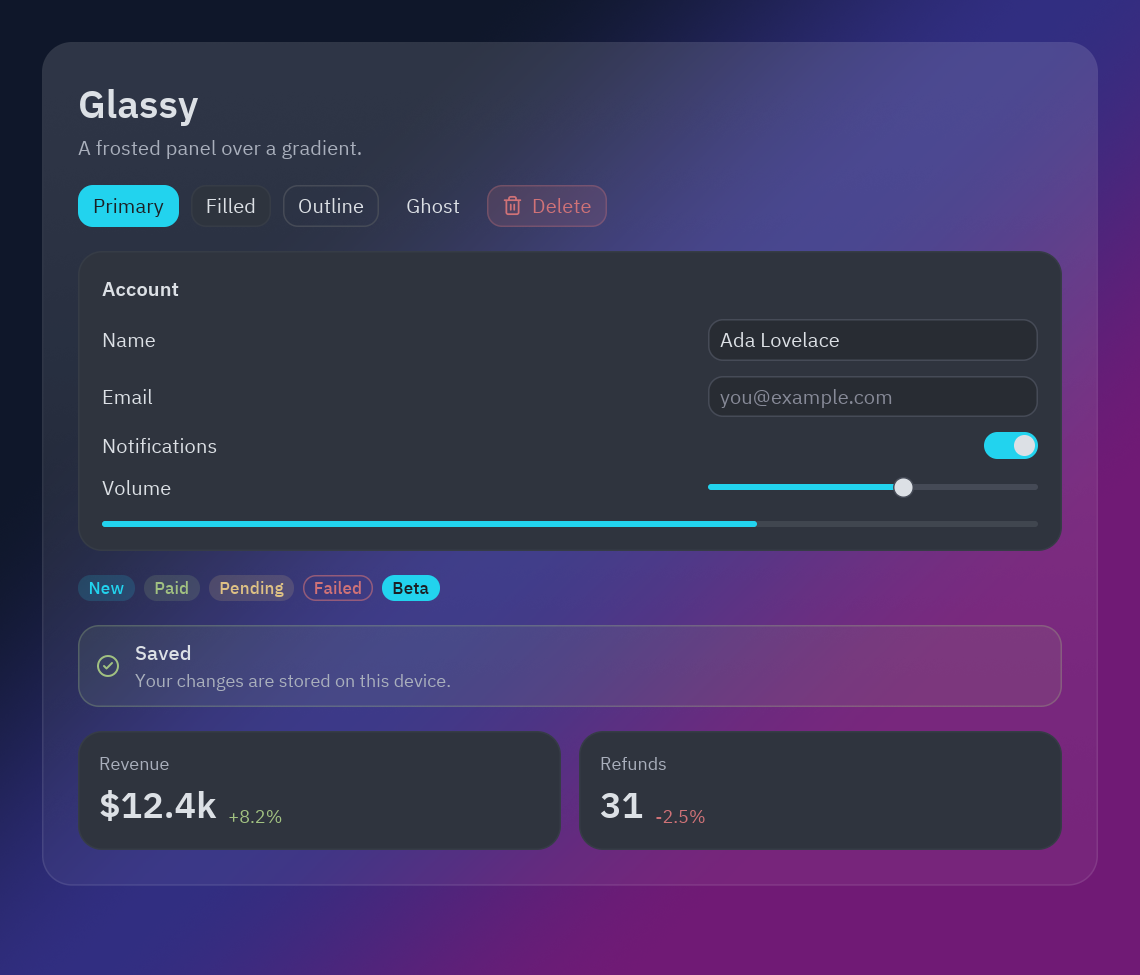
"""A glassy dark look: a gradient behind the window and a frosted panel on top.
    python examples/theming/glassy_dark.py
- The global style paints the window with a ``pz.Gradient``.- ``glass`` turns a container into a translucent panel that blurs what is behind it.- The theme itself is One Dark with a cyan accent (``with_accent``) and rounder corners."""
import pyzed as pzfrom preview import preview
GLASSY = pz.themes.ONE_DARK.derive(name="Glassy Dark", radius=14, radius_sm=10).with_accent("#22d3ee")pz.themes.register(GLASSY)
NIGHT = pz.Gradient(["#0f172a", "#312e81", "#701a75"], angle=135)

class GlassyApp(pz.App):    title = "Glassy dark"    size = (760, 650)    theme = "Glassy Dark"    style = pz.Style(background=NIGHT)  # paints the whole window
    def view(self):        panel = pz.container(preview("Glassy", "A frosted panel over a gradient."), width="fill").style(            glass={"tint": "#ffffff", "strength": 0.08, "blur": 24}, radius=20, padding=24,            border=(1, "#ffffff22"))        return pz.container(panel, padding=28, width="fill", height="fill")

if __name__ == "__main__": pz.run(GlassyApp)Playful pastel
Section titled “Playful pastel”A cream background, candy colors and very round corners. derive sets pastel avatar colors (players), and a
named style (pz.define_style("bubble", ...)) draws the card around the screen.
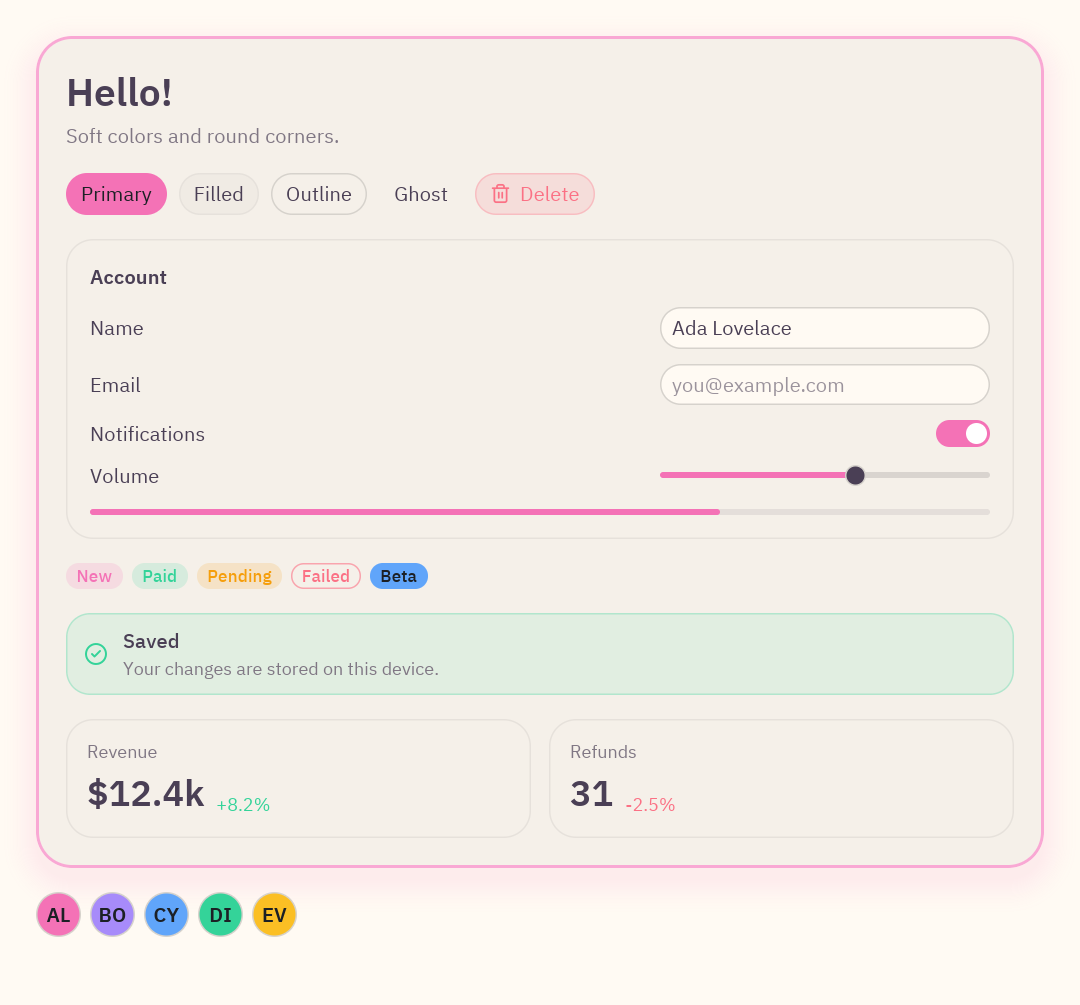
"""A playful pastel theme: cream background, candy colors and very round corners.
    python examples/theming/pastel.py
- ``Theme.generate`` for a light theme, then ``derive`` with a pastel info color and avatar colors.- ``pz.define_style`` names a reusable "bubble" style for the card around everything."""
import pyzed as pzfrom pyzed import uifrom preview import preview
PASTEL = pz.Theme.generate(    "Pastel", background="#fffaf3", text="#4a3f55", accent="#f472b6", radius=16,    success="#34d399", warning="#f59e0b", error="#fb7185",).derive(info="#60a5fa", players=("#f472b6", "#a78bfa", "#60a5fa", "#34d399", "#fbbf24"))pz.themes.register(PASTEL)
pz.define_style("bubble", background="surface", radius=24, padding=20, border=(2, "#f9a8d4"),                shadow=("#f472b633", (0, 8), 24))

class PastelApp(pz.App):    title = "Pastel"    size = (720, 670)    theme = "Pastel"
    def view(self):        friends = pz.row([ui.avatar(name, index=i, size=30) for i, name in enumerate(["AL", "BO", "CY", "DI", "EV"])],                         spacing=6)        return pz.container(pz.column([            pz.container(preview("Hello!", "Soft colors and round corners."), width="fill").style("bubble"),            friends,        ], spacing=16), padding=24, width="fill", height="fill")

if __name__ == "__main__":    pz.run(PastelApp)
Two themes in one window
Section titled “Two themes in one window”A light sidebar in a dark app, with a theme picker that saves the chosen theme to a JSON file and loads it on the
next start (Theme.save and Theme.load).
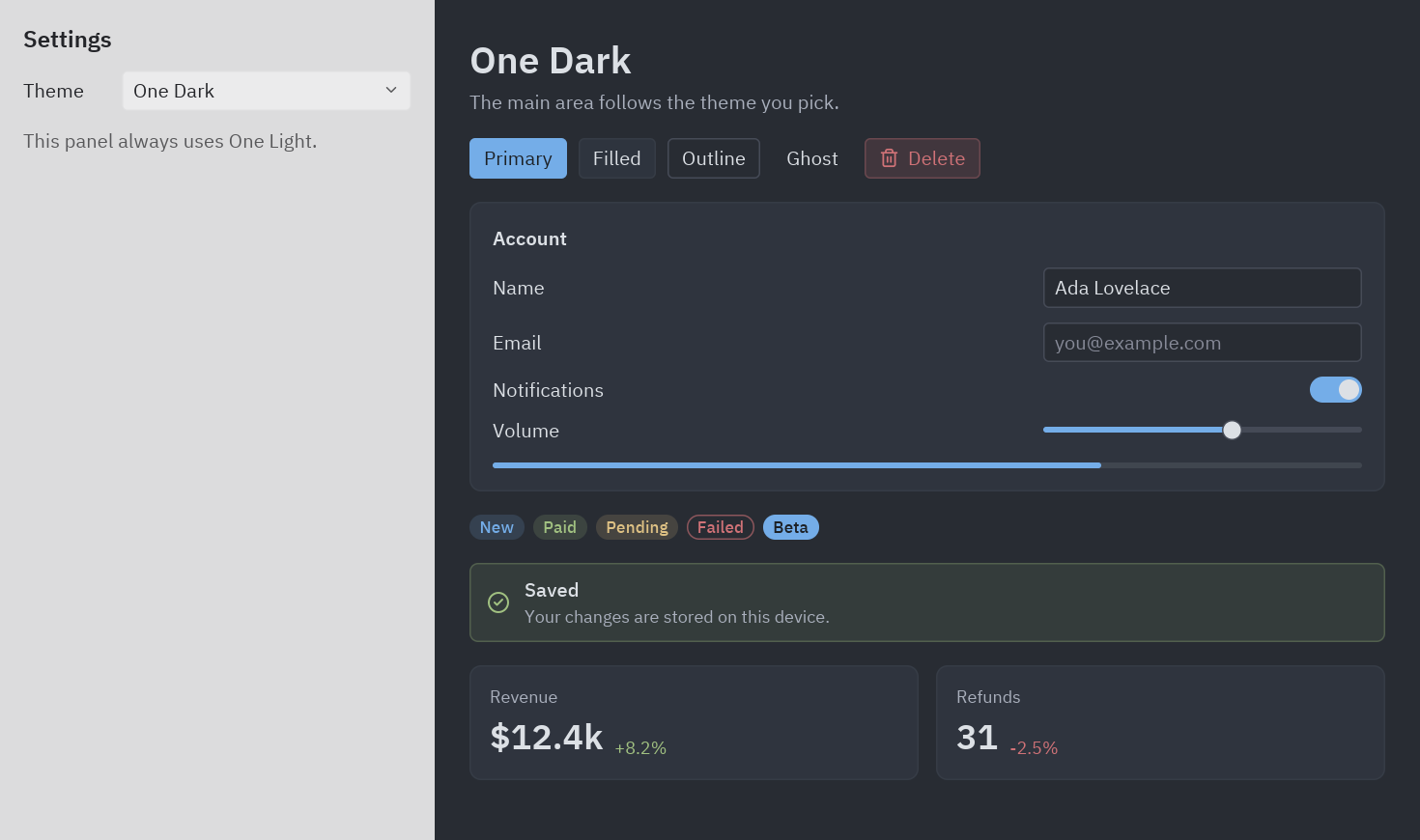
with theme: draws the sidebar with One Light."""Two themes in one window, and a theme picker that remembers your choice.
python examples/theming/mixed.py
- ``with theme:`` draws a block with another theme (here, a light sidebar in a dark app).- ``self.theme = name`` changes the theme at runtime; the whole window restyles at once.- ``Theme.save`` and ``Theme.load`` keep the chosen theme in a JSON file."""
from pathlib import Path
import pyzed as pzfrom pyzed import uifrom preview import preview
SAVED = Path(__file__).with_name("my-theme.json")
class MixedApp(pz.App): title = "Mixed themes" size = (980, 580)
def __init__(self): self.theme = "One Dark" if SAVED.exists(): self.theme = pz.themes.register(pz.Theme.load(SAVED)).name
def pick(self, name): self.theme = name pz.themes.get(name).save(SAVED) # remembered for the next start
def view(self): current = self.resolved_theme().name with pz.themes.get("One Light"): # everything built in this block uses One Light sidebar = pz.container(pz.column([ ui.heading("Settings", level=3), ui.field("Theme", ui.select(pz.themes.names(), current, self.pick, width=200)), ui.muted("This panel always uses One Light."), ], spacing=12), padding=16, width=300, height="fill").style(background="background") main = pz.container(preview(current, "The main area follows the theme you pick."), padding=24, width="fill", height="fill") return pz.row([sidebar, main], height="fill")
if __name__ == "__main__": pz.run(MixedApp)The shared preview
Section titled “The shared preview”"""A small "kitchen sink" used by every example in this folder.
It only uses theme tokens and ``pyzed.ui`` components, so it takes the look of whatevertheme is current: run any of the examples next to it to see the same screen restyled.
python examples/theming/brand.py"""
import pyzed as pzfrom pyzed import ui
def preview(title: str = "Preview", subtitle: str = "Every color on this screen comes from the theme."): """A heading, buttons in every variant, a small form, badges, a callout and two stats.""" buttons = pz.row([ ui.button("Primary", lambda: None, variant="solid"), ui.button("Filled", lambda: None), ui.button("Outline", lambda: None, variant="outline"), ui.button("Ghost", lambda: None, variant="ghost"), ui.button("Delete", lambda: None, variant="tinted", tint="error", icon="trash-2"), ], spacing=8, wrap=True) form = pz.column([ ui.field("Name", ui.input("Ada Lovelace", lambda _v: None, width=220)), ui.field("Email", ui.input("", lambda _v: None, placeholder="you@example.com", width=220)), ui.field("Notifications", ui.switch(True, lambda _v: None)), ui.field("Volume", pz.container(ui.slider(0.6, lambda _v: None), width=220)), ], spacing=10) badges = pz.row([ ui.badge("New"), ui.badge("Paid", tint="success"), ui.badge("Pending", tint="warning"), ui.badge("Failed", tint="error", variant="outline"), ui.badge("Beta", tint="info", variant="solid"), ], spacing=6, wrap=True) stats = pz.row([ ui.stat("Revenue", "$12.4k", delta=8.2, width="fill"), ui.stat("Refunds", "31", delta=-2.5, width="fill"), ], spacing=12) return pz.column([ pz.column([ui.heading(title), ui.muted(subtitle)], spacing=4), buttons, ui.card(pz.column([form, ui.progress(0.7)], spacing=14), title="Account"), badges, ui.callout("Saved", "Your changes are stored on this device.", tint="success"), stats, ], spacing=16)Every color in it is a token or a tint, which is why one file looks right in six very different themes. Write your own views the same way.