
Building AI apps
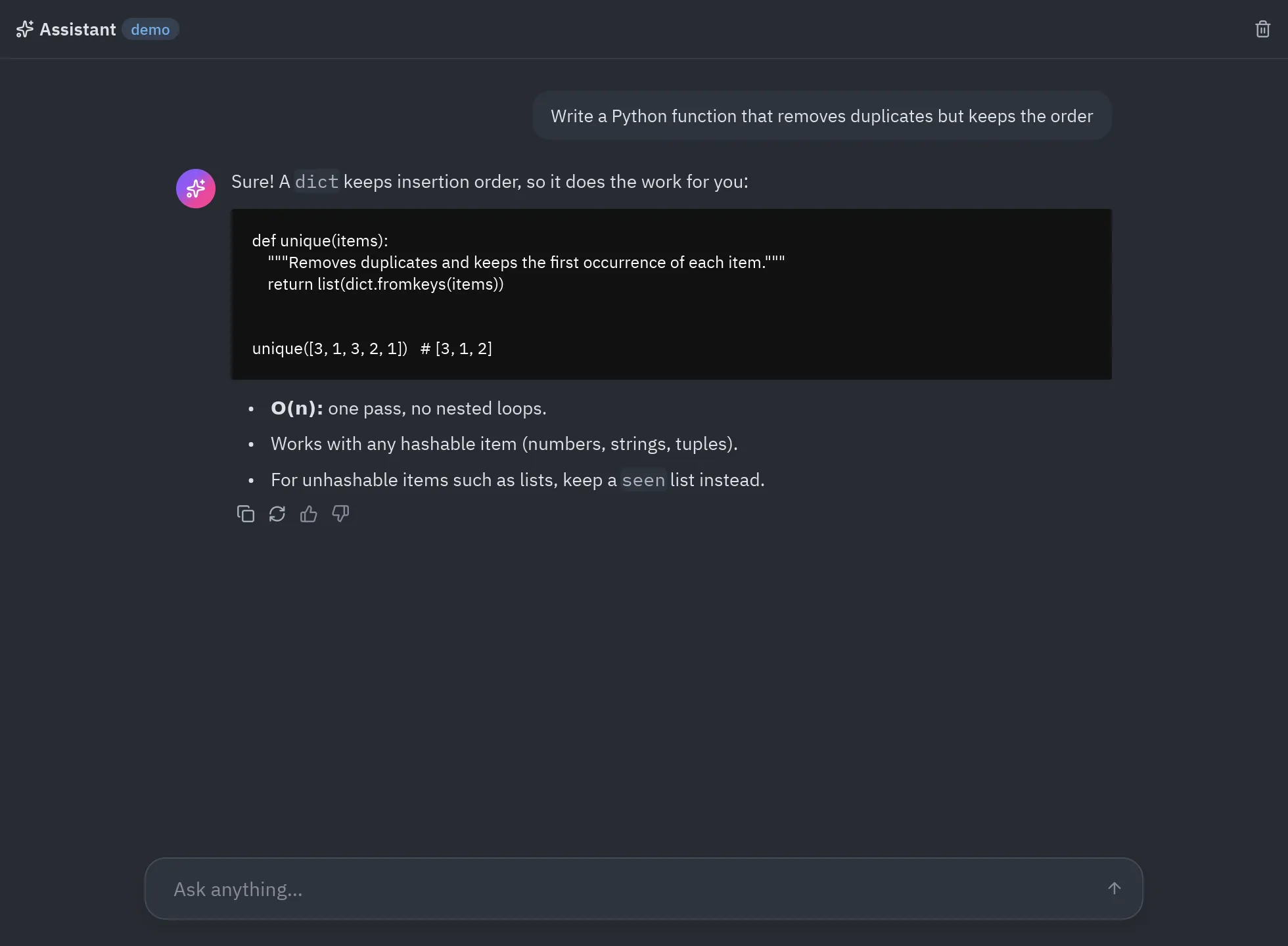
Pyzed is a good fit for AI apps: answers stream in token by token while the window stays responsive, Markdown and code render out of the box, and the components (inputs, cards, spinners, badges) already look like a modern AI tool. This page builds a complete streaming chat that talks to any OpenAI-compatible server (OpenAI, Ollama, LM Studio, vLLM, llama.cpp, OpenRouter, Groq…) with httpx, and runs without network in a demo mode.
| Empty thread | Streaming |
|---|---|
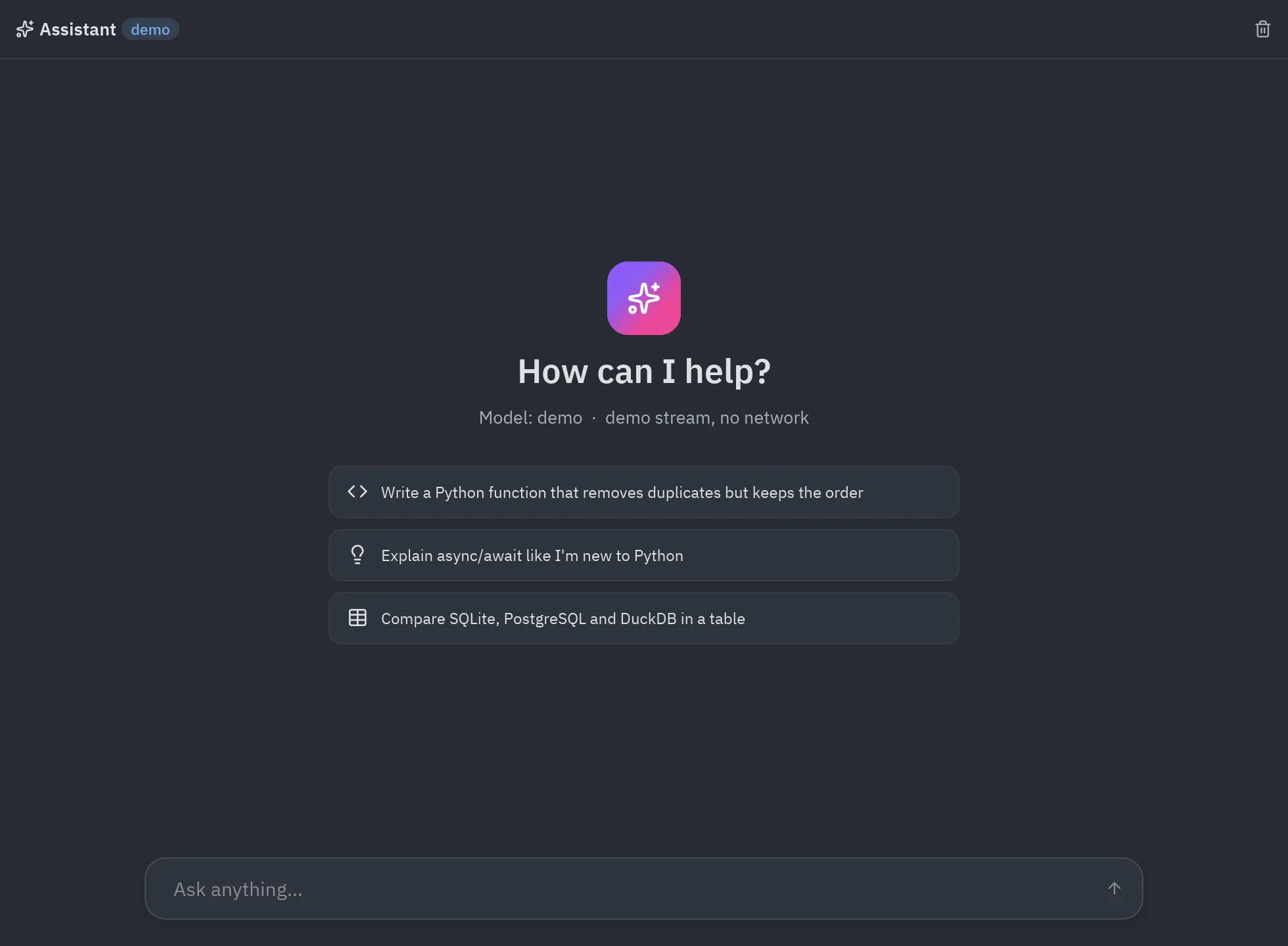 |
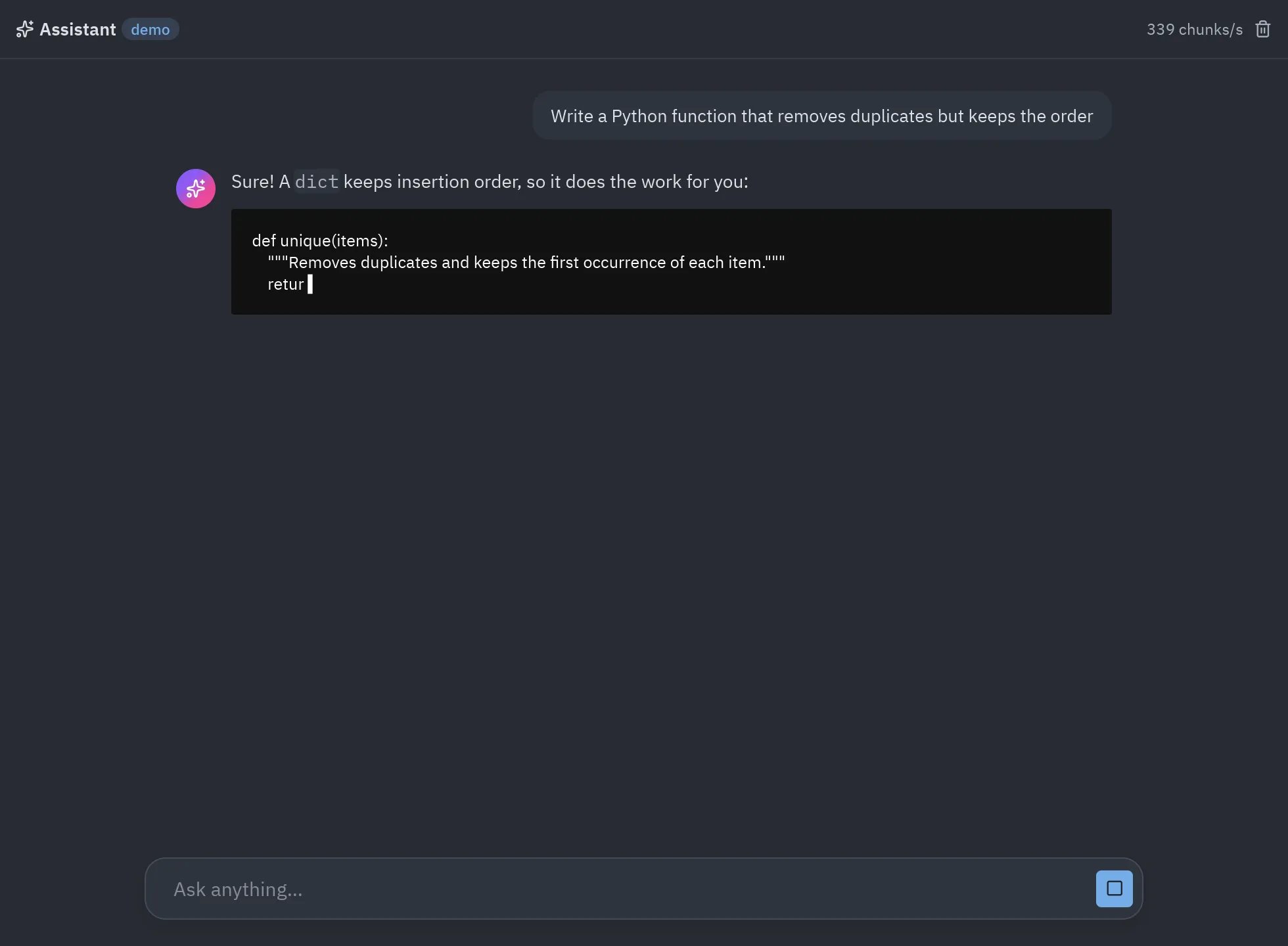 |
Run it
Section titled “Run it”uv run python examples/ai_chat.py # demo: a canned answer, no network, no keyCHAT_BASE_URL=http://localhost:11434/v1 CHAT_MODEL=llama3.2 uv run --with httpx python examples/ai_chat.py # OllamaCHAT_BASE_URL=https://api.openai.com/v1 CHAT_API_KEY=sk-... CHAT_MODEL=<model> uv run --with httpx python examples/ai_chat.pyuv run python examples/ai_chat.py # demo: a canned answer, no network, no key$env:CHAT_BASE_URL="http://localhost:11434/v1"; $env:CHAT_MODEL="llama3.2"; uv run --with httpx python examples/ai_chat.py # Ollama$env:CHAT_BASE_URL="https://api.openai.com/v1"; $env:CHAT_API_KEY="sk-..."; $env:CHAT_MODEL="<model>"; uv run --with httpx python examples/ai_chat.pypython examples/ai_chat.py # demo: a canned answer, no network, no keypip install httpx # for a real modelCHAT_BASE_URL=http://localhost:11434/v1 CHAT_MODEL=llama3.2 python examples/ai_chat.py # OllamaCHAT_BASE_URL=https://api.openai.com/v1 CHAT_API_KEY=sk-... CHAT_MODEL=<model> python examples/ai_chat.pypython examples/ai_chat.py # demo: a canned answer, no network, no keypip install httpx # for a real model$env:CHAT_BASE_URL="http://localhost:11434/v1"; $env:CHAT_MODEL="llama3.2"; python examples/ai_chat.py # Ollama$env:CHAT_BASE_URL="https://api.openai.com/v1"; $env:CHAT_API_KEY="sk-..."; $env:CHAT_MODEL="<model>"; python examples/ai_chat.pypython3 examples/ai_chat.py # demo: a canned answer, no network, no keypython3 -m pip install httpx # for a real modelCHAT_BASE_URL=http://localhost:11434/v1 CHAT_MODEL=llama3.2 python3 examples/ai_chat.py # OllamaCHAT_BASE_URL=https://api.openai.com/v1 CHAT_API_KEY=sk-... CHAT_MODEL=<model> python3 examples/ai_chat.pypy examples/ai_chat.py # demo: a canned answer, no network, no keypy -m pip install httpx # for a real model$env:CHAT_BASE_URL="http://localhost:11434/v1"; $env:CHAT_MODEL="llama3.2"; py examples/ai_chat.py # Ollama$env:CHAT_BASE_URL="https://api.openai.com/v1"; $env:CHAT_API_KEY="sk-..."; $env:CHAT_MODEL="<model>"; py examples/ai_chat.pyThe code is examples/ai_chat.py, about 220
lines with the UI. The important parts follow.
How streaming works
Section titled “How streaming works”sequenceDiagram
participant UI as UI thread
participant App as AIChat
participant Loop as asyncio loop
participant API as Model server
UI->>App: Enter → send()
App-->>Loop: return reply() (async generator)
Loop->>API: POST /chat/completions (stream=true)
loop every token
API-->>Loop: data: {"choices":[{"delta":{"content":"…"}}]}
Loop-->>App: yield ("delta", turn, text) → update()
App->>UI: view() with the longer answer
end
Loop-->>App: yield ("done", turn, None)
A callback that returns an async generator makes Pyzed run it on its asyncio loop, and every value it yields
goes to update on the UI thread (see Async and subscriptions). No threads, queues or
locks in your code.
1. Read the stream from the server
Section titled “1. Read the stream from the server”OpenAI-compatible servers stream server-sent events:
lines that start with data: and hold a JSON chunk, ending with data: [DONE].
async def openai_stream(messages, *, model=MODEL, base_url=BASE_URL, api_key=API_KEY):    """Yields the answer's text pieces from an OpenAI-compatible ``/chat/completions`` endpoint."""    import httpx  # only needed when talking to a real server
    headers = {"Authorization": f"Bearer {api_key}"} if api_key else {}    body = {"model": model, "messages": messages, "stream": True}    async with httpx.AsyncClient(timeout=httpx.Timeout(60, connect=10)) as client:        async with client.stream("POST", f"{base_url.rstrip('/')}/chat/completions", json=body,                                 headers=headers) as response:            if response.status_code >= 400:                detail = (await response.aread()).decode(errors="replace")[:300]                raise RuntimeError(f"HTTP {response.status_code}: {detail}")            async for line in response.aiter_lines():  # server-sent events: "data: {...}"                if not line.startswith("data:"):                    continue                data = line[5:].strip()                if data == "[DONE]":                    break                delta = json.loads(data)["choices"][0].get("delta", {}).get("content")                if delta:                    yield delta
The demo mode swaps it for a function with the same shape, so the rest of the app doesn’t know the difference:
async def demo_stream(messages, *, delay=0.015): """A stand-in for the model: streams a canned answer a few characters at a time.""" text = DEMO_ANSWER for i in range(0, len(text), 4): await asyncio.sleep(delay) yield text[i:i + 4]2. Send, and turn the stream into messages
Section titled “2. Send, and turn the stream into messages”def send(self, text=None): text = (text if text is not None else self.draft).strip() if not text or self.busy: return None self.messages += [{"role": "user", "content": text}, {"role": "assistant", "content": ""}] self.draft, self.error, self.busy = "", "", True self.turn += 1 history = [{"role": "system", "content": SYSTEM}] + self.messages[:-1] return [self.reply(self.turn, history), pz.Command.scroll_to_end("thread")]
async def reply(self, turn, history): """Runs on Pyzed's asyncio loop; each yield goes to update() on the UI thread.""" try: async for piece in self.stream(history): if turn != self.turn: # stopped or superseded return yield ("delta", turn, piece) except Exception as error: # network errors, bad keys... shown in the thread yield ("error", turn, str(error) or type(error).__name__) yield ("done", turn, None)sendreturns a list: the generator and a command that scrolls the thread down. Pyzed runs both.- Each reply is tagged with a turn number. Stop just increments
self.turn: the running generator sees a newer turn and returns, andupdateignores pieces of an older turn that were already on their way. - Errors become a message instead of an exception, so a wrong key or a server that’s down shows a red callout in the thread and the app keeps working.
3. Update the state
Section titled “3. Update the state”def update(self, message): kind, turn, value = message if turn != self.turn: return None if kind == "delta": self.messages[-1]["content"] += value return pz.Command.scroll_to_end("thread") if kind == "error": self.error = value elif kind == "done": self.busy = False return None4. The view
Section titled “4. The view”The assistant’s answer is a ui.markdown, with a cursor (▍) appended while it streams and a ui.spinner before
the first token. The thread is a pz.scrollable(..., anchor_bottom=True) so new text stays in view, and the
composer swaps its send button for a Stop button while busy:
action = (ui.icon_button("square", self.stop, variant="solid", tooltip="Stop") if self.busy else ui.icon_button("arrow-up", self.send, variant="solid" if self.draft.strip() else "filled", tooltip="Send", disabled=not self.draft.strip()))Copy, regenerate and feedback buttons appear under finished answers; pz.Command.copy(text) puts the answer on
the clipboard.
Test it without a network
Section titled “Test it without a network”The stream is a constructor argument, so tests drive the whole app with a fake model, the same way Pyzed’s own tests
do in tests/test_blocks.py:
import asynciofrom ai_chat import AIChat, DEMO_ANSWER, demo_stream

def test_streams_the_answer():    app = AIChat(stream=lambda messages: demo_stream(messages, delay=0))    effects = app.send("hello")    reply = next(e for e in effects if hasattr(e, "__aiter__"))
    async def run():        async for message in reply:            app.update(message)
    asyncio.run(run())    assert app.messages[-1]["content"] == DEMO_ANSWER and not app.busy    app.screenshot("chat.png")          # off-screen, no window
The repository’s test also starts a tiny local HTTP server that speaks server-sent events and checks that
openai_stream sends the right request and joins the pieces.
With pyzed.agents: providers and tools
Section titled “With pyzed.agents: providers and tools”For more than one provider, keys in the system keychain and tools (functions the model can call), use
pyzed.agents, the engine of Pyzed Design’s agent. Agent.run blocks, so run it in a
worker with pz.Command.perform and forward its events to update with pz.post, which is safe from any thread:
import pyzed as pzfrom pyzed import agents, ui

@agents.tooldef stock(product: str) -> int:    """How many units of a product are in stock."""    return {"chair": 4, "desk": 0}.get(product, 0)

class Shop(pz.App):    def __init__(self):        self.agent = agents.Agent("ollama:qwen3:8b", tools=[stock], system="You help the shop's staff.")        self.answer, self.prompt, self.busy = "", "", False
    def ask(self):        self.answer, self.busy = "", True        return pz.Command.perform(lambda: self.agent.run(self.prompt, on_event=pz.post), self.finished)
    def finished(self, text):        self.busy = False
    def update(self, event):        if isinstance(event, agents.Event) and event.kind == "text":            self.answer += event.text
    def view(self):        return pz.column([            ui.markdown(self.answer or "Ask about the stock."),            ui.spinner() if self.busy else None,            ui.input(self.prompt, lambda v: setattr(self, "prompt", v), on_submit=self.ask),        ], spacing=8, padding=16)
Ideas to build on
Section titled “Ideas to build on”- Several conversations: keep a list of threads and show them in a sidebar with
ui.list_item, like the chat block. - Attachments: read a file the user picks and add its text to the message.
- Tools that touch the UI: a tool marked
ui=Trueruns on the UI thread through the agent’sexecutor. - A local-first app: Ollama or LM Studio on the same machine, no key, no data leaves the computer.
- Styling: give the assistant’s avatar a glow (
.style(glow=("#8b5cf6", 18))) or the composer a glass panel; see Animation and effects.