
Recetario de temas
Seis temas completos, listos para copiar en tu app. Cada uno es un archivo de
examples/theming/ y dibuja la misma pantalla
(preview.py: botones en cada variante, un pequeño formulario, insignias, un aviso y dos estadísticas), así puedes
comparar cómo la cambia cada tema.
Ejecutarlos
Sección titulada «Ejecutarlos»Desde un clon del repositorio (mira Ejecutar los ejemplos):
uv run python examples/theming/brand.pypython3 examples/theming/brand.pypy examples\theming\brand.pyCambia brand.py por high_contrast.py, retro_terminal.py, glassy_dark.py, pastel.py o mixed.py.
Tema de marca, claro y oscuro
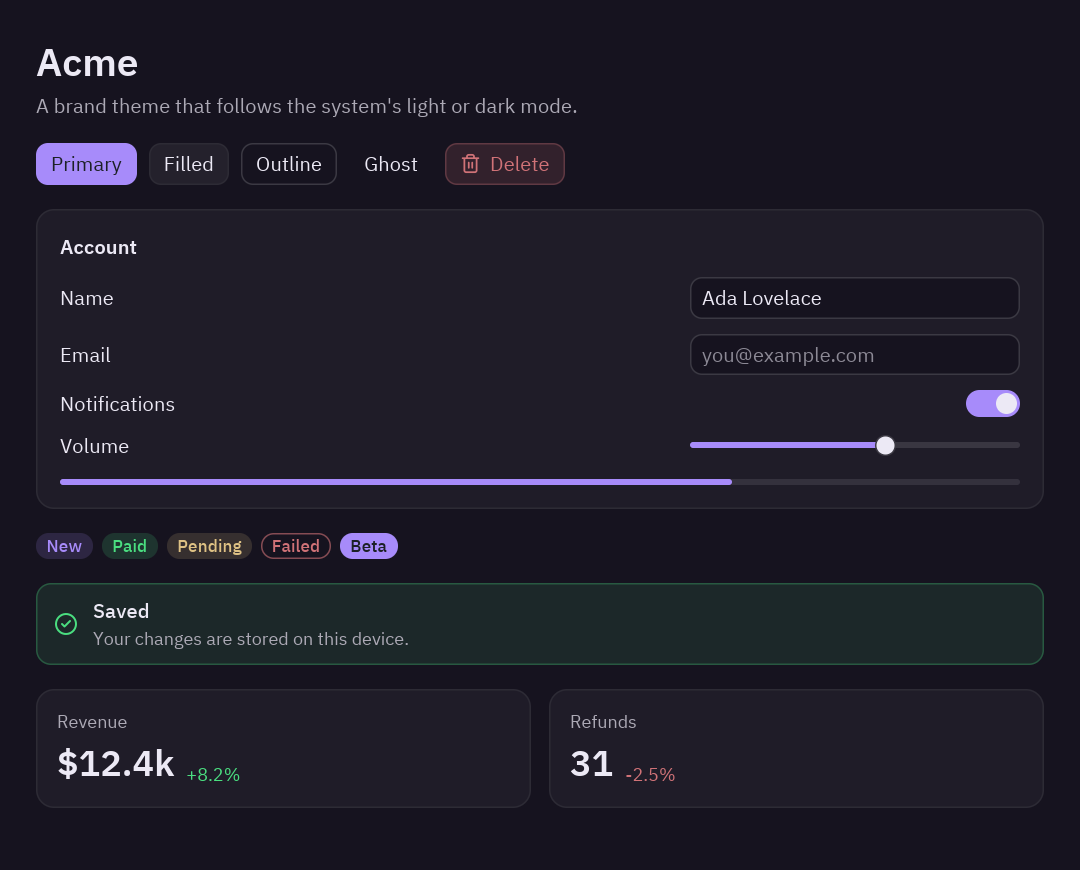
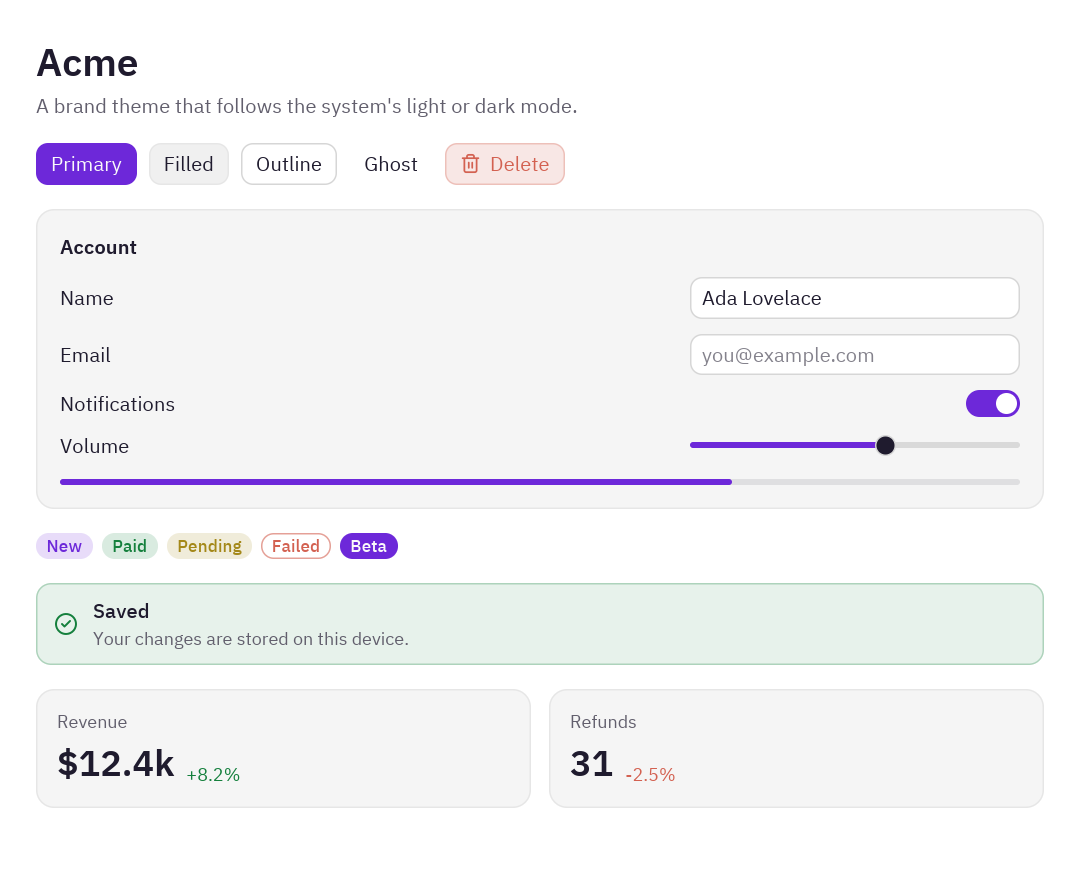
Sección titulada «Tema de marca, claro y oscuro»La paleta de una empresa en dos versiones que siguen el modo claro u oscuro del sistema. Theme.generate construye
cada versión a partir de tres colores; derive fija el verde propio de la marca para el éxito.
"""A brand theme in light and dark that follows the operating system.
    python examples/theming/brand.py
- ``Theme.generate`` builds a whole theme from a background, a text and an accent color.- ``derive`` changes a few tokens on top (rounder corners, the brand's own green for success).- ``themes.register`` gives the themes a name, and ``themes.auto`` picks light or dark like the OS."""
import pyzed as pzfrom preview import preview
BRAND = "#6d28d9"  # the brand's purple
ACME_LIGHT = pz.Theme.generate(    "Acme Light", background="#ffffff", text="#1f1b2e", accent=BRAND, radius=10,).derive(success="#15803d")
ACME_DARK = pz.Theme.generate(    "Acme Dark", background="#16131f", text="#ece9f5", accent="#a78bfa", radius=10,).derive(success="#4ade80")
pz.themes.register(ACME_LIGHT)pz.themes.register(ACME_DARK)

class BrandApp(pz.App):    title = "Acme"    size = (720, 580)    theme = pz.themes.auto("Acme Light", "Acme Dark")  # light or dark, like the system
    def view(self):        return pz.container(preview("Acme", "A brand theme that follows the system's light or dark mode."),                            padding=24, width="fill", height="fill")

if __name__ == "__main__":    pz.run(BrandApp)
Qué cambiar: los tres colores de cada generate, y radius para esquinas más redondas o más rectas.
Alto contraste
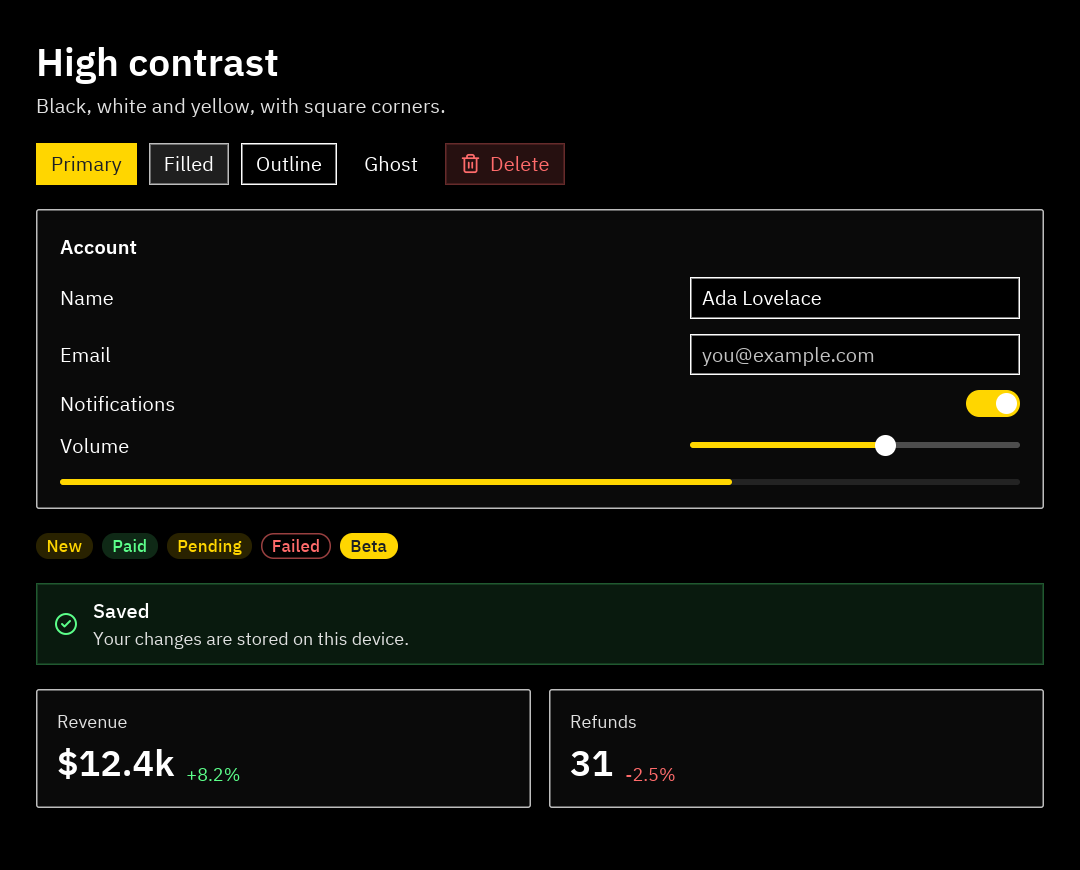
Sección titulada «Alto contraste»Negro y blanco puros con foco amarillo, para quien necesita un contraste fuerte (y una buena prueba de cómo se ve tu
app con bordes grandes y claros). Theme.from_dict lista cada token que cambia; el resto viene de One Dark. El script
muestra la relación de contraste de los colores principales al arrancar.
"""A high-contrast theme for readers who need strong colors and clear edges.
    python examples/theming/high_contrast.py
- ``Theme.from_dict`` starts from One Dark and replaces only the tokens you list.- ``pz.theme.contrast`` checks the WCAG contrast ratio of two colors (7:1 or more is "AAA").- A global ``style`` makes every text bigger."""
import pyzed as pzfrom preview import preview
HIGH_CONTRAST = pz.Theme.from_dict({    "name": "High Contrast",    "appearance": "dark",    # surfaces: pure black, panels a touch lighter so they stay visible    "background": "#000000", "surface": "#0a0a0a", "elevated": "#141414", "editor": "#000000",    "panel": "#0a0a0a", "title_bar": "#000000", "status_bar": "#000000",    # strong white borders    "border": "#ffffff", "border_variant": "#bdbdbd",    # text: white, and muted text that is still very readable    "text": "#ffffff", "text_muted": "#e0e0e0", "text_placeholder": "#c2c2c2", "text_disabled": "#9e9e9e",    "icon": "#ffffff", "icon_muted": "#e0e0e0",    # buttons and list rows    "element": "#1f1f1f", "element_hover": "#333333", "element_active": "#4d4d4d",    "ghost_hover": "#262626", "ghost_active": "#3d3d3d", "ghost_selected": "#3d3d3d",    # status colors that stay readable on black    "error": "#ff6b6b", "warning": "#ffd600", "success": "#5cff8a", "info": "#6bc8ff",    # square corners    "radius": 0, "radius_sm": 0,}).with_accent("#ffd600")  # yellow focus rings, selection and primary buttons
pz.themes.register(HIGH_CONTRAST)

def report(theme):    """Prints the contrast ratio of the main text colors against the background."""    for token in ("text", "text_muted", "accent", "error"):        ratio = pz.theme.contrast(theme.color(token), theme.background)        print(f"{token:>10} on background: {ratio:4.1f}:1")

class HighContrastApp(pz.App):    title = "High contrast"    size = (720, 580)    theme = "High Contrast"    style = pz.Style(size=15)  # every text that does not set its own size
    def view(self):        return pz.container(preview("High contrast", "Black, white and yellow, with square corners."),                            padding=24, width="fill", height="fill")

if __name__ == "__main__": report(HIGH_CONTRAST) pz.run(HighContrastApp)Terminal retro
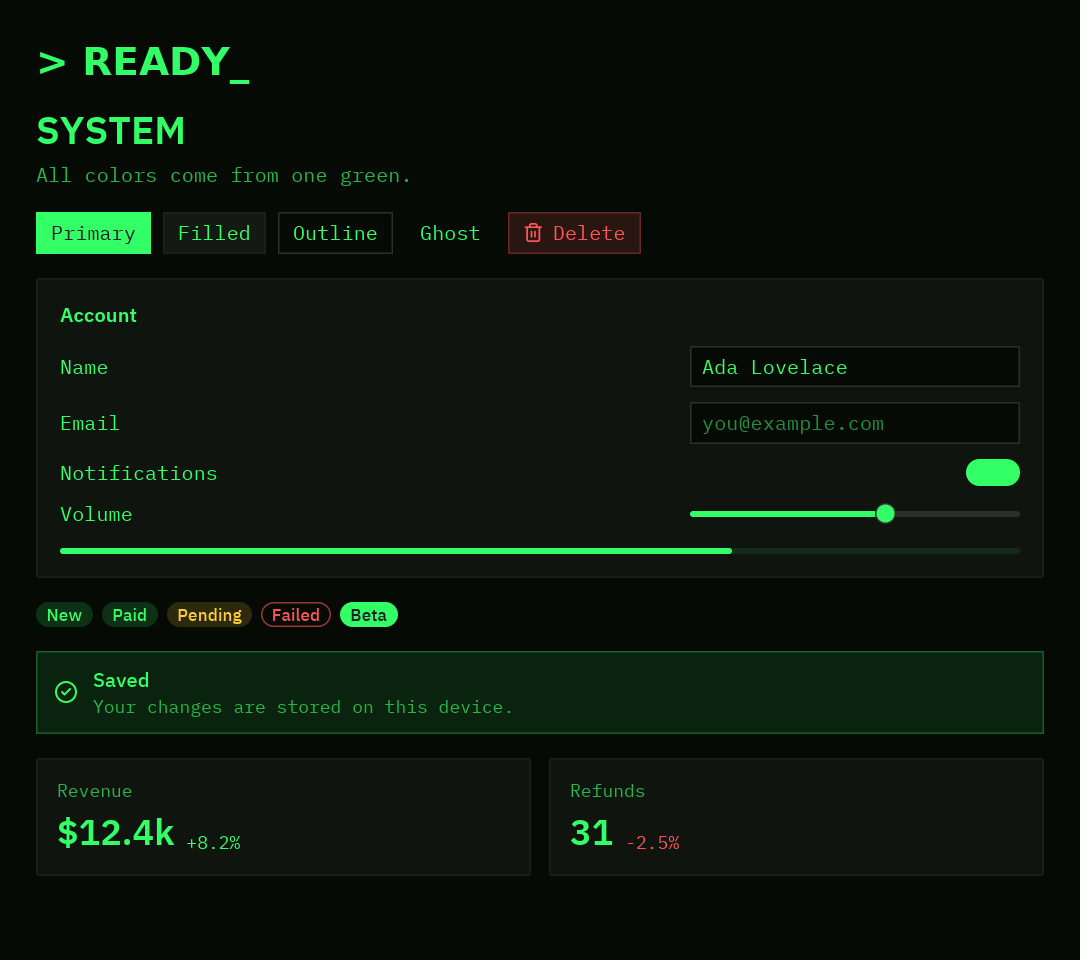
Sección titulada «Terminal retro»Fósforo verde sobre negro. Un único verde se vuelve el texto, el acento y el color de éxito; el estilo global hace que todo el texto sea monoespaciado.
"""A retro terminal theme: green phosphor on black, monospaced and square.
    python examples/theming/retro_terminal.py
- ``Theme.generate`` with a green text color and a green accent.- ``syntax`` and ``ansi`` recolor code and the terminal to match.- The global style switches every text to the monospaced font."""
import pyzed as pzfrom preview import preview
PHOSPHOR = "#33ff66"
RETRO = pz.Theme.generate(    "Retro Terminal",    background="#050a05",    text=PHOSPHOR,    accent=PHOSPHOR,    error="#ff5555",    warning="#ffcc33",    success=PHOSPHOR,    radius=0,    syntax={"keyword": ("#a6ff00", "bold"), "string": "#7dffb0", "comment": ("#1f7a3a", "italic")},).derive(ansi={"green": PHOSPHOR, "bright_black": "#1f7a3a"})
pz.themes.register(RETRO)

class RetroApp(pz.App):    title = "Retro terminal"    size = (720, 640)    theme = "Retro Terminal"    style = pz.Style(font="mono", size=13)  # every text in the window is monospaced
    def view(self):        title = pz.text("> READY_").style(size=26, weight="bold", color="accent")        return pz.container(pz.column([title, preview("SYSTEM", "All colors come from one green.")], spacing=12),                            padding=24, width="fill", height="fill")

if __name__ == "__main__":    pz.run(RetroApp)
Vidrio oscuro
Sección titulada «Vidrio oscuro»Un degradado detrás de la ventana y un panel de vidrio esmerilado encima. El tema es One Dark con acento cian; el
aspecto viene del estilo global (background= un degradado) y del efecto glass.
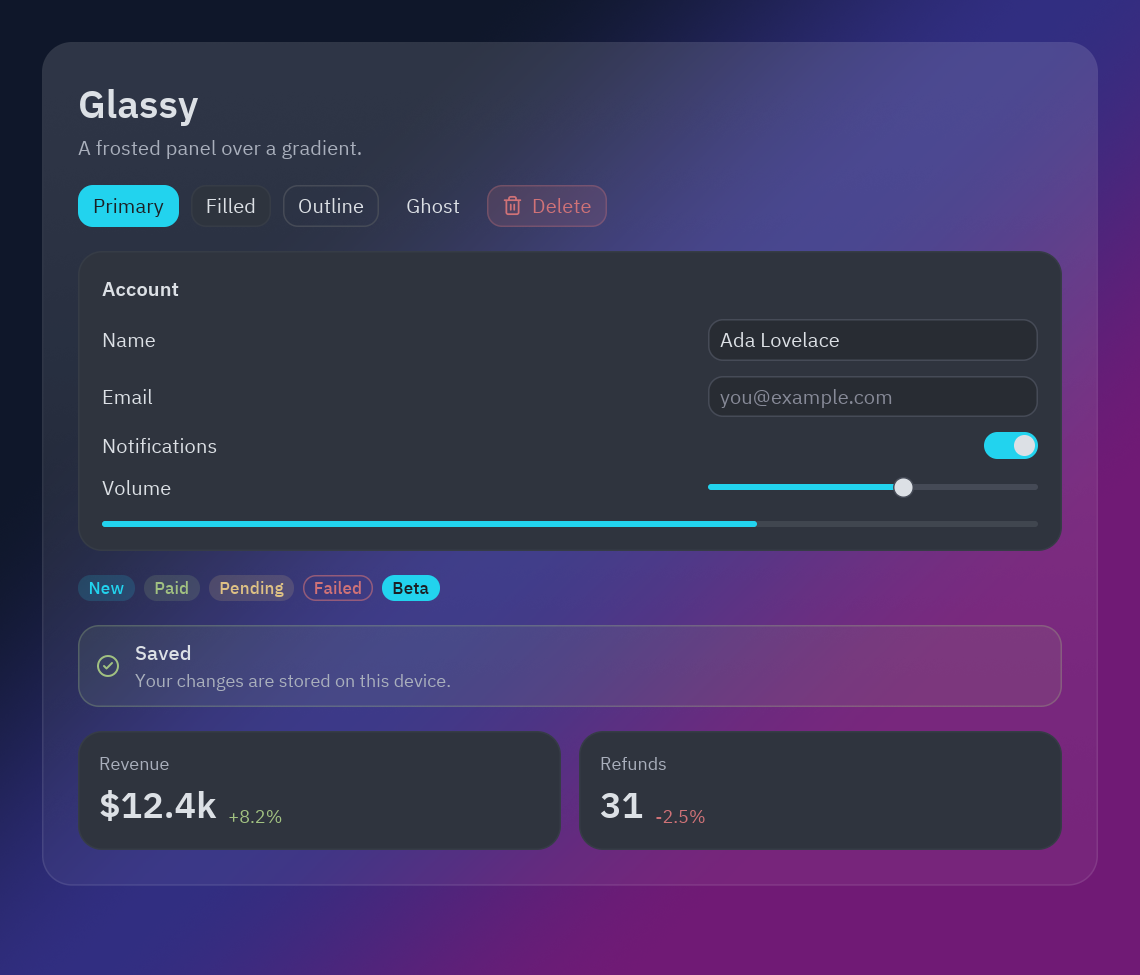
"""A glassy dark look: a gradient behind the window and a frosted panel on top.
    python examples/theming/glassy_dark.py
- The global style paints the window with a ``pz.Gradient``.- ``glass`` turns a container into a translucent panel that blurs what is behind it.- The theme itself is One Dark with a cyan accent (``with_accent``) and rounder corners."""
import pyzed as pzfrom preview import preview
GLASSY = pz.themes.ONE_DARK.derive(name="Glassy Dark", radius=14, radius_sm=10).with_accent("#22d3ee")pz.themes.register(GLASSY)
NIGHT = pz.Gradient(["#0f172a", "#312e81", "#701a75"], angle=135)

class GlassyApp(pz.App):    title = "Glassy dark"    size = (760, 650)    theme = "Glassy Dark"    style = pz.Style(background=NIGHT)  # paints the whole window
    def view(self):        panel = pz.container(preview("Glassy", "A frosted panel over a gradient."), width="fill").style(            glass={"tint": "#ffffff", "strength": 0.08, "blur": 24}, radius=20, padding=24,            border=(1, "#ffffff22"))        return pz.container(panel, padding=28, width="fill", height="fill")

if __name__ == "__main__": pz.run(GlassyApp)Pastel divertido
Sección titulada «Pastel divertido»Un fondo crema, colores de caramelo y esquinas muy redondas. derive fija colores pastel para los avatares
(players), y un estilo con nombre (pz.define_style("bubble", ...)) dibuja la tarjeta alrededor de la pantalla.
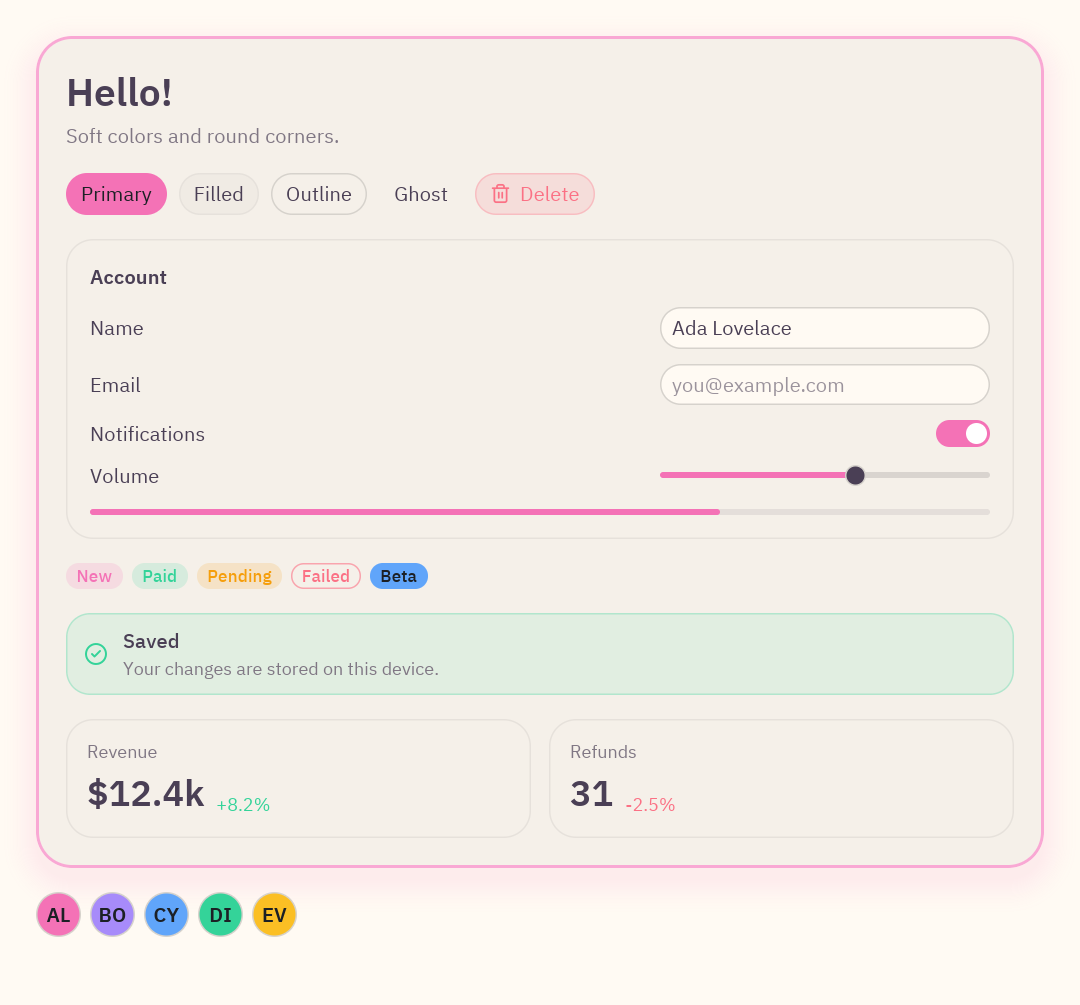
"""A playful pastel theme: cream background, candy colors and very round corners.
    python examples/theming/pastel.py
- ``Theme.generate`` for a light theme, then ``derive`` with a pastel info color and avatar colors.- ``pz.define_style`` names a reusable "bubble" style for the card around everything."""
import pyzed as pzfrom pyzed import uifrom preview import preview
PASTEL = pz.Theme.generate(    "Pastel", background="#fffaf3", text="#4a3f55", accent="#f472b6", radius=16,    success="#34d399", warning="#f59e0b", error="#fb7185",).derive(info="#60a5fa", players=("#f472b6", "#a78bfa", "#60a5fa", "#34d399", "#fbbf24"))pz.themes.register(PASTEL)
pz.define_style("bubble", background="surface", radius=24, padding=20, border=(2, "#f9a8d4"),                shadow=("#f472b633", (0, 8), 24))

class PastelApp(pz.App):    title = "Pastel"    size = (720, 670)    theme = "Pastel"
    def view(self):        friends = pz.row([ui.avatar(name, index=i, size=30) for i, name in enumerate(["AL", "BO", "CY", "DI", "EV"])],                         spacing=6)        return pz.container(pz.column([            pz.container(preview("Hello!", "Soft colors and round corners."), width="fill").style("bubble"),            friends,        ], spacing=16), padding=24, width="fill", height="fill")

if __name__ == "__main__":    pz.run(PastelApp)
Dos temas en una ventana
Sección titulada «Dos temas en una ventana»Una barra lateral clara en una app oscura, con un selector de temas que guarda el tema elegido en un archivo JSON y lo
carga al siguiente arranque (Theme.save y Theme.load).
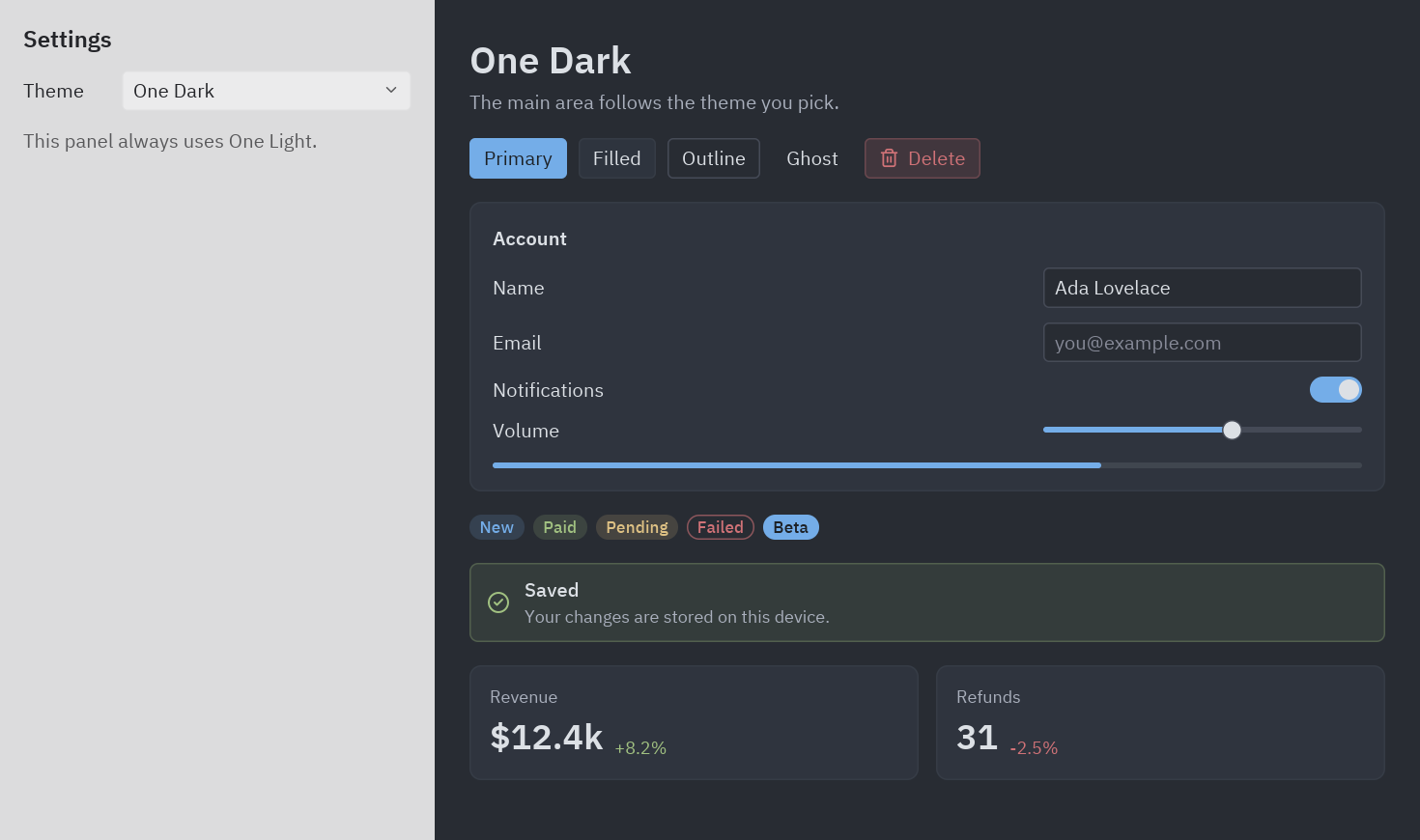
with tema: dibuja la barra lateral con One Light."""Two themes in one window, and a theme picker that remembers your choice.
python examples/theming/mixed.py
- ``with theme:`` draws a block with another theme (here, a light sidebar in a dark app).- ``self.theme = name`` changes the theme at runtime; the whole window restyles at once.- ``Theme.save`` and ``Theme.load`` keep the chosen theme in a JSON file."""
from pathlib import Path
import pyzed as pzfrom pyzed import uifrom preview import preview
SAVED = Path(__file__).with_name("my-theme.json")
class MixedApp(pz.App): title = "Mixed themes" size = (980, 580)
def __init__(self): self.theme = "One Dark" if SAVED.exists(): self.theme = pz.themes.register(pz.Theme.load(SAVED)).name
def pick(self, name): self.theme = name pz.themes.get(name).save(SAVED) # remembered for the next start
def view(self): current = self.resolved_theme().name with pz.themes.get("One Light"): # everything built in this block uses One Light sidebar = pz.container(pz.column([ ui.heading("Settings", level=3), ui.field("Theme", ui.select(pz.themes.names(), current, self.pick, width=200)), ui.muted("This panel always uses One Light."), ], spacing=12), padding=16, width=300, height="fill").style(background="background") main = pz.container(preview(current, "The main area follows the theme you pick."), padding=24, width="fill", height="fill") return pz.row([sidebar, main], height="fill")
if __name__ == "__main__": pz.run(MixedApp)La vista de prueba compartida
Sección titulada «La vista de prueba compartida»"""A small "kitchen sink" used by every example in this folder.
It only uses theme tokens and ``pyzed.ui`` components, so it takes the look of whatevertheme is current: run any of the examples next to it to see the same screen restyled.
python examples/theming/brand.py"""
import pyzed as pzfrom pyzed import ui
def preview(title: str = "Preview", subtitle: str = "Every color on this screen comes from the theme."): """A heading, buttons in every variant, a small form, badges, a callout and two stats.""" buttons = pz.row([ ui.button("Primary", lambda: None, variant="solid"), ui.button("Filled", lambda: None), ui.button("Outline", lambda: None, variant="outline"), ui.button("Ghost", lambda: None, variant="ghost"), ui.button("Delete", lambda: None, variant="tinted", tint="error", icon="trash-2"), ], spacing=8, wrap=True) form = pz.column([ ui.field("Name", ui.input("Ada Lovelace", lambda _v: None, width=220)), ui.field("Email", ui.input("", lambda _v: None, placeholder="you@example.com", width=220)), ui.field("Notifications", ui.switch(True, lambda _v: None)), ui.field("Volume", pz.container(ui.slider(0.6, lambda _v: None), width=220)), ], spacing=10) badges = pz.row([ ui.badge("New"), ui.badge("Paid", tint="success"), ui.badge("Pending", tint="warning"), ui.badge("Failed", tint="error", variant="outline"), ui.badge("Beta", tint="info", variant="solid"), ], spacing=6, wrap=True) stats = pz.row([ ui.stat("Revenue", "$12.4k", delta=8.2, width="fill"), ui.stat("Refunds", "31", delta=-2.5, width="fill"), ], spacing=12) return pz.column([ pz.column([ui.heading(title), ui.muted(subtitle)], spacing=4), buttons, ui.card(pz.column([form, ui.progress(0.7)], spacing=14), title="Account"), badges, ui.callout("Saved", "Your changes are stored on this device.", tint="success"), stats, ], spacing=16)Cada color que usa es un token o un tinte; por eso un mismo archivo se ve bien en seis temas muy distintos. Escribe tus propias vistas de la misma forma.