
Otras librerías
Cada librería cae en uno de los casos del resumen: async, bloqueante, un servidor o un stream. Estas recetas cubren las que más se preguntan.
aiosqlite
Sección titulada «aiosqlite»aiosqlite le da a SQLite una API async. Como Pyzed ejecuta
todas las corrutinas en un mismo loop, una sola conexión abierta en on_start sirve a toda la app:
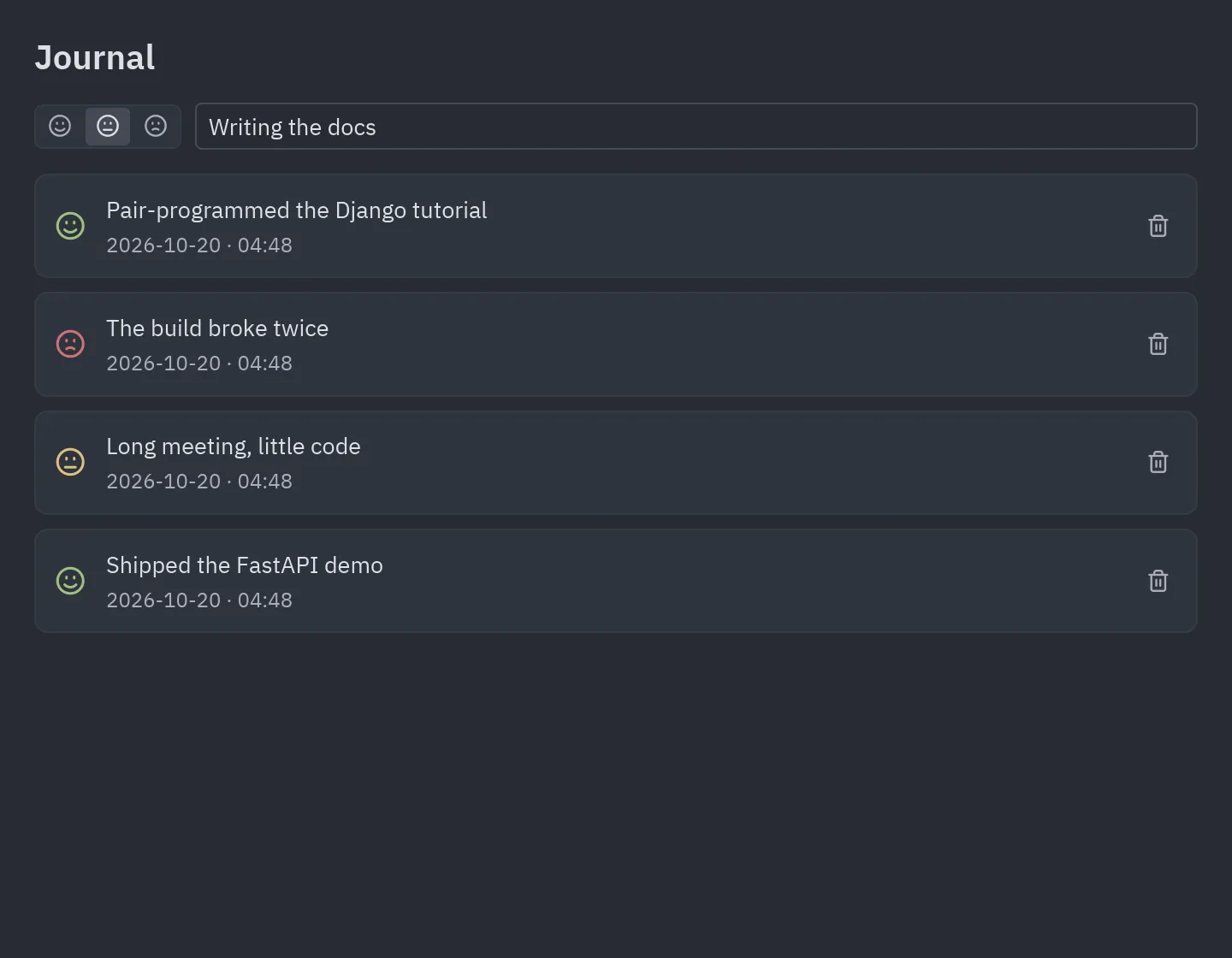
class Journal(pz.App):    async def on_start(self):        self.db = await aiosqlite.connect("journal.db")        self.db.row_factory = aiosqlite.Row        await self.db.execute("CREATE TABLE IF NOT EXISTS entries (...)")        return await self.load()
async def load(self): async with self.db.execute("SELECT * FROM entries ORDER BY id DESC") as cursor: return ("loaded", await cursor.fetchall())cd examples/integrations/aiosqlite_journaluv run main.pycd examples/integrations/aiosqlite_journalpython3 -m venv .venvsource .venv/bin/activatepip install pyzed-ui aiosqlitepython main.pycd examples/integrations/aiosqlite_journalpy -m venv .venv.venv\Scripts\Activate.ps1pip install pyzed-ui aiosqlitepython main.pycd examples/integrations/aiosqlite_journalpython3 -m pip install pyzed-ui aiosqlitepython3 main.pycd examples/integrations/aiosqlite_journalpy -m pip install pyzed-ui aiosqlitepy main.pyCódigo completo: examples/integrations/aiosqlite_journal/main.py
"""A journal on aiosqlite: one async SQLite connection living on Pyzed's asyncio loop.
    uv run main.py
The database (journal.db) is created next to this file on the first run.Walkthrough: https://albakore.github.io/pyzed/integrations/other-libraries/#aiosqlite"""
from __future__ import annotations
from datetime import datetimefrom pathlib import Path
import aiosqlite
import pyzed as pzfrom pyzed import ui
DATABASE = Path(__file__).with_name("journal.db")MOODS = {"great": ("smile", "success"), "okay": ("meh", "warning"), "rough": ("frown", "error")}

class Journal(pz.App):    title = "Journal · aiosqlite"    size = (720, 560)
    def __init__(self):        self.db: aiosqlite.Connection | None = None  # opened on Pyzed's loop, used only from coroutines        self.entries: list[aiosqlite.Row] = []        self.text = ""        self.mood = "great"
    async def on_start(self):        self.db = await aiosqlite.connect(DATABASE)        self.db.row_factory = aiosqlite.Row        await self.db.execute("""CREATE TABLE IF NOT EXISTS entries (            id INTEGER PRIMARY KEY, written TEXT NOT NULL, mood TEXT NOT NULL, text TEXT NOT NULL)""")        await self.db.commit()        return await self.load()
    async def load(self):        async with self.db.execute("SELECT * FROM entries ORDER BY id DESC LIMIT 200") as cursor:            return ("loaded", await cursor.fetchall())
    async def add(self, text: str, mood: str):        await self.db.execute("INSERT INTO entries (written, mood, text) VALUES (?, ?, ?)",                              (datetime.now().isoformat(timespec="minutes"), mood, text))        await self.db.commit()        return await self.load()
    async def remove(self, entry_id: int):        await self.db.execute("DELETE FROM entries WHERE id = ?", (entry_id,))        await self.db.commit()        return await self.load()
    def submit(self, *_):        text, self.text = self.text.strip(), ""        return self.add(text, self.mood) if text else None
    def update(self, message):        kind, rows = message        if kind == "loaded":            self.entries = rows
    def entry(self, row):        icon, tint = MOODS[row["mood"]]        return ui.card(pz.row([            pz.icon(icon, size=18, color=self.resolved_theme().color(tint)),            pz.column([ui.label(row["text"]), ui.muted(row["written"].replace("T", " · "), size="sm")],                      spacing=4, width="fill"),            ui.icon_button("trash-2", lambda: self.remove(row["id"]), size="sm", tooltip="Delete"),        ], spacing=12, align="center"), padding=12)
    def view(self):        t = self.resolved_theme()        composer = pz.row([            ui.toggle_group([(mood, icon) for mood, (icon, _) in MOODS.items()], self.mood, lambda m: setattr(self, "mood", m)),            ui.input(self.text, lambda v: setattr(self, "text", v), placeholder="How was your day? (Enter to save)",                     on_submit=self.submit),        ], spacing=8, align="center")        entries = pz.scrollable(pz.column([self.entry(r) for r in self.entries], spacing=8), height="fill") \            if self.entries else ui.empty_state("Nothing written yet", "Your entries are stored in journal.db.",                                                icon="notebook-pen")        return pz.container(pz.column([ui.heading("Journal", level=2), composer, entries], spacing=14),                            padding=20, width="fill", height="fill", bg=t.editor)

if __name__ == "__main__":    pz.run(Journal)
SQLAlchemy asyncio
Sección titulada «SQLAlchemy asyncio»Se explica en la página de SQLAlchemy: la
demo sqlalchemy_quickstart ejecuta la misma ventana sobre una Session síncrona o sobre una
AsyncSession con aiosqlite (uv run main.py --async).
pandas y Polars
Sección titulada «pandas y Polars»ui.table recibe una lista de dicts, que está a una llamada de un DataFrame. Lee los archivos
grandes en un hilo para que la ventana siga respondiendo:
import pandas as pd

class Sales(pz.App):    def __init__(self):        self.frame = pd.DataFrame()
    def open(self, path):        return pz.Command.perform(lambda: pd.read_csv(path), self.loaded)
    def loaded(self, frame):        self.frame = frame        self.rows = frame.to_dict("records")       # Polars: frame.to_dicts()
    def view(self):        columns = [ui.Column(name, name) for name in self.frame.columns]        return ui.table(columns, self.rows, height="fill")
La tabla está virtualizada, así que cientos de miles de filas se desplazan con fluidez. Para
filtrar, haz la consulta sobre el DataFrame (frame[frame.city == city]) y reconstruye
self.rows.
requests y otros clientes bloqueantes
Sección titulada «requests y otros clientes bloqueantes»Cualquier llamada bloqueante pasa por Command.perform. Conviene capturar los errores de
raise_for_status dentro de la función para que then siempre reciba algo que mostrar:
import requests

def fetch_weather(city):    try:        response = requests.get("https://wttr.in/" + city, params={"format": "j1"}, timeout=10)        response.raise_for_status()        return response.json()    except requests.RequestException as error:        return {"error": str(error)}

class Weather(pz.App):    def search(self, city):        return pz.Command.perform(lambda: fetch_weather(city), self.show)
Pub/sub de Redis y otros streams
Sección titulada «Pub/sub de Redis y otros streams»Un flujo de eventos es una suscripción: pz.listen ejecuta un generador async mientras aparece
en subscriptions() y lo detiene cuando deja de aparecer:
import redis.asyncio as redis

async def events():    client = redis.Redis()    async with client.pubsub() as pubsub:        await pubsub.subscribe("orders")        async for message in pubsub.listen():            if message["type"] == "message":                yield ("order", message["data"].decode())

class Orders(pz.App):    def subscriptions(self):        return [pz.listen(events)] if self.live else []
Los WebSockets funcionan igual; mira examples/websocket_stream.py y la
guía de async.
Matplotlib
Sección titulada «Matplotlib»Pyzed dibuja sus propios gráficos (ui.bar_chart, ui.sparkline, ui.donut, pz.canvas),
pero una figura de Matplotlib se puede mostrar como imagen. pz.image acepta bytes PNG; crea la
figura con matplotlib.figure.Figure (no con pyplot) para poder dibujarla en un hilo sin
riesgo:
import iofrom matplotlib.figure import Figure

def render(values) -> bytes:    figure = Figure(figsize=(6, 3), dpi=144)    figure.subplots().plot(values)    buffer = io.BytesIO()    figure.savefig(buffer, format="png", transparent=True)    return buffer.getvalue()

class Plot(pz.App):    def refresh(self):        return pz.Command.perform(lambda: render(self.values), lambda png: setattr(self, "png", png))
    def view(self):        return pz.image(self.png) if self.png else ui.spinner()